How to Select Fewer Vertices for Face Modeling
-
Hi! I'm modeling human face but somehow ran into this issue with Vertex Tool - I think I could select each individual point or some points to move or rotate to form the 3D shape out of the drawn 2D geometries. However, now when I click on points to show the Gizmo, a lot of points are selected! A lot more than what I want to select to change, so I can't change any of them individually... As shown on the screenshot at the upper left corner, 200+ vertices are selected! How can I select less vertices? For example, when I only want to select the edge of the face to pull back? I'm sure it could be done before, maybe because of the geometries I drew are not correct? Please kindly help. Appreciated.
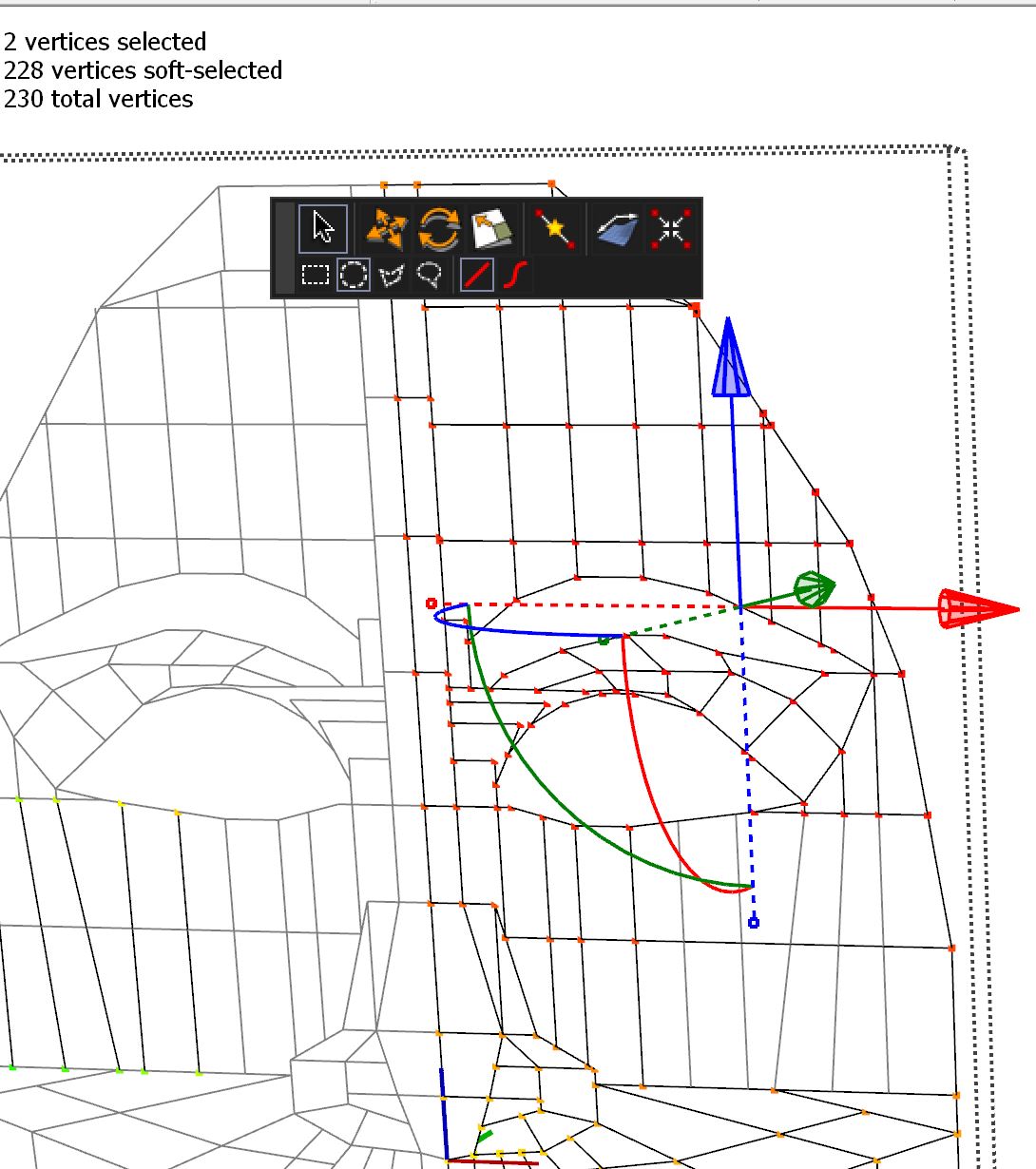
-
Set the falloff to 0
-
@rich o brien said:
Set the falloff to 0
Thank you!! Ha, I clicked on the Soft Selection several times but didn't think to check and change the radius, silly me. Much appreciated.


Hello! It looks like you're interested in this conversation, but you don't have an account yet.
Getting fed up of having to scroll through the same posts each visit? When you register for an account, you'll always come back to exactly where you were before, and choose to be notified of new replies (either via email, or push notification). You'll also be able to save bookmarks and upvote posts to show your appreciation to other community members.
With your input, this post could be even better 💗
Register Login


Advertisement