[Plugin] LordOfTheToolbars - v4.0a - 22 Sep 26




-
thank you very much
-
Hi,
Why the "selection arrow" is not on the master toolbar list ?
This would be very useful for me to customize a side toolbar on a single column rather than the two columns of the "large toolset" bar.
I know that I can use the spacebar at any time, but it would be more practical for me to have the "selection arrow" icon accessible.
Thanks.
-
@rougeee said:
This would be very useful for me to customize a side toolbar on a single column rather than the two columns of the "large toolset" bar.
You could natively (without LOTT) create a custom toolbar to replace the Large Toolset.
-
Thanks, indeed, I don't know why I never thought of that...

-
Hello, I found a compatibility issue with the Universal Importer.
https://sketchucation.com/pluginstore?pln=universal_importerWhen I installed this plugin, any interaction with LordOfTheToolbars started creating unnecessary icons on custom panels. It is solved by disabling the Importer, but at first it was not clear what was happening, then I figured it out myself. So I'm just informing you that such a case took place.
-
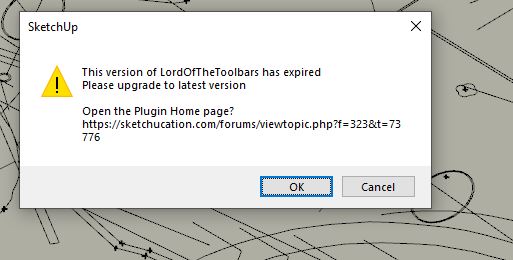
Currently the plugin prohibits to use itself if 'the version is expired' (at least the history command). Could it just informuser instead of prohibition? It's very uncomfortable to restart multiple files.
-
@rv1974 said:
Currently the plugin prohibits to use itself if 'the version is expired' (at least the history command). Could it just informuser instead of prohibition? It's very uncomfortable to restart multiple files.
What do you mean by 'version is expired'?
-
A pop-up window saying version is expired and DL link below
-
@rv1974 said:
A pop-up window saying version is expired and DL link below
Version of what? Could you show the screenshot.
-
this one, it should inform just once and let user continue use LOTT commands without restart.
-
-
that's what I'm asking for. Currently you are not allowed to use all LOTT's features without updating AND restarting.
-
There's a bug in the version 2.1a which is the blocks in the toolbar coustoming view can't be clicked or dragged means this whole function won't work anylonger. Other views just look like the toolbar comstuming view are still work just fine. I've already reinstalled the fredo6library and the LOTT plugins many times and removed all the other plugins and all the files that produced by the LOTT(like everything in that autosave folders), and this situation still doesn;t get good.
-
@xjpes said:
There's a bug in the version 2.1a which is the blocks in the toolbar coustoming view can't be clicked or dragged means this whole function won't work anylonger. Other views just look like the toolbar comstuming view are still work just fine. I've already reinstalled the fredo6library and the LOTT plugins many times and removed all the other plugins and all the files that produced by the LOTT(like everything in that autosave folders), and this situation still doesn;t get good.
I am not sure I undertand where is the problem.
Could you try version 2.2a and tell me if this solves the issue.
-
NEW RELEASE: LordOfTheToolbars v2.2a - 28 Jun 22
Requirements
- LibFredo6: v12.9a or above
- Sketchup version: SU2017 and above
LordOfTheToolbars 2.1a includes
- Bug fixing
Home Page of LordOfTheToolbars for information and Download.
-
@aismebel said:
Hey Freddo. First I want to thank you for your work, your extensions are very helpful.
With "LordOfTheToolbars" I'm having trouble loading the tabs I've created.
These problems started after my SU crashed. Resetting the settings and reinstalling the plugin can not solve the problem (((
Loading tabs starts only after clicking on any icon of the LordOfTheToolbars plugin.
Very inconvenient (Icons constantly fly off from the places where I installed them (
https://youtu.be/EWKnFRXS1NEGood afternoon Fred. Earlier I wrote to you that I had problems loading icons. And I couldn't click the "Menu" tab to create a new command. You suggested that perhaps because of the Cyrillic alphabet. Managed to solve the problem! You need to remove or disable the "Universal importer" pagin and the problem is gone!
-
Great Tool.
I only have a problem, since I installed the new version the option to create personal commands from the menu commands does not work.
Every fredo plugin is update.
-
@menmsis said:
I only have a problem, since I installed the new version the option to create personal commands from the menu commands does not work.
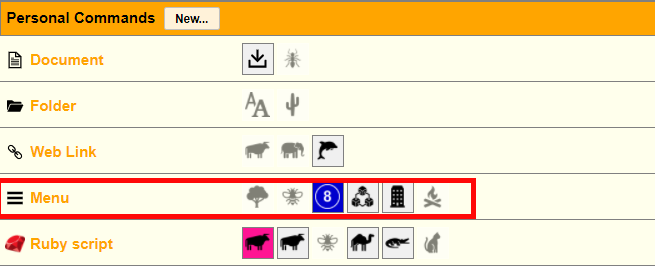
By saying "the menu commands does not work", do you mean that
- the functionality is not available (i.e. the row with 'Menu' is missing)
- or when you click on the Menu label, nothing happens (if so, could you open the Ruby console before clicking and check if there are error messages)
- or something else...
-
@menmsis said:
I only have a problem...
What version of SketchUp are you using? That may have an impact. Please complete your profile.
-
@fredo6 said:
@menmsis said:
I only have a problem, since I installed the new version the option to create personal commands from the menu commands does not work.
By saying "the menu commands does not work", do you mean that
- the functionality is not available (i.e. the row with 'Menu' is missing)
- or when you click on the Menu label, nothing happens (if so, could you open the Ruby console before clicking and check if there are error messages)
- or something else...
[attachment=0:3qwq1hzc]<!-- ia0 -->LOTT perso commands - Menu.png<!-- ia0 -->[/attachment:3qwq1hzc]
Fredo, what happens is exactly as you mention on option 2. I click the Menu and nothing happens. I got the following erro in the ruby console:
Error: #<RangeError: invalid codepoint 0xD83D in UTF-8>
c:/users/mario navarro/appdata/roaming/sketchup/sketchup 2022/sketchup/plugins/fredo6_!libfredo6/body_lib6g6.rbe:5390:inall_menus' c:/users/mario navarro/appdata/roaming/sketchup/sketchup 2022/sketchup/plugins/fredo6_!libfredo6/body_lib6g6.rbe:5390:inmenu_mapping'
c:/users/mario navarro/appdata/roaming/sketchup/sketchup 2022/sketchup/plugins/fredo6_!libfredo6/body_lib6g6.rbe:5468:inmenu_structured_list' c:/users/mario navarro/appdata/roaming/sketchup/sketchup 2022/sketchup/plugins/!!fredo6_lordofthetoolbars/lordofthetoolbarspersodialog.rbe:1056:inmenu_compute_list'
c:/users/mario navarro/appdata/roaming/sketchup/sketchup 2022/sketchup/plugins/!!fredo6_lordofthetoolbars/lordofthetoolbarspersodialog.rbe:480:indialog_format_menu_list' c:/users/mario navarro/appdata/roaming/sketchup/sketchup 2022/sketchup/plugins/!!fredo6_lordofthetoolbars/lordofthetoolbarspersodialog.rbe:411:indialog_format_properties'
c:/users/mario navarro/appdata/roaming/sketchup/sketchup 2022/sketchup/plugins/!!fredo6_lordofthetoolbars/lordofthetoolbarspersodialog.rbe:329:indialog_prepare_html' c:/users/mario navarro/appdata/roaming/sketchup/sketchup 2022/sketchup/plugins/!!fredo6_lordofthetoolbars/lordofthetoolbarspersodialog.rbe:263:indialog_load_html'
c:/users/mario navarro/appdata/roaming/sketchup/sketchup 2022/sketchup/plugins/!!fredo6_lordofthetoolbars/lordofthetoolbarspersodialog.rbe:175:indialog_invoke' c:/users/mario navarro/appdata/roaming/sketchup/sketchup 2022/sketchup/plugins/!!fredo6_lordofthetoolbars/lordofthetoolbarsmanager.rbe:4975:inperso_dialog_invoke'
c:/users/mario navarro/appdata/roaming/sketchup/sketchup 2022/sketchup/plugins/!!fredo6_lordofthetoolbars/lordofthetoolbarsmasterdialog.rbe:4447:inperso_new_command' c:/users/mario navarro/appdata/roaming/sketchup/sketchup 2022/sketchup/plugins/!!fredo6_lordofthetoolbars/lordofthetoolbarsmasterdialog.rbe:2459:indialog_callback_exec'
c:/users/mario navarro/appdata/roaming/sketchup/sketchup 2022/sketchup/plugins/!!fredo6_lordofthetoolbars/lordofthetoolbarsmasterdialog.rbe:2316:indialog_callback' c:/users/mario navarro/appdata/roaming/sketchup/sketchup 2022/sketchup/plugins/fredo6_!libfredo6/body_lib6chromiumwdlg.rbe:2427:incall'
c:/users/mario navarro/appdata/roaming/sketchup/sketchup 2022/sketchup/plugins/fredo6_!libfredo6/body_lib6chromiumwdlg.rbe:2427:inmaster_callback' c:/users/mario navarro/appdata/roaming/sketchup/sketchup 2022/sketchup/plugins/fredo6_!libfredo6/body_lib6chromiumwdlg.rbe:2205:inj_action'
c:/users/mario navarro/appdata/roaming/sketchup/sketchup 2022/sketchup/plugins/fredo6_!libfredo6/body_lib6chromiumwdlg.rbe:2164:inj_callback' c:/users/mario navarro/appdata/roaming/sketchup/sketchup 2022/sketchup/plugins/fredo6_!libfredo6/body_lib6chromiumwdlg.rbe:2150:inblock in j_dispatch'
c:/users/mario navarro/appdata/roaming/sketchup/sketchup 2022/sketchup/plugins/fredo6_!libfredo6/body_lib6chromiumwdlg.rbe:2142:ineach' c:/users/mario navarro/appdata/roaming/sketchup/sketchup 2022/sketchup/plugins/fredo6_!libfredo6/body_lib6chromiumwdlg.rbe:2142:inj_dispatch'
...


Hello! It looks like you're interested in this conversation, but you don't have an account yet.
Getting fed up of having to scroll through the same posts each visit? When you register for an account, you'll always come back to exactly where you were before, and choose to be notified of new replies (either via email, or push notification). You'll also be able to save bookmarks and upvote posts to show your appreciation to other community members.
With your input, this post could be even better 💗
Register Login


Advertisement