sketchucation logo sketchucation
    • Login
    Oops, your profile's looking a bit empty! To help us tailor your experience, please fill in key details like your SketchUp version, skill level, operating system, and more. Update and save your info on your profile page today!
    ⚠️ Update | Sketchucation Tools 5.0.8 released with licensing improvements and bugfixes Download

    [Plugin] LordOfTheToolbars - v4.0a - 22 Sep 26


    Scheduled Pinned Locked Moved Plugins
    508 Posts 98 Posters 521.8k Views 96 Watching
    Loading More Posts
    • Oldest to Newest
    • Newest to Oldest
    • Most Votes
    Reply
    • Reply as topic
    Log in to reply
    This topic has been deleted. Only users with topic management privileges can see it.
    • fredo6F
      fredo6
      last edited by

      @aa6 said:

      Having similar problem... the plug-in seems to work fine, but I can't get the vignette stripe to display. I can see it with "pop up the vignette stripe" but it comes up as a floating menu and then disappears when I click away.

      Could you open the Ruby Console at startup to see potential errors (just open the Ruby console, quit Sketchup and restart Sketchup).

      1 Reply Last reply
      Reply Quote 0
      • A
        AISmebel
        last edited by

        I really look forward to fixing this error.
        I have been working with this problem for several months, it greatly interferes when after each launch of SU. When you first need to run Lord (so that the icons appear), and then they need to be put in their places (because after launch they appear in the center of the monitor) 😞((

        1 Reply Last reply
        Reply Quote 0
        • A
          aa6
          last edited by

          Hi - Thanks for the quick response! I re-started with the ruby console open, but I don't see any errors - although I'm not exactly sure what I'm looking for.

          1 Reply Last reply
          Reply Quote 0
          • R
            rv1974
            last edited by

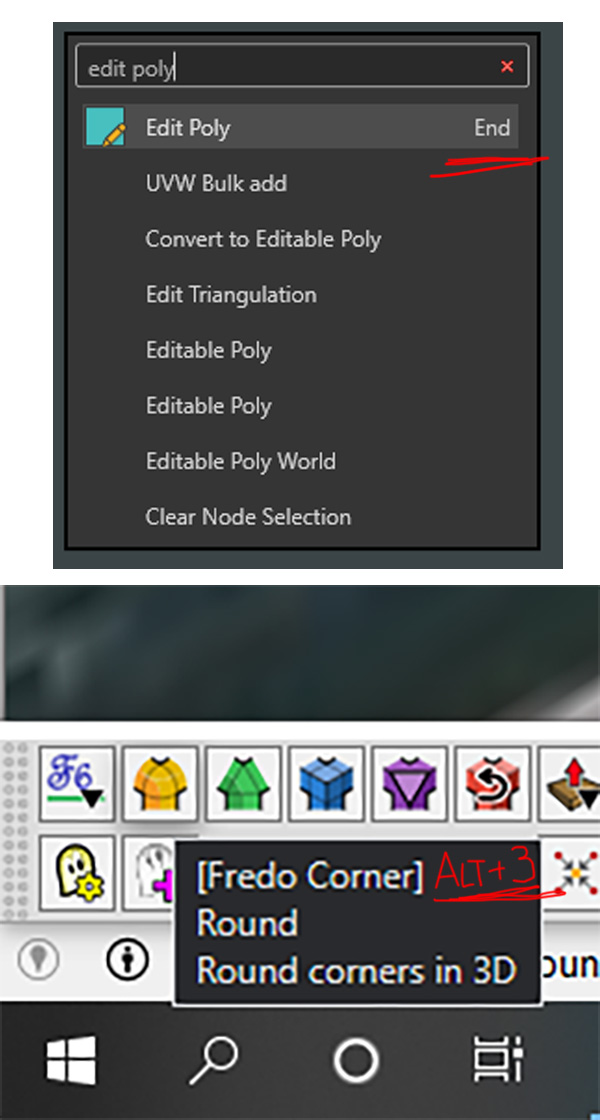
            Fredo, is there any technical obstacle to show user's shortcuts in the tool tips and command search?

            Untitled-1.jpg

            1 Reply Last reply
            Reply Quote 0
            • D
              digitect
              last edited by

              No vignette stripe for me either on SketchUp Pro 2020 on Windows 10, with LOTT v2.0a and LibFredo6 v12.8a.

              I can make it temporarily visible via menu Tools > Fredo6 Collection > LOTT > Pop Up but then it disappears the first click anywhere in the SketchUp window. Ruby Console shows no actions or errors.

              1 Reply Last reply
              Reply Quote 0
              • S
                Scozzarella
                last edited by

                Sketchup 2022 MAC

                the Pie Tool doesn't work if I press the button on Palette of LordofTheToolbars.

                Is it a bug?

                1 Reply Last reply
                Reply Quote 0
                • D
                  digitect
                  last edited by

                  @digitect said:

                  No vignette stripe for me...

                  UPDATE: I position my Windows taskbar at screen top, and found LOTT beneath it. So that default needs to be adjusted. Once I found, and adjusted, several LOTT positioning options from their defaults (sticky to Sketchup window, position in Popup mode, position when cycling), it behaved as expected.

                  1 Reply Last reply
                  Reply Quote 0
                  • fredo6F
                    fredo6
                    last edited by

                    @scozzarella said:

                    Sketchup 2022 MAC

                    the Pie Tool doesn't work if I press the button on Palette of LordofTheToolbars.

                    Is it a bug?

                    As far as I now the Pie tool (from Rich O Brien) is not supported on Mac.

                    1 Reply Last reply
                    Reply Quote 0
                    • Dave RD
                      Dave R
                      last edited by

                      @scozzarella said:

                      Sketchup 2022 MAC...

                      Is it a bug?

                      No. As Fredo indicated, Pie is Windows only.

                      Screenshot - 5_11_2022 , 2_06_04 PM.png

                      Etaoin Shrdlu

                      %

                      (THERE'S NO PLACE LIKE)

                      G28 X0.0 Y0.0 Z0.0

                      M30

                      %

                      1 Reply Last reply
                      Reply Quote 0
                      • S
                        Scozzarella
                        last edited by

                        /Users/angeloscozzarella/Desktop/Schermata 2022-05-12 alle 04.42.13.png

                        1 Reply Last reply
                        Reply Quote 0
                        • S
                          Scozzarella
                          last edited by

                          Schermata 2022-05-12 alle 04.42.13.png

                          1 Reply Last reply
                          Reply Quote 0
                          • fredo6F
                            fredo6
                            last edited by

                            @Scozzarella

                            What is the problem?

                            1 Reply Last reply
                            Reply Quote 0
                            • S
                              Scozzarella
                              last edited by

                              @fredo6 said:

                              @Scozzarella

                              What is the problem?

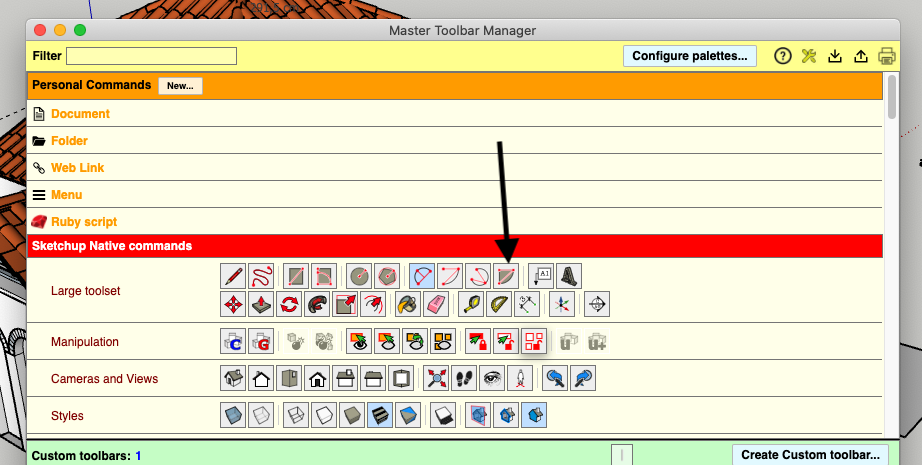
                              If I click on the button with tool indicates by my arrow, (Arc Pie Tool) the tool doesn't activate.

                              1 Reply Last reply
                              Reply Quote 0
                              • fredo6F
                                fredo6
                                last edited by

                                @scozzarella said:

                                If I click on the button with tool indicates by my arrow, (Arc Pie Tool) the tool doesn't activate.

                                Strange. On Mac, it works for SU2021, but not for SU2022

                                Thanks for signaling the problem.

                                1 Reply Last reply
                                Reply Quote 0
                                • S
                                  Scozzarella
                                  last edited by

                                  you are welcome

                                  1 Reply Last reply
                                  Reply Quote 0
                                  • fredo6F
                                    fredo6
                                    last edited by

                                    NEW RELEASE: LordOfTheToolbars v2.1a - 14 May 22

                                    Requirements

                                    • LibFredo6: v12.9a or above
                                    • Sketchup version: SU2017 and above

                                    LordOfTheToolbars 2.1a includes

                                    • Bug fixing
                                    • Future compatibility

                                    Home Page of LordOfTheToolbars for information and Download.

                                    Main post of this LordOfTheToolbars thread.

                                    1 Reply Last reply
                                    Reply Quote 0
                                    • S
                                      Scozzarella
                                      last edited by

                                      thank you very much

                                      1 Reply Last reply
                                      Reply Quote 0
                                      • R
                                        Rougeee
                                        last edited by

                                        Hi,

                                        Why the "selection arrow" is not on the master toolbar list ?

                                        This would be very useful for me to customize a side toolbar on a single column rather than the two columns of the "large toolset" bar.

                                        I know that I can use the spacebar at any time, but it would be more practical for me to have the "selection arrow" icon accessible.

                                        Thanks.

                                        1 Reply Last reply
                                        Reply Quote 0
                                        • Dave RD
                                          Dave R
                                          last edited by

                                          @rougeee said:

                                          This would be very useful for me to customize a side toolbar on a single column rather than the two columns of the "large toolset" bar.

                                          You could natively (without LOTT) create a custom toolbar to replace the Large Toolset.

                                          Etaoin Shrdlu

                                          %

                                          (THERE'S NO PLACE LIKE)

                                          G28 X0.0 Y0.0 Z0.0

                                          M30

                                          %

                                          1 Reply Last reply
                                          Reply Quote 0
                                          • R
                                            Rougeee
                                            last edited by

                                            Thanks, indeed, I don't know why I never thought of that... πŸ˜†

                                            1 Reply Last reply
                                            Reply Quote 0

                                            Hello! It looks like you're interested in this conversation, but you don't have an account yet.

                                            Getting fed up of having to scroll through the same posts each visit? When you register for an account, you'll always come back to exactly where you were before, and choose to be notified of new replies (either via email, or push notification). You'll also be able to save bookmarks and upvote posts to show your appreciation to other community members.

                                            With your input, this post could be even better πŸ’—

                                            Register Login
                                            • 1
                                            • 2
                                            • 6
                                            • 7
                                            • 8
                                            • 9
                                            • 10
                                            • 25
                                            • 26
                                            • 8 / 26
                                            • First post
                                              Last post
                                            Buy SketchPlus
                                            Buy SUbD
                                            Buy WrapR
                                            Buy eBook
                                            Buy Modelur
                                            Buy Vertex Tools
                                            Buy SketchCuisine
                                            Buy FormFonts

                                            Advertisement