[Plugin] LordOfTheToolbars - v2.9c - 20 Dec 24




-
@panixia said:
I have a workaround for this.
Assign some weird shortcut to your menu item (I say "weird" because maybe you don't want to waste some available handy keyboard shortcut for this).
Then create a ruby script button and type in the following....Thank you for that, greatly appreciated.
I'm not sure if related to the other comments about depreciations in Ruby (I can't see win32ole being depreciated) but I did need to import it (at least for thefirst time use) in order to use your workaround.
My enviroment is SU v23 Pro on Windows 10, its a fairly recent clean windows/sketchup install and most Fredo's other plugins & libraries have been loaded for a while.Simple one line modification to yours:
require "win32ole"
shell = WIN32OLE;;new("WScript.Shell")
shell.SendKeys "InsertYourWeirdSendkeyShortcutHere"
I added some notes/comments to my script as I've had a few friends ask how I was able to get my toolbar icons working again (specifically ones for thomthom's cleanup which has none by default).
If it helps others just copy/paste the below into the ruby script button to replace the default there and adjust per panixia's instructions:
#--------------------------------------------------------------------------------------------
# LOTT - Personal Command "Workaround" - all credits go to panixia at Sketchucation Forums;
# https://sketchucation.com/forums/viewtopic.php?f=323&t=73776&start=270#p687744
#
# 1. Assign a "weird" shortcut key (something you wouldn't want to use elsewhere) via
#    "Preferences -> shortcuts" to the menu item desired. eg. Ctrl+Shift+Alt+F11
# 2. Replace the text between the quotes "InsertYourWeirdSendkeyShortcutHere"
#    in the code below with the shortcut key you assigned using Sendkeys syntax.
# 3. (Optional) If you also want to use a "normal" shortcut key (eg Ctrl+Shift+C)
#    assign it to this script using the "shortcut" field at the top of this window.
#
# Some Common Syntax References below, the full syntax reference is available at;
# https://learn.microsoft.com/en-us/office/vba/language/reference/user-interface-help/sendkeys-statement
#
# Common SendKeys References;
# Modifier Keys;  CTRL; ^ | SHIFT; + | ALT; %
# Held Keys;      HELD(KEY1 KEY2)   eg; +(EC)     would hold shift while pressing E then C.
# Repeat keys;    {KEY NUMBER}      eg; {LEFT 42} would press Left 42 times.
# Function keys;  {KEY}             eg; {F11}     would press F11.
#
# Script Modification Example;
# 	To press "Ctrl+Shift+Alt+F11" (the weird shortcut you assigned to the menu item)
# 	each time you hit the toolbar icon (or press a shortcut if assigned above)
# 	change line 37 below as follows;
# 		From; shell.SendKeys "InsertYourWeirdSendkeyShortcutHere"
# 		to;   shell.SendKeys "^+%({F11})"
#
# Troubleshooting;
# - If you receive a ruby error regarding a uninitialized constant WIN32OLE
#     uncommenting line 35 (delete the # at the beginning) may help.
# - Some keys can be difficult to enter due to the editors autocorrect (eg."[")
#     composing your command in another editor then copy/pasting to this window can help.
#--------------------------------------------------------------------------------------------

#require "win32ole"    # uncomment if needed for a "uninitialized constant WIN32OLE error"
shell = WIN32OLE;;new("WScript.Shell")
shell.SendKeys "InsertYourWeirdSendkeyShortcutHere"
Hopefully Trimbles SU developers will find a way to add/restore some methods into the new UI framework to allow developers like Fredo to fix/provide features like this. They greatly expand what Sketchup is capable of which imho makes it a much better tool for some things than many others out there.
-
NEW RELEASE: LordOfTheToolbars v2.5a - 26 Aug 23
Requirements
- LibFredo6: v14.2a or above
- Sketchup version: SU2017 and above
LordOfTheToolbars 2.5a includes
- Bug fixing
- Future compatibility
DO NOT FORGET TO UPGRADE TO LibFredo6 v14.2a or above
Home Page of LordOfTheToolbars for information and Download.
-
"-Future compatibility" Encouraging)))

-
Hello how are you.
I still don't remember where I put the bars.
Every time I open SketchUp, I have to sort them.
The tools made from the menu are disabled and I cannot create others from the menu.I use:
SketchUp 23.0.419 64-bit
LordOfTheToolbars 2.5a
LibFredo6 14.2aAny help, I appreciate it.
-
Hi,
It seems that the full screen or cleanscreen mode icon in the vignette is missing in this new version of the LordOfTheToolbars - v2.5a.
I really appreciate this function as I find it very useful on a daily basis.
Any ideas how to get it back?
Big thanks in advance

-
Hi,
It seems that the full screen or cleanscreen mode icon in the vignette is missing in this new version of the LordOfTheToolbars - v2.5a.
I really appreciate this function as I find it very useful on a daily basis.
Any ideas how to get it back?
Big thanks in advance
-
@swedentan said:
It seems that the full screen or cleanscreen mode icon in the vignette is missing in this new version of the LordOfTheToolbars - v2.5a.
Yes. As of SU2023, LOTT does not support ClearScreen and any feature related to Menus.
This is due to changes in Sketchup in SU2023. -
My Lord of the Toolbars vignette stripe has completely disappeared. I have tried all I could, still stumped.
I'm using Windows 10
Sketchup Pro 21.1.332
LibFredo 14.2a
Lord of the toolbars 2.5aLord of the toolbars is still running fine on my other machine.
Thanks.
I downloaded all the updates. Can anyone help? thanks. -
Serious help needed!
my vignette stripe has disappeared and is nowhere to be found!
I'm running sketchup 21.1.332 on Windows 10
I'm running Fredo6 14.2a
and Lord of the Toolbars 2.5alots of sign in and out
lots of restarts.
I can still access everything EXCEPT the vignetter Stripe.
Also, on my other computer it's running normal and fine
any suggestions?
Uninstall and reinstall? -
@studiospectre said:
Serious help needed!
my vignette stripe has disappeared and is nowhere to be found!
I'm running sketchup 21.1.332 on Windows 10
I'm running Fredo6 14.2a
and Lord of the Toolbars 2.5alots of sign in and out
lots of restarts.
I can still access everything EXCEPT the vignetter Stripe.
Also, on my other computer it's running normal and fine
any suggestions?
Uninstall and reinstall?Sketchup 2023.1 ha introduced new changes in the UI framework which are causing problems in LOTT.
One of them is the visibility of the vignette stripe if it is too small.
The only thing you can try is to set the size of the Vignette Stripe to Large or Extra Large (there is a menu for that).
-
Hi. First of all, thanks fredo for this wonderful tool !
I'm having trouble with custom toolbars and screen position (on SU 2023, with a dual screen configuration). Maybe other had this too, and I'm wasting your time, but I cannot find it on the forum...
I've put all my favorite tools in one single simple toolbar, and I want to have it vertically, hovering on the second screen in one precise position. I've done that since a long time with multiple SU toolbars, and it was working fine. But now, with LOTT, everytime I reopen SU, this toolbar is reset horizontally. Is there a workaround to convince it to stay upright ?
An other minor issue is that separators don't appear in the toolbar. Is that a known issue ?
Thanks in advance.
-
Thanks Fredo,
I've tried manipulating the settings for the vignette stripe and it is still completely vanished.
It put on the Ring like Frodo and is invisible.
Should I maybe bite the bullet and upgrade to 23?
I can totally do it I was just forestalling having to port over all my extensions and risk everything getting all jumbled up in VRAY too. Not sure how that would work but I guess I might have to find out.
It's rather tuff to use LOTT without the Stripe.But, this is only to show that this plugin is SO VALUABLE> thanks in any case.
-
Am I missing something? I out of nowhere started receiving the error message "This version of LordOfTheToolbars (2.5a) has expired Please upgrade to the latest version", I haven't upgraded Sketchup. I tried uninstalling and re-installing the plugin. I've tried updating the Sketchucation extension. I can't get this message to go away or get my custom toolbars back. Was there an update that wasn't posted to the site? Is there any way I can diagnose and resolve this issue?
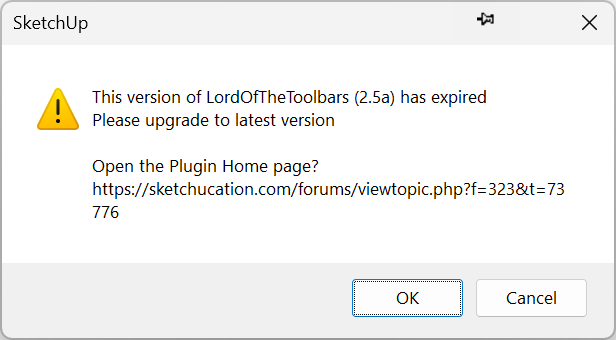
-
@awadrummer said:
Am I missing something? I out of nowhere started receiving the error message "This version of LordOfTheToolbars (2.5a) has expired Please upgrade to the latest version", I haven't upgraded Sketchup.
The message has nothing to do with updating SketchUp. What version of SketchUp are you using, anyway? Your forum profile says pre-2013.
@awadrummer said:
I tried uninstalling and re-installing the plugin. I've tried updating the Sketchucation extension. I can't get this message to go away or get my custom toolbars back. Was there an update that wasn't posted to the site? Is there any way I can diagnose and resolve this issue?
Uninstalling and reinistalling it won't fix it. Fredo will need to update it to extend the expiration date. If you look at the extension's page in the Extension Store you'll see it expires 31 October.

LordOfTheToolbars | SketchUcation
3D SketchUp Community for Design and Engineering Professionals.
(sketchucation.com)
-
Hi Dave, I am running SketchUp Pro 2021 Version 21.1.332 64-bit
Sorry, I just saw the last half of your reply. Just making sure I understand correctly, the plugin is just totally unusable until he updates the expiration date on his end right?
-
@awadrummer said:
I am running SketchUp Pro 2021
Thanks for updating your profile.
Hopefully Fredo will be along in the morning and update LOTT.
-
@dave r said:
@awadrummer said:
I am running SketchUp Pro 2021
Thanks for updating your profile.
Hopefully Fredo will be along in the morning and update LOTT.
Yes hopefully so. I noticed he put "Free for now", I'm not opposed to paying for it. I purchased all his other plugins without hesitation when they went paid. Thanks for the help!
-
31 oct 2023 stops working... no update for 2.5a.. please release new update
-
@awadrummer said:
Am I missing something? I out of nowhere started receiving the error message "This version of LordOfTheToolbars (2.5a) has expired Please upgrade to the latest version", I haven't upgraded Sketchup. I tried uninstalling and re-installing the plugin. I've tried updating the Sketchucation extension. I can't get this message to go away or get my custom toolbars back. Was there an update that wasn't posted to the site? Is there any way I can diagnose and resolve this issue?
I have the exact same problem.
I basically cant't use Sketchup without LOTT, I rebuilt my whole Sketchup interface with custom toolbar and palettes.
I hope Fredo can fix this quickly.
-
Same issue here, I'm a bit panicking !





Advertisement