sketchucation logo sketchucation
    • 登入
    Oops, your profile's looking a bit empty! To help us tailor your experience, please fill in key details like your SketchUp version, skill level, operating system, and more. Update and save your info on your profile page today!
    🔌 Smart Spline | Fluid way to handle splines for furniture design and complex structures. Download

    [Plugin] LordOfTheToolbars - v2.9c - 20 Dec 24


    已排程 已置頂 已鎖定 已移動 Plugins
    481 貼文 92 Posters 356.5k 瀏覽 91 Watching
    正在載入更多貼文
    • 從舊到新
    • 從新到舊
    • 最多點贊
    回覆
    • 在新貼文中回覆
    登入後回覆
    此主題已被刪除。只有擁有主題管理權限的使用者可以查看。
    • A 離線
      AISmebel
      最後由 編輯

      Hello fredo. I have broken icons of plugins and scripts for which I used my pictures. Can they be restored somehow? I don't know how it happened ((
      I do restore toolbars but does not help. All the pictures that I used are in place.
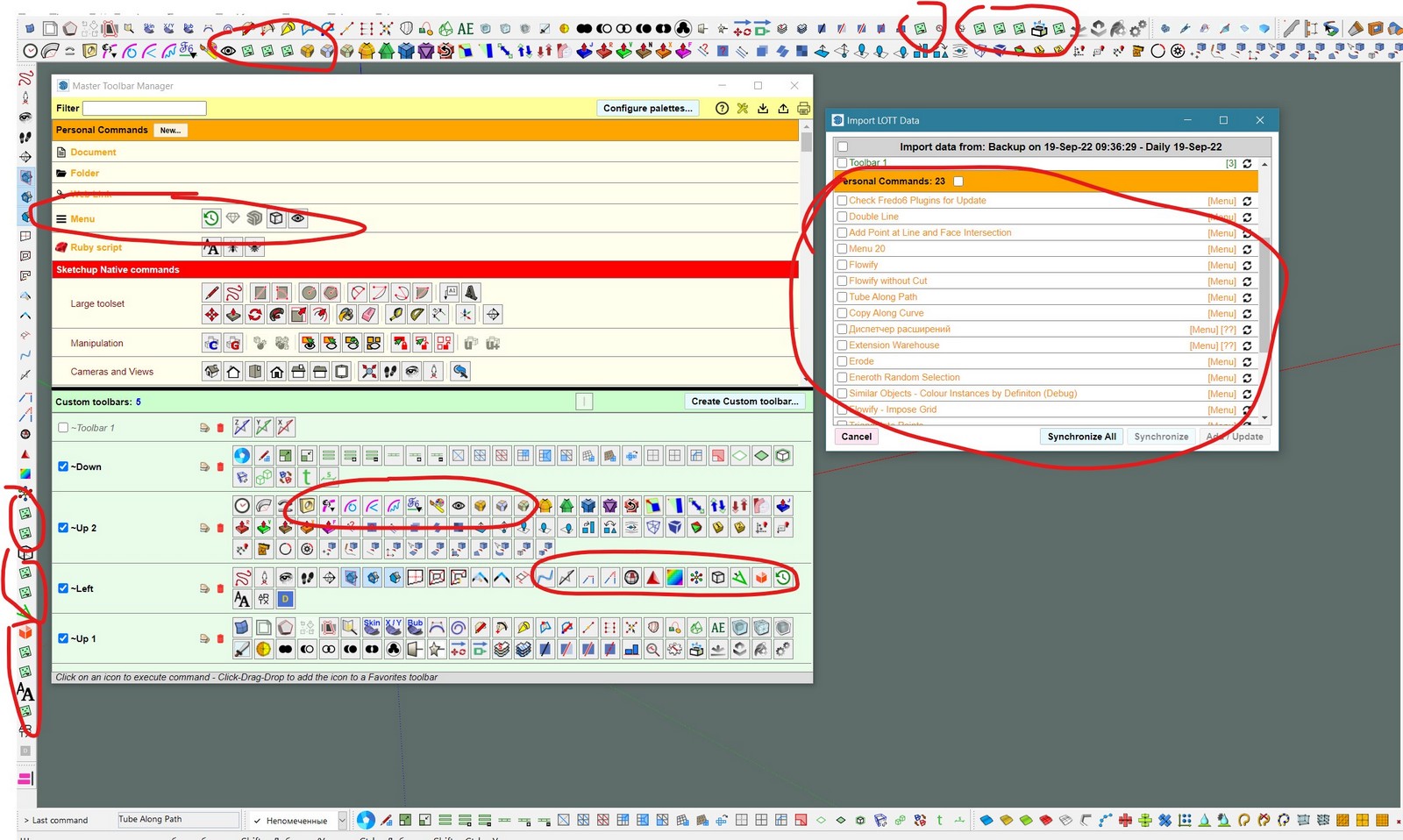

      1.jpg

      1 條回覆 最後回覆 回覆 引用 0
      • H 離線
        haymaker
        最後由 編輯

        Hey Fredo.
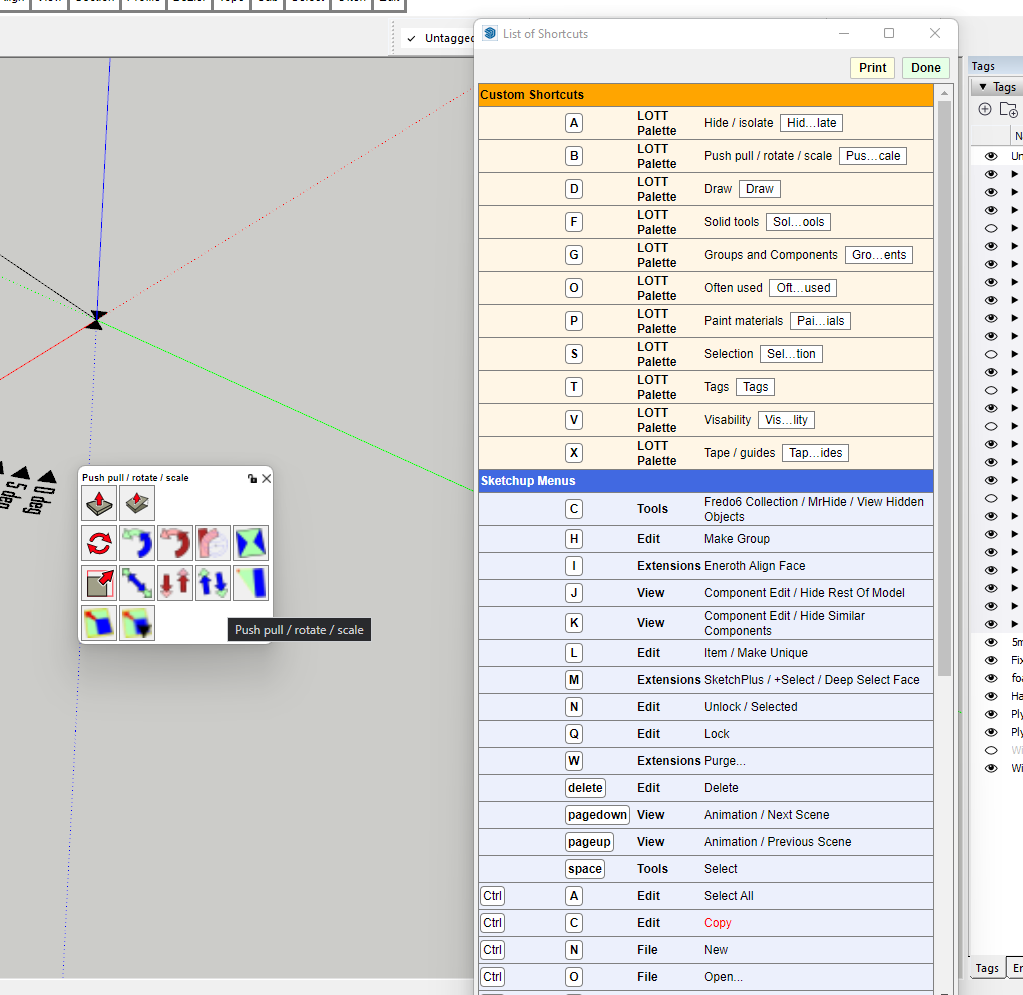
        I just brought your bundle and made a donation for all the great work you do. Before I install it I thought I would re arrange some of my LOTT pallets first. I have been using LOTT for a while now and love it, however the new pallets I have created will not disappear after I pick a tool or click outside of the pallet, or even if I press escape.. I have to either double click on the top of the pallet or click the red X to get them to close. Some, but not all of my older pallets continue to work fine and they close by themselves once I have clicked the icon for the tool I want to use. I have scrolled through the 'Default parameters' window but cant see if I am missing something or is this a bug. I have saved settings and closed and restarted SU but that did not help,
        Any assistance you can offer would be greatly appreciated, I would like to resolve this issue before I install the bundle encase I have any other issues.
        Could this be an issue with libFredo6 as this is the most recent update?
        I have attached a screen shot, shortcuts A, B, D and X are the ones that are not working, A B and X are new, D is an old one that is also not working.

        SU2022
        LOTT v2.2a
        Libfredo6 13.2a Last updated on the 16 sep 22
        Windows 11

        Thanks for your help

        Mike


        Screenshot

        1 條回覆 最後回覆 回覆 引用 0
        • fredo6F 離線
          fredo6
          最後由 編輯

          @haymaker,

          Could you open the Ruby Console before trying to close a palette, in case there is an error message displayed.

          For shortcuts, I would suggest you do not select letters that are used by Sketchup native tools (such as A, B, D and X).

          1 條回覆 最後回覆 回覆 引用 0
          • H 離線
            haymaker
            最後由 編輯

            Hey Fredo
            I have changed a shortcut key to SHIFT H but problem persists.
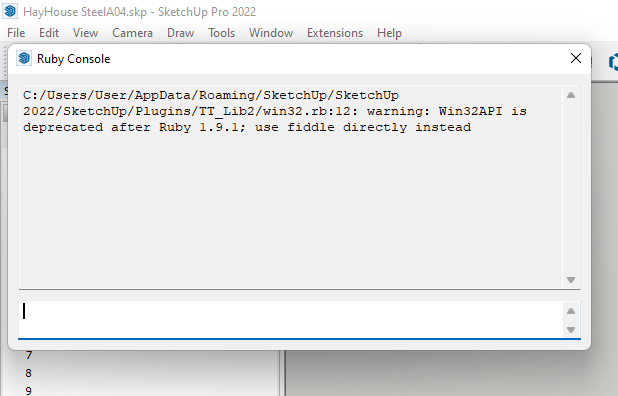
            I opened the Ruby console and got no message when closing a pallet but I did get the attached message on start up of sketchup.
            It means nothing to me, hopefully you can understand it.
            Thanks for your help

            Mike


            LOTT 2 10.png

            1 條回覆 最後回覆 回覆 引用 0
            • H 離線
              haymaker
              最後由 編輯

              Fredo
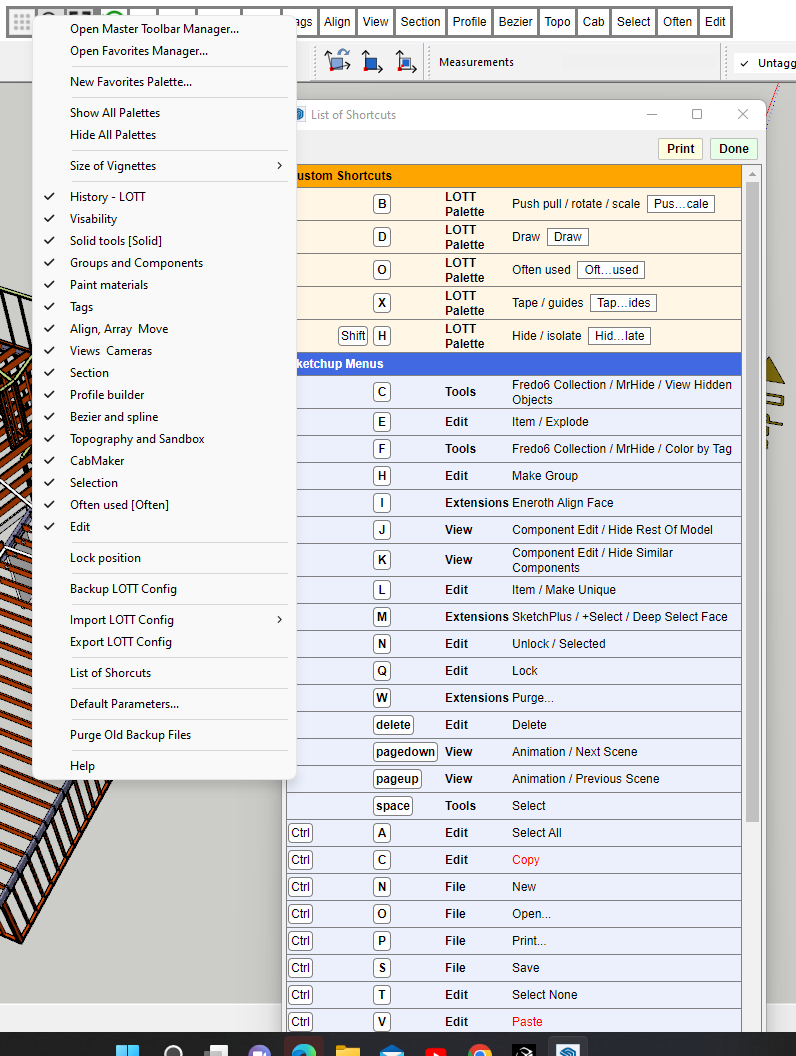
              I have cleaned out a few unused shortcut keys. There are now just 5 shortcuts for LOTT, and I noticed that the four that are not working properly also don't show up in the 'menu' window as shown by the screen shot. The only pallet that shows up in the orange custom shortcuts and the menu window is "Often used" and that was created a long time ago. the other 4 pallets and shortcuts were created yesterday and are the ones causing issues

              Cheers


              Screenshot (23).pngLOTT 2 10 a.png

              1 條回覆 最後回覆 回覆 引用 0
              • fredo6F 離線
                fredo6
                最後由 編輯

                1. The warning in the console is for TTLib. It is harmless and not related to LOTT.

                2. I cannot reproduce the problem with shortcuts. In my environment, I can just define them and they work.

                Do you have the latest version of LibFredo6 and LOTT installed?

                1 條回覆 最後回覆 回覆 引用 0
                • H 離線
                  haymaker
                  最後由 編輯

                  Hi
                  I have version 13.2a and 2.2a installed and when I check using your 'check for updates everything is green and up to date. I will uninstall both Library and LOTT and reinstall them. see if that works.
                  Will let you know. Thanks

                  1 條回覆 最後回覆 回覆 引用 0
                  • Dave RD 離線
                    Dave R
                    最後由 編輯

                    @haymaker said:

                    I have version 13.2a and 2.2a installed

                    How are you checking? The current version of LibFredo6 is 13.4a.

                    Etaoin Shrdlu

                    %

                    (THERE'S NO PLACE LIKE)

                    G28 X0.0 Y0.0 Z0.0

                    M30

                    %

                    1 條回覆 最後回覆 回覆 引用 0
                    • H 離線
                      haymaker
                      最後由 編輯

                      Hi
                      Thanks for the input
                      I checked using Fredo 'Check for update command' It said it was all up to date?
                      I just uploaded the latest version and problem persists
                      I have uninstalled LOTT and am about to reinstall it.
                      Will report back soon

                      Cheers

                      1 條回覆 最後回覆 回覆 引用 0
                      • Dave RD 離線
                        Dave R
                        最後由 編輯

                        @haymaker said:

                        I just uploaded the latest version and problem persists

                        Did you quit SketchUp and restart it to make sure all extensions were loaded correctly?

                        Did you install SketchUp correctly? That requires right clicking on the installer and selecting run as administrator.

                        Etaoin Shrdlu

                        %

                        (THERE'S NO PLACE LIKE)

                        G28 X0.0 Y0.0 Z0.0

                        M30

                        %

                        1 條回覆 最後回覆 回覆 引用 0
                        • H 離線
                          haymaker
                          最後由 編輯

                          Yes I quit SU every time I make a change.
                          When I installed SU I did not right click and run as administrator. I did not know that was a thing.
                          SU is on my personal computer. How do I fix that, Do I have to uninstall SU.. If I do that will I lose all my settings and plugins.

                          Thanks again for your help

                          1 條回覆 最後回覆 回覆 引用 0
                          • Dave RD 離線
                            Dave R
                            最後由 編輯

                            @haymaker said:

                            When I installed SU I did not right click and run as administrator. I did not know that was a thing.
                            SU is on my personal computer. How do I fix that, Do I have to uninstall SU.. If I do that will I lose all my settings and plugins.

                            Thanks again for your help

                            Quit both SketchUp and LayOut. find the downloaded installer in your Downloads folder or get it from sketchup.com/download/all. Right click on the installer, choose Run as administrator, and when prompted, choose Repair.

                            As for your settings and extensions, no, you will not lose them.

                            Etaoin Shrdlu

                            %

                            (THERE'S NO PLACE LIKE)

                            G28 X0.0 Y0.0 Z0.0

                            M30

                            %

                            1 條回覆 最後回覆 回覆 引用 0
                            • H 離線
                              haymaker
                              最後由 編輯

                              OMG I FIXED IT
                              As usual the problem was at my end.
                              So I figured out if you exclude the palette name from showing in the Vignette strip then the palette will not disappear once a tool is selected if you launched the palette with a shortcut key. If I select 'icon' or 'abbreviation' when setting up the favourite then the palette acts as expected and disappears once the tool is picked.
                              I am not sure if this is a deliberate function or an oversite. The reason I removed them from showing in the Vignette strip was to reduce clutter when moussing across for other pallets, I have them as shortcuts which I have mapped to the space mouse so I click on one of those keys when I need the palette. My work around is to assign a single letter to the abbreviation and position them at the end of the vignette strip.
                              I feel like a bit of a muppet for not making the connection sooner. There is nothing like beating your head against a brick wall to induce a bit of clarity!!
                              Thank you for your efforts in resolving this.

                              Mike

                              1 條回覆 最後回覆 回覆 引用 0
                              • Y 離線
                                yishuiyiqin
                                最後由 編輯

                                conflict with v-ray 6.0

                                1 條回覆 最後回覆 回覆 引用 0
                                • X 離線
                                  xudognik_rus
                                  最後由 編輯

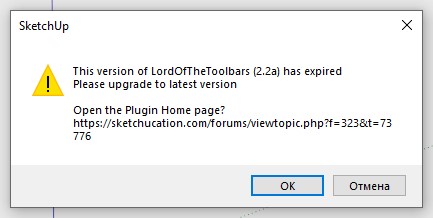
                                  Hi. The plugin asks to update, but the version is up to date. What to do?

                                  Screenshot_1.jpg

                                  1 條回覆 最後回覆 回覆 引用 0
                                  • M 離線
                                    Msaitakalin
                                    最後由 編輯

                                    when will the final version be released
                                    i can't use it now

                                    1 條回覆 最後回覆 回覆 引用 0
                                    • M 離線
                                      Msaitakalin
                                      最後由 編輯

                                      when will the last version be out I can't use now i need urgent support

                                      1 條回覆 最後回覆 回覆 引用 0
                                      • fredo6F 離線
                                        fredo6
                                        最後由 編輯

                                        NEW RELEASE: LordOfTheToolbars v2.3a - 31 Oct 22

                                        Requirements

                                        • LibFredo6: v13.4a or above
                                        • Sketchup version: SU2017 and above

                                        LordOfTheToolbars 2.3a includes

                                        • Bug fixing
                                        • Extension of validity

                                        DO NOT FORGET TO UPGRADE TO LibFredo6 v13.4a or above

                                        Home Page of LordOfTheToolbars for information and Download.

                                        Main post of this LordOfTheToolbars thread.

                                        1 條回覆 最後回覆 回覆 引用 0
                                        • D 離線
                                          debbio
                                          最後由 debbio 編輯

                                          Dear Fredo,

                                          First of all many thanks for everything you are doing, I rely on your software and innovation more than on what the entire Trimble company does. For this exact reason I was wondering if there was the possibility to just buy LOTT as you made possible for other extensions of yours.

                                          These continuous updates are a problem because every time you make a change I have to update all the machines straight away otherwise nothing works (this time, by the way, the plugin dos not seem to load every time). I would much rather pay to update the plugin when I am ready to do so.

                                          Thanks!

                                          Nicola

                                          1 條回覆 最後回覆 回覆 引用 0
                                          • fredo6F 離線
                                            fredo6
                                            最後由 編輯

                                            @debbio said:

                                            Dear Fredo,

                                            First of all many thanks fro everything you are doing, I rely on your software and innovation more than on what the entire Trimble company does. For this exact reason I was wondering if there was the possibility to just buy LOTT as you made possible for other extensions of yours.

                                            These continuous updates are a problem because every time you make a change I have to update all the machines straight away otherwise nothing works (this time, by the way, the plugin dos not seem to load every time). I would much rather pay to update the plugin when I am ready to do so.

                                            I am not sure I understand. Paying for the plugin will not change the question of plugin updates (and potential bugs)...


                                            1 條回覆 最後回覆 回覆 引用 0
                                            • 1
                                            • 2
                                            • 15
                                            • 16
                                            • 17
                                            • 18
                                            • 19
                                            • 24
                                            • 25
                                            • 17 / 25
                                            • 第一個貼文
                                              最後的貼文
                                            Buy SketchPlus
                                            Buy SUbD
                                            Buy WrapR
                                            Buy eBook
                                            Buy Modelur
                                            Buy Vertex Tools
                                            Buy SketchCuisine
                                            Buy FormFonts

                                            Advertisement