SCFLicense: Extension Licensing on Sketchucation
-
Error A02 is related to your signature file. Please send your scflicense file and signature file to support[at]sketchucation.com so we can examine them. Thanks
-
We purchased the bundle for Fredo and followed the descriptions.
When trying to validate the license it says
'msg_validation_error ..... ERROR_07'
Sketchucation is up to date.
The licenses don't show up in 'Global status of plugins under SCF License'.
What to do? -
@jenkus said:
We purchased the bundle for Fredo and followed the descriptions.
When trying to validate the license it says
'msg_validation_error ..... ERROR_07'
Sketchucation is up to date.
The licenses don't show up in 'Global status of plugins under SCF License'.
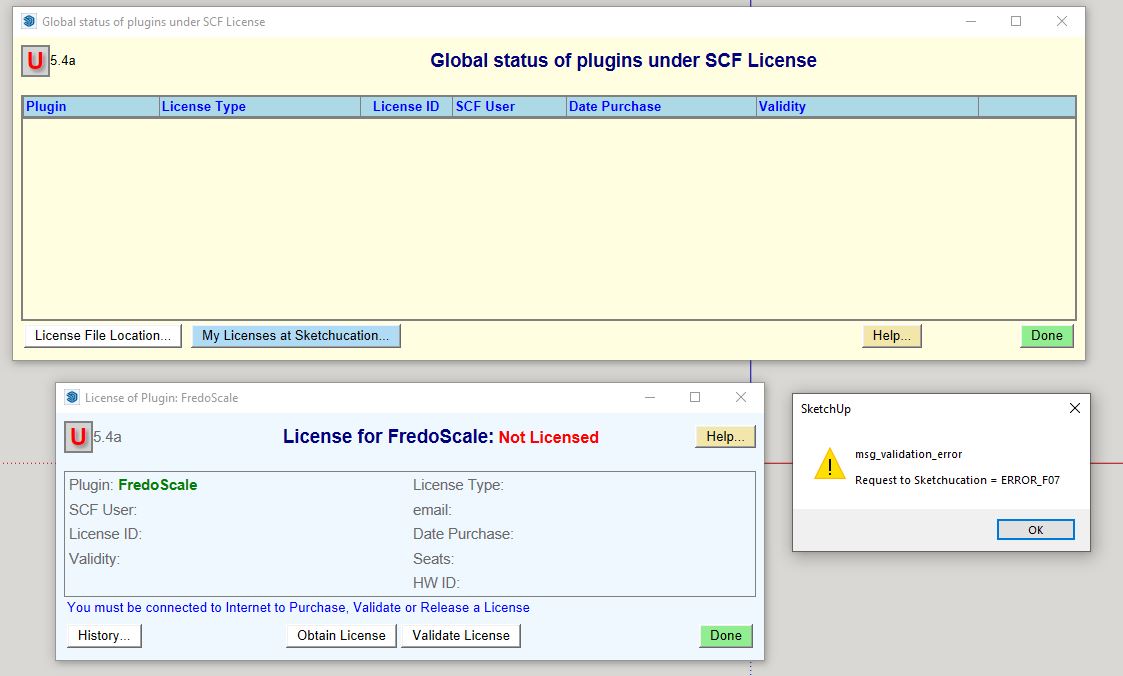
What to do?Screenshot the error message. We have no ERROR_07 message But we do have A07, B07 etc....
-
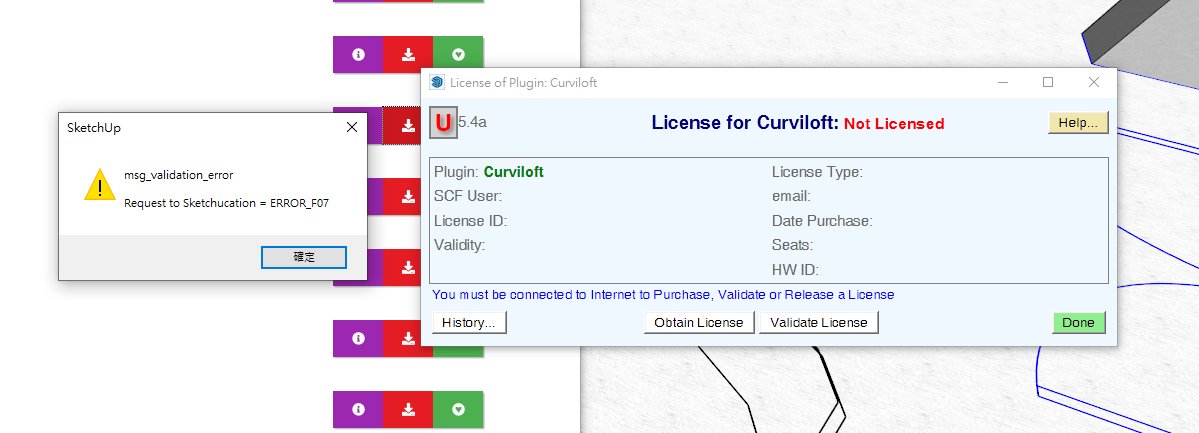
With some problem on validation error. How can i fix it? I had try delete license file, but it doesn't work.
-
Make sure you are using Sketchucation Tools v4.2.5 and the latest LibFredo.
-
As you might see from similar posts...
You need to have the following installed...Latest SketchUcation toolset [>= v4.2.5]
Latest Lib Fredo [>= 12.5a]
Latest versions of the [to be] licensed Fredo-extensions.After the installations you need to restart SketchUp to ensure everything is synced.
If this doesn't resolve an issue there are recommendations to delete a file and let it be recreated, or failing that, to email your scflicense file and signature file to support[at]sketchucation.com...
On a side note... when you installed SketchUp did you do it correctly ?
Do in wrongly can result in all finds of unpredictable permission issues down the line...
To fix it...
Close SketchUp.
While logged into Windows with your normal user-account...
Find the relevant SketchUp installer's exe file [usually in your Downloads folder].
Select its icon, right-click > context-menu > "Run as administrator"
When prompted choose "Repair"
Let it complete...
Restart SketchUp...Running a installer's exe file in any other way - e.g. by double-clicking it to 'Run' - is not equivalent - even if your normal user-account has admin powers...
-
@rich o brien said:
@jenkus said:
We purchased the bundle for Fredo and followed the descriptions.
When trying to validate the license it says
'msg_validation_error ..... ERROR_07'
Sketchucation is up to date.
The licenses don't show up in 'Global status of plugins under SCF License'.
What to do?Screenshot the error message. We have no ERROR_07 message But we do have A07, B07 etc....
-
Hi!
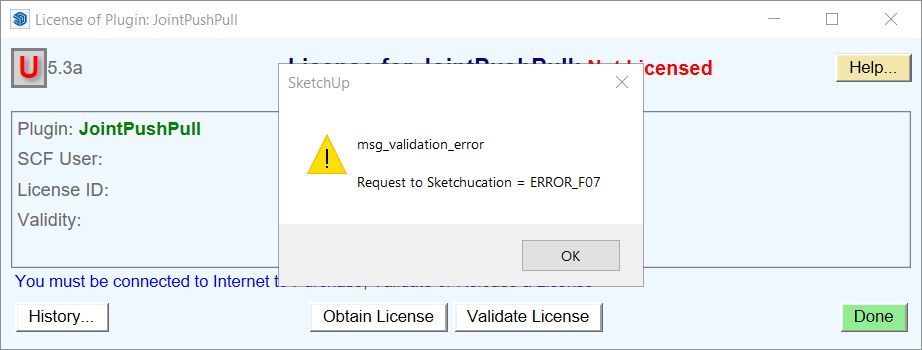
I just purchased the plug in bundle but the validation of the licence file gives me some troubles.
Somebody there that can help with this issue..?Thanks
-
@carus said:
...but the validation of the licence file gives me some troubles.
As has been indicated repeatedly in this thread, update the Sketchucation Extension Store and then restart SketchUp.
Please complete your profile with SketchUp version and operating system.
-
For ERROR_F07 I would follow TIG's instructions....
For deletion of signature files you need to go to your \AppData\Local\SCF Licenses and delete the file named...
SCFLicenseSignature - DO NOT MODIFY OR DELETE.txt -
This is the issue raised by some earlier posts...
Please read those in detail for more info...BUT from the dialog you posted it's clear that you have not installed the latest SketchUcation toolset and consequently you do not have the latest SCF licensing tool installed...
Also ensure that you have latest versions of the Fredo-extensions installed.
Restart SketchUp after installations to ensure everything is synced...
-
OK, so after some backend probing
 we have pinpointed the F07 error that is appearing.
It likely your .scflicense having no content. If it's 0kb in size then that's the issue.
We are reverting back a few hours and reissuing license files which should fix these f07 errors.
Sorry about that.
-
@rich o brien said:
OK, so after some backend probing
we have pinpointed the F07 error that is appearing.It likely your .scflicense having no content. If it's 0kb in size then that's the issue.
We are reverting back a few hours and reissuing license files which should fix these f07 errors.
Sorry about that.
Should we contact if our license files is 0KB, or later we will got a new file in email
-
@vizz1999 said:
@rich o brien said:
OK, so after some backend probing
we have pinpointed the F07 error that is appearing.It likely your .scflicense having no content. If it's 0kb in size then that's the issue.
We are reverting back a few hours and reissuing license files which should fix these f07 errors.
Sorry about that.
Should we contact if our license files is 0KB, or later we will got a new file in email
We will email out new license files shortly. We can see which ones are empty so expect a proper license file soon
-
Hello, yes I thought it was strange that all my license files were 0kb empty files. I just received emails with new licenses that are about 600 bytes in size. I just tried to validate the RoundCorner license with the new license file and it worked. Thank you
-
@simplesketch said:
I just tried to validate the RoundCorner license with the new license file and it worked. Thank you
No, thank you for your patience.
-
Hi any and all.
I have followed TIG's directions but I'm still getting ERROR_F07. I'm using SU Pro 2022 on a PC. I have used TIG's directions - launched the exe as admin - and repaired my install. I have version 4.2.5 of the plugin store installed. I have version 12.8a of LibFredo6 installed. I have installed, closed and reopened SU and all the toolbars are visible. But I cannot get the validation to work.
-
@john sb said:
Hi any and all.
I have followed TIG's directions but I'm still getting ERROR_F07. I'm using SU Pro 2022 on a PC. I have used TIG's directions - launched the exe as admin - and repaired my install. I have version 4.2.5 of the plugin store installed. I have version 12.8a of LibFredo6 installed. I have installed, closed and reopened SU and all the toolbars are visible. But I cannot get the validation to work.
Hi John,
Earlier today we had a problem with the license files we sent out. If your license file size is 0kb it is one of the problem licenses.
We reissued emails in the evening with the correct license file. Did you get those?
-
Hi Rich
Yes actually that is the case. I only just noticed they had 0kb. And I didn't know what was up with the, I thought, duplicate emails. I'll try using the latest email versions.
Thank you. -
Report back if there's success or failure. I hope success





Hello! It looks like you're interested in this conversation, but you don't have an account yet.
Getting fed up of having to scroll through the same posts each visit? When you register for an account, you'll always come back to exactly where you were before, and choose to be notified of new replies (either via email, or push notification). You'll also be able to save bookmarks and upvote posts to show your appreciation to other community members.
With your input, this post could be even better 💗
Register Login


Advertisement