sketchucation logo sketchucation
    • Login
    Oops, your profile's looking a bit empty! To help us tailor your experience, please fill in key details like your SketchUp version, skill level, operating system, and more. Update and save your info on your profile page today!
    ⚠️ Update | Sketchucation Tools 5.0.8 released with licensing improvements and bugfixes Download

    SCFLicense: Extension Licensing on Sketchucation

    Scheduled Pinned Locked Moved Plugins
    2.3k Posts 515 Posters 2.6m Views 520 Watching
    Loading More Posts
    • Oldest to Newest
    • Newest to Oldest
    • Most Votes
    Reply
    • Reply as topic
    Log in to reply
    This topic has been deleted. Only users with topic management privileges can see it.
    • Rich O BrienR
      Rich O Brien Moderator @omni
      last edited by

      @omni said:

      Hello, I purchased software under my personal account. Can I use it on a company computer for commercial use?

      Yes, you can use extensions on other devices and manage seats at https://sketchucation.com/webshop/my-licences.php

      Download the free D'oh Book for SketchUp 📖

      1 Reply Last reply 👌
      Reply Quote 0
      • S
        songhwazee
        last edited by Rich O Brien

        저는 학생인데요 경제적인 어려움이있어 결재하지 못하지만 나중에 돈벌어서 결재 할테니 사용하게 해주세요

        I'm a student, and I can't approve it because of financial difficulties, but I'll make money later and pay for it, so please let me use it.

        1 Reply Last reply
        Reply Quote 0
        • P
          publied
          last edited by publied

          Hi. On August 25, I purchased a license for RoundCorner. Today, I’m picking up a project again and trying to use the plugin, but it’s asking for a FredoCorner license, which I obviously don’t have. Did I miss something? Thanks for your help—it’s a small but important issue.

          hire me@ http://www.publied.it !

          Rich O BrienR 1 Reply Last reply
          Reply Quote 0
          • Rich O BrienR
            Rich O Brien Moderator @publied
            last edited by

            @publied

            RoundCorner and Fredo Corner are separate extensions.

            Download the free D'oh Book for SketchUp 📖

            1 Reply Last reply
            Reply Quote 0
            • pep75P
              pep75
              last edited by

              I want to release all my seats for Fredocorner, but I can only release one seat. What should I do?

              Rich O BrienR 1 Reply Last reply
              Reply Quote 0
              • Rich O BrienR
                Rich O Brien Moderator @pep75
                last edited by

                @pep75 said:

                I want to release all my seats for Fredocorner, but I can only release one seat. What should I do?

                Update extensions on the device that has no online releasing at https://sketchucation.com/webshop/my-licences.php

                Download the free D'oh Book for SketchUp 📖

                pep75P 1 Reply Last reply
                Reply Quote 0
                • pep75P
                  pep75 @Rich O Brien
                  last edited by

                  @Rich-O-Brien Thanks! But I can't reach that device anymore....:(

                  1 Reply Last reply
                  Reply Quote 0
                  • Rich O BrienR
                    Rich O Brien Moderator
                    last edited by

                    If you email me at support@sketchucation.com with the device ID I can reset it for you.

                    Download the free D'oh Book for SketchUp 📖

                    1 Reply Last reply 🙏
                    Reply Quote 0
                    • pep75P
                      pep75
                      last edited by

                      Thanks Rich! Just mailed you!

                      1 Reply Last reply
                      Reply Quote 1
                      • L
                        Leobrumel
                        last edited by Rich O Brien

                        I didn`t receive an email with the license! Please re send to [REDACTED]

                        1 Reply Last reply
                        Reply Quote 0
                        • fredo6F
                          fredo6
                          last edited by

                          It might be in your SPAM folder. Anyway, you can see and download your license at https://sketchucation.com/webshop/my-licences.php (just sign in to Sketchucation).

                          By the way, remove the mention of your email address in the previous post. It's never safe to post such information on public forums.

                          1 Reply Last reply
                          Reply Quote 0
                          • N
                            nabilyon1992 Newcomers
                            last edited by

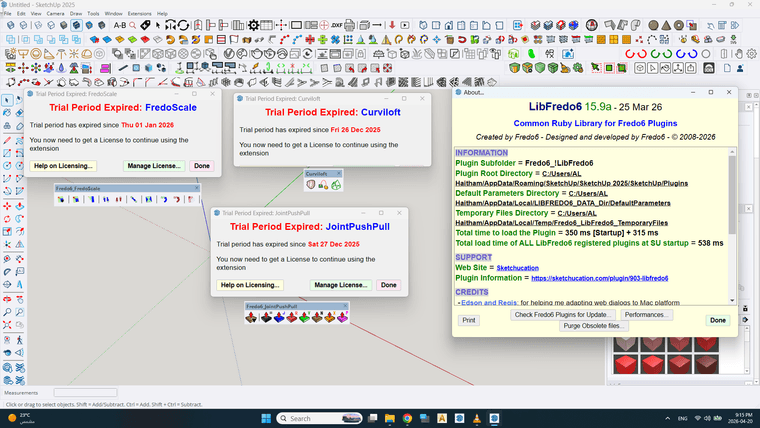
                            Hello, I have a problem using Plugin FREDOلقطة شاشة 2026-04-20 211527.png

                            fredo6F 1 Reply Last reply
                            Reply Quote 0
                            • fredo6F
                              fredo6 @nabilyon1992
                              last edited by

                              @nabilyon1992

                              You have NO license registered under your user name (nabilyon1992).

                              Did you purchase licenses with another username?

                              1 Reply Last reply
                              Reply Quote 0
                              • J
                                JanSteinman Newcomers
                                last edited by

                                I am unable to license plugins.

                                Due to the error message, I think this is a general problem, but specifically I was trying to license FredoSpline.

                                I followed the instructions, and clicked Tools —> Fredo6 Collection —> FredoSpline —> License…

                                Then I got the following notifier:
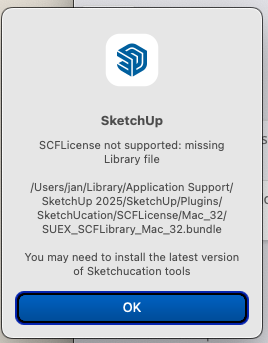
                                 Screenshot  2026-04-21 at 16.16.52.png

                                For whatever reason, I cannot run SketchUp 2025 or 2026 as available on the SketchUp website — it simply hangs, even overnight, without displaying anything more than a menu bar. Trimble is currently ignoring my bug report on that.

                                I followed the instructions and installed the latest version of Sketchucation tools and restarted SketchUp — same problem.

                                So I am using an older version of SketchUp 2025 (25.0.659)

                                The file it complains about in the dialogue in fact exists and is read-writeable:

                                0> ls -l ~/Library/Application\ Support/SketchUp\ 2025/SketchUp/Plugins/SketchUcation/SCFLicense/Mac_32/SUEX_SCFLibrary_MAC_32.bundle 
                                -rw-rw-rw-  1 jan  staff  349136 15 Aug  2025 /Users/jan/Library/Application Support/SketchUp 2025/SketchUp/Plugins/SketchUcation/SCFLicense/Mac_32/SUEX_SCFLibrary_MAC_32.bundle


                                Any ideas? I would really like to use FredoSpline, and my trial expires soon!

                                Thanks for any help offered!

                                Rich O BrienR 1 Reply Last reply
                                Reply Quote 0
                                • J
                                  JanSteinman Newcomers @fredo6
                                  last edited by

                                  This XML file does not appear to have any style information associated with it. The document tree is shown below.
                                  <Error>
                                  <Code>AccessDenied</Code>
                                  <Message>Access Denied</Message>
                                  <RequestId>XSFMZRMJCV5R3NQD</RequestId>
                                  <HostId>
                                  mM8JG7eWUA89O8+UOiRtpkOMumktFOeAeTObVEvFoWljU2Nt5SMrn3fAmzVOYWPAS9vaHQP1jk0=
                                  </HostId>
                                  </Error>
                                  
                                  1 Reply Last reply
                                  Reply Quote 1
                                  • Rich O BrienR
                                    Rich O Brien Moderator @JanSteinman
                                    last edited by

                                    @JanSteinman said:

                                    For whatever reason, I cannot run SketchUp 2025 or 2026 as available on the SketchUp website

                                    Can you expand on this? SketchUp not running for 'whatever reason' is lacking detail.

                                    Download the free D'oh Book for SketchUp 📖

                                    J 1 Reply Last reply
                                    Reply Quote 0
                                    • J
                                      JanSteinman Newcomers @Rich O Brien
                                      last edited by

                                      @Rich-O-Brien When I start (on MacOS 13.7.8) the available download of either SketchUp 2025 or 2026, it displays the menu bar for SketchUp, but then hangs infinitely† with just the Spinning Beach Ball of Death.

                                      The version of SketchUp 2025 that was in the /Applications folder on my automatic backups (version 25.0.659) works just fine, but displays the "missing Library file" notifier that I showed a few messages ago.

                                      I really need this! I have helpers for the build arriving, and materials being delivered next Friday.

                                      †Thinking it was just busy, I let it run overnight, and still had the SBBoD in the morning. All other applications (Mail, Firefox, etc.) continue working just fine. I have to force-quit SketchUp.

                                      1 Reply Last reply
                                      Reply Quote 1
                                      • J
                                        JanSteinman Newcomers
                                        last edited by

                                        Ah, I see your bug.

                                        I am on a case-sensitive file system — which is totally supported by Apple. The file present has "MAC" in it, and the dialogue has "Mac" in it.

                                        Don't feel bad… it took three years of continuous bug reports before Adobe made their case consistent within their applications!

                                        I suggest you should test on the most constrained case, in this case, on a case-sensitive file system. 🙂

                                        I think the other problem I'm having may be related to this, as well.

                                        But you won't even hear about this until Sketchucation takes this message out of moderation status… 😞

                                        1 Reply Last reply
                                        Reply Quote 1
                                        • Rich O BrienR
                                          Rich O Brien Moderator
                                          last edited by

                                          Moderation is there to prevent spam. You should no longer be subject to moderation.

                                          Download the free D'oh Book for SketchUp 📖

                                          1 Reply Last reply
                                          Reply Quote 0
                                          • C
                                            cirocire
                                            last edited by

                                            Hi,
                                            I don't know what happened, however, although I can see the licenses online, when I try to upload the license file, this happens (pls see attached image)
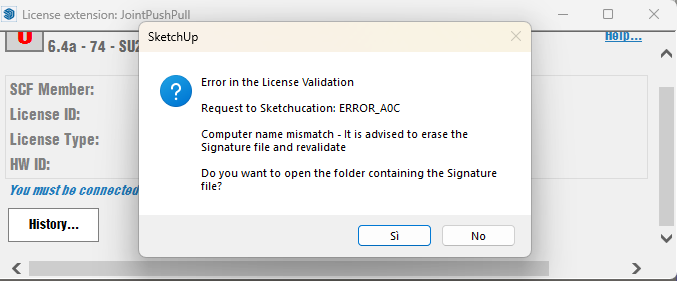

                                            License error.png

                                            1 Reply Last reply
                                            Reply Quote 0

                                            Hello! It looks like you're interested in this conversation, but you don't have an account yet.

                                            Getting fed up of having to scroll through the same posts each visit? When you register for an account, you'll always come back to exactly where you were before, and choose to be notified of new replies (either via email, or push notification). You'll also be able to save bookmarks and upvote posts to show your appreciation to other community members.

                                            With your input, this post could be even better 💗

                                            Register Login
                                            • 1
                                            • 2
                                            • 73
                                            • 74
                                            • 75
                                            • 76
                                            • 77
                                            • 115
                                            • 116
                                            • 75 / 116
                                            • First post
                                              Last post
                                            Buy SketchPlus
                                            Buy SUbD
                                            Buy WrapR
                                            Buy eBook
                                            Buy Modelur
                                            Buy Vertex Tools
                                            Buy SketchCuisine
                                            Buy FormFonts

                                            Advertisement