SCFLicense: Extension Licensing on Sketchucation
-
@Rich-O-Brien
Fredo6 Plugins Information on 2025-07-31 09:52:26 +0800- Platform: x64-mswin64_140 - Ruby: 3.2.2
- Sketchup: 25.0.660
- LibFredo6: v15.4b
- LibFredo6 Binary loaded
- Sketchucation ExtensionStore: 4.4.1
- SCFLicense: v6.4a - 74
- Fredo6 Plugins
LordOfTheToolbars v2.9c
Animator v4.5a
Curviloft v2.0a - licensed FULL
Curvizard v2.5a - licensed FULL
ElevationProfile v1.3a
FredoBatch v1.4a
FredoCorner v2.7a - licensed FULL
FredoScale v3.6a - licensed FULL
FredoSketch v1.6a
FredoSpline v2.6a - licensed FULL
FredoTools v4.5c
JointPushPull v4.9a - licensed FULL
MoveAlignMe v1.4a
Pic2Shape v1.1a
Souvenir v2.2b
ToolsOnSurface v2.6a - licensed FULL
TopoShaper v2.7a
VisuHole v1.5a
Axyz v1.1a - SCFLicense directory present
Signature File: 2025-05-11 17:10:53 +0800
Curviloft: 2025-07-16 14:46:30 +0800
Curvizard: 2025-07-15 09:49:28 +0800
FredoCorner: 2025-07-15 20:27:04 +0800
FredoGhost: 2025-07-30 14:08:38 +0800
FredoScale: 2025-07-15 14:40:43 +0800
FredoSpline: 2025-07-14 10:50:34 +0800
JointPushPull: 2025-07-14 11:05:46 +0800
ToolsOnSurface: 2025-07-14 10:35:38 +0800
VisuHole: 2025-07-08 15:11:16 +0800
-
If you view the output above there is no FredoGhost installed.
Please go to Extensions > Sketchucation > ExtensionStore
Use Search to find FredoGhost and click Install for version 2.1
Restart SketchUp
Go to Tools > Fredo Collection > FredoGhost > Licenses...
Use your license to Activate FredoGhost
-
@Rich-O-Brien
Hello, I have installed FredoGhost. The toolbar and menu can both display FredoGhost normally, but it does not appear in the Fredo6 "Check for Updates" list. I have also tried completely reinstalling SU 2025, but the problem still persists. -
Only thing I could suggest is to go to your Plugins folder...
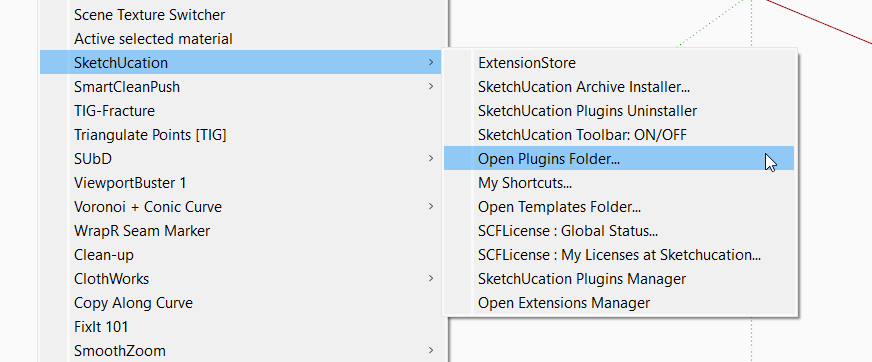
Delete the Fredo6_FredoGhost.rb file and Fredo6_FredoGhost folder
Restart SketchUp
Install FredoGhost using Sketchucation Tools
Restart SketchUp to ensure its a complete install
Run the Window > Libfredo Settings > Fredo6 Plugins Information for Sketchucation Support menu command in SketchUp and validate that FredoGhost is listed.
Activate the license.
If its not listed maybe @fredo6 has ideas as to why you are seeing menu entries and toolbars but unable to license?
Have you done something unconventional in terms of moving extensions to SketchUp 2025?
-
Hello,
FredoScale and FredoSketch stopped working this morning, everything is up-to-date...
Tried to re-install both. I've purchased license last year and no issues so far.
License also not visible in SketchUcation but i've got the file on my hard-drive...
Any suggestions?
Thx -
Most likely you've got more than 1 account and you purchased using the other account.
Please run the Window > Libfredo Settings > Fredo6 Plugins Information for Sketchucation Support menu command in SketchUp and copy/paste the output into your reply.
-
> FredoScale v3.6a > FredoSketch v1.6a- SCFLicense directory present
Signature File: 2025-08-04 12:03:37 +0200
- SCFLicense directory present
-
That's not the full output. Can you provide the full output?
-
Fredo6 Plugins Information on 2025-08-04 12:53:38 +0200
- Platform: x64-mswin64_140 - Ruby: 3.2.2
- Sketchup: 25.0.660
- LibFredo6: v15.4c
- LibFredo6 Binary loaded
- Sketchucation ExtensionStore: 4.4.1
- SCFLicense: v6.4a - 74
- Fredo6 Plugins
FredoScale v3.6a
FredoSketch v1.6a - SCFLicense directory present
Signature File: 2025-08-04 12:03:37 +0200
-
Fredo6 Plugins Information on 2025-08-04 12:53:38 +0200
- Platform: x64-mswin64_140 - Ruby: 3.2.2
- Sketchup: 25.0.660
- LibFredo6: v15.4c
- LibFredo6 Binary loaded
- Sketchucation ExtensionStore: 4.4.1
- SCFLicense: v6.4a - 74
- Fredo6 Plugins
FredoScale v3.6a
FredoSketch v1.6a - SCFLicense directory present
Signature File: 2025-08-04 12:03:37 +0200
-
Thanks a lot
-
Can you share error messages when you use your license file to activate?
Also having 2 accounts is not helping you. I'd suggest you request to delete the unneeded account.
-
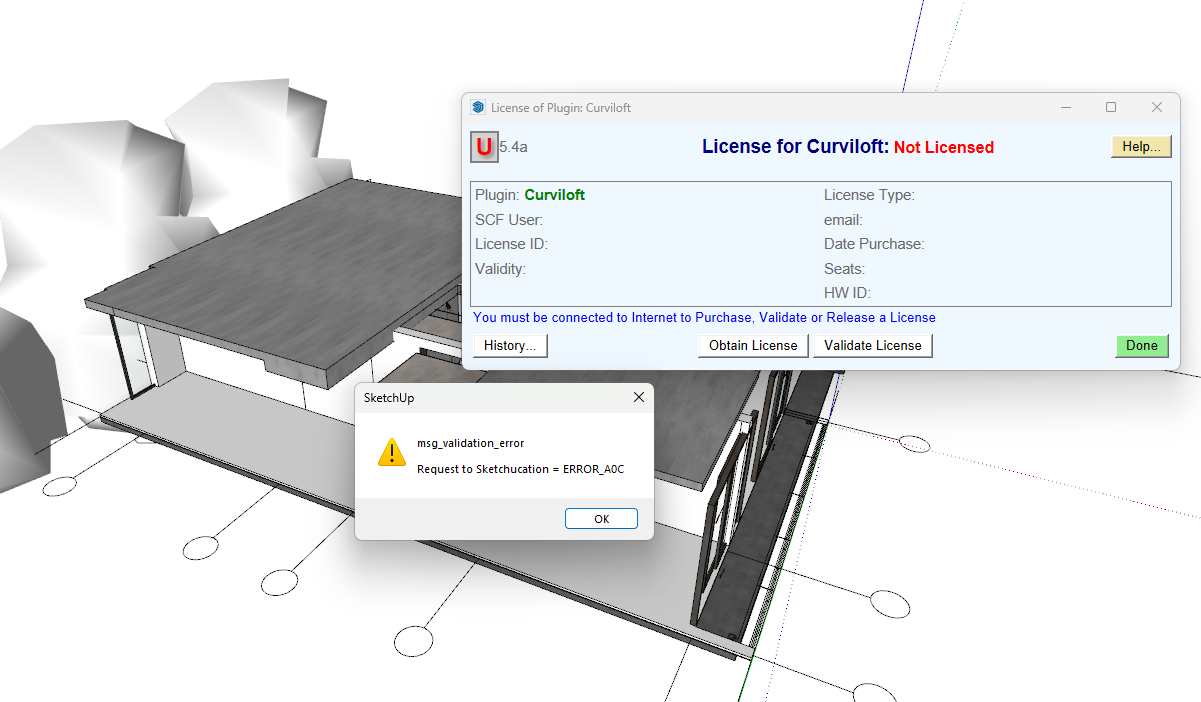
I had bought the lisense and this show up -
@NhaQuynh Please update all extensions.
You are using a very old version of Sketchucation Tools which contains the licensing system.
-
Hi Sketchucation,
I just started using Fredo6 few weeks back. I was using it perfectly fine on my desktop (Windows 10) with a free account. when I try to install it on my new laptop (running Windows 11) it keep showing me it license has been expired.
Then I try to install fredo6 on my old laptop and it works. I believe I did the installation correctly but don't know what went wrong. I'm using FredoScale and FredoCorner.
Please help. Thanks in advance.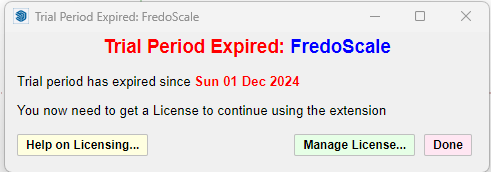
-
Hi,
Please run the Window > Libfredo Settings > Fredo6 Plugins Information for Sketchucation Support menu command in SketchUp on the device with the issue and copy/paste the output into your reply.
-
Fredo6 Plugins Information on 2025-08-08 18:26:44 +0800
- Platform: x64-mswin64_140 - Ruby: 2.7.2
- Sketchup: 22.0.316
- LibFredo6: v15.4c
- LibFredo6 Binary loaded
- Sketchucation ExtensionStore: 4.4.1
- SCFLicense: v6.4a - 74
- Fredo6 Plugins
FredoCorner v2.7a
FredoScale v3.6a - SCFLicense directory present
Signature File: 2025-08-08 02:27:31 +0800
-
If you download your license files from https://sketchucation.com/webshop/my-licences.php and use Tools > Fredo Collection > [Plugin Name] > License... to activate.
Are you getting error messages?
-
I'm using free account. there is nothing in my license page. by the way, I'm installing my sketchup 2022 in drive D:. can that cause the error?
-
If you haven't bought a license then its normal to see Trial Expired.
To buy licenses please visit https://sketchucation.com/plugin-list.php


Hello! It looks like you're interested in this conversation, but you don't have an account yet.
Getting fed up of having to scroll through the same posts each visit? When you register for an account, you'll always come back to exactly where you were before, and choose to be notified of new replies (either via email, or push notification). You'll also be able to save bookmarks and upvote posts to show your appreciation to other community members.
With your input, this post could be even better 💗
Register Login


Advertisement