Plugin that matches file name and definition name of comp?
-
Remember that it's possible to make a component with a name that cannot be used in a file name, so the saved SKP cannot always have the component's name.
Some characters might be allowed in a component-name, but are not applicable in the saved-SKP's name, or even when they are acceptable they are best avoided.
e.g. #{}<>:/?$+%!`'"&*=@|;,. and even the lowly <space> -
@tig said:
Remember that it's possible to make a component with a name that cannot be used in a file name, so the saved SKP cannot always have the component's name.
Some characters might be allowed in a component-name, but are not applicable in the saved-SKP's name, or even when they are acceptable they are best avoided.
e.g. #{}<>:/?$+%!`'"&*=@|;,. and even the lowly <space>Thanks @TIG.
As I mentioned this is a quick and dirty plugin. I spent ~half an hour on it... This is one of the reason if not in PluginStore yet.
Sure, there is plenty of room for improvement, here and there.
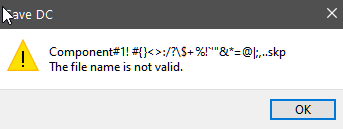
I hope @LEGOsketcher will give some feedback if he like it or not...Beside that I generally agree to check for special characters, in this case you will get a system warning during file saving "The file name is not valid." at least in Windows, like this:
-
Hi Everyone !
thanks for your plugin Dezmo, it's cool.
Just to tell you that I've tested it with SU17 Make and SU2020 Pro and that it works for me.

But ...
just a (stupid?) question about
"Save as: DC name"
Will be grayed out if not applicable.as it's always grayed for me ... when is it applicable ?
Thanks again
-
@dav_id said:
Hi Everyone !
"Save as: DC name"
Will be grayed out if not applicable.as it's always grayed for me ... when is it applicable ?
Thanks again
DC: Dynamic Component
That one will be available only if you have Dynamic Component and you set the name in Component Attribute window. (like a lover left corner show in the first post screenshot).
More: https://help.sketchup.com/en/sketchup/making-dynamic-component
-
@dezmo said:
@dav_id said:
Hi Everyone !
"Save as: DC name"
Will be grayed out if not applicable.as it's always grayed for me ... when is it applicable ?
Thanks again
DC: Dynamic Component
That one will be available only if you have Dynamic Component and you set the name in Component Attribute window. (like a lover left corner show in the first post screenshot).
More: https://help.sketchup.com/en/sketchup/making-dynamic-component
oups ... sorry, of course ... i just tried to do this with simple Components

Thanks ... i'll try again with a DC
UPDATE :
It's ok for me with SU17 Make and SU2020 Pro
-
-
Despite that I did not receive any feedback from the original requester yet, there is a refined version:
Dezmo_save_as_name_Beta_2020_0824_1405.rbz
After installation You need to restart SU if the previous version was there.History:
#Beta_2020_0819_1526: Initial version of Dezmo Save as name (see in above post)
This version:
#Beta_2020_0824_1405:- Added instance name possibility
- The context menu will contain up to 3 sub-menus (including the current names)
- The context menu will disappear if not relevant (instead of graying out)
? Known issue: -You can not select the SU file version to save to (You can't save to older version)
! Known benefit: + You can even save a group now.
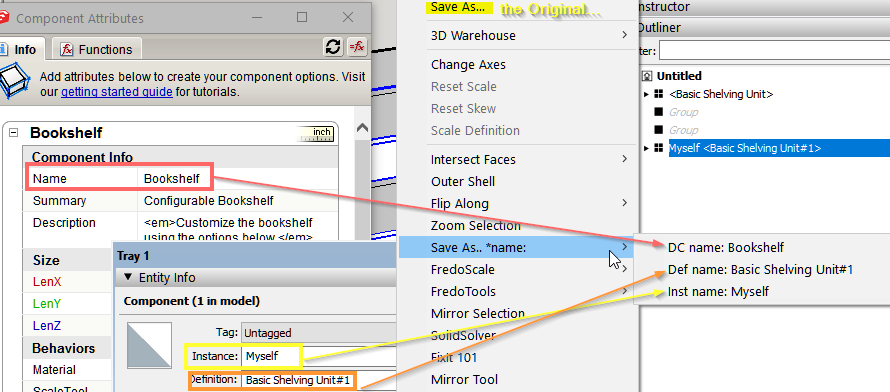
I intend to put it in the PluginStore later ... after some feedback and if I have more time to do so.
-
It is not 100% clear if you want to use the component definition name or the name from the dynamic component attribute...
Therefore I made both
This is a quick and dirty plugin: USE YOUR OWN RISK!
After installing the extension you will get 2 new context menu item (right click on the component):
-
"Save as: DC name"
-
"Save as: Def name"
Will be grayed out if not applicable.
I hope this is what you want and it will works for you!
Note: Scroll down for new release in a later post of mine!
-
-
@dezmo said:
? Known issue: -You can not select the SU file version to save to (You can't save to older version)
Oups ... sorry
I had not seen that ... but actually I have the same problem
Best regards
-
Unlike Model#save or Model#save_copy, unfortunately the Ruby API does not allow me to give a second parameter - version - for Definition.#save_as.
And UI.savepanel have it's limitation too......Therefore I got stuck here for now with "versionig". I need more time to figure out workaround, if any.


Hello! It looks like you're interested in this conversation, but you don't have an account yet.
Getting fed up of having to scroll through the same posts each visit? When you register for an account, you'll always come back to exactly where you were before, and choose to be notified of new replies (either via email, or push notification). You'll also be able to save bookmarks and upvote posts to show your appreciation to other community members.
With your input, this post could be even better 💗
Register Login


Advertisement