sketchucation logo sketchucation
    • Login
    Oops, your profile's looking a bit empty! To help us tailor your experience, please fill in key details like your SketchUp version, skill level, operating system, and more. Update and save your info on your profile page today!
    ⚠️ Update | Sketchucation Tools 5.0.8 released with licensing improvements and bugfixes Download

    Vray Animation of Scenes

    Scheduled Pinned Locked Moved SketchUp Discussions
    sketchup
    14 Posts 4 Posters 3.3k Views 4 Watching
    Loading More Posts
    • Oldest to Newest
    • Newest to Oldest
    • Most Votes
    Reply
    • Reply as topic
    Log in to reply
    This topic has been deleted. Only users with topic management privileges can see it.
    • B
      blueman2
      last edited by

      I'm looking for an extension or plugin that will help me create an animated movie from scene transitions that can be saved as an mp4. I have vray and I have Fredo's Animator but it seems, from what I can tell, that it only works to animate objects within the scene rather than the scene transitions. Any help would be appreciated. I just want to animate the scene transitions I already have set up.

      Thanks

      1 Reply Last reply
      Reply Quote 0
      • fredo6F
        fredo6
        last edited by

        @blueman2 said:

        I have vray and I have Fredo's Animator but it seems, from what I can tell, that it only works to animate objects within the scene rather than the scene transitions.

        With Animator, you can easily place scenes along the timeline and choose the transition between them, with options for easing if needed.

        1 Reply Last reply
        Reply Quote 0
        • B
          blueman2
          last edited by

          @fredo6 said:

          @blueman2 said:

          I have vray and I have Fredo's Animator but it seems, from what I can tell, that it only works to animate objects within the scene rather than the scene transitions.

          Thanks Fredo, I will try that a little later and see if I can figure it out. Is there any documentation anywhere that describes animating the scenes?

          1 Reply Last reply
          Reply Quote 0
          • fredo6F
            fredo6
            last edited by

            You can insert cameras taken from scenes
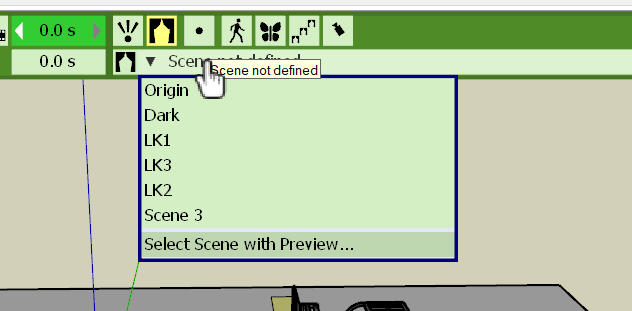
            Animator Scenes.png

            1 Reply Last reply
            Reply Quote 0
            • B
              blueman2
              last edited by

              Thanks Fredo,

              I was able to get the scenes in the time line and adjust the duration but unable to see the transition between the two scenes as a slow smooth camera movement as you can see when you are in sketchup and click from scene one to scene 2. I think I'm still missing something.

              1 Reply Last reply
              Reply Quote 0
              • fredo6F
                fredo6
                last edited by

                @blueman2 said:

                Thanks Fredo,

                I was able to get the scenes in the time line and adjust the duration but unable to see the transition between the two scenes as a slow smooth camera movement as you can see when you are in sketchup and click from scene one to scene 2. I think I'm still missing something.

                Just put the all durations to 0, so that you have a succession of small diamond in the timeline.
                If you configure a positive duration, the camera will keep the scene view for the specified duration.

                1 Reply Last reply
                Reply Quote 0
                • B
                  blueman2
                  last edited by

                  @fredo6 said:

                  @blueman2 said:

                  Thanks Fredo,

                  I was able to get the scenes in the time line and adjust the duration but unable to see the transition between the two scenes as a slow smooth camera movement as you can see when you are in sketchup and click from scene one to scene 2. I think I'm still missing something.

                  Just put the all durations to 0, so that you have a succession of small diamond in the timeline.
                  If you configure a positive duration, the camera will keep the scene view for the specified duration.

                  That took care of it. Thank you.

                  1 Reply Last reply
                  Reply Quote 0
                  • A
                    alaindesrosiers
                    last edited by

                    Does anyone know why fredo animator doesn't work with V-Ray 4.2

                    1 Reply Last reply
                    Reply Quote 0
                    • fredo6F
                      fredo6
                      last edited by

                      @alaindesrosiers said:

                      Does anyone know why fredo animator doesn't work with V-Ray 4.2

                      It was a problem with VRay.

                      It's now fixed. Just install LibFredo6 v10.9a, just released.

                      Fredo

                      1 Reply Last reply
                      Reply Quote 0
                      • Dave RD
                        Dave R
                        last edited by

                        @fredo6 said:

                        It was a problem with VRay.

                        Does this mean you had to make an accommodation for the faulty Vray?

                        Etaoin Shrdlu

                        %

                        (THERE'S NO PLACE LIKE)

                        G28 X0.0 Y0.0 Z0.0

                        M30

                        %

                        1 Reply Last reply
                        Reply Quote 0
                        • fredo6F
                          fredo6
                          last edited by

                          @dave r said:

                          Does this mean you had to make an accommodation for the faulty Vray?

                          Not faulty. VRay Next introduced a new way to track the movement of objects for optimization, whereas Animator handles the movement of objects in its own way (also for optimization).

                          The VRay Sketchup team gave me a workaround to resolve the issue.

                          1 Reply Last reply
                          Reply Quote 0
                          • fredo6F
                            fredo6
                            last edited by

                            @blueman2

                            Difficult to tell without seeing the model.

                            Could you post it or PM it to me so that I can have a look.

                            Thanks

                            Fredo

                            1 Reply Last reply
                            Reply Quote 0
                            • B
                              blueman2
                              last edited by

                              @fredo6 said:

                              @alaindesrosiers said:

                              Does anyone know why fredo animator doesn't work with V-Ray 4.2

                              It was a problem with VRay.

                              It's now fixed. Just install LibFredo6 v10.9a, just released.

                              Fredo

                              I'm still having an issue and wondering if this comment about Vray has something to do with it. I am able to get the scenes loaded in Animator and they show the camera transitions perfectly. However, when I go to make a movie, the result of a vray rendered movie shows the wrong camera position or angle as you can see in these images that show it during the beginning of the scene transition and after the transition.

                              This is the position before transition

                              During the scene transition the camera jumps to what should be the proper transition here:

                              However, when I animate as "Natural", outside of Vray, it is correct

                              I installed LibFredo6 v10.9a to see if that was the problem but it did not correct it. The normal scene transition in Sketchup is fine. I can see now change in camera angle. I'm not sure where the problem is?

                              1 Reply Last reply
                              Reply Quote 0
                              • B
                                blueman2
                                last edited by

                                @fredo6 said:

                                @blueman2

                                Difficult to tell without seeing the model.

                                Could you post it or PM it to me so that I can have a look.

                                Thanks

                                Fredo

                                Thanks Fredo! I will PM you

                                1 Reply Last reply
                                Reply Quote 0

                                Hello! It looks like you're interested in this conversation, but you don't have an account yet.

                                Getting fed up of having to scroll through the same posts each visit? When you register for an account, you'll always come back to exactly where you were before, and choose to be notified of new replies (either via email, or push notification). You'll also be able to save bookmarks and upvote posts to show your appreciation to other community members.

                                With your input, this post could be even better 💗

                                Register Login
                                • 1 / 1
                                • First post
                                  Last post
                                Buy SketchPlus
                                Buy SUbD
                                Buy WrapR
                                Buy eBook
                                Buy Modelur
                                Buy Vertex Tools
                                Buy SketchCuisine
                                Buy FormFonts

                                Advertisement

