sketchucation logo sketchucation
    • 登入
    Oops, your profile's looking a bit empty! To help us tailor your experience, please fill in key details like your SketchUp version, skill level, operating system, and more. Update and save your info on your profile page today!
    🔌 Smart Spline | Fluid way to handle splines for furniture design and complex structures. Download

    [Plugin] Universal Importer - v1.2.6 - 30 July 2024

    已排程 已置頂 已鎖定 已移動 Plugins
    447 貼文 110 Posters 474.7k 瀏覽 110 Watching
    正在載入更多貼文
    • 從舊到新
    • 從新到舊
    • 最多點贊
    回覆
    • 在新貼文中回覆
    登入後回覆
    此主題已被刪除。只有擁有主題管理權限的使用者可以查看。
    • A 離線
      Ahmed0007
      最後由 編輯

      @samuel_t said:

      @ahmed0007 said:

      Error 😕
      .glb 7.9mb
      Model is here : https://www.dropbox.com/s/bte329pn42gs5px/80005e0d-0006-f600-b63f-84710c7967bb.zip?dl=0

      This error happens because textures are embedded in model. So I've extracted and relinked them...

      You can download fixed model here. Click on "Valider et télécharger le fichier".

      There's no automatic fix for now. 😕

      Thank you!

      1 條回覆 最後回覆 回覆 引用 0
      • A 離線
        Ahmed0007
        最後由 編輯

        any other way to donate? paypal is not available in my country.

        1 條回覆 最後回覆 回覆 引用 0
        • samuel_tS 離線
          samuel_t
          最後由 編輯

          @ahmed0007 said:

          any other way to donate? paypal is not available in my country.

          Bank transfer. I can send you my IBAN in PM if you want to make a donation without PayPal.

          1 條回覆 最後回覆 回覆 引用 0
          • A 離線
            Ahmed0007
            最後由 編輯

            @samuel_t said:

            @ahmed0007 said:

            any other way to donate? paypal is not available in my country.

            Bank transfer. I can send you my IBAN in PM if you want to make a donation without PayPal.

            sure!

            1 條回覆 最後回覆 回覆 引用 0
            • samuel_tS 離線
              samuel_t
              最後由 編輯

              @oxer said:

              @einstein said:

              By the way, I think it would be cool to also have polygon reduction as standalone tool for meshes that already exist in SketchUp. Because we haven't had a decent free polyreducer in SketchUp so far. It's just a suggestion.

              It's a good idea 👍

              This idea was implemented in v1.0.8. cf. Toolbar.

              1 條回覆 最後回覆 回覆 引用 0
              • samuel_tS 離線
                samuel_t
                最後由 編輯

                @ahmed0007 said:

                Error 😕
                .glb 7.9mb
                Model is here : https://www.dropbox.com/s/bte329pn42gs5px/80005e0d-0006-f600-b63f-84710c7967bb.zip?dl=0

                This error happens because textures are embedded in model. So I've extracted and relinked them...

                You can download fixed model here. Click on "Valider et télécharger le fichier" button.

                There's no automatic fix for now. Since v1.0.8, this issue is automatically fixed.

                1 條回覆 最後回覆 回覆 引用 0
                • samuel_tS 離線
                  samuel_t
                  最後由 編輯

                  1.0.8 version:

                  • Allows you to apply a polygon reduction on current SketchUp model via toolbar.
                  • Fixes model import with embedded textures. Up to 10 textures are supported.
                  • Names imported model with original filename. This should eases management.

                  Download latest Universal Importer plugin from SketchUcation PluginStore.

                  1 條回覆 最後回覆 回覆 引用 0
                  • jiminy-billy-bobJ 離線
                    jiminy-billy-bob
                    最後由 編輯

                    @samuel_t said:

                    Famous plugins like Artisan and Skatter are using C:\ProgramData. This isn't a problem.

                    For Skatter, we use ProgramData only for the initial install, not for temp files.

                    25% off Skatter for SketchUcation Premium Members

                    1 條回覆 最後回覆 回覆 引用 0
                    • samuel_tS 離線
                      samuel_t
                      最後由 編輯

                      @jiminy-billy-bob said:

                      @samuel_t said:

                      Famous plugins like Artisan and Skatter are using C:\ProgramData. This isn't a problem.

                      For Skatter, we use ProgramData only for the initial install, not for temp files.

                      OK.

                      1 條回覆 最後回覆 回覆 引用 0
                      • K 離線
                        Khai
                        最後由 編輯

                        for a future time, any chance of supporting grouping of imported meshes?

                        1 條回覆 最後回覆 回覆 引用 0
                        • samuel_tS 離線
                          samuel_t
                          最後由 編輯

                          @khai said:

                          for a future time, any chance of supporting grouping of imported meshes?

                          Chances are low since mesh hierarchy is lost during conversion. 😕

                          1 條回覆 最後回覆 回覆 引用 0
                          • K 離線
                            Khai
                            最後由 編輯

                            oh. not good.. since if you import a mesh in sections rather than in a hierachy, the way that SU places it in scene - you manually placing it instead of just in position - makes lining it all up again a nightmare if you've got large sets...

                            hmm no matter.... I can work round it...

                            1 條回覆 最後回覆 回覆 引用 0
                            • samuel_tS 離線
                              samuel_t
                              最後由 編輯

                              1.0.9 version:

                              • Supports up to 1000 embedded textures.
                              • Shows face count before/after reduction.

                              Download latest Universal Importer plugin from SketchUcation PluginStore.

                              1 條回覆 最後回覆 回覆 引用 0
                              • E 離線
                                ehc2000
                                最後由 編輯

                                Hi,
                                Really excited about this plugin!

                                Mac OS X 10.11.6 , SU 18.0.16976

                                It’s not working for me. Trying some simple .obj files (ca. 9mb) and get this message (after I get the "Do you want to reduce polygon count?" and "Model Height" Dialogs:
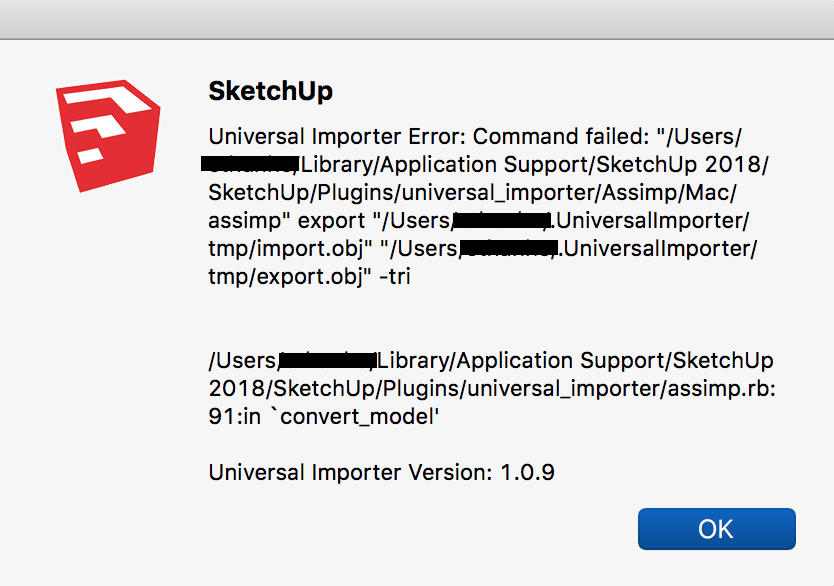
                                Screen Shot 2020-01-13 at 1.51.49 PM.png

                                Tried some .ply files of the same object, same message.

                                Tried a very simple, small .stl file (750kb) and got:

                                *Universal Importer Error: No space left on device - write
                                /Applications/SketchUp 2018/SketchUp.app/Contents/Frameworks/Ruby.framework/Versions/2.2/lib/ruby/2.2.0/fileutils.rb:1393:in `copy_stream'

                                Universal Importer Version: 1.0.9*

                                Indeed, my HD is very full, but at the time of my import attempt, it had ca. 4GB free space, no other programs were running, aside from Chrome.

                                Does it need to make use of more than 4GB of temp space to import a file with only 7,500 vertices and 15,000 faces?

                                As a last attempt before I write here, I made a super simple 2m cube and 2m sphere in C4D and exported as OBJ (274 verts 540 faces) and I still got the error as the above screenshot. I also tried this with a simple 2x2m plane. No luck.

                                Something I'm missing?

                                a few other notes/questions:
                                • If I press Cancel after “Model Height” (i like this feature, by the way), it still (attempts) to opens the file... is that because it is then opening the file at whatever size it’s been set to previously? or is it supposed to cancel the import?

                                • I can’t double click a file name and have it import it (like if I were pressing "Open") (wheras I can when with the normal import dialog with other images and 3D models already supported by SU). it’s a minor thing, but double-clicking a file in any OSX UI opens it (or at least many do), so it's pretty ingrained in my workflow. 😉

                                anyway, thoughts on the error messages?
                                Thanks!!

                                1 條回覆 最後回覆 回覆 引用 0
                                • OxerO 離線
                                  Oxer
                                  最後由 編輯

                                  Spanish Language for v1.0.9

                                  es.zip

                                  REQUEST: Can you investigate the missing texts in the importing popup windows on macos? I think for users it's very useful to see the text to understand what have to do.

                                  "The result is the end what is important is the process" by Oxer
                                  http://www.oxervision.blogspot.com/

                                  1 條回覆 最後回覆 回覆 引用 0
                                  • samuel_tS 離線
                                    samuel_t
                                    最後由 編輯

                                    @oxer said:

                                    Spanish Language for v1.0.9

                                    [attachment=0:8aivyaaf]<!-- ia0 -->es.zip<!-- ia0 -->[/attachment:8aivyaaf]

                                    Thanks for translation, Oxer. 😉

                                    @oxer said:

                                    REQUEST: Can you investigate the missing texts in the importing popup windows on macos? I think for users it's very useful to see the text to understand what have to do.

                                    I can't fix this problem because:

                                    "[On a Mac] UI.openpanel ignores the title argument. There isn’t even a place in the dialog for a title to appear. It also doesn’t support wildcard patterns for the filename and there is no place for a selection list to appear anyway. In fact, the filename argument appears to have no effect at all; it isn’t pre-selected and the user can choose anything."

                                    Source: https://forums.sketchup.com/t/good-default-directory-for-ui-savepanel/40307/6

                                    1 條回覆 最後回覆 回覆 引用 0
                                    • samuel_tS 離線
                                      samuel_t
                                      最後由 編輯

                                      @oxer said:

                                      Thanks for the aclaration.
                                      Thea4SU plugin has an options to Create or Edit Thea Model in it appears a tittle and options to selec model format, see the image.

                                      [attachment=0:1sjaildi]<!-- ia0 -->Texts in window.jpg<!-- ia0 -->[/attachment:1sjaildi]

                                      I'm Thea4SU beta tester and I can ask to Tomasz (TheaSU developer) if it's possible implement that in Universal Importer.

                                      Good idea!

                                      1 條回覆 最後回覆 回覆 引用 0
                                      • samuel_tS 離線
                                        samuel_t
                                        最後由 編輯

                                        1.1.0 version:

                                        • Fixes "big copy" issue again.
                                        • Shows face count before reduction.
                                        • Updates translations.

                                        Download latest Universal Importer plugin from SketchUcation PluginStore.

                                        1 條回覆 最後回覆 回覆 引用 0
                                        • OxerO 離線
                                          Oxer
                                          最後由 編輯

                                          Thanks for the aclaration.
                                          Thea4SU plugin has an options to Create or Edit Thea Model in it appears a tittle and options to select model format, see the image.
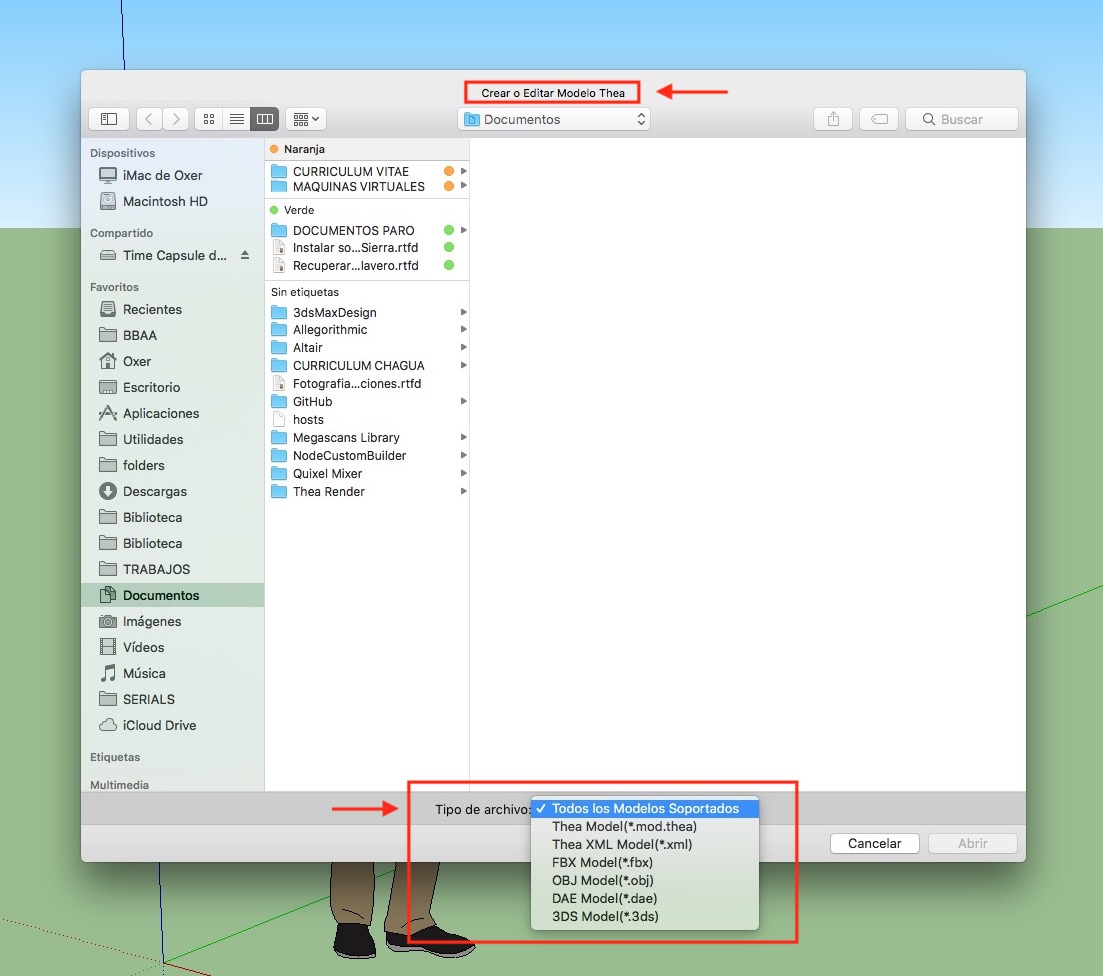
                                          Texts in window.jpg

                                          I'm Thea4SU beta tester and I can ask to Tomasz (TheaSU developer) if it's possible implement that in Universal Importer.

                                          "The result is the end what is important is the process" by Oxer
                                          http://www.oxervision.blogspot.com/

                                          1 條回覆 最後回覆 回覆 引用 0
                                          • A 離線
                                            Ahmed0007
                                            最後由 編輯

                                            @ahmed0007 said:

                                            Error 😕
                                            .glb 7.9mb
                                            Model is here : https://www.dropbox.com/s/bte329pn42gs5px/80005e0d-0006-f600-b63f-84710c7967bb.zip?dl=0

                                            this issue has been fixed in this version 😮 🎉
                                            just one little problem is the origin of the imported component placed very far away from geometry
                                            (~ 13579.78') this make very difficult to place the component.
                                            Thanks for this fix 😄

                                            1 條回覆 最後回覆 回覆 引用 0
                                            • 1
                                            • 2
                                            • 17
                                            • 18
                                            • 19
                                            • 20
                                            • 21
                                            • 22
                                            • 23
                                            • 19 / 23
                                            • 第一個貼文
                                              最後的貼文
                                            Buy SketchPlus
                                            Buy SUbD
                                            Buy WrapR
                                            Buy eBook
                                            Buy Modelur
                                            Buy Vertex Tools
                                            Buy SketchCuisine
                                            Buy FormFonts

                                            Advertisement

