Caster wheel
-
Hi people,
Hope you all doing well.
I am not quite sure is this is a right section to post my question but I am struggling to draw difficult shapes and forms. I feel like I don't have that visual understanding how to do it and I know that will come with more time and practice. I don't have any problem with furniture, etc.. However I am facing problems drawing this caster wheel. See attached. How did you get that understanding of shapes and how to draw them ? How to simply draw this caster wheel ?
Thank you in advance for your answers.
Deividas

-
have you tried to break it down into simpler pieces? Also, look for symmetry, you can model half and flip.
-
mrossk has given you some good advice. You might also want to look in the 3D Warehouse for caster components. There are some good ones there and they might give you ideas about how to model your own.
Keep in mind, if you are using this caster in a larger model, there's no need to create a highly detailed model of it. You could skip the bearings, rivets, and the brake pad for example. They won't show anyhow.
-
Dave's good advice. What do you need it for? A simple model will serve in an interior scene. If you wanted to print a part, much more detail, accuracy, and research would be needed.
-
@mrossk said:
have you tried to break it down into simpler pieces? Also, look for symmetry, you can model half and flip.
Yes, that's what I am trying to do. Thanks for the answer.
-
@dave r said:
mrossk has given you some good advice. You might also want to look in the 3D Warehouse for caster components. There are some good ones there and they might give you ideas about how to model your own.
Keep in mind, if you are using this caster in a larger model, there's no need to create a highly detailed model of it. You could skip the bearings, rivets, and the brake pad for example. They won't show anyhow.
Good idea about warehouse. I'll have a look for similar objects.
Also is Sketchup suitable software for making small/detailed objects ? I keep getting a message that "Radius is too small or number of segments is too large for given angle".
-
@pbacot said:
Dave's good advice. What do you need it for? A simple model will serve in an interior scene. If you wanted to print a part, much more detail, accuracy, and research would be needed.
Just simply create a visual of a wheel and attach it to the furniture that's the main reason.
-
In addition, is it possible to see how a part was drawn is skectchup ? when you downloaded something from warehouse ? I mean exploding a view or something ?
-
@deivis1992 said:
Also is Sketchup suitable software for making small/detailed objects ? I keep getting a message that "Radius is too small or number of segments is too large for given angle".
You might want to scale up the component for models this size. I am not sure why you get those particular messages, but for many operations SU will not create small faces. However when you scale the component back down the faces will still be there.
If you are indeed using SU components you can use the Dave Method and duplicate the component then scale that second instance of the component, and work on that. The changes will also be made in the original small instance. Scale at 10-100 times larger.
-
@unknownuser said:
Also is Sketchup suitable software for making small/detailed objects ?
Yes of course! It's the more friendly prog for that!

The only thing is that is not a nurbs prog, so a circle is not a circle but a polygon so increase reasonably the number of segments when absolutly needing! (1000 is possible but 128 is a big maximum
And of course sometime Intersection & Boolean functions can't give a perfect result if you draw at too smaller scale! So work at meter with 3 decimals and not at millimeters!
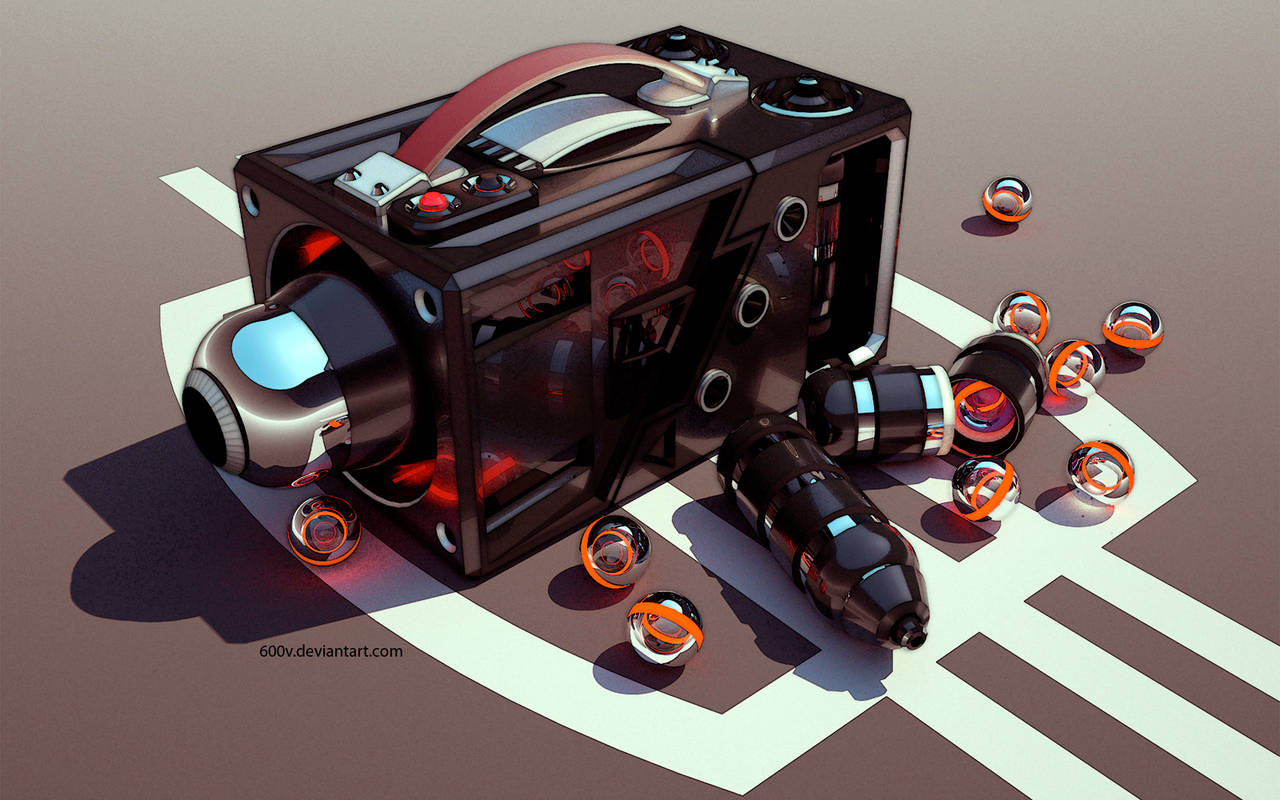
See this for inspiration!
By Xlrlxi - 600v
-
@deivis1992 said:
Also is Sketchup suitable software for making small/detailed objects ? I keep getting a message that "Radius is too small or number of segments is too large for given angle".
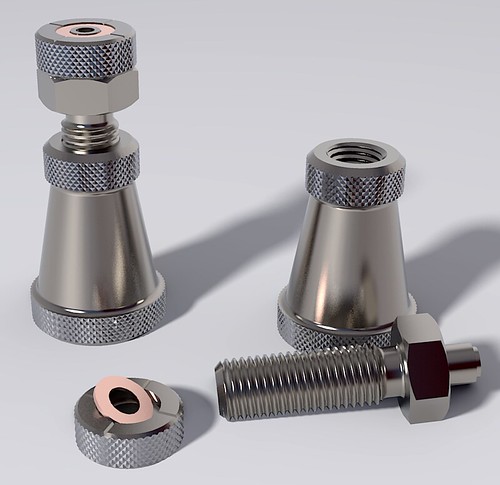
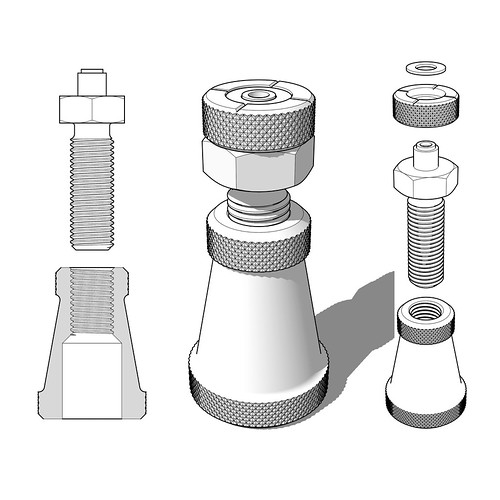
It is possible to model small, detailed objects in SketchUp. The body of this machinist's jack is 56mm tall. Although they can exist, SketchUp doesn't create tiny faces. The solution is to use the []Dave Method](https://sketchucation.com/forums/viewtopic.php?f) as pbacot indicated or work at a larger size and scale down after modeling.
You've surely noticed that SketchUp approximates arcs, circles and other curves using a series of straight edge segments. The message you report appears when you try to make a very small radius arc or circle in which those segments would be too small for creating faces. It is intended to help users avoid holes in their models and was especially aimed at models for 3D printing. Holes in surfaces prevent models from being printable.
@deivis1992 said:
In addition, is it possible to see how a part was drawn is skectchup ? when you downloaded something from warehouse ? I mean exploding a view or something ?
It depends on how it was modeled and if the individual parts were made as components or groups. If they were, you can move them away from each other so you can look at just the caster frame, for example. It is sometimes possible to suss out how the author modeled something using clues they might leave behind in hidden geometry and such. Some times you just have to guess, though.
@deivis1992 said:
Just simply create a visual of a wheel and attach it to the furniture that's the main reason.
I would never tell you not to model the caster because it would be a good learning experience. If you are interested in modeling caster or other small hardware, you should do that. In the interest of expediency, however, you might consider using a caster from the 3D Warehouse if you can find one that is close enough. Or use one as a starting point and modify it as needed. If you do choose to use one from the Warehouse in your project, don't insert it directly. Open it first in a separate SketchUp session so you can examine it and make sure it is suitable. Check its dimensions, look for unneeded detail and remove it and so on. As I wrote before, you won't need details like bearings and rivets or screws. If a caster you download from the Warehouse has those, take a few minutes to remove them and clean up the model to reduce its file size. Also check to see that face orientation is correct and fix any that are reversed. In Model Info>Statistics, Purge Unused and then save the component locally so you can import it into your furniture model.
-
Please be aware that not all models in the Warehouse are made in SketchUp and most are not good examples --at least what I've tried.
-
Peter makes an excellent point. You have to be discerning about the models you use from the Warehouse. File size can be an indicator of how much detail there is. There's probably little point in putting a 10 Mb caster component into a 1 Mb furniture model.
-
Also if you are just using them as a small visual addition they could be face me components.
So much comes down to your use case. -
@pbacot said:
@deivis1992 said:
Also is Sketchup suitable software for making small/detailed objects ? I keep getting a message that "Radius is too small or number of segments is too large for given angle".
You might want to scale up the component for models this size. I am not sure why you get those particular messages, but for many operations SU will not create small faces. However when you scale the component back down the faces will still be there.
If you are indeed using SU components you can use the Dave Method and duplicate the component then scale that second instance of the component, and work on that. The changes will also be made in the original small instance. Scale at 10-100 times larger.
Just for the record: scaling up means that I need to use meters or centimeters instead of millimeters ? For example: instead of 5mm, I need to use 5 cm ? I'll look into the Dave's method as well. Thank you.
-
@dave r said:
@deivis1992 said:
Also is Sketchup suitable software for making small/detailed objects ? I keep getting a message that "Radius is too small or number of segments is too large for given angle".
It is possible to model small, detailed objects in SketchUp. The body of this machinist's jack is 56mm tall. Although they can exist, SketchUp doesn't create tiny faces. The solution is to use the []Dave Method](https://sketchucation.com/forums/viewtopic.php?f) as pbacot indicated or work at a larger size and scale down after modeling.
You've surely noticed that SketchUp approximates arcs, circles and other curves using a series of straight edge segments. The message you report appears when you try to make a very small radius arc or circle in which those segments would be too small for creating faces. It is intended to help users avoid holes in their models and was especially aimed at models for 3D printing. Holes in surfaces prevent models from being printable.
@deivis1992 said:
In addition, is it possible to see how a part was drawn is skectchup ? when you downloaded something from warehouse ? I mean exploding a view or something ?
It depends on how it was modeled and if the individual parts were made as components or groups. If they were, you can move them away from each other so you can look at just the caster frame, for example. It is sometimes possible to suss out how the author modeled something using clues they might leave behind in hidden geometry and such. Some times you just have to guess, though.
@deivis1992 said:
Just simply create a visual of a wheel and attach it to the furniture that's the main reason.
I would never tell you not to model the caster because it would be a good learning experience. If you are interested in modeling caster or other small hardware, you should do that. In the interest of expediency, however, you might consider using a caster from the 3D Warehouse if you can find one that is close enough. Or use one as a starting point and modify it as needed. If you do choose to use one from the Warehouse in your project, don't insert it directly. Open it first in a separate SketchUp session so you can examine it and make sure it is suitable. Check its dimensions, look for unneeded detail and remove it and so on. As I wrote before, you won't need details like bearings and rivets or screws. If a caster you download from the Warehouse has those, take a few minutes to remove them and clean up the model to reduce its file size. Also check to see that face orientation is correct and fix any that are reversed. In Model Info>Statistics, Purge Unused and then save the component locally so you can import it into your furniture model.
Thank you for such a long and informative answer.
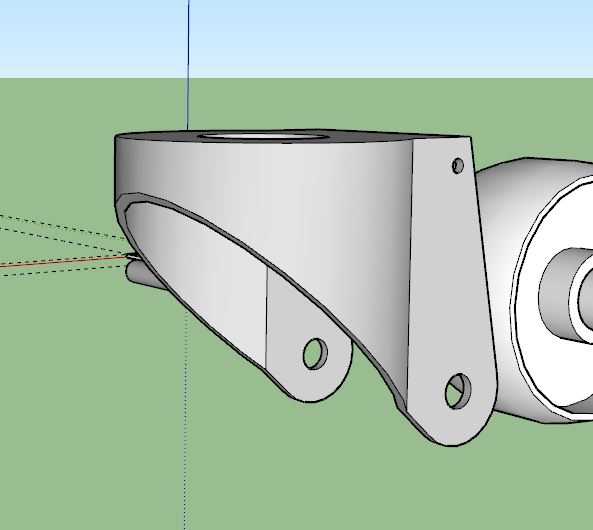
So I have exploded caster wheel but how to find out how was the frame drawn ?
Please see attached.
-
@deivis1992 said:
Just for the record: scaling up means that I need to use meters or centimeters instead of millimeters ? For example: instead of 5mm, I need to use 5 cm ? I'll look into the Dave's method as well. Thank you.
Yes. That's it. If you are working with measurements in mm, set SketchUp's units to meters. Or, if you are using "The Dave Method" work at the proper units but before you do anything that might create tiny faces (read that "holes", make component and scale a copy of it up to work on.
@deivis1992 said:
So I have exploded caster wheel but how to find out how was the frame drawn?
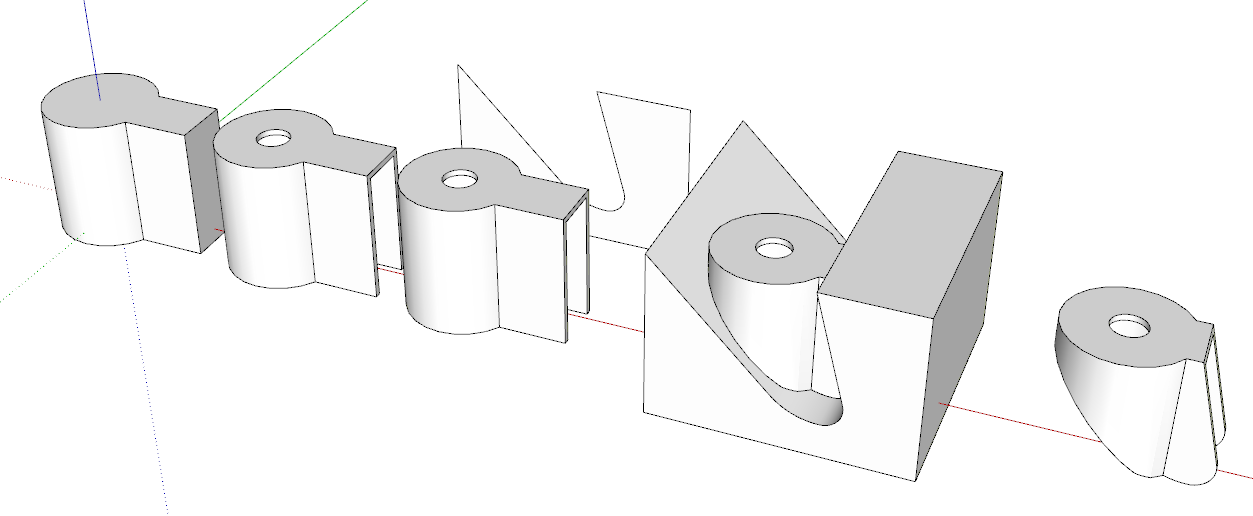
You might turn on Hidden Geometry and look at what you can see. If I had to guess I would say the author drew the plan view of the exterior of the frame, extruded it to make it 3D, used Offset on the bottom face to define the thickness of the metal and pushed the inside up. Then drew a side view shape and pushed it through the existing geometry, intersected the shapes and erased everything that isn't the frame. The slope and sharp edge at the back of the caster frame is a clue.
I'd be using Eneroth Solid Tools to do the trimming of the two shapes.
Very rough example.
-
@dave r said:
@deivis1992 said:
Just for the record: scaling up means that I need to use meters or centimeters instead of millimeters ? For example: instead of 5mm, I need to use 5 cm ? I'll look into the Dave's method as well. Thank you.
Yes. That's it. If you are working with measurements in mm, set SketchUp's units to meters. Or, if you are using "The Dave Method" work at the proper units but before you do anything that might create tiny faces (read that "holes", make component and scale a copy of it up to work on.
@deivis1992 said:
So I have exploded caster wheel but how to find out how was the frame drawn?
You might turn on Hidden Geometry and look at what you can see. If I had to guess I would say the author drew the plan view of the exterior of the frame, extruded it to make it 3D, used Offset on the bottom face to define the thickness of the metal and pushed the inside up. Then drew a side view shape and pushed it through the existing geometry, intersected the shapes and erased everything that isn't the frame. The slope and sharp edge at the back of the caster frame is a clue.
I'd be using Eneroth Solid Tools to do the trimming of the two shapes.
Very rough example.
[attachment=0:3a2n6jke]<!-- ia0 -->Screenshot - 3_25_2019 , 5_14_08 PM.png<!-- ia0 -->[/attachment:3a2n6jke]Thank you for the reply. Could you please explain how you drew that side view, all those angles, ect.,? It's not very clear for me.
-
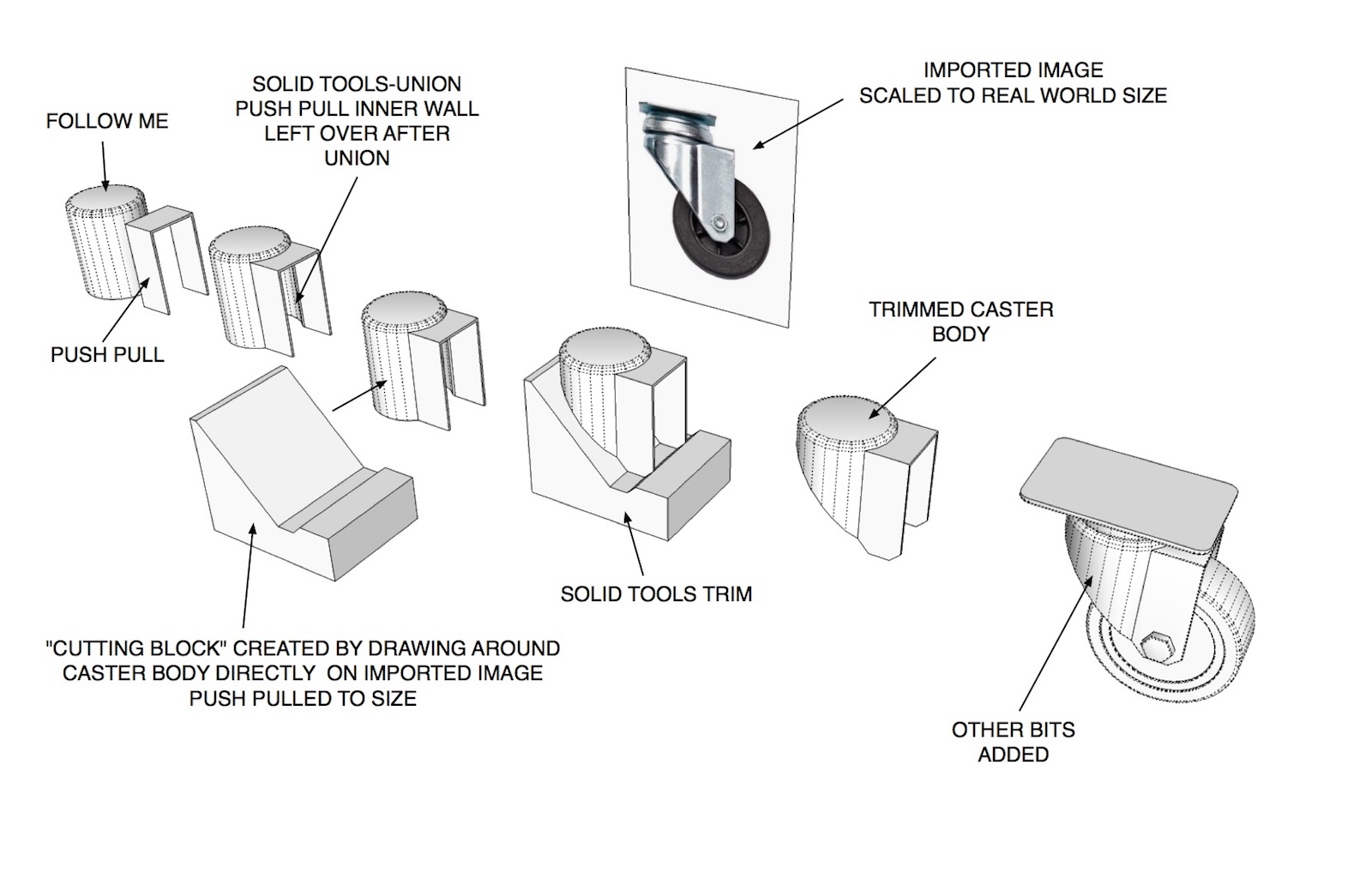
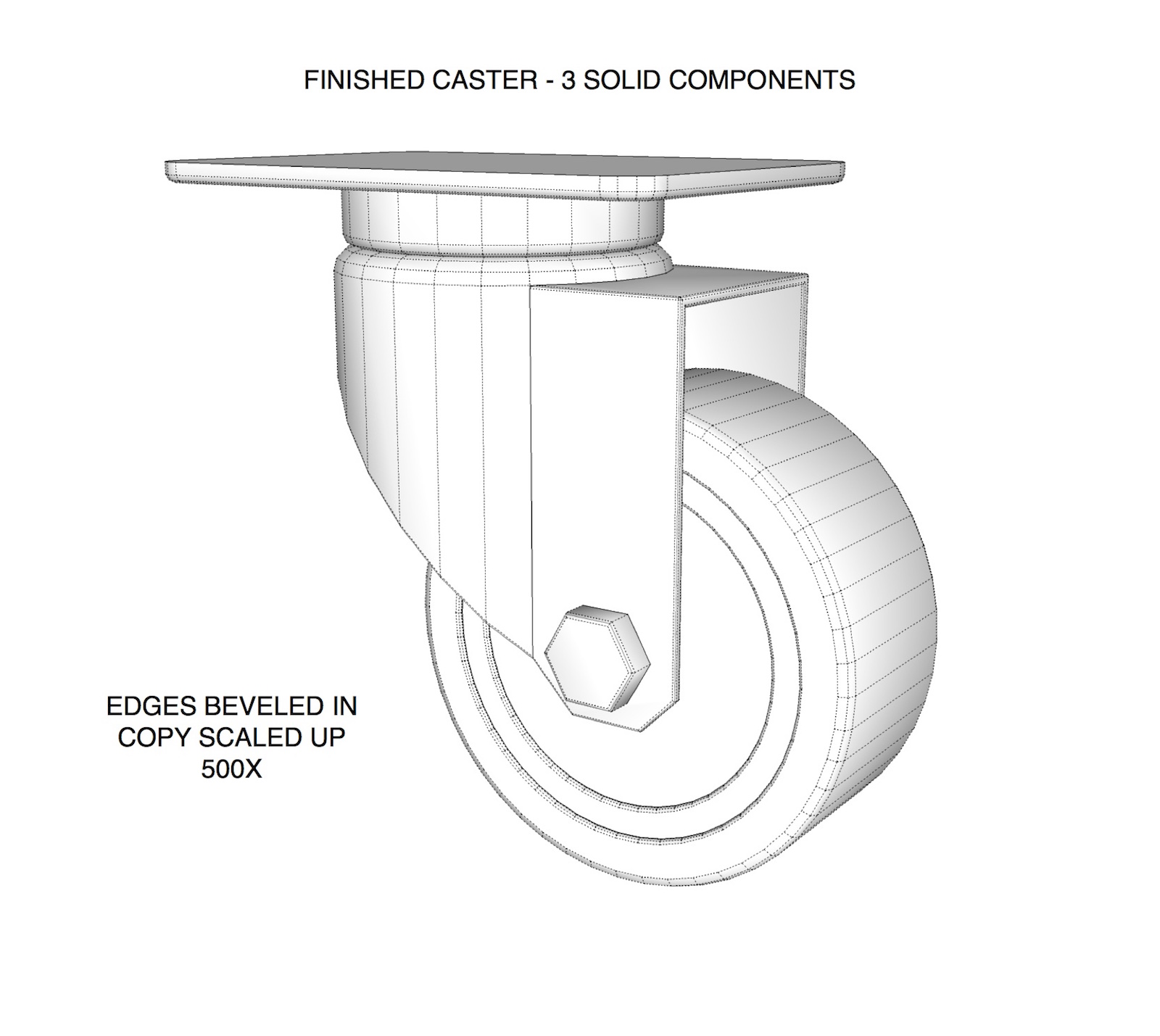
Figured I'd give DaveR a hand with explaining this. Started the model a little different than he did. Hope the images make sense. Took longer to set up the example than to model the darn caster itself
 .
.Word of caution.. if you don't need the extreme detail like beveling edges leave them out. These type of models can get pretty heavy.
-
@tuna1957 said:
Figured I'd give DaveR a hand with explaining this. Started the model a little different than he did. Hope the images make sense. Took longer to set up the example than to model the darn caster itself
.Word of caution.. if you don't need the extreme detail like beveling edges leave them out. These type of models can get pretty heavy.
Wow, looks great! How did you drew around caster body? I am still struggling with that. Really frustrating this part is for me.








Advertisement