sketchucation logo sketchucation
    • 登入
    Oops, your profile's looking a bit empty! To help us tailor your experience, please fill in key details like your SketchUp version, skill level, operating system, and more. Update and save your info on your profile page today!
    🔌 Smart Spline | Fluid way to handle splines for furniture design and complex structures. Download

    [Plugin (final version)] Section Planes Manager

    已排程 已置頂 已鎖定 已移動 Plugins
    27 貼文 13 Posters 10.1k 瀏覽 13 Watching
    正在載入更多貼文
    • 從舊到新
    • 從新到舊
    • 最多點贊
    回覆
    • 在新貼文中回覆
    登入後回覆
    此主題已被刪除。只有擁有主題管理權限的使用者可以查看。
    • JQLJ 離線
      JQL
      最後由 編輯

      @didier bur said:

      About hidden layers: if your sections are on a hidden layer, the plugin also works, but you will not see the sections planes appear in the viewport. Same goes for sections that are hidden entities (masked).

      Hi Didier,

      For me it's perfect then, I wouldn't need to see section planes at all, because the section would be active and that's enough for me.

      However, if you're willing to improve the plugin, how would you feel about having it in a floating window instead of a dropdown menu?

      I would definetelly use that a lot, having a section's list floating on the side, double clicking a section and it would then become active, even if invisible. In fact it would look like outliner without the model part of it. Having the outliner open all times doesn't work at all because it will slow down Sketchup or actually bog it down a lot of times when using plugins. Having an outliner dedicated exclusivelly to sections would be oh so great!

      www.casca.pt
      Visit us on facebook!

      1 條回覆 最後回覆 回覆 引用 0
      • Didier BurD 離線
        Didier Bur
        最後由 編輯

        @srx:

        No, it won't work in SU2017, because sections names and symbols were introduced in SU2018.

        DB

        1 條回覆 最後回覆 回覆 引用 0
        • BoxB 離線
          Box
          最後由 編輯

          It would be worth attaching it as an .rbz since that is the more commonly recognized file extension these days for plugins. Many newer users may not know what to do with an .rb or know where to find their plugin folder.

          1 條回覆 最後回覆 回覆 引用 0
          • Didier BurD 離線
            Didier Bur
            最後由 編輯

            @Box and JQL:

            Done. See top of this topic.
            Enjoy !

            DB

            1 條回覆 最後回覆 回覆 引用 0
            • PixeroP 離線
              Pixero
              最後由 編輯

              Thanks. Will come in handy.

              1 條回覆 最後回覆 回覆 引用 0
              • JQLJ 離線
                JQL
                最後由 編輯

                @didier bur said:

                @Box and JQL:

                Done. See top of this topic.
                Enjoy !

                oh yeah!

                www.casca.pt
                Visit us on facebook!

                1 條回覆 最後回覆 回覆 引用 0
                • jujuJ 離線
                  juju
                  最後由 編輯

                  @jql said:

                  Hi Didier, I've tried it and it's really good.

                  JQL, do you use Skalp? If so, have you tried the two together? Any conflicts?

                  Save the Earth, it's the only planet with chocolate.

                  1 條回覆 最後回覆 回覆 引用 0
                  • JQLJ 離線
                    JQL
                    最後由 編輯

                    I don't use Skalp.

                    www.casca.pt
                    Visit us on facebook!

                    1 條回覆 最後回覆 回覆 引用 0
                    • JQLJ 離線
                      JQL
                      最後由 編輯

                      Hi Didier, I've tried it and it's really good.

                      I made a mockup as what I was actually thinking was something like this:
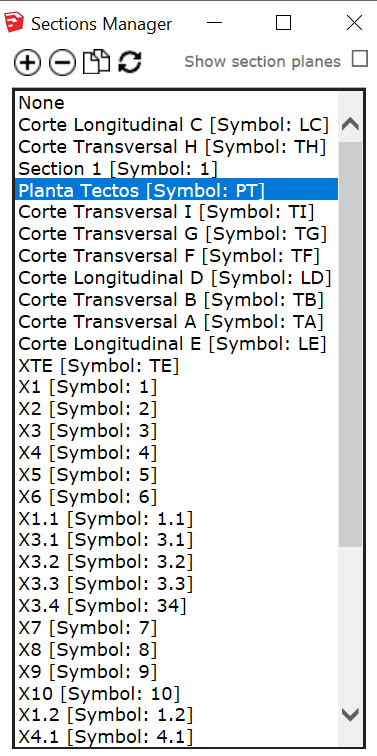
                      sections manager UI.jpg

                      This way we could see the list of all sections and easily navigate in the model (as long as section names are easy enough which, since 2018, can be controlled)

                      I then went ahead and added a few feature requests to the UI too:
                      1 - Double Click would replace the Apply Button;
                      2 - A single click would select a given section (select in the list and in viewport);
                      3 - CTRL/SHIFT would add/remove sections to the selection;
                      4 - Delete selected section(s) from list;
                      5 - And why not add a section while working with the list;
                      6 - Then duplicate seemed natural too as you could duplicate selected sections then select in the list and move around in the viewport.

                      I know this is asking too much, but who knows?...

                      Thanks!

                      EDIT: The plus, minus, duplicate and delete icons are a copy paste from skatter dialog which I believe is inspired in Sketchup's.

                      www.casca.pt
                      Visit us on facebook!

                      1 條回覆 最後回覆 回覆 引用 0
                      • Didier BurD 離線
                        Didier Bur
                        最後由 編輯

                        Hi all,
                        Here is what I ended up with 😉

                        Dropdown list now updates automatically when you add, erase, or modify a section.
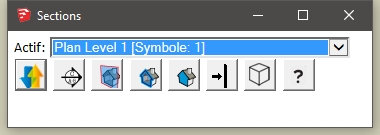
                        The section plane that you select in the list is activated immediately (no need to click on a "apply" button anymore).
                        Tooltips added when mouse hovers icons

                        The row of icons, left to right, do the following:

                        • invert the section plane (toggle)
                        • add a section plane
                        • show all section planes (toggle)
                        • draw the section or not (toggle)
                        • fill or not the section (toggle)
                        • align view to the section plane
                        • perspective/parallel camera (toggle)
                        • display help file

                        spm4.jpg

                        See top of this topic to download the latest RBZ version.

                        Enjoy!

                        DB

                        1 條回覆 最後回覆 回覆 引用 0
                        • Didier BurD 離線
                          Didier Bur
                          最後由 編輯

                          See top of this topic to download the latest RBZ version.

                          Enjoy!

                          DB

                          1 條回覆 最後回覆 回覆 引用 0
                          • pbacotP 離線
                            pbacot
                            最後由 編輯

                            Especially helpful when updating scenes! You don't have to make section planes visible and then hope you can select the one you want (if you don't have all sections per layer like you should, nearly impossible). Then try to update the scene correctly without planes visible etc.

                            MacOSX MojaveSketchUp Pro v19 Twilight v2 Thea v3 PowerCADD

                            1 條回覆 最後回覆 回覆 引用 0
                            • C 離線
                              Charlie__V
                              最後由 編輯

                              Didier,
                              Awesome....simply awesome.....greatly appreciate you sharing this plug-in!

                              Charlie

                              Precision M1710/Win 7 Pro 64 bit/i-7 6920 Quad core 2.9 Ghz -3.8/16Gb ram/NVIDIA M5000M 8Gb

                              1 條回覆 最後回覆 回覆 引用 0
                              • boofredlayB 離線
                                boofredlay
                                最後由 編輯

                                @didier bur said:

                                ...
                                Usage: select "Activate section plane" from the Tools menu.
                                (six languages included: fr,us,de,nl,es,pt,it)
                                For SU v2018 and up.

                                Your original post says this plugin is in the Tools Menu but on my machine it shows up in the Window Menu.

                                Cheers.
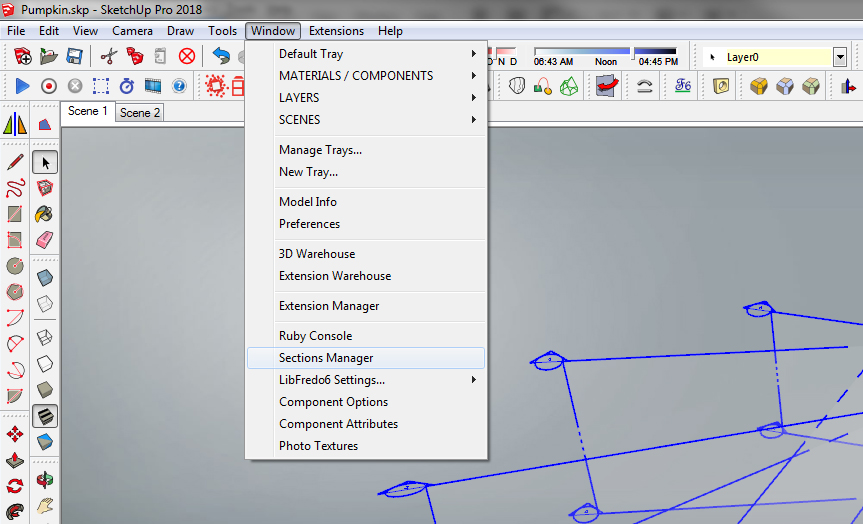

                                Sections Manager.jpg

                                http://www.coroflot.com/boofredlay

                                1 條回覆 最後回覆 回覆 引用 0
                                • Didier BurD 離線
                                  Didier Bur
                                  最後由 編輯

                                  @boffredlay:
                                  You're right. Fixed 😉
                                  Side note: I'll soon publish an enhanced version with another new feature: automatic sectional view creation (scene, layer, material and style options).
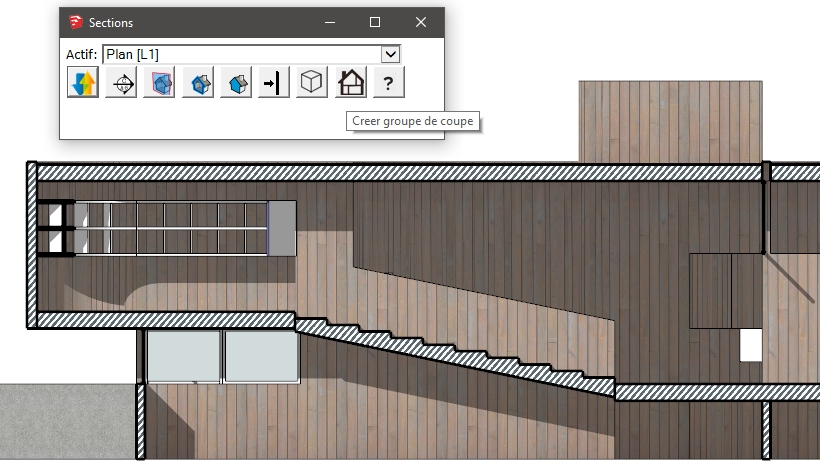
                                  coupe.jpg

                                  DB

                                  1 條回覆 最後回覆 回覆 引用 0
                                  • zooenZ 離線
                                    zooen
                                    最後由 編輯

                                    Bonjour Didier,

                                    Avec SU 2020, j'ai ce rappel à chaque changement de scène si je n'ai pas créé de section.
                                    Il doit y avoir un moyen de désactiver cette petite boîte (je suis obligé de cliquer deux fois sur OK pour qu'elle disparaisse).

                                    Hello Didier,

                                    With SU 2020, I have this reminder at each scene change if I haven't created a section.
                                    There must be a way to deactivate this little box (I have to click OK twice so that it disappears).

                                    1 條回覆 最後回覆 回覆 引用 0
                                    • P 離線
                                      pibuz
                                      最後由 編輯

                                      @didier bur said:

                                      @boffredlay:
                                      You're right. Fixed 😉
                                      Side note: I'll soon publish an enhanced version with another new feature: automatic sectional view creation (scene, layer, material and style options).

                                      [attachment=0:1xckhsb2]<!-- ia0 -->coupe.jpg<!-- ia0 -->[/attachment:1xckhsb2]

                                      HI DIDIER! WONDERFUL PLUGIN!
                                      I don't know how I could have missed that!!!!

                                      Any chance you finally finished the textured section face mod?

                                      WEB (ita) - https://filipposcarso.wixsite.com/ordinentropico

                                      1 條回覆 最後回覆 回覆 引用 0
                                      • Didier BurD 離線
                                        Didier Bur
                                        最後由 編輯

                                        Hi,

                                        Too much work at the moment 😉 Due to lockdown, all my courses with Zoom,Teams,GoToMeeting are taking all my time 😄
                                        Regards,

                                        DB

                                        1 條回覆 最後回覆 回覆 引用 0
                                        • 1
                                        • 2
                                        • 2 / 2
                                        • 第一個貼文
                                          最後的貼文
                                        Buy SketchPlus
                                        Buy SUbD
                                        Buy WrapR
                                        Buy eBook
                                        Buy Modelur
                                        Buy Vertex Tools
                                        Buy SketchCuisine
                                        Buy FormFonts

                                        Advertisement