sketchucation logo sketchucation
    • 登入
    Oops, your profile's looking a bit empty! To help us tailor your experience, please fill in key details like your SketchUp version, skill level, operating system, and more. Update and save your info on your profile page today!
    🔌 Smart Spline | Fluid way to handle splines for furniture design and complex structures. Download

    [Plugin] ClothWorks v1.8.0 - 28 Apr 2024

    已排程 已置頂 已鎖定 已移動 Plugins
    699 貼文 161 Posters 669.8k 瀏覽 161 Watching
    正在載入更多貼文
    • 從舊到新
    • 從新到舊
    • 最多點贊
    回覆
    • 在新貼文中回覆
    登入後回覆
    此主題已被刪除。只有擁有主題管理權限的使用者可以查看。
    • A 離線
      Ahmed0007
      最後由 編輯

      gizmo also gets big when i select the custom made big pin.

      1 條回覆 最後回覆 回覆 引用 0
      • U 離線
        Unexpectediteminbaggingarea
        最後由 編輯

        Hi,

        I have the latest version, 1.1.1 for Mac but the license still keeps deactivating every time I re-start SketchUp.
        Is there a fix for this yet?
        Thank you.

        1 條回覆 最後回覆 回覆 引用 0
        • A 離線
          Anton_S
          最後由 編輯

          @unexpectediteminbaggingarea said:

          Hi,

          I have the latest version, 1.1.1 for Mac but the license still keeps deactivating every time I re-start SketchUp.
          Is there a fix for this yet?
          Thank you.

          Hello,

          Are you using the latest SketchUcationTools, version 3.1.5? If not, please upgrade as it could fix the issue.

          Link Preview Image
          Plugin Store Download | SketchUcation

          Extending SketchUp has never been easier with a suite of tools that make installing and disabling plugins and extensions a one click operation.

          favicon

          (sketchucation.com)

          Anton

          1 條回覆 最後回覆 回覆 引用 0
          • MALAISEM 離線
            MALAISE
            最後由 編輯

            Awsome effects Cheers Anton. (I bought the license today )

            Idea: Set viscosity of collider in order to "simulate" drops moving on surface.
            Very useful for geological deformations explanations.

            Pierre

            La Connaissance n'a de valeur que partagée

            1 條回覆 最後回覆 回覆 引用 0
            • R 離線
              rl.amorato
              最後由 編輯

              Hi Guys, I was wondering if clothworks would be able to wrap around an object, instead of draping over something. Kinda like the reference image attached. Thanks!


              Ring-A-Ding_01.jpg

              1 條回覆 最後回覆 回覆 引用 0
              • A 離線
                Anton_S
                最後由 編輯

                @rl.amorato said:

                Hi Guys, I was wondering if clothworks would be able to wrap around an object, instead of draping over something. Kinda like the reference image attached. Thanks!

                I have tried putting something like this together and it seems like it can be done, well, specifically, with a newer version of ClothWorks, which is still under development.

                I have attached an image and a link to SKP file listing and displaying the key steps.

                Wrapped.png
                https://drive.google.com/open?id=1X-39luoZWwYqP9O-j6zSt4GrTtC3YVAZ

                Anton

                1 條回覆 最後回覆 回覆 引用 0
                • R 離線
                  rl.amorato
                  最後由 編輯

                  https://sketchucation.com/forums/images/smilies/1f635.png Nice! Very nice! I'm looking forward to the new release. Thank you so much for this plugin! You're a godsend!

                  1 條回覆 最後回覆 回覆 引用 0
                  • T 離線
                    trenton.gauthier
                    最後由 編輯

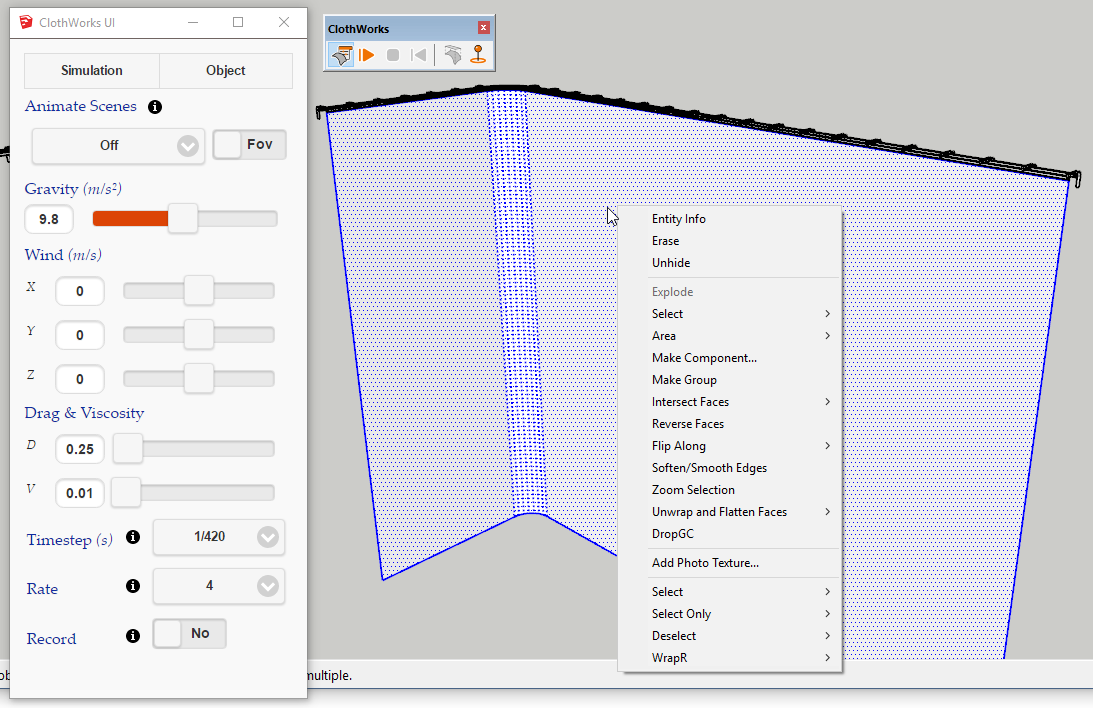
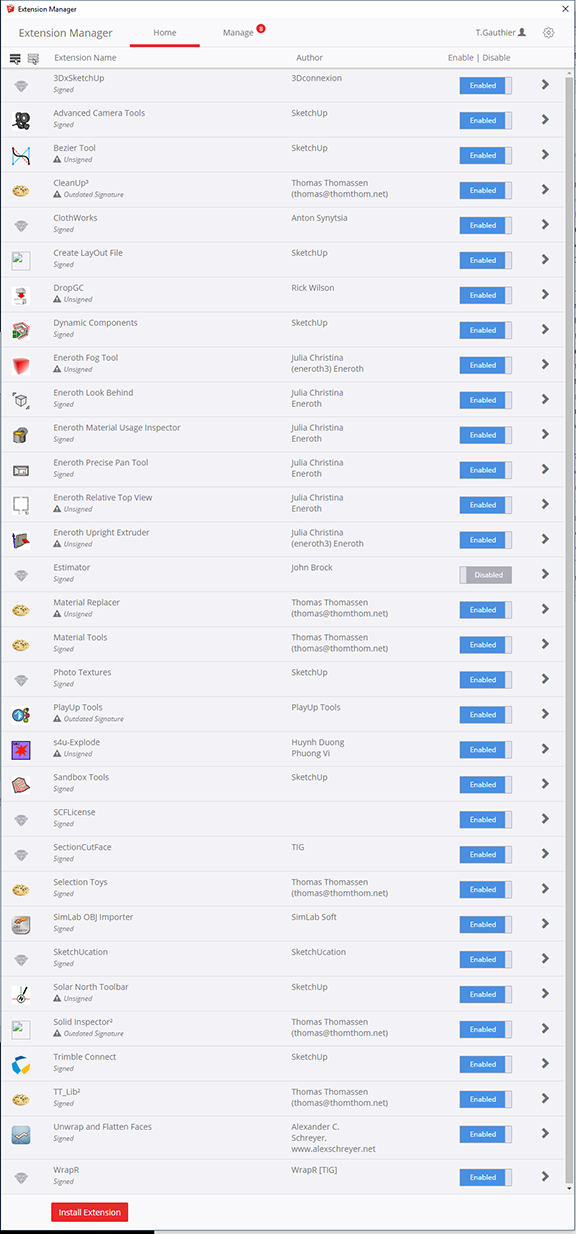
                    Good morning, this is probably not an issue specific to your plugin but I'm missing the right click / aka context menu which is preventing me from using the newly purchased plugin. I've taken the steps of reinstalling the plugin both through the sketchucation store and manually. I'm using a fresh install of Sketchup Pro 2017 ver. 17.2.2555 64 Bit on Windows 10 Pro ver. 1803 with an i7-6700k and GTX 1080 Ti Hybrid. I've also sent you an email.
                    Screenshot


                    Extensions

                    1 條回覆 最後回覆 回覆 引用 0
                    • Dave RD 離線
                      Dave R
                      最後由 編輯

                      @trenton.gauthier said:

                      ...but I'm missing the right click / aka context menu which is preventing me from using the newly purchased plugin.

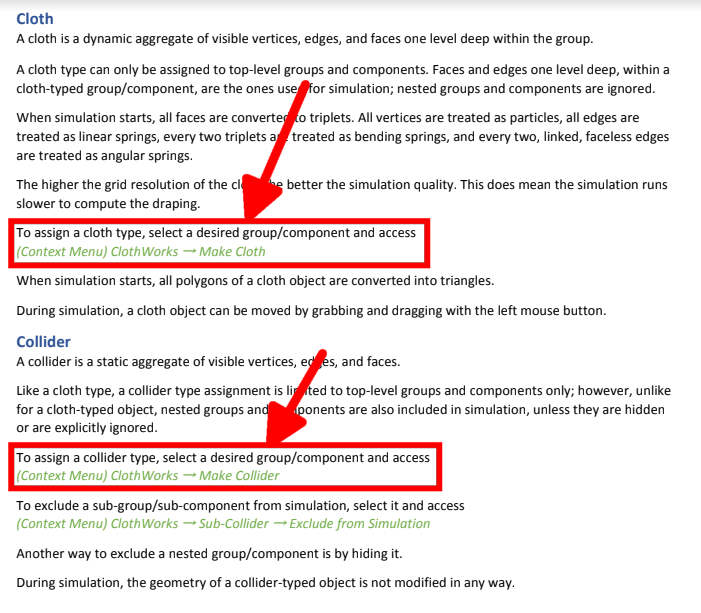
                      The Context menu is just that. The menu items in it depend upon the context you are clicking on. You are right clicking on loose geometry. To get Clothworks to show, you need to right click on a component or group.

                      When all else fails, read the manual.
                      Screenshot - 8_3_2018 , 11_11_52 AM.png

                      Etaoin Shrdlu

                      %

                      (THERE'S NO PLACE LIKE)

                      G28 X0.0 Y0.0 Z0.0

                      M30

                      %

                      1 條回覆 最後回覆 回覆 引用 0
                      • K 離線
                        king1997
                        最後由 編輯

                        when I click to (Menu) Extensions → ClothWorks → License ...
                        SFC License dialog box <<<<<< this never show up what to do help i have already paid 😢 😢

                        1 條回覆 最後回覆 回覆 引用 0
                        • A 離線
                          Anton_S
                          最後由 編輯

                          @king1997 said:

                          when I click to (Menu) Extensions → ClothWorks → License ...
                          SFC License dialog box <<<<<< this never show up what to do help i have already paid 😢 😢

                          Did you install SketchUcationTools, specifically version 3.1.5? https://sketchucation.com/resources/plugin-store-download

                          1 條回覆 最後回覆 回覆 引用 0
                          • Gus RG 離線
                            Gus R
                            最後由 編輯

                            Howdy,

                            LTNS. Great plugin.

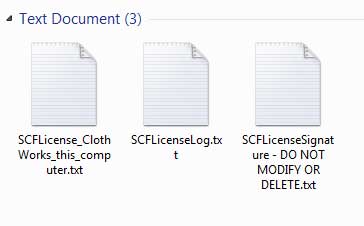
                            Having problems licensing this. I submitted the license several times now and followed instructions to delete the three files per page 5 of 5.

                            When I restart Sketchup it's not licensed again.

                            So I tried again.

                            I exceeded seats and have requested a restart and will try again.

                            Had the latest Sketchucation tool installed but installed the latest version just in case. Didn't seem to make a difference.

                            License is located in C:\Users\Asus P8P67 Deluxe\AppData\Local\SCF Licenses.

                            www.instagram.com/gusrobatto/

                            www.facebook.com/gusrobatto

                            www.flickr.com/photos/gusrobatto

                            1 條回覆 最後回覆 回覆 引用 0
                            • A 離線
                              Anton_S
                              最後由 編輯

                              Gus,

                              I reset your licence. Please refer to Licencing Manual, Known Issue section, starting at number 2 for further instructions: https://drive.google.com/open?id=1QLzrBm5Qy7ZQh56HNqRl_LjqxNhgd9dO

                              Anton

                              1 條回覆 最後回覆 回覆 引用 0
                              • Gus RG 離線
                                Gus R
                                最後由 編輯

                                Anton,

                                Thanks. Looks like it took this time around but I killed one seat after deleting the following:
                                Untitled-1.jpg

                                Those three files returned and I let them remain and it's still licensed after restart.

                                This is from page 5 of the install instructions.

                                @anton_s said:

                                Gus,

                                I reset your licence. Please refer to Licencing Manual, Known Issue section, starting at number 2 for further instructions: https://drive.google.com/open?id=1QLzrBm5Qy7ZQh56HNqRl_LjqxNhgd9dO

                                Anton

                                www.instagram.com/gusrobatto/

                                www.facebook.com/gusrobatto

                                www.flickr.com/photos/gusrobatto

                                1 條回覆 最後回覆 回覆 引用 0
                                • A 離線
                                  Anton_S
                                  最後由 編輯

                                  Gus,

                                  I can see the seats went back up to two. If seats fill up again, send me a private message for an alternative solution.

                                  Anton

                                  1 條回覆 最後回覆 回覆 引用 0
                                  • StinkieS 離線
                                    Stinkie
                                    最後由 編輯

                                    I'm interested in buying ClothWorks. My modeling and rendering machine isn't connected to the internet, though. Is that a problem?

                                    1 條回覆 最後回覆 回覆 引用 0
                                    • Gus RG 離線
                                      Gus R
                                      最後由 編輯

                                      Anton,

                                      Well, believe it or not it lost the license again. Was practicing with it last night and this morning and I just went back and it's not licensed again. Didn't touch anything so to speak and didn't run anything like CCleaner.

                                      I did however clear my temp directory.

                                      I went back and restored what I deleted from the temp file and the license came back.

                                      License should be reliant on what's in the temp directory. Let me see if I can localize the file in the temp directory.

                                      @anton_s said:

                                      Gus,

                                      I can see the seats went back up to two. If seats fill up again, send me a private message for an alternative solution.

                                      Anton

                                      www.instagram.com/gusrobatto/

                                      www.facebook.com/gusrobatto

                                      www.flickr.com/photos/gusrobatto

                                      1 條回覆 最後回覆 回覆 引用 0
                                      • Gus RG 離線
                                        Gus R
                                        最後由 編輯

                                        Anton,

                                        It creates a random named directory in the temp directory which rolls over on re-start of Sketchup to a new directory name. Each has a .tmp file.

                                        Sometimes it doesn't roll over and create a new one.

                                        If I completely delete my temp directory contents it loses the license. Returns when I undelete the last .tmp file with random directory name.

                                        www.instagram.com/gusrobatto/

                                        www.facebook.com/gusrobatto

                                        www.flickr.com/photos/gusrobatto

                                        1 條回覆 最後回覆 回覆 引用 0
                                        • Gus RG 離線
                                          Gus R
                                          最後由 編輯

                                          Did a clean install of Sketchucation Tools. Didn't work. It's dependent on what's in the temp directory.

                                          www.instagram.com/gusrobatto/

                                          www.facebook.com/gusrobatto

                                          www.flickr.com/photos/gusrobatto

                                          1 條回覆 最後回覆 回覆 引用 0
                                          • A 離線
                                            Anton_S
                                            最後由 編輯

                                            Gus,

                                            From what I recall, on Windows, SCFLicensing does indeed relent on temp folder location. Addressing that issue, however, is out of my reach.

                                            I sent you a private message regarding an alternative solution.

                                            Anton

                                            1 條回覆 最後回覆 回覆 引用 0
                                            • 1
                                            • 2
                                            • 13
                                            • 14
                                            • 15
                                            • 16
                                            • 17
                                            • 34
                                            • 35
                                            • 15 / 35
                                            • 第一個貼文
                                              最後的貼文
                                            Buy SketchPlus
                                            Buy SUbD
                                            Buy WrapR
                                            Buy eBook
                                            Buy Modelur
                                            Buy Vertex Tools
                                            Buy SketchCuisine
                                            Buy FormFonts

                                            Advertisement


