sketchucation logo sketchucation
    • 登入
    Oops, your profile's looking a bit empty! To help us tailor your experience, please fill in key details like your SketchUp version, skill level, operating system, and more. Update and save your info on your profile page today!
    🔌 Smart Spline | Fluid way to handle splines for furniture design and complex structures. Download

    [Plugin] ClothWorks v1.8.0 - 28 Apr 2024

    已排程 已置頂 已鎖定 已移動 Plugins
    699 貼文 161 Posters 669.8k 瀏覽 161 Watching
    正在載入更多貼文
    • 從舊到新
    • 從新到舊
    • 最多點贊
    回覆
    • 在新貼文中回覆
    登入後回覆
    此主題已被刪除。只有擁有主題管理權限的使用者可以查看。
    • GD3DesignG 離線
      GD3Design
      最後由 編輯

      Excuse me for being off topic... But what are you using for recording screen and creating gif's (windows)? Can you point me towards a tutorial?

      Always love Box & other's mini-tutorial gif's...and would love to figure how to contribute my own from time to time...(without trying out the 100's of apps that came up when I googled...)

      Cheers!

      1 條回覆 最後回覆 回覆 引用 0
      • P 離線
        prashantscorpion16
        最後由 編輯

        Great plugin Anton.! Thank you.

        1 條回覆 最後回覆 回覆 引用 0
        • Dave RD 離線
          Dave R
          最後由 編輯

          Yes, indeed! Thank you, Anton.

          A simple table cloth with ClothWorks. I love how the textures are handled correctly. I wish I could apply textures as easily to other surfaces that weren't made with ClothWorks.
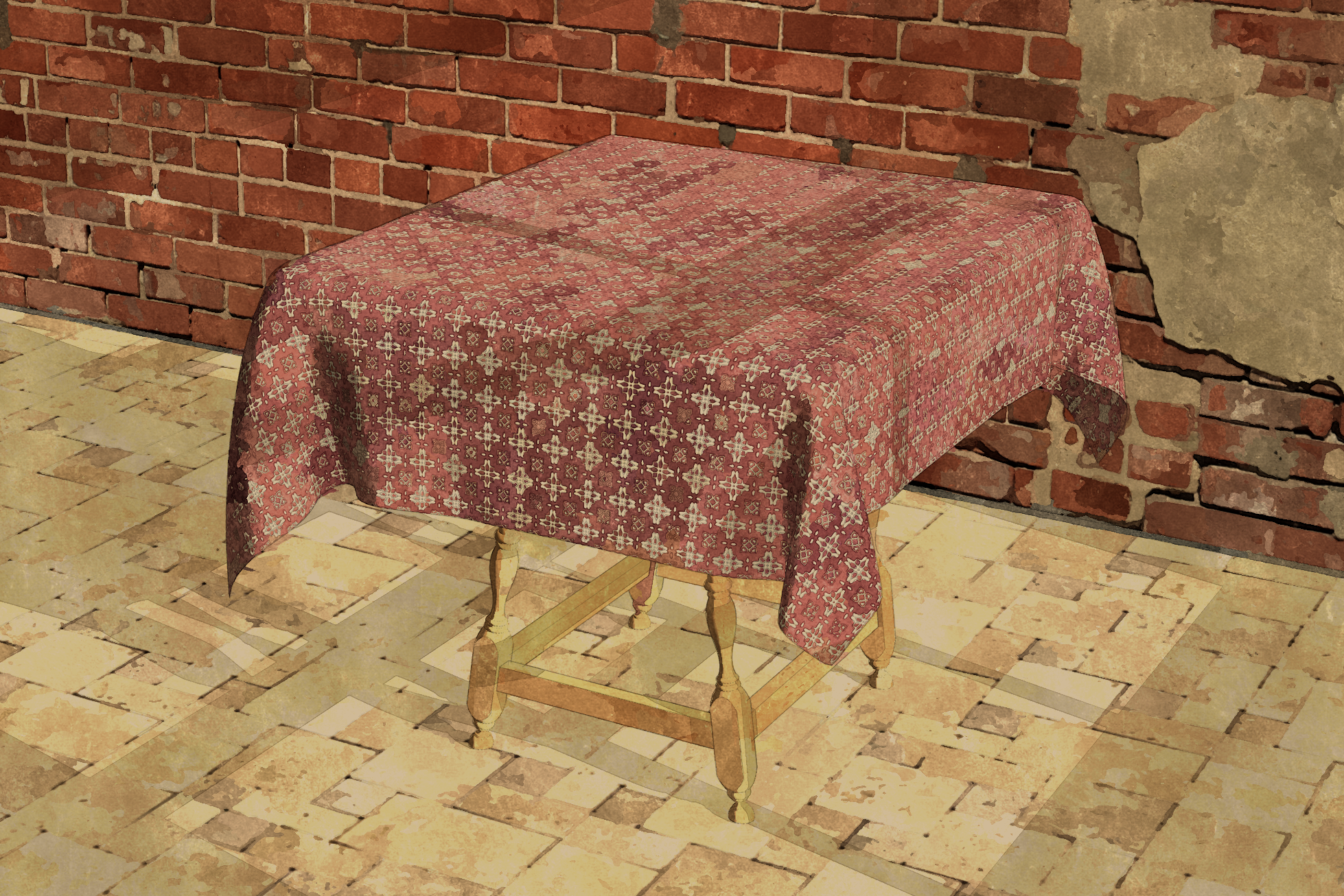
          Tavern Table with cloth2.png

          Etaoin Shrdlu

          %

          (THERE'S NO PLACE LIKE)

          G28 X0.0 Y0.0 Z0.0

          M30

          %

          1 條回覆 最後回覆 回覆 引用 0
          • slodkaS 離線
            slodka
            最後由 編輯

            Hi,Anton.
            I want to reset all my seats,but I can't use PM,so I leave a message here.
            My mail address is slodka@hotmail.com.
            Thanks you.

            1 條回覆 最後回覆 回覆 引用 0
            • A 離線
              Ahmed0007
              最後由 編輯

              Complete Guide
              https://www.youtube.com/watch?v=da7WY3uFQCc

              1 條回覆 最後回覆 回覆 引用 0
              • A 離線
                Ahmed0007
                最後由 編輯

                some problems (please Fix)

                1. license remove everytime after running a CCleaner.
                  2.When i select 2 or more pins the size of gizmo gets too big. (it's depend on distance between pins)
                  3.When i Export skp frame i just get one posotion of flag in all skp(s)
                  Thanks
                1 條回覆 最後回覆 回覆 引用 0
                • A 離線
                  Anton_S
                  最後由 編輯

                  Hello Ahmed,

                  I will address the 2nd and 3rd issues in the next release. Thanks for including the keyword "distance", which stimulated an idea of how to fix it.

                  About the licensing CCleaner issue, I refereed to SketchUcation guys, and they said the circumstances that cause it are unclear at the moment, but it is being looked into.

                  Thanks,

                  Anton

                  1 條回覆 最後回覆 回覆 引用 0
                  • A 離線
                    Anton_S
                    最後由 編輯

                    @slodka said:

                    I want to reset all my seats,but I can't use PM,so I leave a message here.

                    Hi, I reset your seats. Please refer to page 4, Known Issue section in the Licencing Manual, for resetting on your side.

                    Also, consider updating to latest SketchUcationTools v3.1.5, which potentially, addresses the licensing issues on Mac OS X: https://sketchucation.com/pluginstore?pln=SketchUcationTools

                    1 條回覆 最後回覆 回覆 引用 0
                    • A 離線
                      Ahmed0007
                      最後由 編輯

                      Thanks
                      and also Thanks for This Great Plugin.

                      1 條回覆 最後回覆 回覆 引用 0
                      • A 離線
                        Ahmed0007
                        最後由 編輯

                        gizmo also gets big when i select the custom made big pin.

                        1 條回覆 最後回覆 回覆 引用 0
                        • U 離線
                          Unexpectediteminbaggingarea
                          最後由 編輯

                          Hi,

                          I have the latest version, 1.1.1 for Mac but the license still keeps deactivating every time I re-start SketchUp.
                          Is there a fix for this yet?
                          Thank you.

                          1 條回覆 最後回覆 回覆 引用 0
                          • A 離線
                            Anton_S
                            最後由 編輯

                            @unexpectediteminbaggingarea said:

                            Hi,

                            I have the latest version, 1.1.1 for Mac but the license still keeps deactivating every time I re-start SketchUp.
                            Is there a fix for this yet?
                            Thank you.

                            Hello,

                            Are you using the latest SketchUcationTools, version 3.1.5? If not, please upgrade as it could fix the issue.

                            Link Preview Image
                            Plugin Store Download | SketchUcation

                            Extending SketchUp has never been easier with a suite of tools that make installing and disabling plugins and extensions a one click operation.

                            favicon

                            (sketchucation.com)

                            Anton

                            1 條回覆 最後回覆 回覆 引用 0
                            • MALAISEM 離線
                              MALAISE
                              最後由 編輯

                              Awsome effects Cheers Anton. (I bought the license today )

                              Idea: Set viscosity of collider in order to "simulate" drops moving on surface.
                              Very useful for geological deformations explanations.

                              Pierre

                              La Connaissance n'a de valeur que partagée

                              1 條回覆 最後回覆 回覆 引用 0
                              • R 離線
                                rl.amorato
                                最後由 編輯

                                Hi Guys, I was wondering if clothworks would be able to wrap around an object, instead of draping over something. Kinda like the reference image attached. Thanks!


                                Ring-A-Ding_01.jpg

                                1 條回覆 最後回覆 回覆 引用 0
                                • A 離線
                                  Anton_S
                                  最後由 編輯

                                  @rl.amorato said:

                                  Hi Guys, I was wondering if clothworks would be able to wrap around an object, instead of draping over something. Kinda like the reference image attached. Thanks!

                                  I have tried putting something like this together and it seems like it can be done, well, specifically, with a newer version of ClothWorks, which is still under development.

                                  I have attached an image and a link to SKP file listing and displaying the key steps.

                                  Wrapped.png
                                  https://drive.google.com/open?id=1X-39luoZWwYqP9O-j6zSt4GrTtC3YVAZ

                                  Anton

                                  1 條回覆 最後回覆 回覆 引用 0
                                  • R 離線
                                    rl.amorato
                                    最後由 編輯

                                    https://sketchucation.com/forums/images/smilies/1f635.png Nice! Very nice! I'm looking forward to the new release. Thank you so much for this plugin! You're a godsend!

                                    1 條回覆 最後回覆 回覆 引用 0
                                    • T 離線
                                      trenton.gauthier
                                      最後由 編輯

                                      Good morning, this is probably not an issue specific to your plugin but I'm missing the right click / aka context menu which is preventing me from using the newly purchased plugin. I've taken the steps of reinstalling the plugin both through the sketchucation store and manually. I'm using a fresh install of Sketchup Pro 2017 ver. 17.2.2555 64 Bit on Windows 10 Pro ver. 1803 with an i7-6700k and GTX 1080 Ti Hybrid. I've also sent you an email.
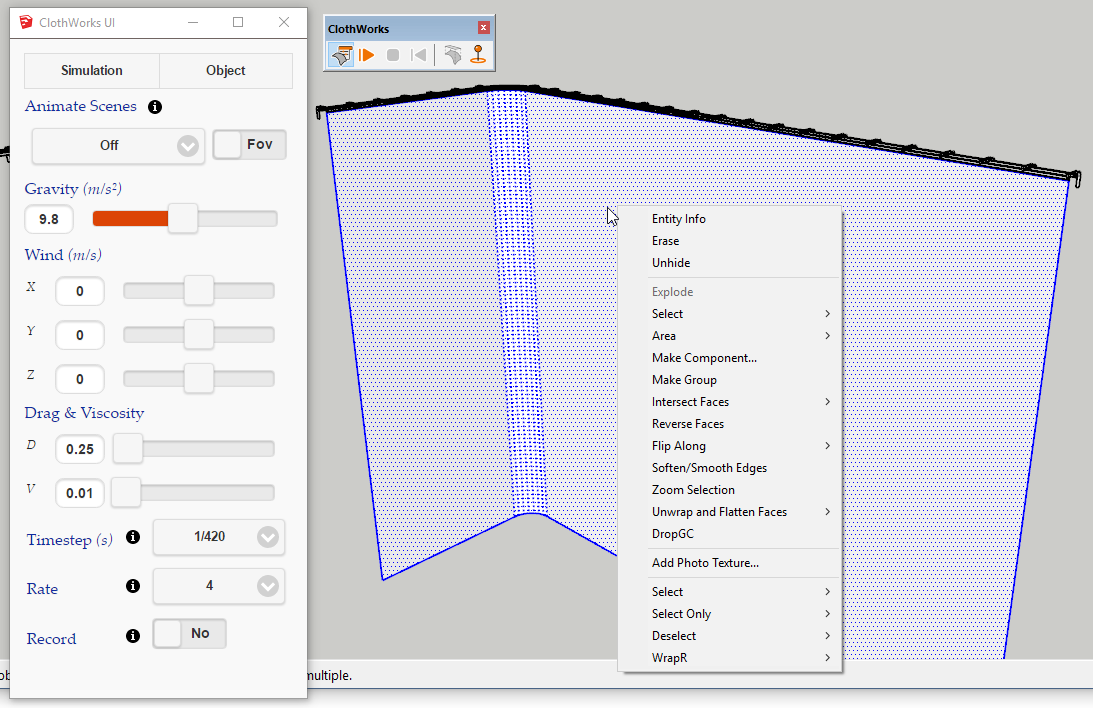
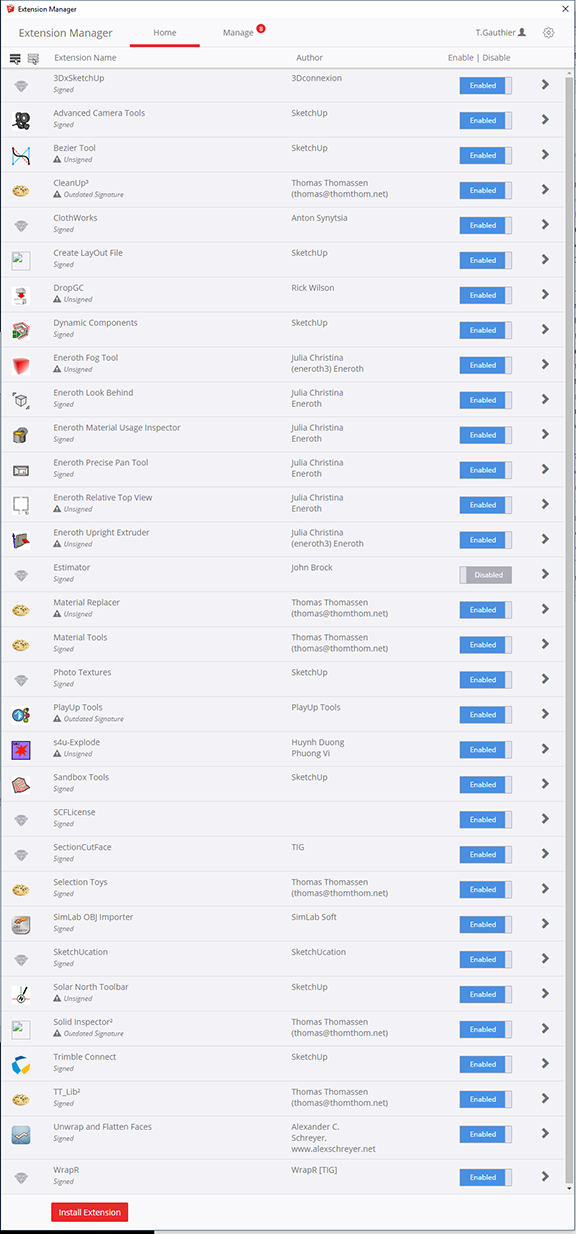
                                      Screenshot


                                      Extensions

                                      1 條回覆 最後回覆 回覆 引用 0
                                      • Dave RD 離線
                                        Dave R
                                        最後由 編輯

                                        @trenton.gauthier said:

                                        ...but I'm missing the right click / aka context menu which is preventing me from using the newly purchased plugin.

                                        The Context menu is just that. The menu items in it depend upon the context you are clicking on. You are right clicking on loose geometry. To get Clothworks to show, you need to right click on a component or group.

                                        When all else fails, read the manual.
                                        Screenshot - 8_3_2018 , 11_11_52 AM.png

                                        Etaoin Shrdlu

                                        %

                                        (THERE'S NO PLACE LIKE)

                                        G28 X0.0 Y0.0 Z0.0

                                        M30

                                        %

                                        1 條回覆 最後回覆 回覆 引用 0
                                        • K 離線
                                          king1997
                                          最後由 編輯

                                          when I click to (Menu) Extensions → ClothWorks → License ...
                                          SFC License dialog box <<<<<< this never show up what to do help i have already paid 😢 😢

                                          1 條回覆 最後回覆 回覆 引用 0
                                          • A 離線
                                            Anton_S
                                            最後由 編輯

                                            @king1997 said:

                                            when I click to (Menu) Extensions → ClothWorks → License ...
                                            SFC License dialog box <<<<<< this never show up what to do help i have already paid 😢 😢

                                            Did you install SketchUcationTools, specifically version 3.1.5? https://sketchucation.com/resources/plugin-store-download


                                            1 條回覆 最後回覆 回覆 引用 0
                                            • 1
                                            • 2
                                            • 7
                                            • 8
                                            • 9
                                            • 10
                                            • 11
                                            • 34
                                            • 35
                                            • 9 / 35
                                            • 第一個貼文
                                              最後的貼文
                                            Buy SketchPlus
                                            Buy SUbD
                                            Buy WrapR
                                            Buy eBook
                                            Buy Modelur
                                            Buy Vertex Tools
                                            Buy SketchCuisine
                                            Buy FormFonts

                                            Advertisement