sketchucation logo sketchucation
    • Login
    Oops, your profile's looking a bit empty! To help us tailor your experience, please fill in key details like your SketchUp version, skill level, operating system, and more. Update and save your info on your profile page today!
    ⚠️ Update | Sketchucation Tools 5.0.8 released with licensing improvements and bugfixes Download

    [Plugin] ClothWorks v1.8.0 - 28 Apr 2024

    Scheduled Pinned Locked Moved Plugins
    716 Posts 167 Posters 883.4k Views 166 Watching
    Loading More Posts
    • Oldest to Newest
    • Newest to Oldest
    • Most Votes
    Reply
    • Reply as topic
    Log in to reply
    This topic has been deleted. Only users with topic management privileges can see it.
    • G
      GadgetB
      last edited by

      I worked out that you only get the context menu on first-level grouping; it doesn't like groups within groups.

      1 Reply Last reply
      Reply Quote 0
      • S
        stuff4oleg
        last edited by

        I've just noticed that ClothWorks doesn't work inside Groups: you just can't see it's context menu.
        I.e. if you have empty scene with your cloth geometry inside the group and this group is on top level inside the Outliner, then you can right-click, make it Cloth (or collider) and so on, like it is shown in all those Youtube videos.

        But as soon as you put your "Cloth" group inside another group or component, get in this grouping group, you can no longer see context menu.

        This is very restrictive, most scenes are very complex and have complex hierarchies.

        1 Reply Last reply
        Reply Quote 0
        • R
          rogalxxx
          last edited by

          any Black Friday deals on clothworks?

          1 Reply Last reply
          Reply Quote 0
          • A
            Anton_S
            last edited by

            @rogalxxx Good idea. There is a high chance for a cyber Monday deal!

            1 Reply Last reply
            Reply Quote 0
            • J
              Julian_Collinge
              last edited by

              @gadgetb said:

              I worked out that you only get the context menu on first-level grouping; it doesn't like groups within groups.

              Brilliant - this was the issue I had after spending much time installing, uninstalling, reinstalling.

              FIRST LEVEL GROUPS ONLY!

              1 Reply Last reply
              Reply Quote 0
              • A
                Anton_S
                last edited by

                Announcing version 1.5!

                Features include reworked physics, redesigned UI, adaptive remeshing, as well as, quadrilateral, equilateral, and adaptive grids.

                At the moment, I have only made one tutorial featuring Adaptive Remeshing. A tutorial about equilateral and adaptive grids will follow in the future. As for a small intro, adaptive grids are useful for simulating tents and complex cloth structures. Adaptive grid replaces the original Smart Grid and goes much further, allowing for applying grids to 3d shapes. As regards to quadrilateral and equilateral grids, the structure of quadrilateral grid is imbalanced and makes hanging cloth stretch unequally at cross-diagonal directions. Equilateral grid is a useful alternative for simulating curtains or any other hanging cloth. Unlike equilateral grid, quadrilateral grid is compatible with quad modelling.

                A detailed list of changes can be viewed at ClothWorks PluginStore page: https://sketchucation.com/plugin/2053-clothworks

                And and here is the Adaptive Remeshing tutorial:

                Have a great 2018!

                -- Anton

                1 Reply Last reply
                Reply Quote 0
                • PixeroP
                  Pixero
                  last edited by

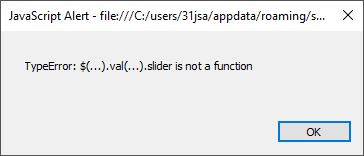
                  After installing the latest version I get this:
                  screen.JPG

                  1 Reply Last reply
                  Reply Quote 0
                  • A
                    Anton_S
                    last edited by

                    @pixero said:

                    After installing the latest version I get this:
                    [attachment=0:28c1uhfa]<!-- ia0 -->screen.JPG<!-- ia0 -->[/attachment:28c1uhfa]

                    Can you try a fresh install by deleting ClothWorks from plugins forlder and than installing?

                    1 Reply Last reply
                    Reply Quote 0
                    • PixeroP
                      Pixero
                      last edited by

                      Doing a fresh install seem to have fixed the issue. Thanks.

                      1 Reply Last reply
                      Reply Quote 0
                      • HornOxxH
                        HornOxx
                        last edited by

                        Hello All
                        about 2 weeks ago my old faithful notebook broke down and all attempts to reanimate it failed. Now, finally I sit in front of a new machine and try to reconstruct my entire so far "SkUp world" 😉 .

                        One component of this world has been Clothworks from which I cannot reconstruct any informations. I can't even figure out how or where I bought the license or how this purchase would work now.

                        If someone helps me here I might be able to reconstruct the purchase via PayPal at least, hopefully!
                        I'd be happy if someone could give me some guidance 😄

                        never trust a skinny cook

                        1 Reply Last reply
                        Reply Quote 0
                        • A
                          Anton_S
                          last edited by

                          @HornOxx I sent you a private message regarding this.

                          1 Reply Last reply
                          Reply Quote 0
                          • A
                            Ahmed0007
                            last edited by

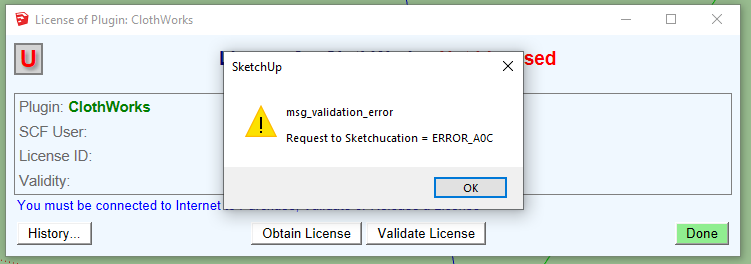
                            unable to active the plugin in sketchup 2018
                            getting this error
                            please help.

                            Capture.PNG

                            1 Reply Last reply
                            Reply Quote 0
                            • Dave RD
                              Dave R
                              last edited by

                              Do you have the latest version of the SCF Extension Store installed?

                              Etaoin Shrdlu

                              %

                              (THERE'S NO PLACE LIKE)

                              G28 X0.0 Y0.0 Z0.0

                              M30

                              %

                              1 Reply Last reply
                              Reply Quote 0
                              • A
                                Ahmed0007
                                last edited by

                                @dave r said:

                                Do you have the latest version of the SCF Extension Store installed?

                                yes.
                                ExtensionStore v3.1.6
                                ClothWorks v1.5.2

                                1 Reply Last reply
                                Reply Quote 0
                                • A
                                  Anton_S
                                  last edited by

                                  Ahmed0007,

                                  This error could be showing up due to the seats being filled up. I reset your license from the server side. Please refer to Licensing Manual, Known Issue section, starting from #2 to reset your license from your side.

                                  We apologize for the inconvenience!

                                  Anton

                                  1 Reply Last reply
                                  Reply Quote 0
                                  • A
                                    Ahmed0007
                                    last edited by

                                    @anton_s said:

                                    Ahmed0007,

                                    This error could be showing up due to the seats being filled up. I reset your license from the server side. Please refer to Licensing Manual, Known Issue section, starting from #2 to reset your license from your side.

                                    We apologize for the inconvenience!

                                    Anton

                                    problem solved now
                                    Thank you so much. 👍

                                    1 Reply Last reply
                                    Reply Quote 0
                                    • W
                                      wordsongoku
                                      last edited by

                                      Hi,

                                      I was wondering if license files are sent manually? I bought a copy like 2 hours ago and only got a paypal confirmation mail but no mail containing my license file. Should I wait a little longer or is it nescessary to contact support?

                                      Best

                                      1 Reply Last reply
                                      Reply Quote 0
                                      • G
                                        Gábor
                                        last edited by

                                        @wordsongoku said:

                                        I was wondering if license files are sent manually?

                                        License files are sent automatically at time of purchase. Sometimes some over sensitive spam filters put the mail into the Spam / Junk folder. So please first check your spam folder and if you can not find it there contact Anton_S (the author) or me for a copy of your license.

                                        1 Reply Last reply
                                        Reply Quote 0
                                        • W
                                          wordsongoku
                                          last edited by

                                          @gábor said:

                                          License files are sent automatically at time of purchase. Sometimes some over sensitive spam filters put the mail into the Spam / Junk folder. So please first check your spam folder and if you can not find it there contact Anton_S (the author) or me for a copy of your license.

                                          Hi,

                                          I already checked my junk folder but I didn't receive anything since purchasing the license. Since it seems I can't send you private messages on this board I fired a mail to the support address.

                                          1 Reply Last reply
                                          Reply Quote 0
                                          • A
                                            Anton_S
                                            last edited by

                                            @wordsongoku We sent you an email with your license file attached.

                                            1 Reply Last reply
                                            Reply Quote 0

                                            Hello! It looks like you're interested in this conversation, but you don't have an account yet.

                                            Getting fed up of having to scroll through the same posts each visit? When you register for an account, you'll always come back to exactly where you were before, and choose to be notified of new replies (either via email, or push notification). You'll also be able to save bookmarks and upvote posts to show your appreciation to other community members.

                                            With your input, this post could be even better 💗

                                            Register Login
                                            • 1
                                            • 2
                                            • 15
                                            • 16
                                            • 17
                                            • 18
                                            • 19
                                            • 35
                                            • 36
                                            • 17 / 36
                                            • First post
                                              Last post
                                            Buy SketchPlus
                                            Buy SUbD
                                            Buy WrapR
                                            Buy eBook
                                            Buy Modelur
                                            Buy Vertex Tools
                                            Buy SketchCuisine
                                            Buy FormFonts

                                            Advertisement

