sketchucation logo sketchucation
    • 登入
    Oops, your profile's looking a bit empty! To help us tailor your experience, please fill in key details like your SketchUp version, skill level, operating system, and more. Update and save your info on your profile page today!
    🔌 Smart Spline | Fluid way to handle splines for furniture design and complex structures. Download

    Sending To Layout

    已排程 已置頂 已鎖定 已移動 LayOut Discussions
    layout
    28 貼文 4 Posters 8.4k 瀏覽 4 Watching
    正在載入更多貼文
    • 從舊到新
    • 從新到舊
    • 最多點贊
    回覆
    • 在新貼文中回覆
    登入後回覆
    此主題已被刪除。只有擁有主題管理權限的使用者可以查看。
    • Joe WoodJ 離線
      Joe Wood
      最後由 編輯

      I'm trying to learn layout fast! Need to get some dwgs created!

      I've been reading up on it some but I can't understand the online videos because of my hearing ..

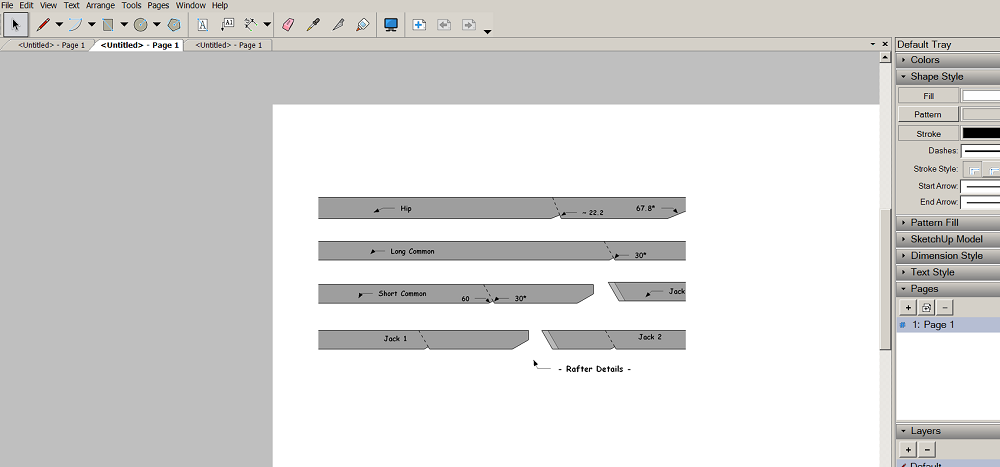
      I have my Scene all set up and changed all the Rafters from 3d to 2d so the bevel cuts don't interfere with measuring, put Units at Architectural to a 1/16, and hid all the Dimensions
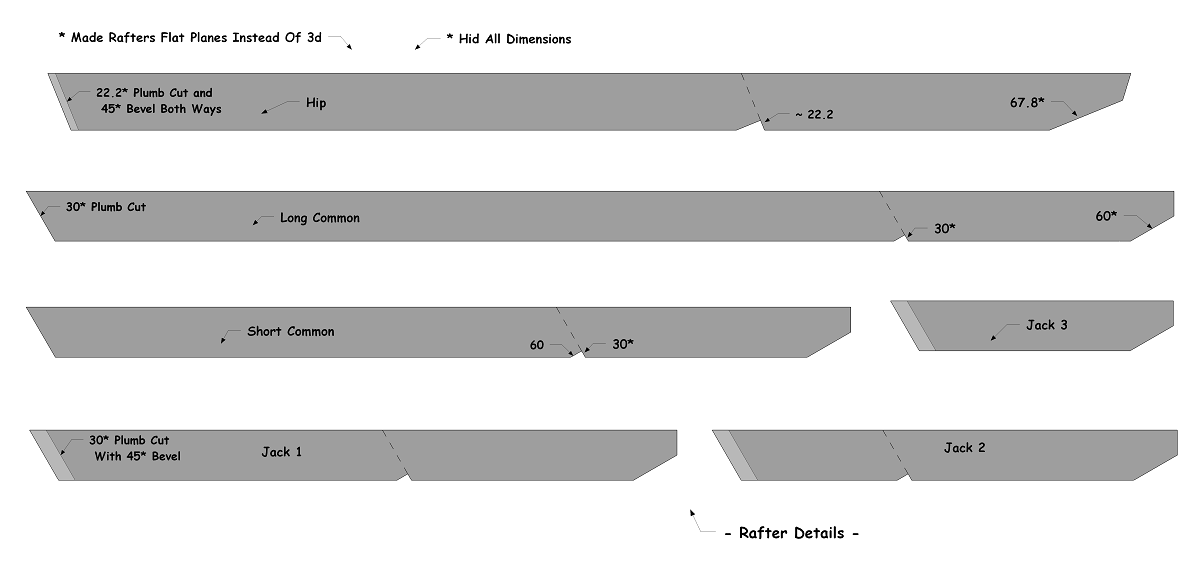
      1.png

      In Layout I go to My Templates and choose Blank. I see the Scene there but it's only a part of the whole Scene. I see where to change the paper size but not the Scene's size? So how do I get that full sized on the paper?
      2.png

      Joe Wood
      woodsshop.com/

      1 條回覆 最後回覆 回覆 引用 0
      • Dave RD 離線
        Dave R
        最後由 編輯

        Select the viewport with a single click and drag the edges. Hold Alt while dragging to resize about the center. You can set the desired scale in the SketchUp Model inspector window in the tray on the right side of the screen. You might want to do that before dragging the edges of the viewport. Make sure you have selected the scene you created in SU, too.

        Etaoin Shrdlu

        %

        (THERE'S NO PLACE LIKE)

        G28 X0.0 Y0.0 Z0.0

        M30

        %

        1 條回覆 最後回覆 回覆 引用 0
        • Joe WoodJ 離線
          Joe Wood
          最後由 編輯

          Yeah that works Dave!

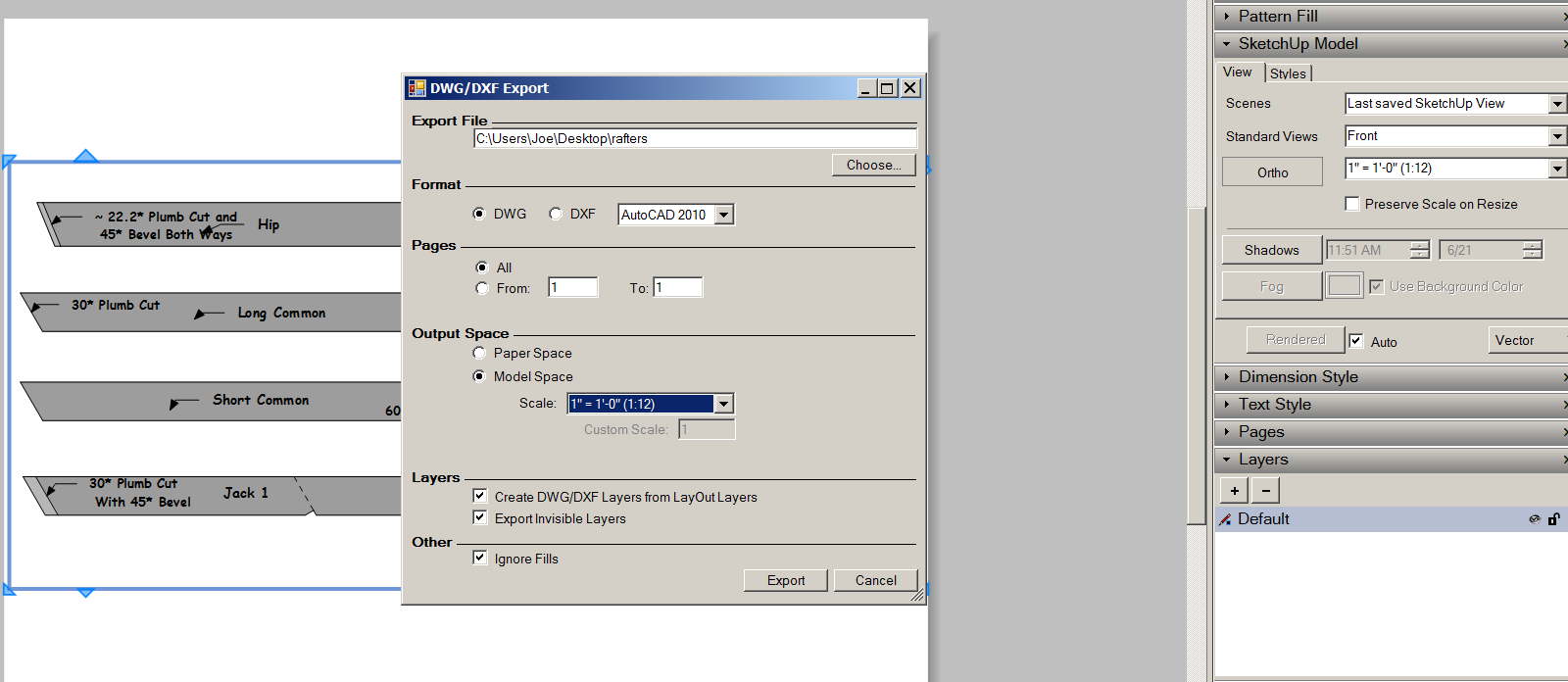
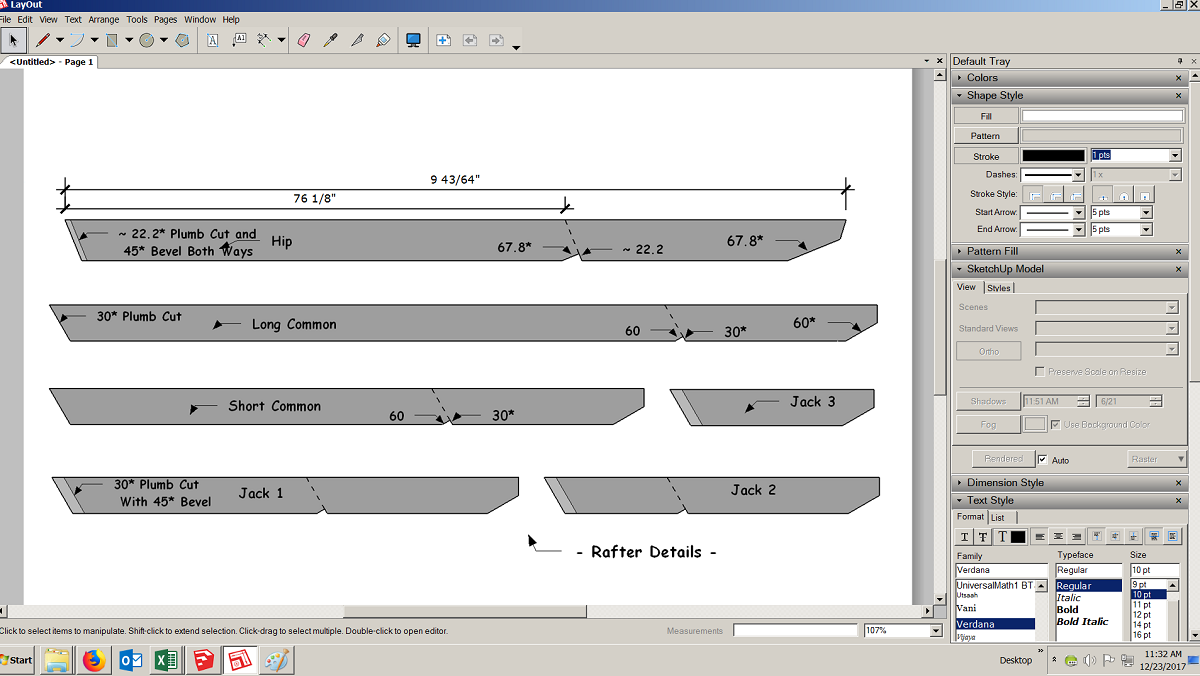
          about the scale- I need to export this Scene as a full sized dwg, but when I select 'Full Sized' scale, the Scene disappears. Right now the scale is 1:12.2959 and the Scene is in the Viewport, what scale should I use?

          Do the units in LO need to be set to cm if that's how my client will be measuring? I just changed that but the on screen dimensions are still in Imperial?
          3.png

          Joe Wood
          woodsshop.com/

          1 條回覆 最後回覆 回覆 引用 0
          • pbacotP 離線
            pbacot
            最後由 編輯

            @joe wood said:

            Yeah that works Dave!

            about the scale- I need to export this Scene as a full sized dwg, but when I select 'Full Sized' scale, the Scene disappears. Right now the scale is 1:12.2959 and the Scene is in the Viewport, what scale should I use?

            Do the units in LO need to be set to cm if that's how my client will be measuring? I just changed that but the on screen dimensions are still in Imperial?

            [attachment=1:36347go3]<!-- ia1 -->3.png<!-- ia1 -->[/attachment:36347go3]

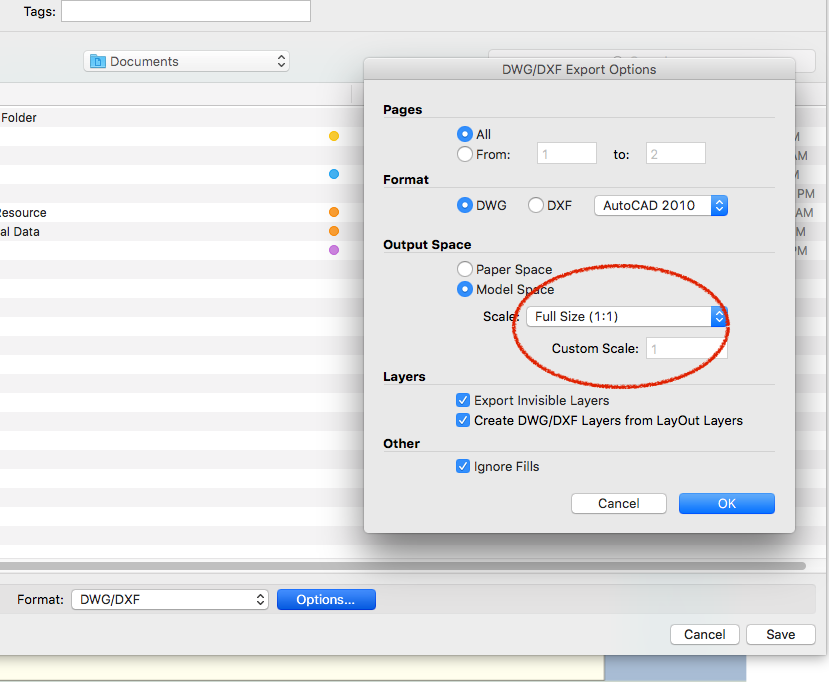
            Not sure what you are doing to get that result, Joe. But maybe this will help a little. Did you look at the option under Export --DWG/DXF? See attached screen shot

            As for the scale of the viewport, I'd look for the standard metric scale that would work for the paper size. Admittedly this choice will be moot for the dwg where it is created 1:1 but it seems like a good practice. IDK what the appropriate metric scale would be in common practice. Layout itself is a "paper space" document, that is all the drawings have a scale. It may be an undefined scale, or the scale of the drawing changes with the size of the viewport, or a perspective, but it is never really 1:1 "model space" as in SketchUP. Still you can export a dwg which IS 1:1.

            Screen Shot 2017-12-23 at 1.53.30 PM.png

            MacOSX MojaveSketchUp Pro v19 Twilight v2 Thea v3 PowerCADD

            1 條回覆 最後回覆 回覆 引用 0
            • Joe WoodJ 離線
              Joe Wood
              最後由 編輯

              No PB, I'm having a problem exporting a dwg at the correct scale or something
              http://sketchucation.com/forums/viewtopic.php?f=15&t=68904

              that's why I'm trying Layout for the first time, to see if I can export a dwg my client can read accurately.

              I have this Rafter Details Scene as well as some Elevations, top view Etc Scenes I need to create dwgs for hopefully in Layout.

              Joe Wood
              woodsshop.com/

              1 條回覆 最後回覆 回覆 引用 0
              • pbacotP 離線
                pbacot
                最後由 編輯

                I was just responding to your last post.

                1. export 1:1 to DWG
                2. What scale should the viewport be.

                but it seems my third response didn't get posted.
                3. How can the dimensions display in LO as cm.

                If created in SU they need to be set to cm in SU.
                If dims are created in LO select the dimensions and change in the "Dimension" window to "cm".

                MacOSX MojaveSketchUp Pro v19 Twilight v2 Thea v3 PowerCADD

                1 條回覆 最後回覆 回覆 引用 0
                • Joe WoodJ 離線
                  Joe Wood
                  最後由 編輯

                  yeah in SUp it was set to cm, I'm just trying to get an accurate dwg my customer can measure in CM.

                  in the SUp Scene I sent to LO, I hid the dimensions, planning to re dimension in LO.

                  I guess I need to know what scale to set in LO to end up with a full scale dwg, but I'm really getting confused now.

                  Joe Wood
                  woodsshop.com/

                  1 條回覆 最後回覆 回覆 引用 0
                  • pbacotP 離線
                    pbacot
                    最後由 編輯

                    Try this: Set the scale in the viewport to something reasonable for paper 1:10. Export to "Model Space"dwg, using the export "Options" window. Under Model space set the scale to 1:10. I can check the dwg on my end if you want.

                    MacOSX MojaveSketchUp Pro v19 Twilight v2 Thea v3 PowerCADD

                    1 條回覆 最後回覆 回覆 引用 0
                    • Joe WoodJ 離線
                      Joe Wood
                      最後由 編輯

                      OK set it to 1" = 10'

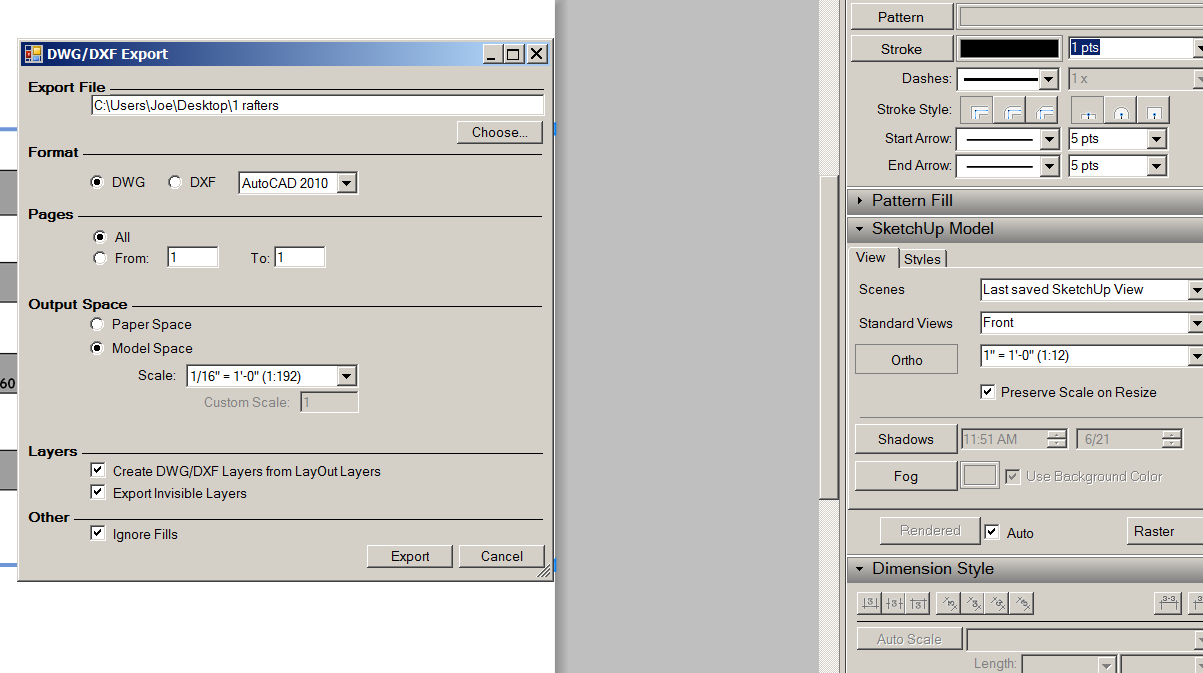
                      1-export.png

                      here are the Export Options, how does this dwg look??

                      EDIT Darn the dwg file is empty ..


                      1 rafters.dwg

                      Joe Wood
                      woodsshop.com/

                      1 條回覆 最後回覆 回覆 引用 0
                      • pbacotP 離線
                        pbacot
                        最後由 編輯

                        You should try setting the viewport to "Vector" instead of Raster in the "SketchUp Model" window of LO. Only Vector or Hybrid settings actually contain the vector information that LO uses to create the dwg.

                        MacOSX MojaveSketchUp Pro v19 Twilight v2 Thea v3 PowerCADD

                        1 條回覆 最後回覆 回覆 引用 0
                        • Joe WoodJ 離線
                          Joe Wood
                          最後由 編輯

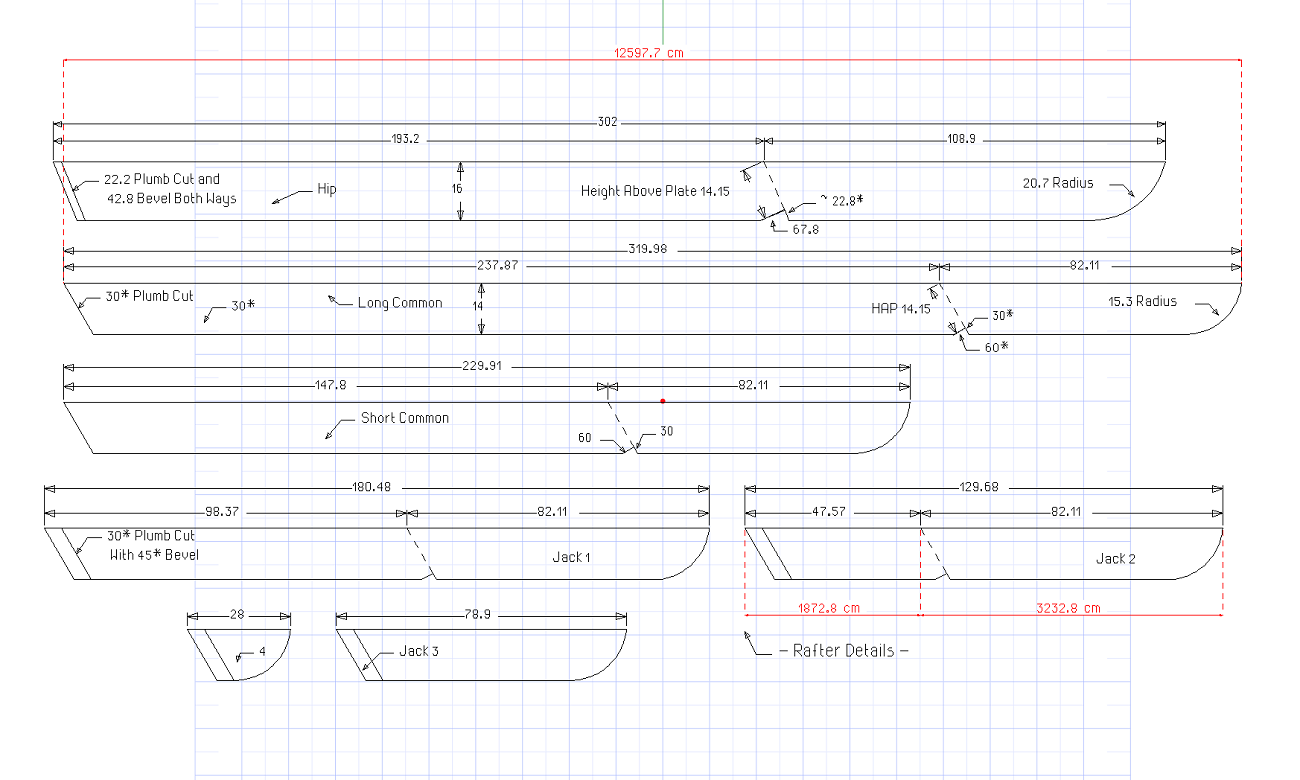
                          OK this one measures correctly, but then the other one did too but gave my client the wrong dimensions. I appreciate you working with me on this PB, esp on Xmas weekend 🙂


                          1 rafter details.png


                          2rafters.dwg

                          Joe Wood
                          woodsshop.com/

                          1 條回覆 最後回覆 回覆 引用 0
                          • pbacotP 離線
                            pbacot
                            最後由 編輯

                            The last one definitely comes in to scale when I open the dwg. Except the top rafter is off slightly--and I remember it being exact on an earlier translation. I get 301.93. So it looks like you found the scaling process that works!

                            MacOSX MojaveSketchUp Pro v19 Twilight v2 Thea v3 PowerCADD

                            1 條回覆 最後回覆 回覆 引用 0
                            • C 離線
                              Charlie__V
                              最後由 編輯

                              @pbacot said:

                              The last one definitely comes in to scale when I open the dwg. Except the top rafter is off slightly--and I remember it being exact on an earlier translation. I get 301.93. So it looks like you found the scaling process that works!

                              I saw in Joe’s image above the SKP viewport in LO is set to 1” = 1’-0”(1:12)
                              Though on export the scale for Model space was set to 1/16” = 1’ (1:192)

                              Perhaps this accounts for the remaining discrepancy?

                              Charlie

                              Precision M1710/Win 7 Pro 64 bit/i-7 6920 Quad core 2.9 Ghz -3.8/16Gb ram/NVIDIA M5000M 8Gb

                              1 條回覆 最後回覆 回覆 引用 0
                              • Joe WoodJ 離線
                                Joe Wood
                                最後由 編輯

                                Yeah I corrected that top rafter just a tiny bit, thanks again for hanging with me thru this!

                                I probably need to match the two scales up though?

                                'I saw in Joe’s image above the SKP viewport in LO is set to 1” = 1’-0”(1:12)
                                Though on export the scale for Model space was set to 1/16” = 1’ (1:192)'

                                can someone tell me how to put the units at cm so I can add dimensions? I go to File > Document Setup and change it there but it doesn't stick?

                                Joe Wood
                                woodsshop.com/

                                1 條回覆 最後回覆 回覆 引用 0
                                • Joe WoodJ 離線
                                  Joe Wood
                                  最後由 編輯

                                  OK matched the two scale up 🙂

                                  1 Untitled.png

                                  but how to change the dimension units??


                                  rafters.dwg

                                  Joe Wood
                                  woodsshop.com/

                                  1 條回覆 最後回覆 回覆 引用 0
                                  • C 離線
                                    Charlie__V
                                    最後由 編輯

                                    @joe wood said:

                                    OK matched the two scale up 😄

                                    [attachment=2:2rsqbge2]<!-- ia2 -->1 Untitled.png<!-- ia2 -->[/attachment:2rsqbge2]

                                    but how to change the dimension units??

                                    Joe,
                                    It might be easier for all of us to help if you posted a simple file like in the image attached.(simple rectangle with imperial and metric dims)

                                    Once the exporting to scale of a single entity is sorted out, you should be able to follow the same procedure with the project you are working on now.

                                    Merely a suggestion.

                                    As to setting/changing the dimension units, I'm not sure you need to change the units for the file, just the settings in the "Tray". Just make sure you have the dimension tool selected to do so.

                                    Charlie


                                    ![Dimension "setting" in LO](/uploads/imported_attachments/w4Fo_LO_Dimension_setting.PNG "Dimension "setting" in LO")

                                    Precision M1710/Win 7 Pro 64 bit/i-7 6920 Quad core 2.9 Ghz -3.8/16Gb ram/NVIDIA M5000M 8Gb

                                    1 條回覆 最後回覆 回覆 引用 0
                                    • Joe WoodJ 離線
                                      Joe Wood
                                      最後由 編輯

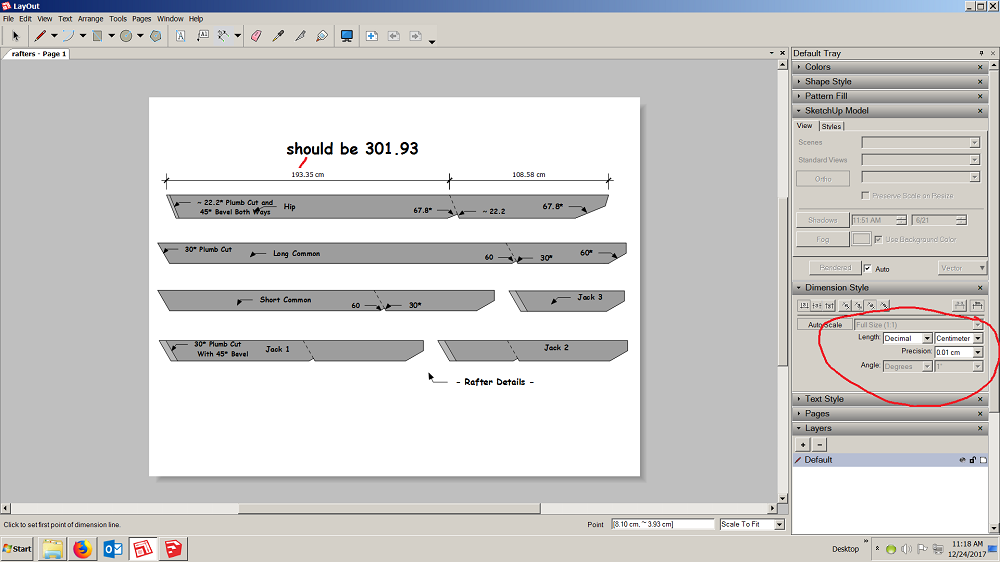
                                      OK found the dimensions in the tray, but when I changed it to cm, all the dimensions are wrong? The SUp model was set to the same cm scale.
                                      9 Untitled.png

                                      here's the skp file!


                                      France 2b.skp

                                      Joe Wood
                                      woodsshop.com/

                                      1 條回覆 最後回覆 回覆 引用 0
                                      • C 離線
                                        Charlie__V
                                        最後由 編輯

                                        @joe wood said:

                                        OK found the dimensions in the tray, but when I changed it to cm, all the dimensions are wrong? The SUp model was set to the same cm scale.

                                        [attachment=5:3e349nvu]<!-- ia5 -->9 Untitled.png<!-- ia5 -->[/attachment:3e349nvu]

                                        here's the skp file!

                                        Joe,
                                        I get 301.93cm for the over all rafter length in both Sketchup Model and Layout file.
                                        please see attached. [attachment=1:3e349nvu]<!-- ia1 -->France 2b_LO_V15.layout<!-- ia1 -->[/attachment:3e349nvu]

                                        PS....in my above simple example the SU model units are in fractional inches and LO model viewport scale @ 1" = 1'-0" [1:12]........I used LO dimensions to illustrate you could leave your native model set to imperial, yet still document & dimension an imperial model to metric (cm/other) in LO. (Rt. click LO viewport..open w/Sketchup to view SU model)
                                        [attachment=0:3e349nvu]<!-- ia0 -->Scale_Test_SUImperial_to_LOMetric_V15.layout<!-- ia0 -->[/attachment:3e349nvu]

                                        Charlie


                                        France 2b_LO_V15.layout


                                        Scale_Test_SUImperial_to_LOMetric_V15.layout

                                        Precision M1710/Win 7 Pro 64 bit/i-7 6920 Quad core 2.9 Ghz -3.8/16Gb ram/NVIDIA M5000M 8Gb

                                        1 條回覆 最後回覆 回覆 引用 0
                                        • Joe WoodJ 離線
                                          Joe Wood
                                          最後由 編輯

                                          I'm not completely getting all of this but seems like I'm close 🙂

                                          but why are these dimensions off?


                                          1 rafters.layout

                                          Joe Wood
                                          woodsshop.com/

                                          1 條回覆 最後回覆 回覆 引用 0
                                          • C 離線
                                            Charlie__V
                                            最後由 編輯

                                            @joe wood said:

                                            I'm not completely getting all of this but seems like I'm close 😄

                                            but why are these dimensions off?

                                            Joe,
                                            Maybe I am not following still?

                                            In the attached model I have set the LO file to imperial and set all viewports to 1"=1'-0" (1:12)(regardless of SU model units)
                                            So, your original SU model in LO appears fist.

                                            I extracted one rafter and dimensioned it in SU after setting model units in SU to Metric.

                                            I then saved this same model and changed the SU model units to Imperial.

                                            Inserted both of these models below your original model in LO

                                            You can now see a representation of both Metric and Imperial (both dimensioned in SU) within the attached LO file. 1 rafters_Imp_Metric_LOFile_Units_Imp_V15.layout

                                            Note: always make sure "preserve scale on resize" box is ticked in the SU model palate.

                                            Hope this all makes sense.

                                            Charlie

                                            Precision M1710/Win 7 Pro 64 bit/i-7 6920 Quad core 2.9 Ghz -3.8/16Gb ram/NVIDIA M5000M 8Gb

                                            1 條回覆 最後回覆 回覆 引用 0
                                            • 1
                                            • 2
                                            • 1 / 2
                                            • 第一個貼文
                                              最後的貼文
                                            Buy SketchPlus
                                            Buy SUbD
                                            Buy WrapR
                                            Buy eBook
                                            Buy Modelur
                                            Buy Vertex Tools
                                            Buy SketchCuisine
                                            Buy FormFonts

                                            Advertisement