sketchucation logo sketchucation
    • Login
    Oops, your profile's looking a bit empty! To help us tailor your experience, please fill in key details like your SketchUp version, skill level, operating system, and more. Update and save your info on your profile page today!
    Mac User? | Join the Rayscaper Beta for Mac Learn More

    JointPushPull 4.0g - Call to kind users for Evaluation

    Scheduled Pinned Locked Moved Plugins
    14 Posts 11 Posters 4.0k Views 11 Watching
    Loading More Posts
    • Oldest to Newest
    • Newest to Oldest
    • Most Votes
    Reply
    • Reply as topic
    Log in to reply
    This topic has been deleted. Only users with topic management privileges can see it.
    • fredo6F
      fredo6
      last edited by fredo6

      I slightly re-engineered JointPushPull around 2 areas:

      1. The Selection Process, which is now based on a single-click method, that is, Hover face - Click - Drag, and you are done (i.e. no more green and red faces!)
      2. The Button palette, which is redesigned to be clearer, and has now a simple and an extended mode. There is also a new tool, called Thickener, which is simply a no-frill JointPushPull with NO button palette and fewer options.

      At this stage, the new JPP 4.0 is packaged as a separate extension with name JointPushPull4. So it can coexist with the current version JPP3.

      JointPushPull v4.1 is now released.
      Please see here for download

      Note that you need to install LibFredo6 7.8a, which is now on the PluginStore.

      I'll be grateful to some kind users to have a look and give some feedback or report problems.

      As many users don't take the time to read documentation or even watch videos when installing extensions, I deliver it here 'naked'. I will however publish soon a small video tutorial on the basic operations, in particular the new selection process.

      Thanks for your cooperation

      Fredo

      EDIT: Here is the video

      1 Reply Last reply
      Reply Quote 0
      • PixeroP
        Pixero
        last edited by

        Looks great!

        1 Reply Last reply
        Reply Quote 0
        • srxS
          srx
          last edited by

          Just what it needs! Intuitive SU like interface. Thank you very much. ๐Ÿ‘

          www.saurus.rs

          1 Reply Last reply
          Reply Quote 0
          • JQLJ
            JQL
            last edited by

            The click+click operation is great!

            www.casca.pt
            Visit us on facebook!

            1 Reply Last reply
            Reply Quote 0
            • filibisF
              filibis
              last edited by

              Great to see already polished tool is getting even more update!
              I give it a try and everything works flawlessly!

              1 Reply Last reply
              Reply Quote 0
              • fredo6F
                fredo6
                last edited by

                Just published an update, as v4.0g - 11 Oct 17

                • fixing a few bugs
                • introducing a transparency factor for wireframe faces (based on a bright suggestion by JQL).
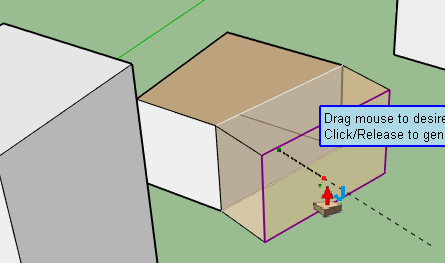
                JPP4 Transparency.png

                Here is a short video on the transparency factor.

                JPP4 Transparency.mov

                I updated the main post with v4.0g.

                Fredo

                1 Reply Last reply
                Reply Quote 0
                • Bob JamesB
                  Bob James
                  last edited by

                  Outstanding! Much easier to use. Thank you!

                  i7-4930K 3.4Ghz, 2x GTX780 6GB, 32GB DDR3-1600 ECC, OCZ Vertex 4 500GB, WD Black 3TB, 32TB NAS, 4x 27" Monitors, SpaceMouse Pro, X-keys XK-60

                  1 Reply Last reply
                  Reply Quote 0
                  • C
                    cuttingedge
                    last edited by

                    even made more powerful!! Thanks Fredo!

                    1 Reply Last reply
                    Reply Quote 0
                    • pilouP
                      pilou
                      last edited by

                      Excellent! ๐Ÿ˜Ž โ˜€

                      Frenchy Pilou
                      Is beautiful that please without concept!
                      My Little site :)

                      1 Reply Last reply
                      Reply Quote 0
                      • cottyC
                        cotty
                        last edited by

                        I've watched the basics video and enjoyed it!

                        my SketchUp gallery

                        1 Reply Last reply
                        Reply Quote 0
                        • pbacotP
                          pbacot
                          last edited by

                          I watched the video and it looks excellent!

                          MacOSX MojaveSketchUp Pro v19 Twilight v2 Thea v3 PowerCADD

                          1 Reply Last reply
                          Reply Quote 0
                          • panixiaP
                            panixia
                            last edited by

                            Thank Fredo for your precious work. I tested JPP4 a little bit and the interface seems to be a big improvement.

                            It also looks like in this relase, the text is always black, not "default line color dependant" as previous versions were. I tend to work with my custom sketchup style, wich uses white as default line color instead of black and having the white text in jpp/curviloft/roundocorner was a bit uncomfortable and hard to read. Now that's perfect!

                            I have a little request, if possible/not too hard: can you add an option to preserve/create quads? Curviloft and Trupaint already support it and can be integrated really well in a quad/sub-d workflow.. Having JPP with same capability would be a dream!

                            1 Reply Last reply
                            Reply Quote 0
                            • fredo6F
                              fredo6
                              last edited by

                              @panixia said:

                              I have a little request, if possible/not too hard: can you add an option to preserve/create quads? Curviloft and Trupaint already support it and can be integrated really well in a quad/sub-d workflow.. Having JPP with same capability would be a dream!

                              I think there is the option, but for Normal PushPull. Not sure it makes sense for the other tools.

                              Fredo

                              1 Reply Last reply
                              Reply Quote 0
                              • panixiaP
                                panixia
                                last edited by

                                @fredo6 said:

                                @panixia said:

                                I have a little request, if possible/not too hard: can you add an option to preserve/create quads? Curviloft and Trupaint already support it and can be integrated really well in a quad/sub-d workflow.. Having JPP with same capability would be a dream!

                                I think there is the option, but for Normal PushPull. Not sure it makes sense for the other tools.

                                Fredo

                                I'll try to put togheter a simple example to show you why i think that could make sense both with NPP and regular JPP.

                                edit: I noticed this tread is about outdated version, so I posted my example here
                                https://sketchucation.com/forums/viewtopic.php?f=323&t=54771&p=626639#p626639

                                1 Reply Last reply
                                Reply Quote 0

                                Hello! It looks like you're interested in this conversation, but you don't have an account yet.

                                Getting fed up of having to scroll through the same posts each visit? When you register for an account, you'll always come back to exactly where you were before, and choose to be notified of new replies (either via email, or push notification). You'll also be able to save bookmarks and upvote posts to show your appreciation to other community members.

                                With your input, this post could be even better ๐Ÿ’—

                                Register Login
                                • 1 / 1
                                • First post
                                  Last post
                                Buy SketchPlus
                                Buy SUbD
                                Buy WrapR
                                Buy eBook
                                Buy Modelur
                                Buy Vertex Tools
                                Buy SketchCuisine
                                Buy FormFonts

                                Advertisement