sketchucation logo sketchucation
    • 登入
    Oops, your profile's looking a bit empty! To help us tailor your experience, please fill in key details like your SketchUp version, skill level, operating system, and more. Update and save your info on your profile page today!
    🔌 Smart Spline | Fluid way to handle splines for furniture design and complex structures. Download

    FlexTools Updates

    已排程 已置頂 已鎖定 已移動 FlexTools
    renderpluginsextensions
    168 貼文 17 Posters 295.2k 瀏覽 17 Watching
    正在載入更多貼文
    • 從舊到新
    • 從新到舊
    • 最多點贊
    回覆
    • 在新貼文中回覆
    登入後回覆
    此主題已被刪除。只有擁有主題管理權限的使用者可以查看。
    • halroachH 離線
      halroach
      最後由 編輯

      Thanks to Justin for the video!

      FlexTools - Super Quick Windows, Doors, Slats...

      1 條回覆 最後回覆 回覆 引用 0
      • halroachH 離線
        halroach
        最後由 編輯

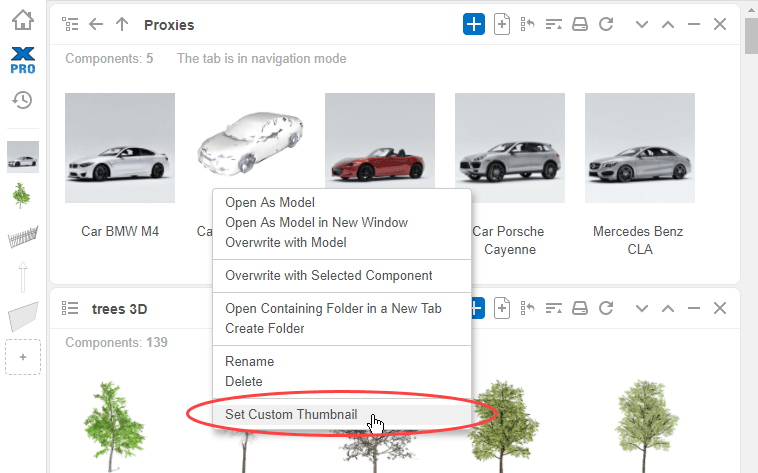
        Have you ever wished you could change default thumbnails with your own, see your rendered images instead of V-ray proxies? You can do that in ComponentFinder now!

        Assign your own thumbnails with custom images:
        Right Click > Set Custom Thumbnail > Choose a JPG or PNG
        ComponentFinder - Set Custom Thumbnails.png

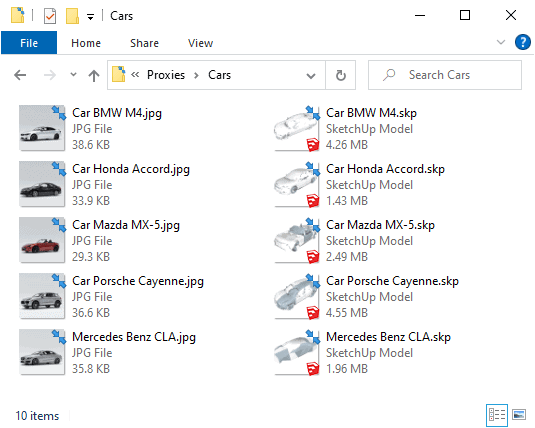
        The thumbnail image you assign will be automatically copied into the folder where the component is stored, and it will be named with the same name.
        View in Windows - Custom thumbnails are saved along side the skp files.png

        Would you find custom thumbnails useful?

        FlexTools - Super Quick Windows, Doors, Slats...

        1 條回覆 最後回覆 回覆 引用 0
        • halroachH 離線
          halroach
          最後由 編輯

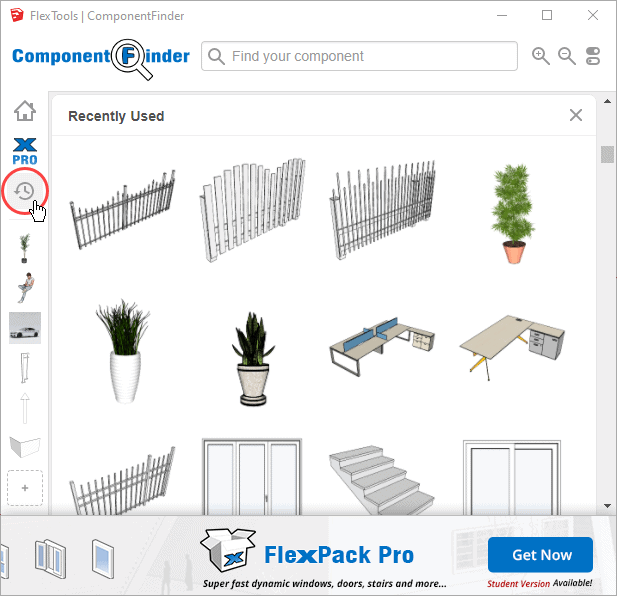
          One more new feature in the latest update is the Recently Used tab.

          You can now reach your recently used components in one click!
          ComponentFinder - Recently Used Tab.png

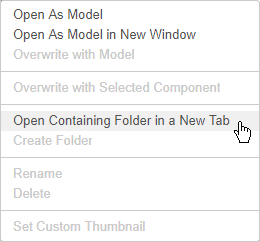
          If you need to find the original folder where a recent component is stored:

          Right Click > ‘Open Containing Folder in a New Tab’
          Open containing folder.png
          Let us know what you think in the comments!

          FlexTools - Super Quick Windows, Doors, Slats...

          1 條回覆 最後回覆 回覆 引用 0
          • halroachH 離線
            halroach
            最後由 編輯

            There are 3 things we can watch forever: fire burning, water falling, and speed modeling with FlexTools. 😄

            Thanks to Moshe Shemesh for sharing the video.

            FlexTools - Super Quick Windows, Doors, Slats...

            1 條回覆 最後回覆 回覆 引用 0
            • halroachH 離線
              halroach
              最後由 編輯

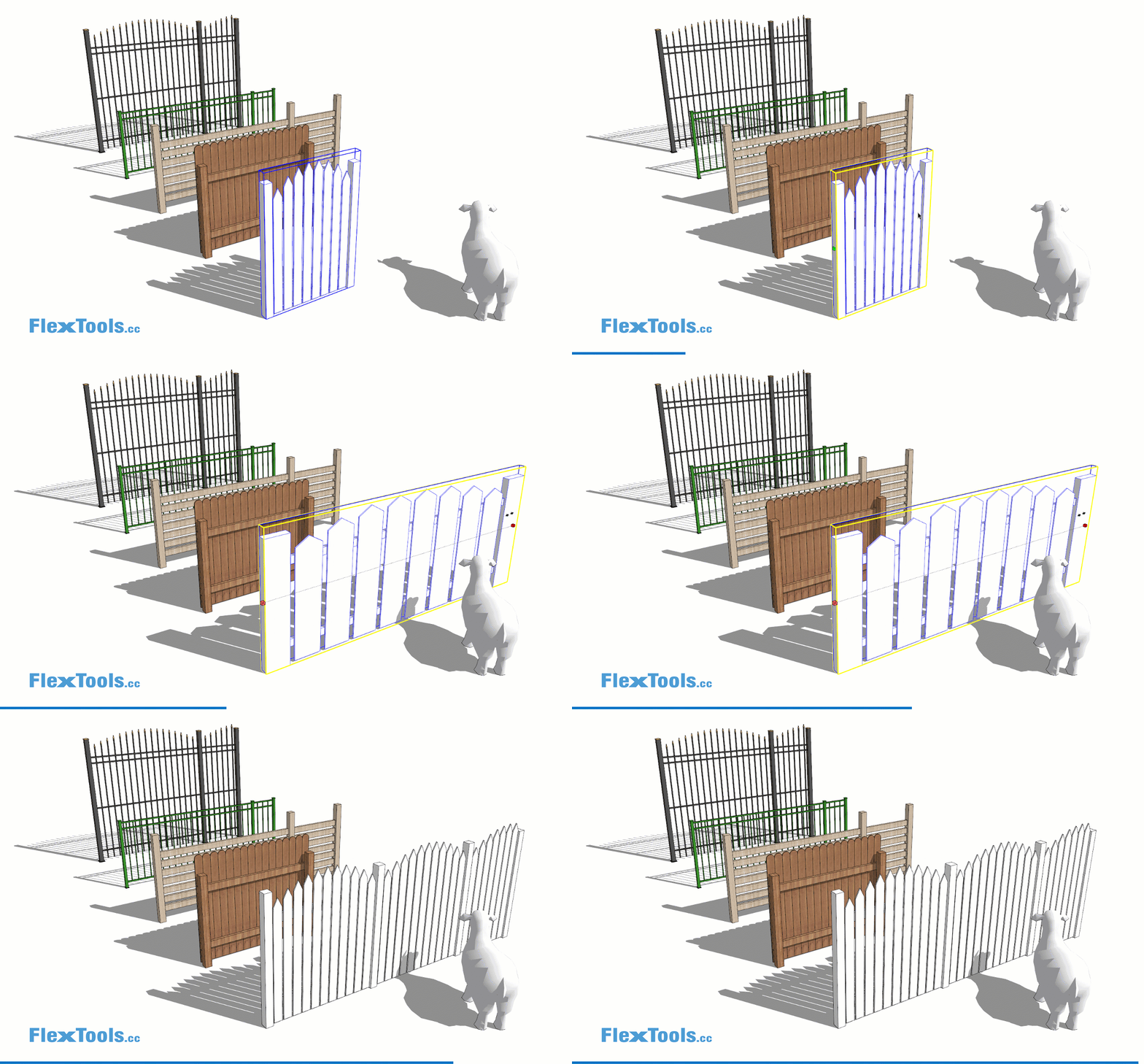
              Introducing FlexFence!

              With this one dynamic component you can create roughly 70% of fences and railings out there, both wooden and metal style.

              Learn more in the blog: https://flextools.cc/blog/introducing-flexfence/
              https://flextools.cc/wp-content/uploads/2021/04/flexfence_examples_01e.gif

              FlexTools - Super Quick Windows, Doors, Slats...

              1 條回覆 最後回覆 回覆 引用 0
              • halroachH 離線
                halroach
                最後由 編輯

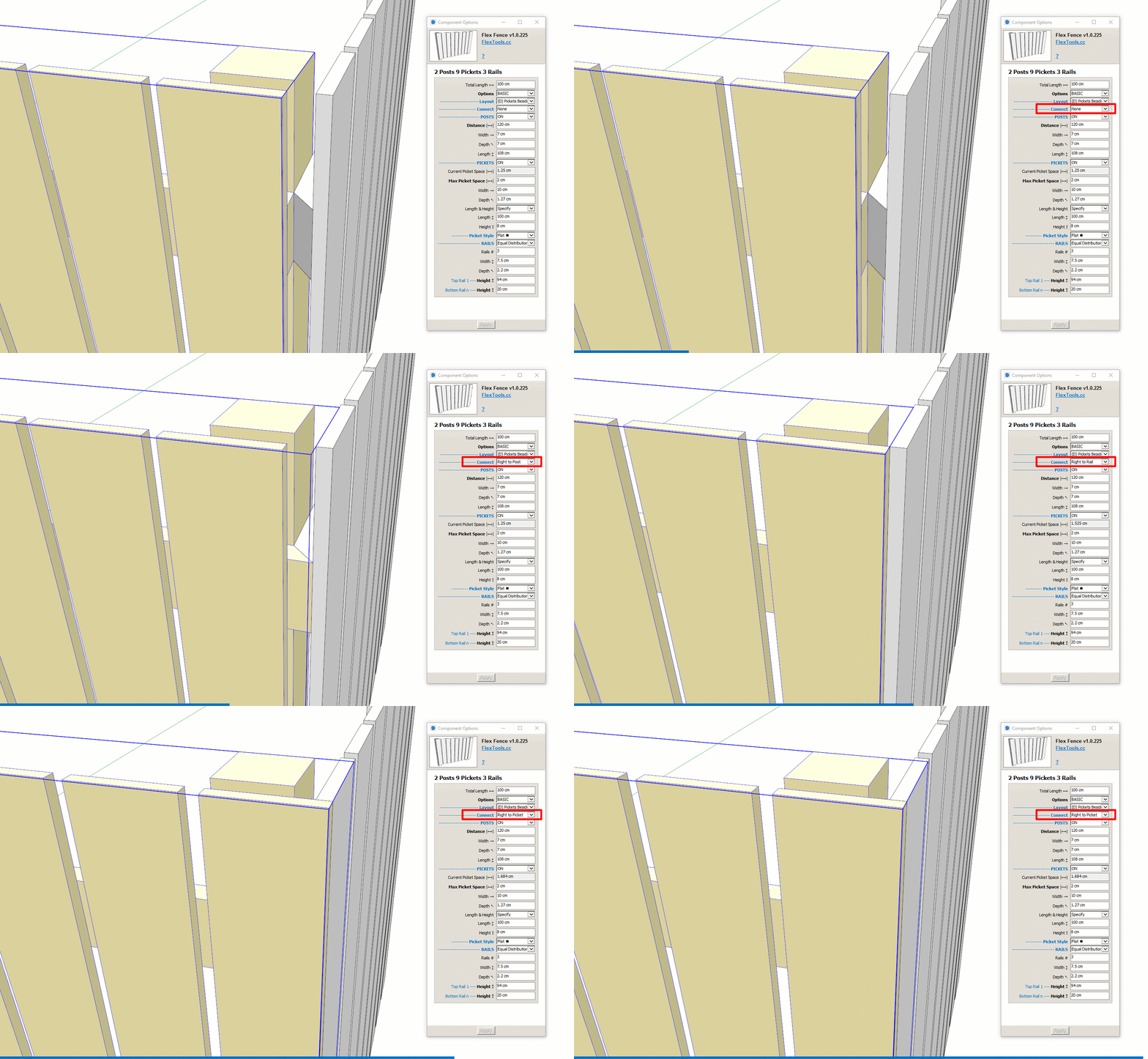
                Flex Fences (and railings) can be easily joined together:

                In order to connect two FlexFences to form a corner:

                1. Place two fences in a 90 degree angle to each other, having them share the location of one of their posts.

                2. Hide one of the edge posts by clicking on it with the interact tool or through the options menu.

                3. If needed, you can choose to extend the picket positions of each fence to reach the other's post, rail or picket.
                https://flextools.cc/wp-content/uploads/2021/04/flexfence-connecting.gif

                --

                Let us know what you think!

                FlexTools - Super Quick Windows, Doors, Slats...

                1 條回覆 最後回覆 回覆 引用 0
                • halroachH 離線
                  halroach
                  最後由 編輯

                  Check out Justin's new video about Easy Fencing in SketchUp!

                  FlexTools - Super Quick Windows, Doors, Slats...

                  1 條回覆 最後回覆 回覆 引用 0
                  • halroachH 離線
                    halroach
                    最後由 編輯

                    We thought it would be helpful if there was a collection of ready-to-use dynamic fences and railings. So we took some popular fences and railings and recreated them with the FlexFence component!

                    Each Flex Fence example can be customized further to best suit your design, and then saved for later immediate use.
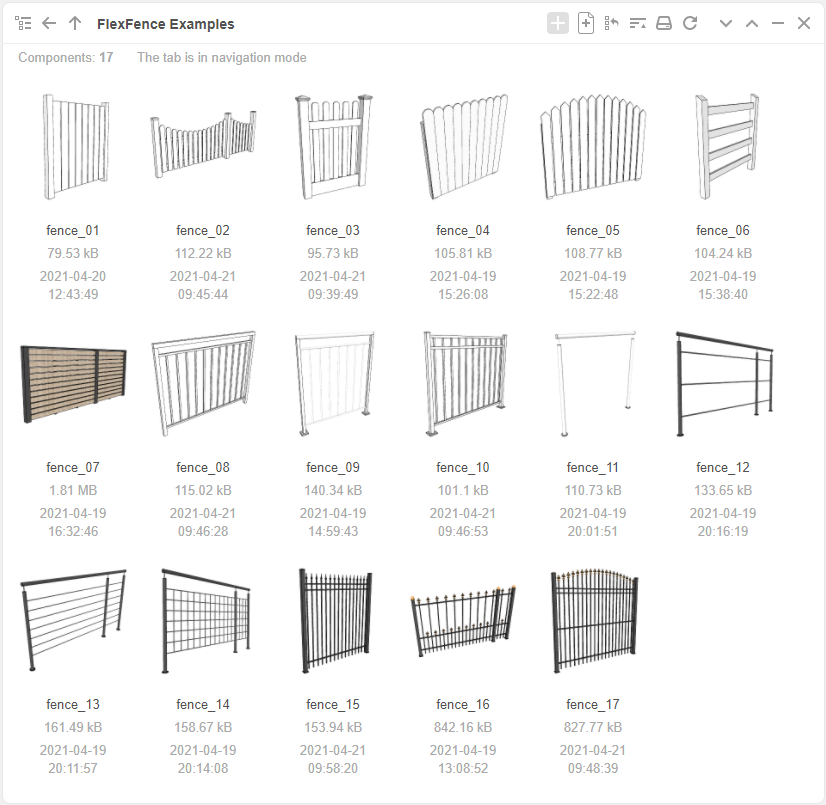
                    Download the collection here

                    FlexFence - Collection.png

                    What other fences/railings would you like to have dynamic?
                    Send us pictures or skp models of your go-to fence and railing types! 😄

                    FlexTools - Super Quick Windows, Doors, Slats...

                    1 條回覆 最後回覆 回覆 引用 0
                    • P 離線
                      pibuz
                      最後由 編輯

                      GIGA thanks!!!!

                      EDIT
                      is there some sort of pre-setting to be choosed before using these DCs?
                      Or is FlexTools PRO needed?

                      I only use component finder, and using these fences as "common" DCs doesn't work at all for me..

                      WEB (ita) - https://filipposcarso.wixsite.com/ordinentropico

                      1 條回覆 最後回覆 回覆 引用 0
                      • halroachH 離線
                        halroach
                        最後由 編輯

                        Hi Filippo,

                        Yes, all the fences are examples of the customized FlexFence component, so you will need a FlexPack Pro license for them to work dynamically.

                        FlexTools - Super Quick Windows, Doors, Slats...

                        1 條回覆 最後回覆 回覆 引用 0
                        • halroachH 離線
                          halroach
                          最後由 編輯

                          “I live in 3D and think in 3D and so I find the most efficient way to get that 3D image out of my head and start working with it is to create it directly in Sketchup." – Derek Sallans, Longhouse Design

                          Derek’s workflow for concept design is so fast and intuitive, so very SketchUp-like (and FlexTools-like), we couldn’t help but share it with you! 😄

                          Check it out: https://flextools.cc/blog/thinking-in-3d-with-sketchup/
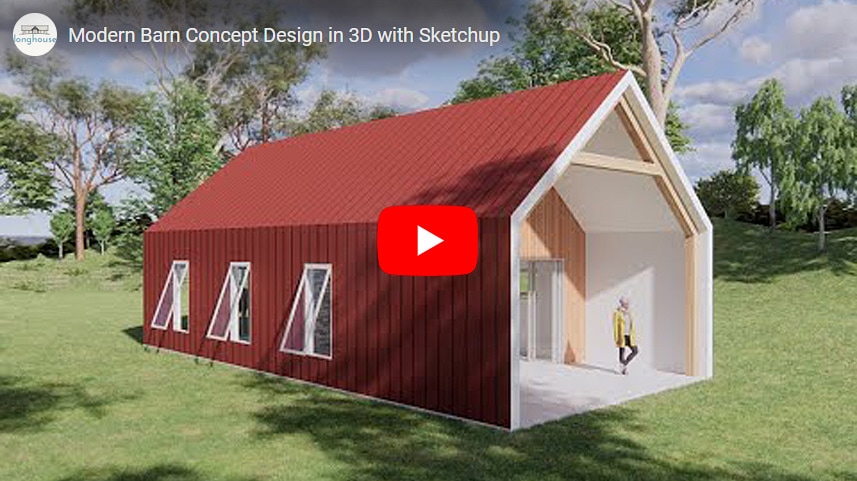
                          Thinking in 3D with SketchUp - cover.jpg

                          FlexTools - Super Quick Windows, Doors, Slats...

                          1 條回覆 最後回覆 回覆 引用 0
                          • halroachH 離線
                            halroach
                            最後由 編輯

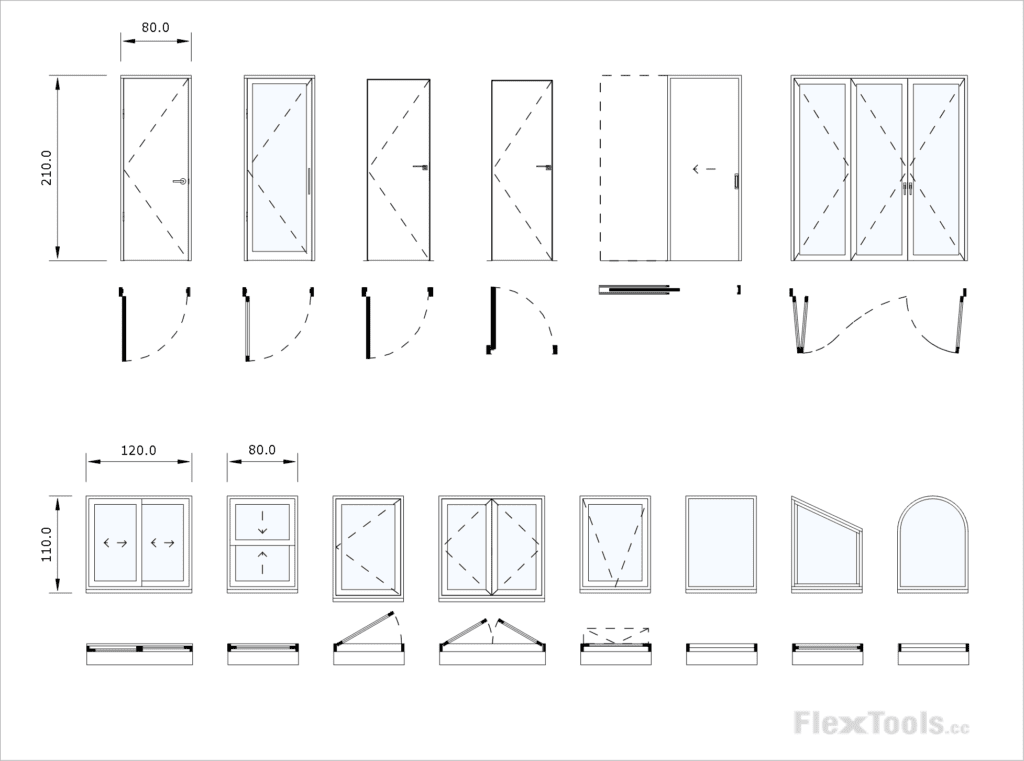
                            How do you show the swinging direction for your doors and windows in elevation?

                            Pointing to the Right? Or Wrong? 😉

                            https://aws1.discourse-cdn.com/sketchup/original/3X/8/7/87c72c249001825b227022a732559e8394c34253.gif

                            We've always thought of this symbol as a triangular flag with the fixed side where the hinges are and the pointy side where the handle is. However, in some places the flag works the other way around, huh?!

                            As we are now working on a tag (layer) for 2D markings for FlexTools components, we need your advice!

                            Which way do you mark your swings?

                            FlexTools - Super Quick Windows, Doors, Slats...

                            1 條回覆 最後回覆 回覆 引用 0
                            • jujuJ 離線
                              juju
                              最後由 編輯

                              @halroach said:

                              How do you show the swinging direction for your doors and windows in elevation?

                              Pointing to the Right? Or Wrong? 😉

                              https://aws1.discourse-cdn.com/sketchup/original/3X/8/7/87c72c249001825b227022a732559e8394c34253.gif

                              We've always thought of this symbol as a triangular flag with the fixed side where the hinges are and the pointy side where the handle is. However, in some places the flag works the other way around, huh?!

                              As we are now working on a tag (layer) for 2D markings for FlexTools components, we need your advice!

                              Which way do you mark your swings?

                              The supposed correct way is with the pointy side pointing to the hinges. However, in practice here in South Africa I've only seen (and used) the pointy side shows to the swinging side with the triangle base at the hinge side.

                              Save the Earth, it's the only planet with chocolate.

                              1 條回覆 最後回覆 回覆 引用 0
                              • jujuJ 離線
                                juju
                                最後由 編輯

                                @halroach said:

                                Hey guys, we're having the first and last sale this year!

                                So, if you'd like to get a FlexTools license for your company or recommend it to a friend, now is the best time to do it!

                                Get FlexPack Pro 30% OFF

                                (Offer ends December 6)

                                [attachment=0:9rgpkxk6]<!-- ia0 -->FlexTools Black Friday - Cover.png<!-- ia0 -->[/attachment:9rgpkxk6]

                                Does this apply to renewals as well?

                                Save the Earth, it's the only planet with chocolate.

                                1 條回覆 最後回覆 回覆 引用 0
                                • halroachH 離線
                                  halroach
                                  最後由 編輯

                                  We've had a lot of requests to solve the timeless problem of having doors both open in plan and closed in elevation at the same time, so you wouldn't need to go back and forth opening and closing doors when switching between your views.

                                  It took us a lot more work and time than expected, but it's finally here.

                                  You can now create instant plans and elevations from your 3D models with just a few clicks!
                                  You can also make quick changes directly in plan and elevation views.

                                  See more in the blog: https://flextools.cc/blog/
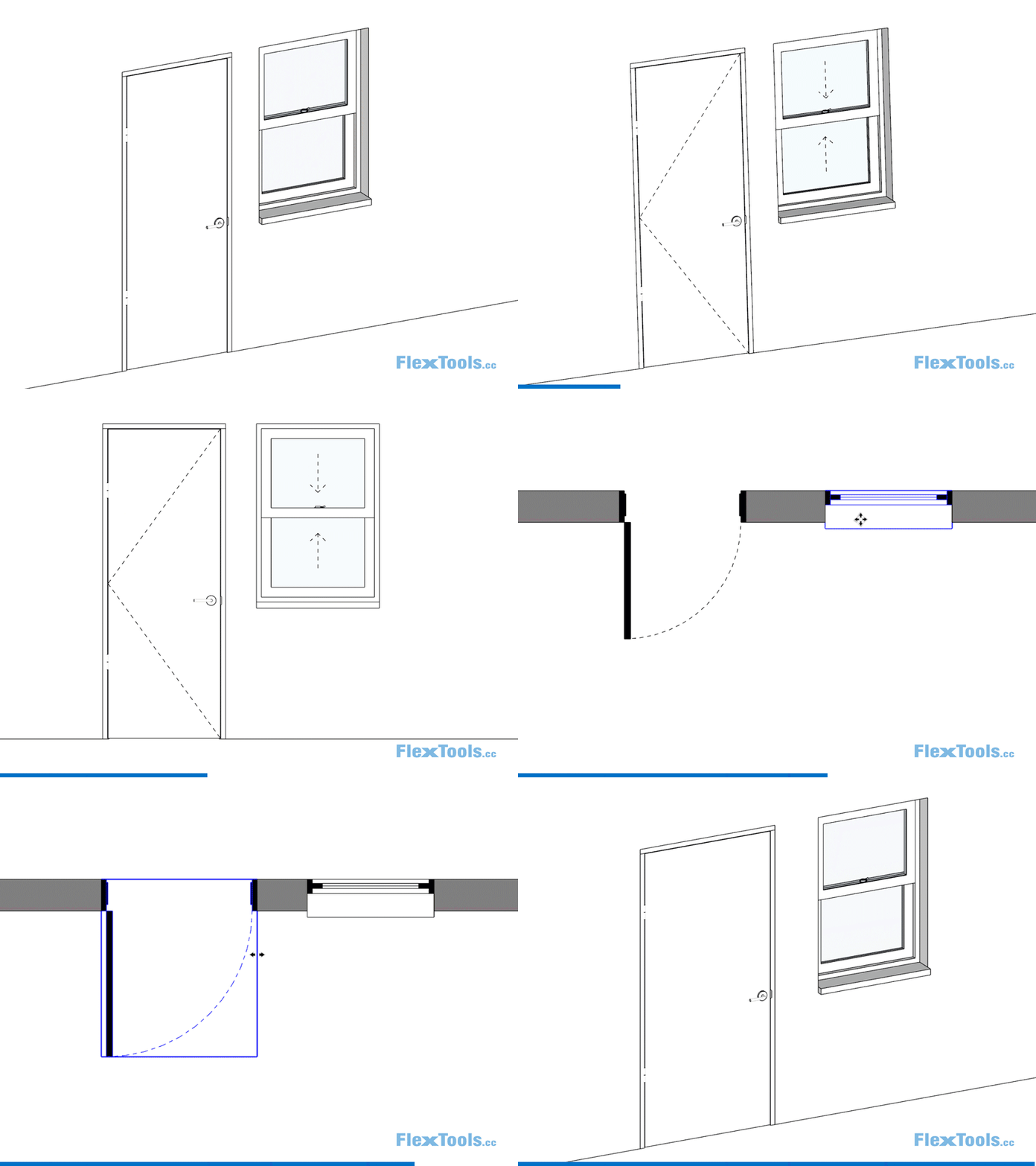
                                  https://flextools.cc/wp-content/uploads/2021/11/flextools-3D-elevation-plan-section_01e-800.gif

                                  FlexTools for SketchUp - 2D doors and windows_1024x761.png

                                  There are a lot more improvements in this update. See them all in the release notes: https://flextools.cc/release-notes/

                                  FlexTools - Super Quick Windows, Doors, Slats...

                                  1 條回覆 最後回覆 回覆 引用 0
                                  • halroachH 離線
                                    halroach
                                    最後由 編輯

                                    Hey guys, we're having the first and last sale this year. So, if you'd like to get a FlexTools license for your company or recommend it to a friend, now is the best time to do it!

                                    FlexTools - Super Quick Windows, Doors, Slats...

                                    1 條回覆 最後回覆 回覆 引用 0
                                    • pbacotP 離線
                                      pbacot
                                      最後由 編輯

                                      Looks good! (and tricky)

                                      MacOSX MojaveSketchUp Pro v19 Twilight v2 Thea v3 PowerCADD

                                      1 條回覆 最後回覆 回覆 引用 0
                                      • halroachH 離線
                                        halroach
                                        最後由 編輯

                                        SketchUp 2022 is here and so is a new FlexTools update!

                                        See what’s new:
                                        https://flextools.cc/blog/ready-for-sketchup-2022/
                                        Sketchup 2022 + FlexTools.png

                                        FlexTools - Super Quick Windows, Doors, Slats...

                                        1 條回覆 最後回覆 回覆 引用 0
                                        • mark_in_seattleM 離線
                                          mark_in_seattle
                                          最後由 編輯

                                          Have not used FlexTools after purchasing it a few months ago until yesterday after checking for updates. Has anyone else experienced the bizarre behavior I'm seeing since doing updates ? If the problem I'm seeing inferencing the FlexTools dynamic components isn't an update issue than I would ask the moderators to move my post to a more appropriate thread.

                                          --- ODD BEHAVIORS ---
                                          Trying to use it in SU-2021-Pro but what a chore Some of the dynamic components ignore my model units setting = architectual inches and displays all the component attributes in metric. Then bringing a fixed window down from the Flextools toolbar didn't make any cutout in my test wall (either if a group, or a component) until trial and error with the FlexTools cutter option which is clumsy and not very obvious to new users like me.

                                          Tried moving a FlexTools dynamic window component in my model only to watch the bizarre behavior as it refuses to inference on anything else in the model.... making it just useless unless all your surfaces are coplaner with the XYZ global axis. Must be doing something wrong here. I could not place a FlexTools fixed window at any edge or vertex in my model that isn't coplaner with global XYZ axis and even then it was far worse than placing any other components in my model .... just bizarre.

                                          What hint can anyone offer to help me place a FlexTools dynamic component with the move tool at a vertex or edge that is rotated away from the global XYZ axis. I have several components and surfaces in my model that are rotated 45-degs off the globla axis.

                                          Thank you for any bread crumbs offered.

                                          1 條回覆 最後回覆 回覆 引用 0
                                          • halroachH 離線
                                            halroach
                                            最後由 編輯

                                            Hi Mark,

                                            1. Regarding the units not displaying correctly, does this happen with all the Flex components from the toolbar? Or with other dynamic components?

                                            2. In order for wall cutting to work correctly when placing a window from the toolbar, it will automatically glue to the surface plane it is FIRST placed on.

                                            a. It is easiest to place the window anywhere on the wall you need it to be on, and then scale and move it to it's exact location.

                                            b. If you need to copy the window around, try with copy and paste. When it is pasted it will again try to glue to the surface that is under your mouse (repeat a. above).

                                            FlexTools - Super Quick Windows, Doors, Slats...

                                            1 條回覆 最後回覆 回覆 引用 0
                                            • 1
                                            • 2
                                            • 5
                                            • 6
                                            • 7
                                            • 8
                                            • 9
                                            • 8 / 9
                                            • 第一個貼文
                                              最後的貼文
                                            Buy SketchPlus
                                            Buy SUbD
                                            Buy WrapR
                                            Buy eBook
                                            Buy Modelur
                                            Buy Vertex Tools
                                            Buy SketchCuisine
                                            Buy FormFonts

                                            Advertisement