Hidden lines not visible in Layout
-
I think the exploded view “beyond” is what is a bit confusing? (Perceived 2 “styles”)
C
-
@charlie__v said:
I think the exploded view “beyond” is what is a bit confusing? (Perceived 2 “styles”)
C
As I already wrote, though...
@dave r said:
there's only one style being displayed; Hidden Line with Back Edges turned on. There's a large surface between the two copies of the model so when rendered as Vector in LO, the components in the rear are not visible.
Maybe this will make it clearer?
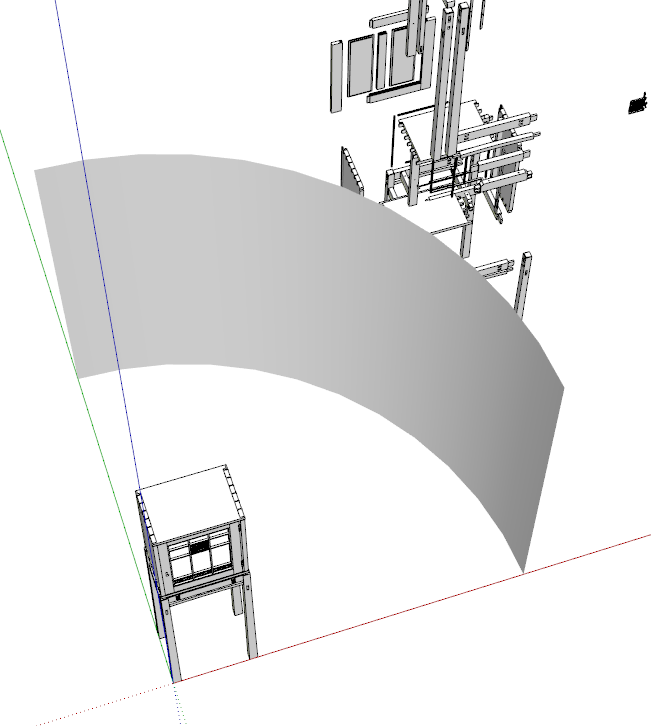
-
OK Dave....now I understand what's going on. At first, I thought the foreground object had a style that shows both solid and dashed lines, and the other one had a style with dashed lines only - although I am not aware of any such style. But your opaque screen is what gives the effect to the latter - not a separate style. This post piqued my interest because it just so happens I had to generate a CD for a steel angle iron frame a few days ago. But I became frustrated at not being able to find a style/render combo to clearly display dashed line back edges. Raster/back edges works, but gives a fuzzy result. And as was mentioned in the post, dashed lines need to be manually traced onto the canvas with LO's line tool. Not something I care to do since several modifications to the object's design often take place which requires time-consuming manual re-tracing updates in LO.
-
Remember, when you are looking at the Raster-rendered viewports on screen, you are probably using less than the maximum quality rendering. When you export to PDF, you can export at the high quality setting.
Another thing to consider is stacking viewports for the same scene. You can render the top one as Vector and leave the bottom one as Raster. That will give you a combination of vector edges with only the back edges displayed as raster and it will allow you to maintain the dynamic link from the scenes so changes will show up automatically (as long as you don't make them modified in LO).
don't stack the viewports on the same layer. Rather use two layers with the upper layer showing the vector rendered viewports.



Advertisement