sketchucation logo sketchucation
    • Login
    Oops, your profile's looking a bit empty! To help us tailor your experience, please fill in key details like your SketchUp version, skill level, operating system, and more. Update and save your info on your profile page today!
    ⚠️ Important | Libfredo 15.6b introduces important bugfixes for Fredo's Extensions Update

    Create a 360 Hidden Line View

    Scheduled Pinned Locked Moved SketchUp Discussions
    sketchup
    13 Posts 6 Posters 1.5k Views 6 Watching
    Loading More Posts
    • Oldest to Newest
    • Newest to Oldest
    • Most Votes
    Reply
    • Reply as topic
    Log in to reply
    This topic has been deleted. Only users with topic management privileges can see it.
    • F Offline
      faust07
      last edited by

      I can recommend a Plugin by Rami_lpm: WebGL Cubic Panorama.
      Export to WebGL, Canvas, Scenes ... (hidden lines are no problem)
      http://sketchucation.com/forums/viewtopic.php?f=323%26amp;t=59335%26amp;hilit=Rami

      1 Reply Last reply Reply Quote 0
      • V Offline
        valerostudio
        last edited by

        @faust07 said:

        I can recommend a Plugin by Rami_lpm: WebGL Cubic Panorama.
        Export to WebGL, Canvas, Scenes ... (hidden lines are no problem)
        http://sketchucation.com/forums/viewtopic.php?f=323%26amp;t=59335%26amp;hilit=Rami

        I did see that, but now how do I turn that into a single 360 image?

        1 Reply Last reply Reply Quote 0
        • HieruH Offline
          Hieru
          last edited by

          Something like this might help with the conversion:

          https://www.360toolkit.co/convert-cubemap-to-spherical-equirectangular.html

          www.davidhier.co.uk

          1 Reply Last reply Reply Quote 0
          • V Offline
            valerostudio
            last edited by

            Woah - OK now we are getting close. Does anyone know what the order that Rami's plugin exports? It doesnt seem to name the views by what the view is, just numbered.

            1 Reply Last reply Reply Quote 0
            • F Offline
              faust07
              last edited by

              The order in Rami's Cubic Panorama is: view to
              east, north, west, south, up, down
              (north is here the y-axis in world coordinates)

              If north is front then it is translated for 360toolkit
              right, front, left, back, up, down

              1 Reply Last reply Reply Quote 0
              • V Offline
                valerostudio
                last edited by

                Only issue I am seeing is that in Rami's plugin, it seems to be creating a border around each cubic export, so when it stitches together, I have this wire-frame cube in my pano.

                1 Reply Last reply Reply Quote 0
                • cottyC Offline
                  cotty
                  last edited by

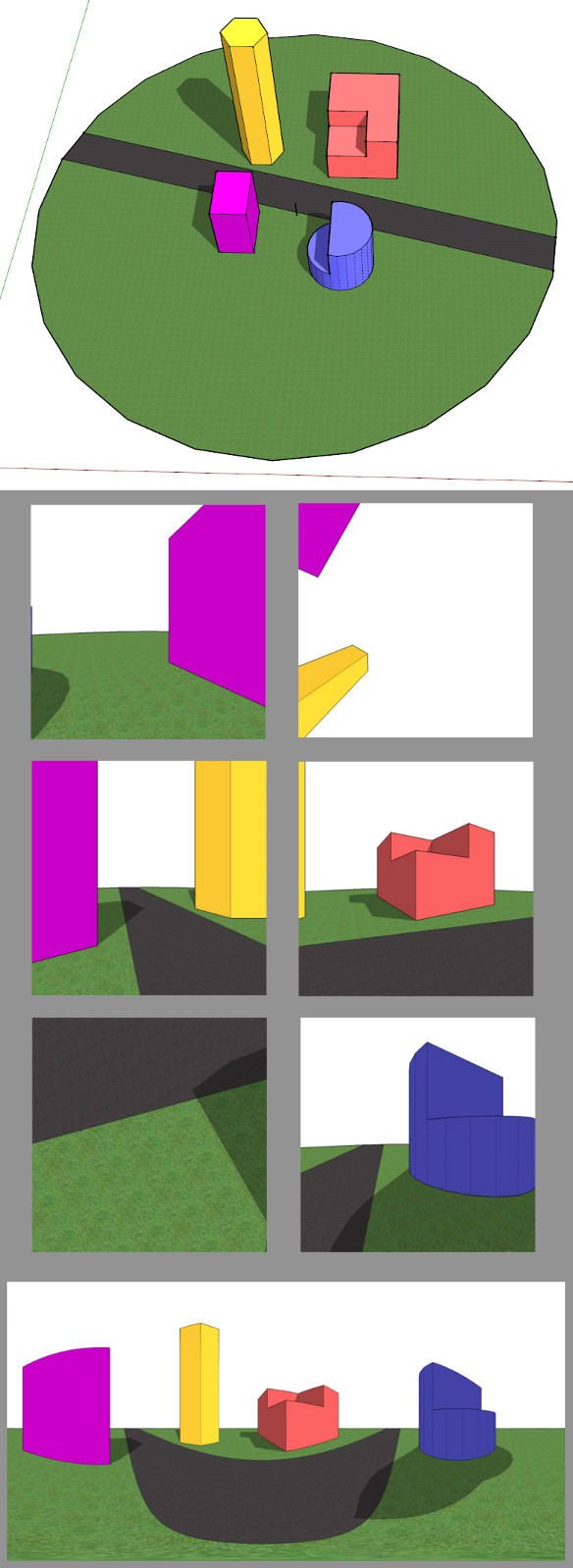
                  I've used CubicPaboOut (http://www.smustard.com/script/CubicPanoOut) in the past for exporting the 6 cube images and $ KRPano (https://krpano.com/) to stitch them together.

                  Example:
                  cotty_cubicpanoout.jpg

                  Interactive version:

                  http://cotty.de/cubicpanoout/Image_sphere.html

                  my SketchUp gallery

                  1 Reply Last reply Reply Quote 0
                  • V Offline
                    valerostudio
                    last edited by

                    Here is what one of the exports looks like from cubicpanout as well - same issue
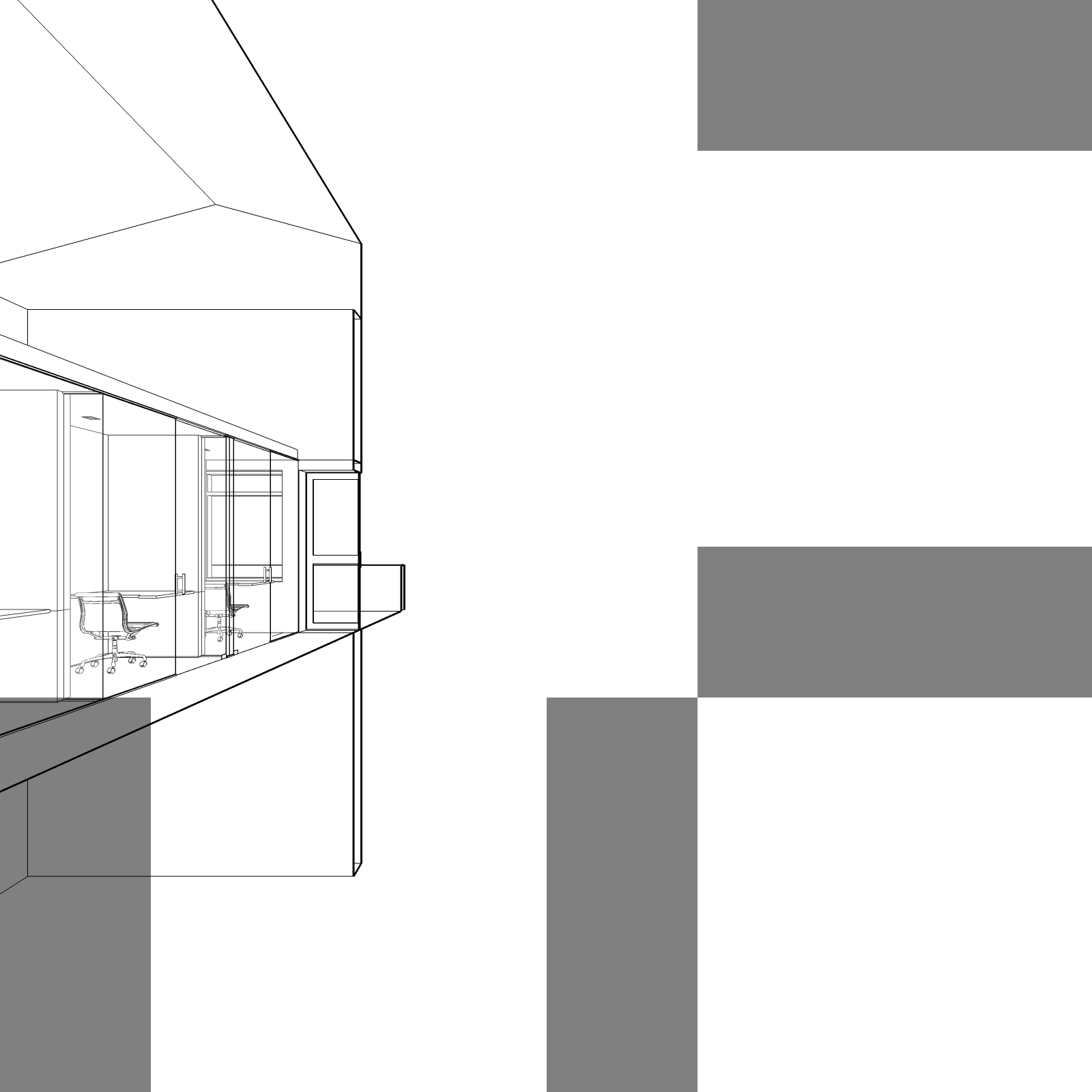

                    Image0001.jpg

                    1 Reply Last reply Reply Quote 0
                    • V Offline
                      valerostudio
                      last edited by

                      Seems to be an old issue - its discussed here, but I am still stuck.
                      https://sketchucation.com/forums/viewtopic.php?f=180%26amp;t=2781

                      1 Reply Last reply Reply Quote 0
                      • V Offline
                        valerostudio
                        last edited by

                        @cotty said:

                        I've used CubicPaboOut (http://www.smustard.com/script/CubicPanoOut) in the past for exporting the 6 cube images and $ KRPano (https://krpano.com/) to stitch them together.

                        Example:

                        [attachment=0:1s4508iw]<!-- ia0 -->cotty_cubicpanoout.jpg<!-- ia0 -->[/attachment:1s4508iw]

                        Interactive version:

                        http://cotty.de/cubicpanoout/Image_sphere.html

                        CubicPanout creates gray bars on my exports, which is an issue that has been seen before.

                        1 Reply Last reply Reply Quote 0
                        • 1 / 1
                        • First post
                          Last post
                        Buy SketchPlus
                        Buy SUbD
                        Buy WrapR
                        Buy eBook
                        Buy Modelur
                        Buy Vertex Tools
                        Buy SketchCuisine
                        Buy FormFonts

                        Advertisement
