sketchucation logo sketchucation
    • 登入
    Oops, your profile's looking a bit empty! To help us tailor your experience, please fill in key details like your SketchUp version, skill level, operating system, and more. Update and save your info on your profile page today!
    🔌 Smart Spline | Fluid way to handle splines for furniture design and complex structures. Download

    [Plugin] Slender - Baking textures in Sketchup with Blender

    已排程 已置頂 已鎖定 已移動 Developers' Forum
    29 貼文 7 Posters 14.8k 瀏覽 7 Watching
    正在載入更多貼文
    • 從舊到新
    • 從新到舊
    • 最多點贊
    回覆
    • 在新貼文中回覆
    登入後回覆
    此主題已被刪除。只有擁有主題管理權限的使用者可以查看。
    • Rich O BrienR 離線
      Rich O Brien Moderator
      最後由 編輯

      @qp

      fantastic idea. Can't get it going yet so subscribing so I can flag updates

      Download the free D'oh Book for SketchUp 📖

      1 條回覆 最後回覆 回覆 引用 0
      • Q 離線
        qpik
        最後由 編輯

        @jql said:

        qpik, you're using cycles or is this blender internal?

        So far internal, why do you ask?

        1 條回覆 最後回覆 回覆 引用 0
        • JQLJ 離線
          JQL
          最後由 編輯

          Out of curiosity. I've seen great things coming from cycles and heard it's improving very fast.

          Who knows where this plugin will lead so, maybe cycles would be a good bet.

          www.casca.pt
          Visit us on facebook!

          1 條回覆 最後回覆 回覆 引用 0
          • filibisF 離線
            filibis
            最後由 編輯

            @filibis said:

            I will see tomorrow what causes problem in the office computer

            I tried again in the office today, i noticed this code was missing in slender.bat

            %~dp0\slender.blend
            

            (see attachment) I don't remember deleting it, maybe downloaded the .zip yesterday before you update or something idk 🤣
            So i downloaded .zip again today, it worked fine. 👍


            slender_blend_missing.jpeg

            1 條回覆 最後回覆 回覆 引用 0
            • PixeroP 離線
              Pixero
              最後由 編輯

              A couple of question.

              How does the geometry look when imported back into SketchUp?
              Is it grouped the same?
              Are the components intact?
              Is the geometry triangulated or as it was originally in SU?

              1 條回覆 最後回覆 回覆 引用 0
              • filibisF 離線
                filibis
                最後由 編輯

                @pixero said:

                How does the geometry look when imported back into SketchUp?
                Is it grouped the same?
                Are the components intact?
                Is the geometry triangulated or as it was originally in SU?

                Seems it imports one component that contains the whole geometry and everything inside exploded. Also triple clicking only select ones that shares the same material. See below for gif demonstrations.

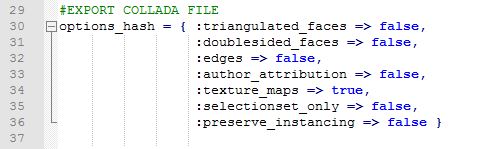
                Triangulation and other export features are optional (see attachment). (But making "preserve_instancing => true" doesn't seem to be working)

                https://gifyu.com/images/slender_demonstration.gif

                https://gifyu.com/images/slender_demonstration_tripleclick.gif


                export_collada.JPG

                1 條回覆 最後回覆 回覆 引用 0
                • Q 離線
                  qpik
                  最後由 編輯

                  Unless I'm missing something there's no combination of COLLADA import/export settings in SU and Blender that would keep components. It's just how those exporters/importers work.

                  Triangulation solves issue with holes in faces, which are not supported, as far as I learned, in Blender.

                  The real question is whether keeping component structure is really necessary, I doubt it.

                  1 條回覆 最後回覆 回覆 引用 0
                  • N 離線
                    n8phu
                    最後由 編輯

                    I am getting the same result as qpik, I put the pause i nthe bat file and this is the error it is giving me:
                    TypeError: Converting py args to operator properties: : keyword "include_material_textures" unrecognized

                    1 條回覆 最後回覆 回覆 引用 0
                    • N 離線
                      n8phu
                      最後由 編輯

                      I should have also included I am using win 10, blender 2.79c, sketchup 17

                      1 條回覆 最後回覆 回覆 引用 0
                      • 1
                      • 2
                      • 2 / 2
                      • 第一個貼文
                        最後的貼文
                      Buy SketchPlus
                      Buy SUbD
                      Buy WrapR
                      Buy eBook
                      Buy Modelur
                      Buy Vertex Tools
                      Buy SketchCuisine
                      Buy FormFonts

                      Advertisement