Skip to content
Collapse
sketchucation logo

sketchucation

  1. Home
  2. Categories
  3. Resources
  4. Plugins
  5. Medeek Wall Plugin
Oops, your profile's looking a bit empty! To help us tailor your experience, please fill in key details like your SketchUp version, skill level, operating system, and more. Update and save your info on your profile page today!
Check out Febhouse | New extensions for Shadow Analysis in SketchUp Download

Medeek Wall Plugin

Scheduled Pinned Locked Moved Plugins
1.6k Posts 29 Posters 1.4m Views 28 Watching
  • Oldest to Newest
  • Newest to Oldest
  • Most Votes
Reply
  • Reply as topic
Log in to reply
This topic has been deleted. Only users with topic management privileges can see it.
  • medeekM Offline
    medeekM Offline
    medeek
    wrote on last edited by
    #1218

    Version 2.8.7 - 05.30.2022

    • Added the "Wall Framing Material" option to the Draw and Edit menus for all wall types.
    • Added "BRICK" as another wall material/texture type.
    http://design.medeek.com/resources/wallplugin/images3/wall_su637_800.jpg

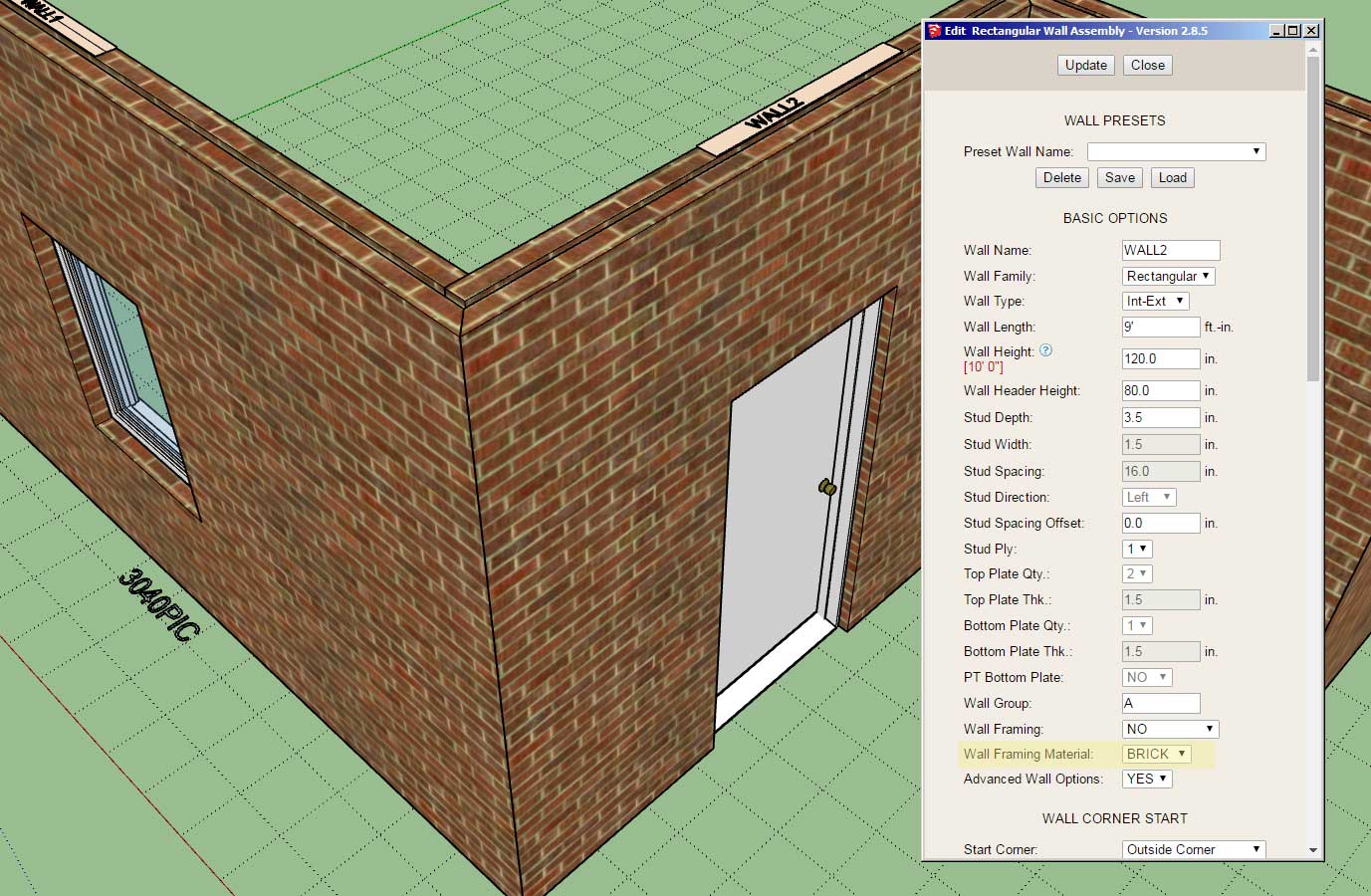
    Previously the wall framing material or texture was set in the global settings, only allowing the user to specify this parameter for the entire model and not on a per wall basis. Now the global setting will set the default value but each wall can be customized to a specific material.

    • Note that this update does not change the way the pressure treated lumber (texture) is applied. This parameter is still set globally (per the model).

    I've also added on additional texture/material for the wall framing and that is brick (red). I had a number of requests for this material recently so I thought it might be useful to add it as another option. Unlike the CMU options the way to correctly use the brick would be to set the Wall Framing parameter as "NO" and the Wall Framing Material parameter as "BRICK". This is really no different than the regular no framing mode other than the brick material gets applied to the wall solid/primitive.

    In all actuality the CMU modes are also very similar to the no framing mode as well however there is a bit more logic required for applying the materials and some minor adjustments for window openings (non-rectangular).

    What I've shown in the screenshot above is a "brick" wall with a 1" air gap and brick cladding, effectively giving me a double brick wall.

    Nathaniel P. Wilkerson PE
    Medeek Engineering Inc
    design.medeek.com

    1 Reply Last reply
    0
    • medeekM Offline
      medeekM Offline
      medeek
      wrote on last edited by
      #1219

      There entire WSWH Strong-Wall series is now available in the warehouse:

      https://3dwarehouse.sketchup.com/model/266431e3-09d5-4859-a61f-9657bc809e9b/WSWH-Simpson-Strong-Walls

      Nathaniel P. Wilkerson PE
      Medeek Engineering Inc
      design.medeek.com

      1 Reply Last reply
      0
      • medeekM Offline
        medeekM Offline
        medeek
        wrote on last edited by
        #1220

        Version 2.8.8 - 06.02.2022

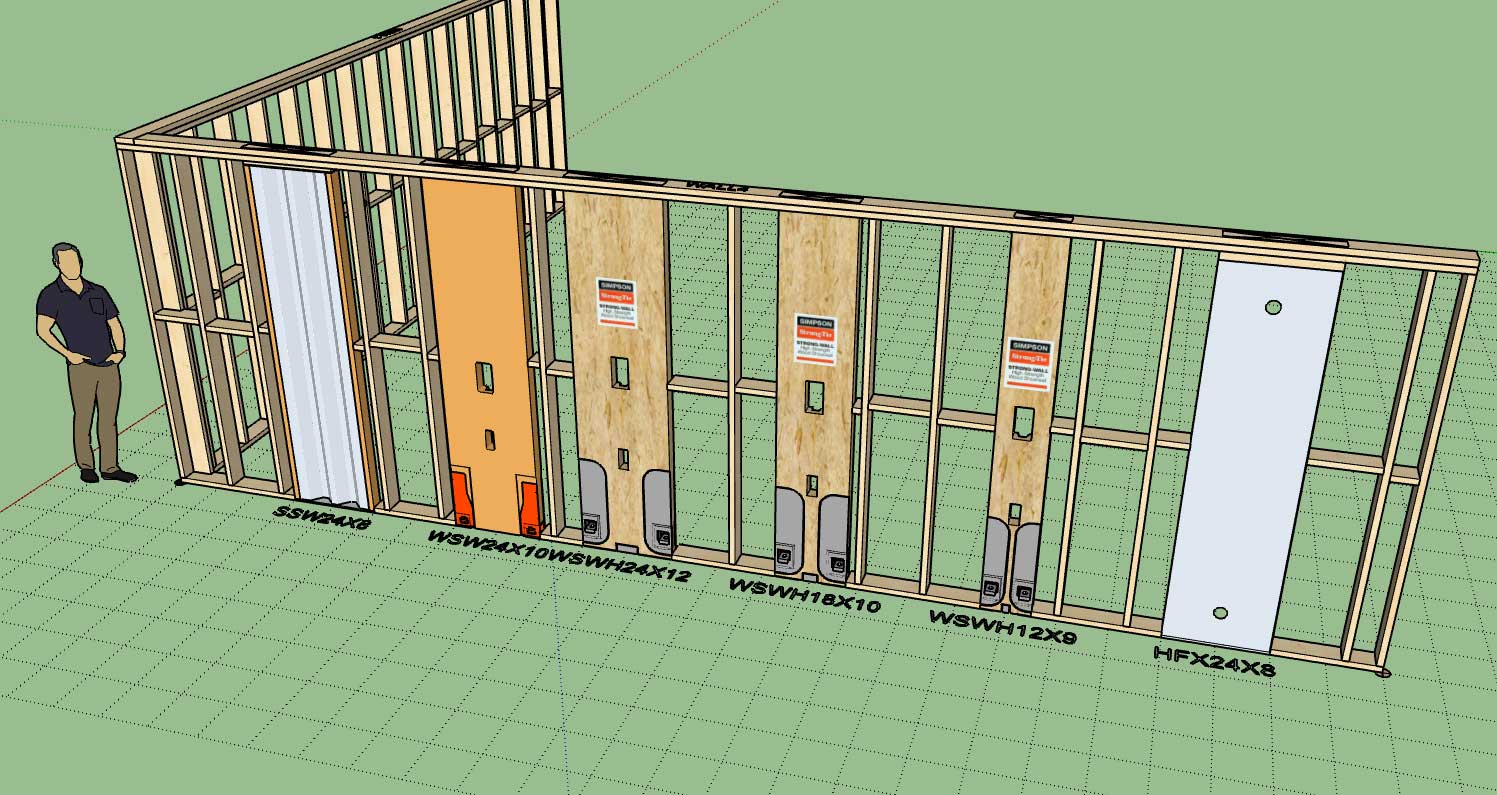
        • Added Simpson Strong-Tie "High Strength" wood shearwalls to the SSW module: 24", 18" and 12".
        http://design.medeek.com/resources/wallplugin/images3/wall_su638_800.jpg

        I don't think the older Simpson wood shearwalls are available for purchase anymore from Simpson but I left them in just in case someone has a need for them.

        Nathaniel P. Wilkerson PE
        Medeek Engineering Inc
        design.medeek.com

        1 Reply Last reply
        0
        • gullfoG Offline
          gullfoG Offline
          gullfo
          wrote on last edited by
          #1221

          good idea to leave the deprecated products in place so if someone is drawing an as-is, they can use them to represent it.

          wondering how complex it is to add new/old components - if this is something only you can do, or if you have some key mapping points on components which could be dropped into the plugin component folder and some text updates to reflect the component anchors, default sizes, rotation point relative to x-y, etc etc. as a means of expanding.

          Glenn

          http://www.runnel.com

          1 Reply Last reply
          0
          • medeekM Offline
            medeekM Offline
            medeek
            wrote on last edited by
            #1222

            I had the same thought when I thought about removing the old hardware, so yes, keeping them in the plugin is probably the right thing to do for now.

            With some components I could make thing user extendable and allow for uploading custom components however with these type of prefabricated shear walls it is a bit more complicated since they are "trimmable" and they need to carefully setup/modeled so that my logic can deal with them in a systematic and predictable fashion.

            Nathaniel P. Wilkerson PE
            Medeek Engineering Inc
            design.medeek.com

            1 Reply Last reply
            0
            • medeekM Offline
              medeekM Offline
              medeek
              wrote on last edited by
              #1223

              Version 2.8.9 - 06.05.2022

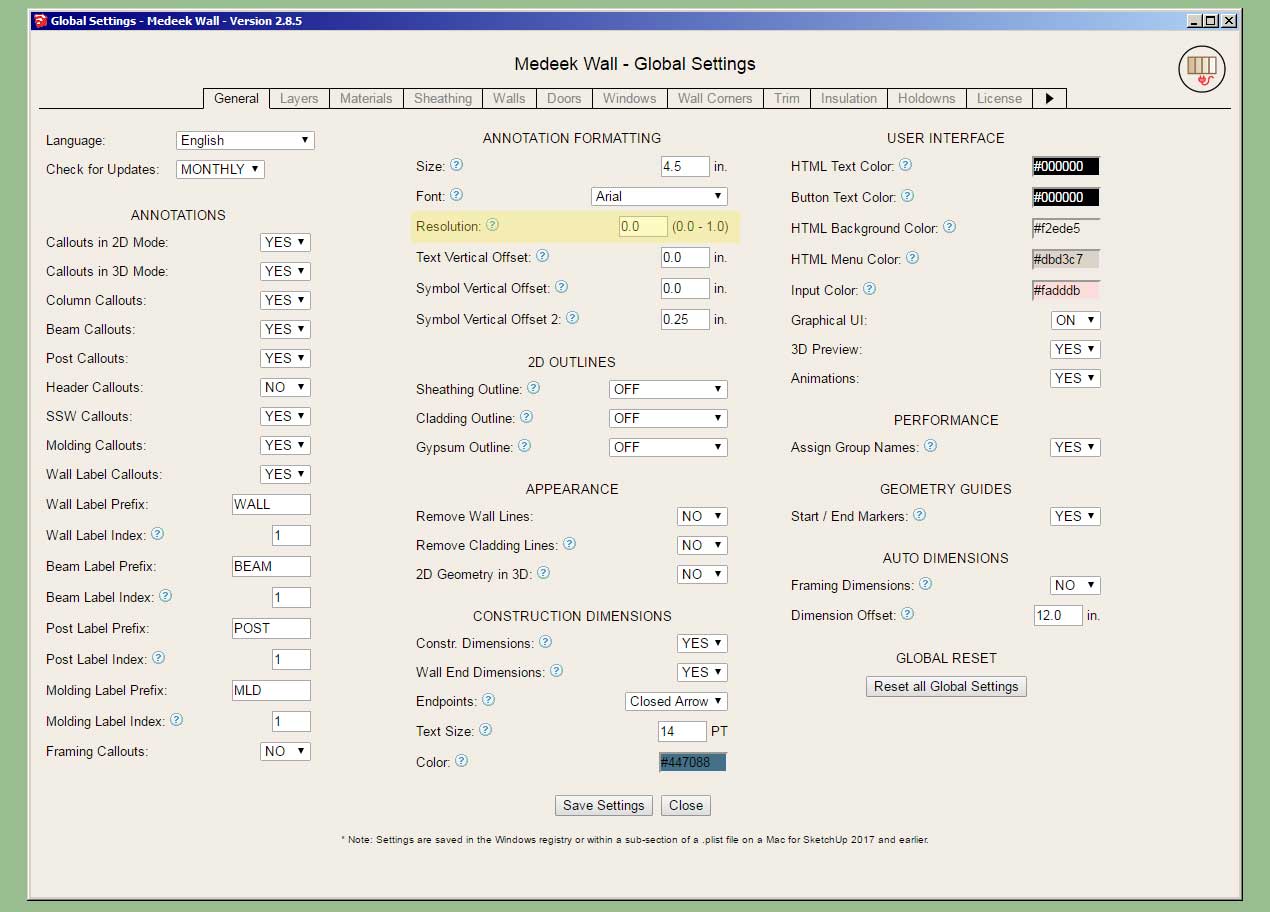
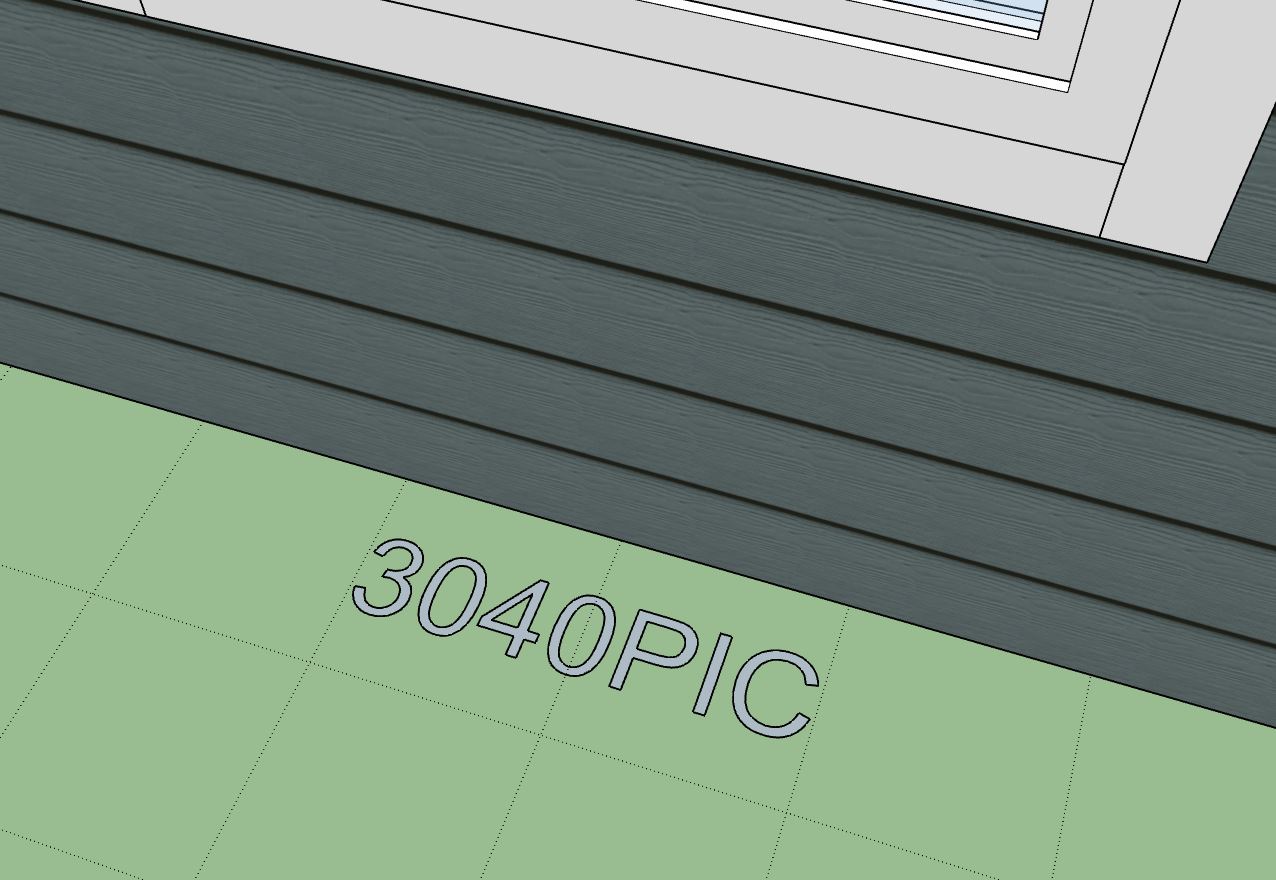
              • Added a "resolution" parameter into the General tab of the Global Settings for adjusting the smoothness of annotation text.
              http://design.medeek.com/resources/wallplugin/images3/wall_su640_800.jpg

              http://design.medeek.com/resources/wallplugin/images3/wall_su639_800.jpg

              By default this parameter is set to 0.5 which may be a bit choppy/pixelated for some. For maximum smoothness set this parameter to zero (as shown above).

              Nathaniel P. Wilkerson PE
              Medeek Engineering Inc
              design.medeek.com

              1 Reply Last reply
              0
              • medeekM Offline
                medeekM Offline
                medeek
                wrote on last edited by
                #1224

                Version 2.8.9 - 06.05.2022

                • Added a "resolution" parameter into the General tab of the Global Settings for adjusting the smoothness of annotation text.

                http://design.medeek.com/resources/wallplugin/images3/wall_su640_800.jpg

                http://design.medeek.com/resources/wallplugin/images3/wall_su639_800.jpg

                By default this parameter is set to 0.5 which may be a bit choppy/pixelated for some. For maximum smoothness set this parameter to zero (as shown above).

                Nathaniel P. Wilkerson PE
                Medeek Engineering Inc
                design.medeek.com

                1 Reply Last reply
                0
                • medeekM Offline
                  medeekM Offline
                  medeek
                  wrote on last edited by
                  #1225

                  Version 2.8.9b - 06.06.2022

                  • Fixed a bug with trimmer studs for garage doors.

                  !!!! CRITICAL BUG FIX !!!!
                  Note that if you are using more than two trimmer studs on your garage doors you will get an error and your garage door will not be drawn. Update to this latest version to fix this bug with the garage door module.

                  This bug has existed for some time and I was probably not aware of it or made aware of it until today because most garage doors don't use more than two trimmers/jack studs. However, it is still strange to me how long it was able to slip by unnoticed.

                  Nathaniel P. Wilkerson PE
                  Medeek Engineering Inc
                  design.medeek.com

                  1 Reply Last reply
                  0
                  • medeekM Offline
                    medeekM Offline
                    medeek
                    wrote on last edited by
                    #1226

                    Tutorial 30 - Double Brick Walls (9:32 min.)

                    Nathaniel P. Wilkerson PE
                    Medeek Engineering Inc
                    design.medeek.com

                    1 Reply Last reply
                    0
                    • medeekM Offline
                      medeekM Offline
                      medeek
                      wrote on last edited by
                      #1227

                      I've decided to kick off the holiday in style and offer a new mdkBIM promotion for the rest of the month of July:
                      http://design.medeek.com/ads/JULY4TH22_BANNER_800.jpg

                      Note: There will be no rainchecks on this promotion and there will also be no discounts on subscription licenses or permanent licenses purchased separately.

                      Nathaniel P. Wilkerson PE
                      Medeek Engineering Inc
                      design.medeek.com

                      1 Reply Last reply
                      0
                      • medeekM Offline
                        medeekM Offline
                        medeek
                        wrote on last edited by
                        #1228

                        Version 2.9.0 - 07.07.2022

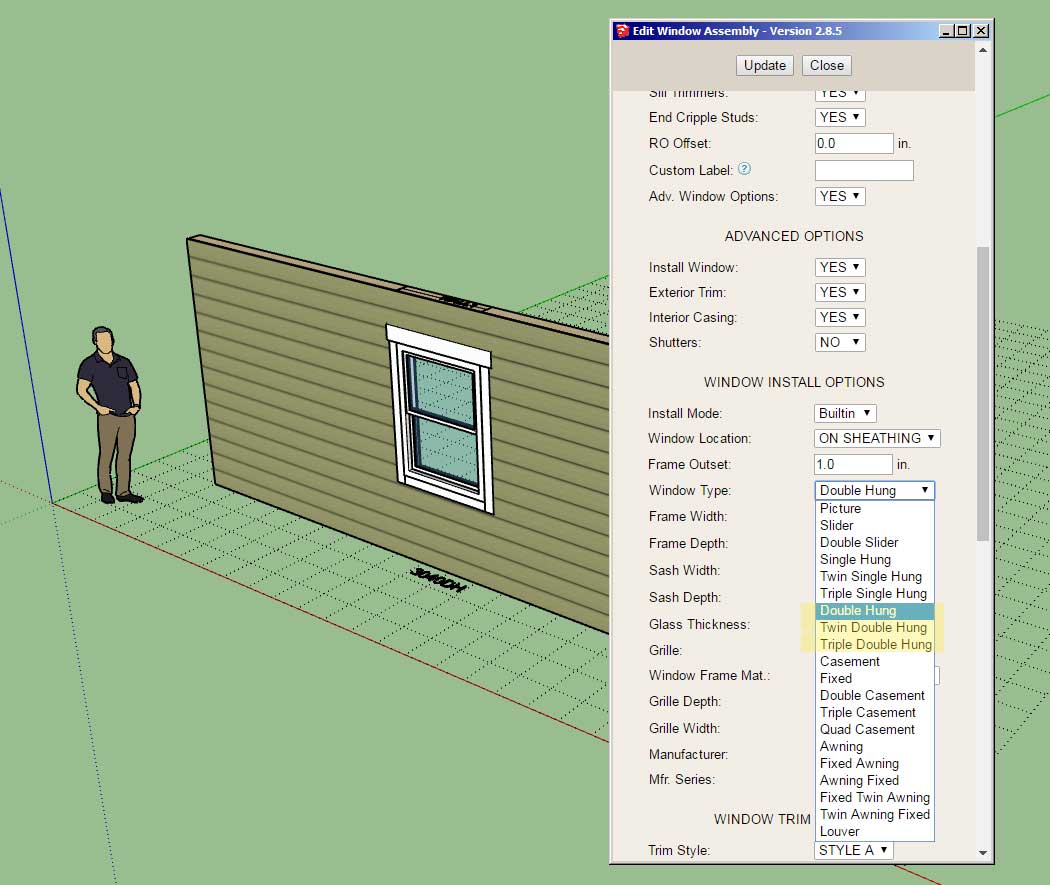
                        • Added the following window types to the window module: Double Hung, Twin Double Hung, Triple Double Hung.
                        http://design.medeek.com/resources/wallplugin/images3/wall_su641_800.jpg

                        Technically these windows are no different (geometrically) than the single hung variants however the callout indicates that they are "double" hung instead of "single" hung. This addition was per customer request.

                        Nathaniel P. Wilkerson PE
                        Medeek Engineering Inc
                        design.medeek.com

                        1 Reply Last reply
                        0
                        • medeekM Offline
                          medeekM Offline
                          medeek
                          wrote on last edited by
                          #1229

                          Version 2.9.1 - 07.08.2022

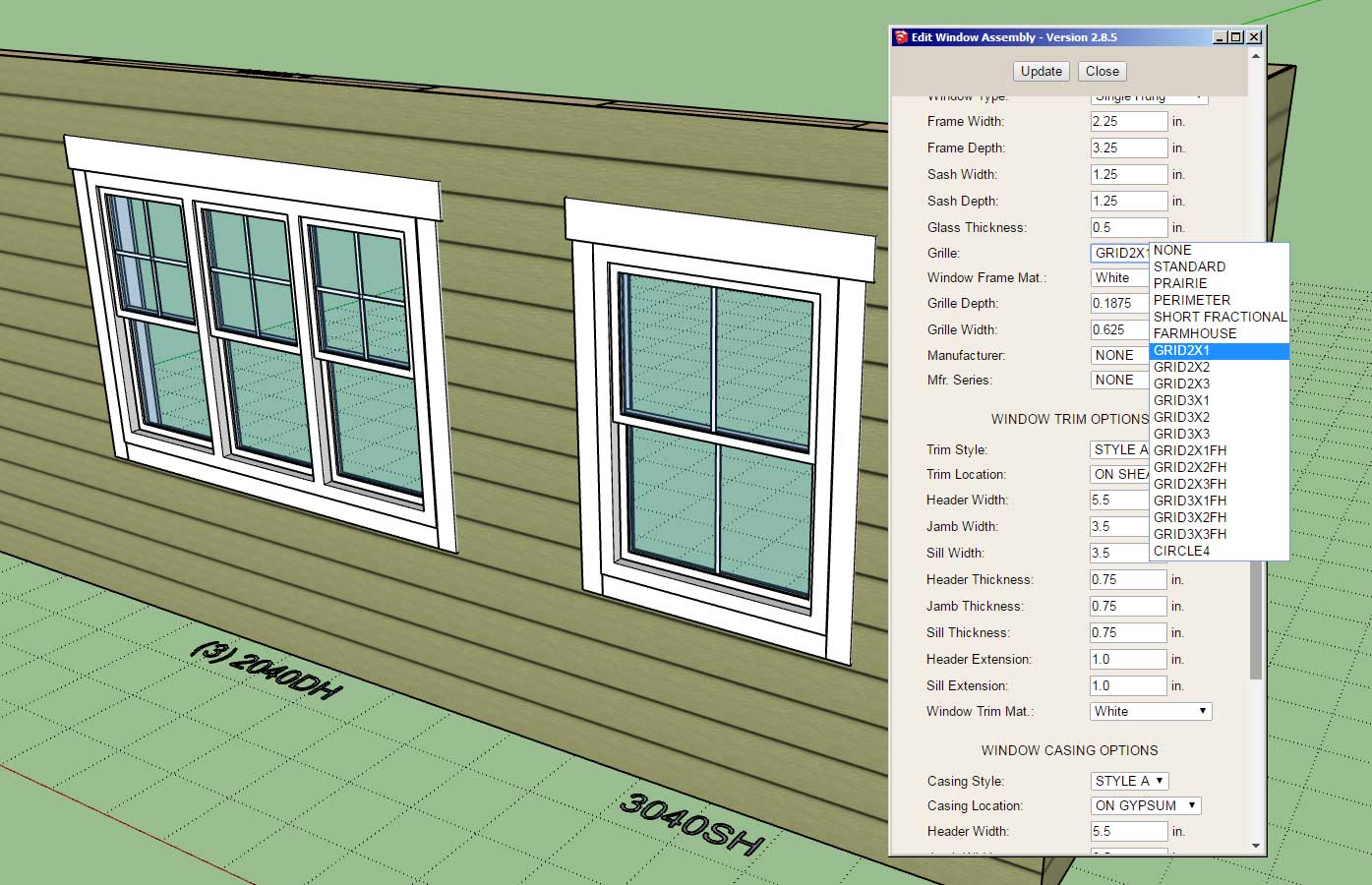
                          • Added additional grille options for windows and doors.
                          http://design.medeek.com/resources/wallplugin/images3/wall_su642_800.jpg

                          The additional grille options are all GRID options. The "FH" appending the window grille options stands for "Farm House". When this option is chosen the grille is only installed in the top window of a single or double hung type window.

                          Nathaniel P. Wilkerson PE
                          Medeek Engineering Inc
                          design.medeek.com

                          1 Reply Last reply
                          0
                          • medeekM Offline
                            medeekM Offline
                            medeek
                            wrote on last edited by
                            #1230

                            Version 2.9.2 - 07.24.2022

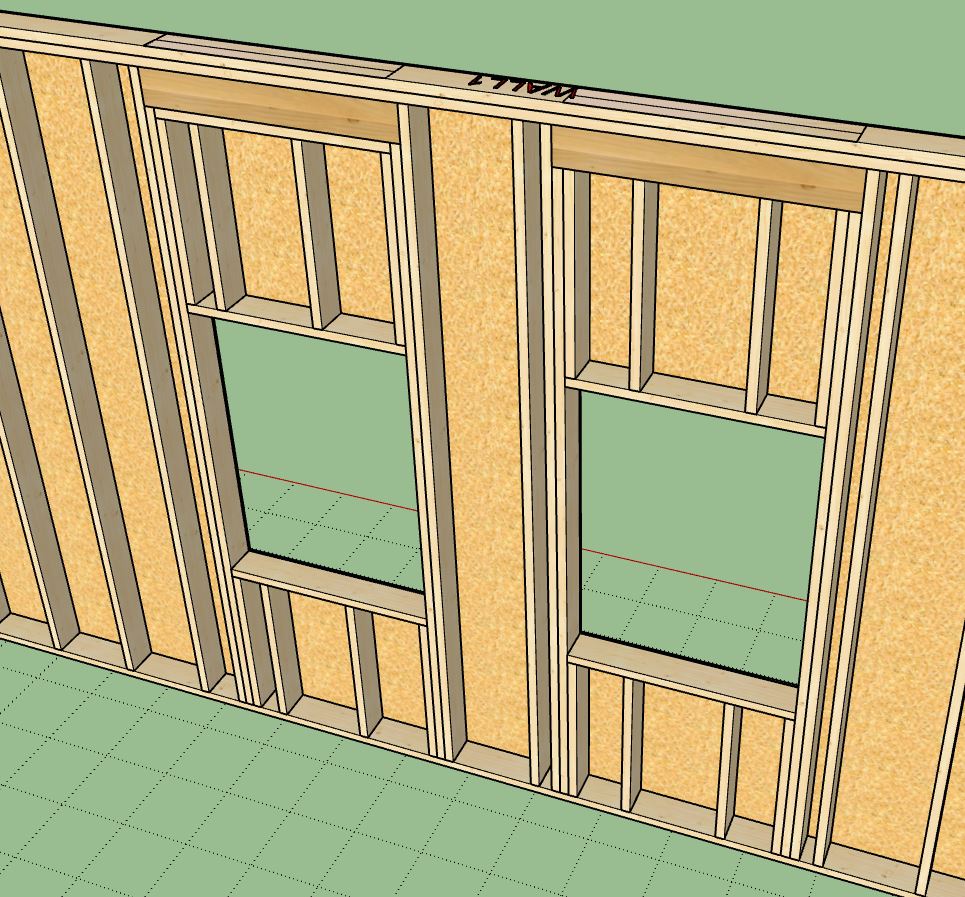
                            • Added one additional raised header configuration for windows and doors.
                            http://design.medeek.com/resources/wallplugin/images3/wall_su643_800.jpg

                            http://design.medeek.com/resources/wallplugin/images3/wall_su644_800.jpg

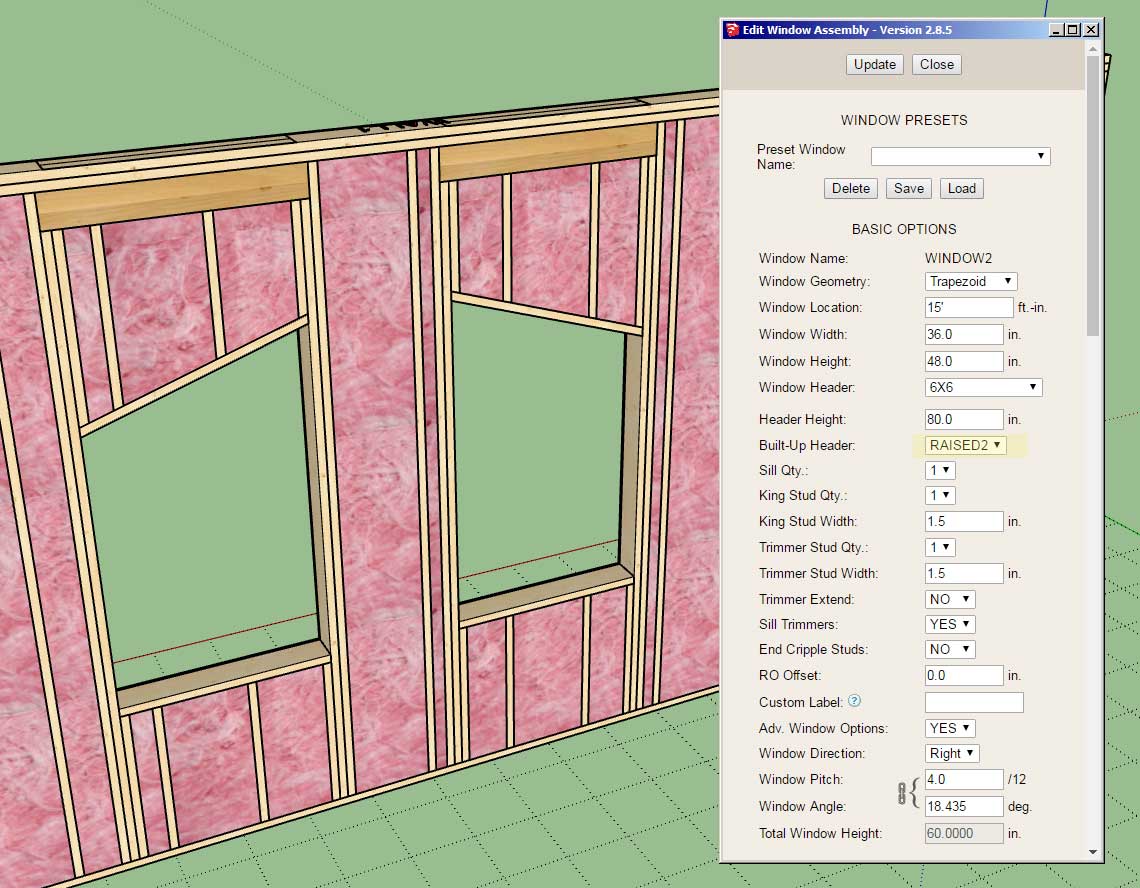
                            The "RAISED2" configuration removes the plate directly below the header. This update per customer request.

                            Nathaniel P. Wilkerson PE
                            Medeek Engineering Inc
                            design.medeek.com

                            1 Reply Last reply
                            0
                            • medeekM Offline
                              medeekM Offline
                              medeek
                              wrote on last edited by
                              #1231

                              Version 2.9.3 - 07.29.2022

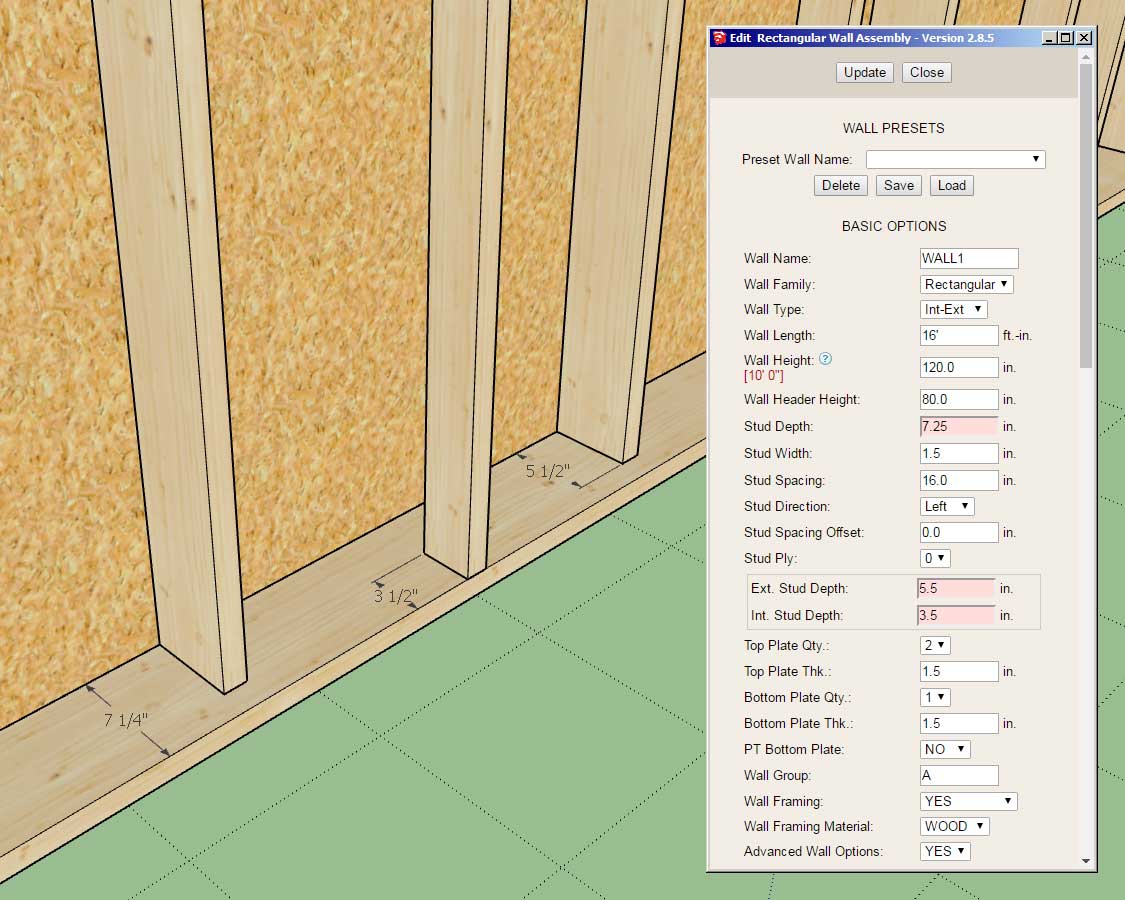
                              • Enabled independent control of exterior and interior stud depths for staggered stud walls (rectangular only).
                              http://design.medeek.com/resources/wallplugin/images4/wall_su645_800.jpg

                              Previously staggered studs were auto-calculated and one could not independently control the stud depth for the exterior and interior studs. This latest update allows for granular control of the stud depths and makes the staggered stud feature more flexible and useful.

                              Nathaniel P. Wilkerson PE
                              Medeek Engineering Inc
                              design.medeek.com

                              1 Reply Last reply
                              0
                              • medeekM Offline
                                medeekM Offline
                                medeek
                                wrote on last edited by
                                #1232

                                After some further thought to window and door casings (interior trim) I realized it would be useful to enable a system whereby the user could essentially create their own profiles and add them into the plugin (library folder) themselves.

                                I will probably include some pre-added profiles like the 365 and a few other common ones, but this way it will be much more flexible for the user and customizable.

                                https://aws1.discourse-cdn.com/sketchup/original/3X/4/0/4012ef82410fc508df0062d1591dc52dae72a55c.jpeg

                                I will start with the door casings first and then add this feature to the window module after.

                                Nathaniel P. Wilkerson PE
                                Medeek Engineering Inc
                                design.medeek.com

                                1 Reply Last reply
                                0
                                • medeekM Offline
                                  medeekM Offline
                                  medeek
                                  wrote on last edited by
                                  #1233

                                  First look at custom casings:

                                  https://aws1.discourse-cdn.com/sketchup/original/3X/2/2/22874a82fbeb911bdc48033e05bfefec73819d3b.jpeg

                                  https://aws1.discourse-cdn.com/sketchup/original/3X/6/3/6374f37c55c6383eb8a021f9ca1f3966e00df91b.jpeg

                                  Notice that when CUSTOM casing is specified for the Casing Style, the edit or draw menu will provide a preview of the profile as shown.

                                  Now I need to work on enabling this for arched doors and also updating the global settings with this new option.

                                  Nathaniel P. Wilkerson PE
                                  Medeek Engineering Inc
                                  design.medeek.com

                                  1 Reply Last reply
                                  0
                                  • medeekM Offline
                                    medeekM Offline
                                    medeek
                                    wrote on last edited by
                                    #1234

                                    Version 2.9.4 - 08.05.2022

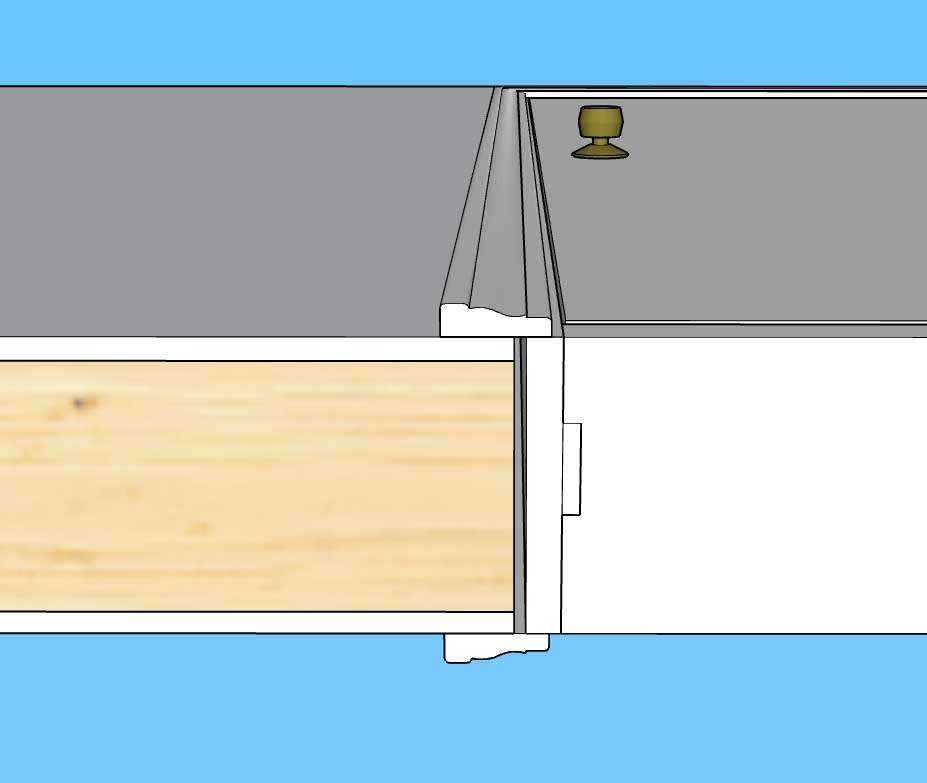
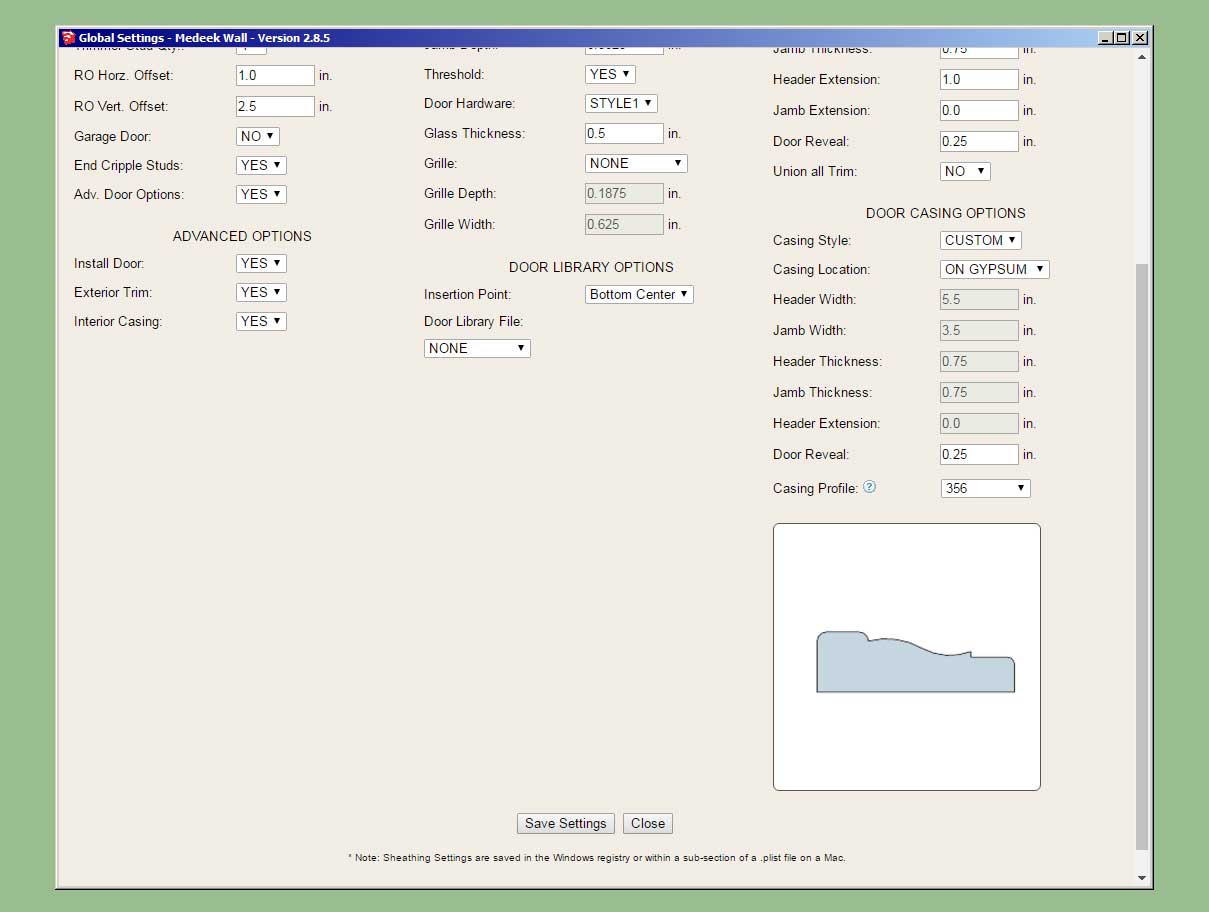
                                    • Enabled CUSTOM door casings for rectangular doors.
                                    • Added a thumbnail preview into the edit and draw door menus showing the custom casing profiles.
                                    • Added a thumbnail preview into the Door tab of the Global Settings and added the custom profile parameter.
                                    http://design.medeek.com/resources/wallplugin/images4/wall_su648_800.jpg

                                    http://design.medeek.com/resources/wallplugin/images4/wall_su649_800.jpg

                                    Additional profiles can be added into the "casings" sub-folder of the "library" folder within the plugin folder. Placement of the profile is important, so best practice is to open one of the two examples within this sub-folder and duplicate its positioning and grouping.

                                    I will still need to enable this feature for arched doors and all window types, so much more work is yet to be done in this regard. It seems there is never a lack of work when it comes to this plugin.

                                    Nathaniel P. Wilkerson PE
                                    Medeek Engineering Inc
                                    design.medeek.com

                                    1 Reply Last reply
                                    0
                                    • medeekM Offline
                                      medeekM Offline
                                      medeek
                                      wrote on last edited by
                                      #1235

                                      Version 2.9.5 - 08.06.2022

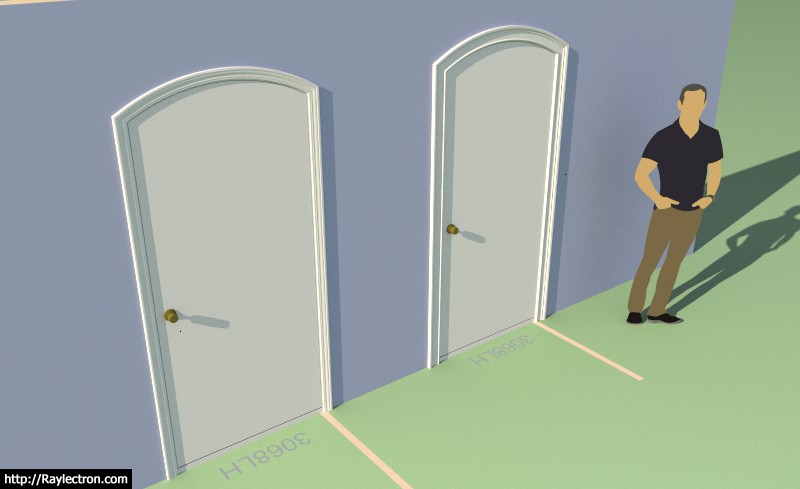
                                      • Enabled CUSTOM door casings for arched doors.
                                      • Added CUSTOM D and CUSTOM F door casing options for rectangular doors.
                                      http://design.medeek.com/resources/wallplugin/images4/wall_su650_800.jpg

                                      http://design.medeek.com/resources/wallplugin/images4/wall_su651_800.jpg

                                      Nathaniel P. Wilkerson PE
                                      Medeek Engineering Inc
                                      design.medeek.com

                                      1 Reply Last reply
                                      0
                                      • medeekM Offline
                                        medeekM Offline
                                        medeek
                                        wrote on last edited by
                                        #1236

                                        Version 2.9.6 - 08.07.2022

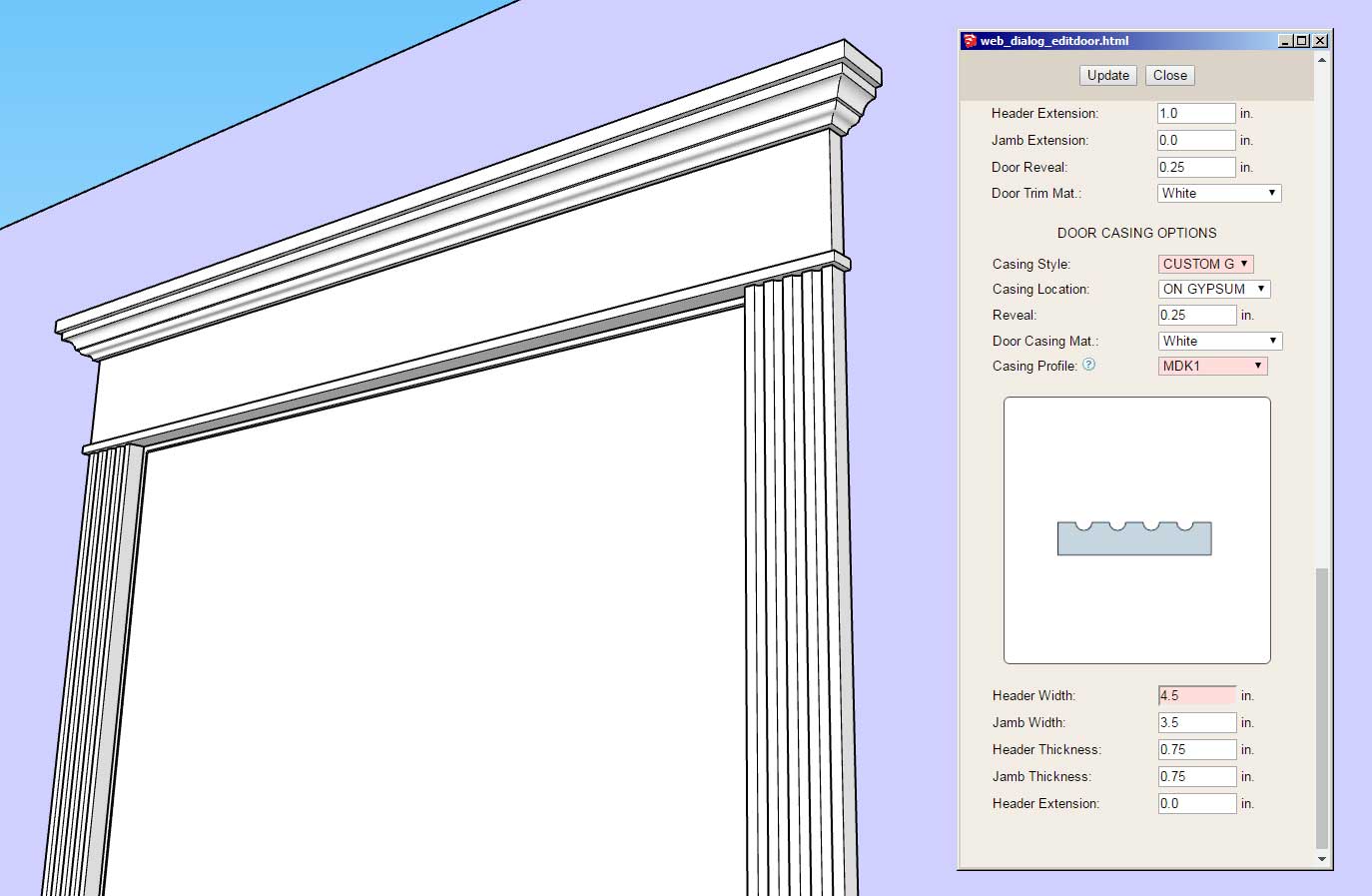
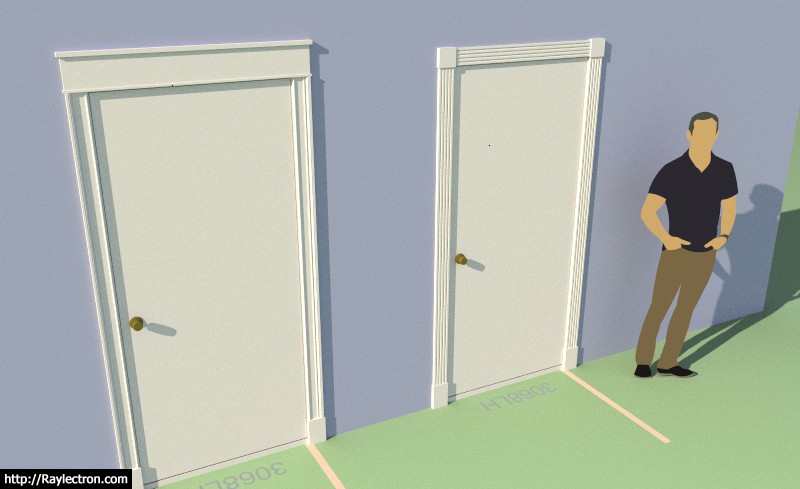
                                        • Added STYLE G and CUSTOM G casing options for rectangular doors.
                                        http://design.medeek.com/resources/wallplugin/images4/wall_su653_800.jpg

                                        I had to add in these two styles since they are used in our own home. I think I have finally beaten this horse to death but if there are any other styles you feel should be added please feel free to contact me or post them here.

                                        The profile for the upper molding is found in the "system" sub-folder of the "library" folder. It can be edited and customized by the user. The file name is: CM_HEADER.skp

                                        Nathaniel P. Wilkerson PE
                                        Medeek Engineering Inc
                                        design.medeek.com

                                        1 Reply Last reply
                                        0
                                        • medeekM Offline
                                          medeekM Offline
                                          medeek
                                          wrote on last edited by
                                          #1237

                                          First look at Style G applied to a window:

                                          https://aws1.discourse-cdn.com/sketchup/original/3X/a/e/ae75519ca5908b72904a3969fcbd1c67ea1bdeca.jpeg

                                          Nathaniel P. Wilkerson PE
                                          Medeek Engineering Inc
                                          design.medeek.com

                                          1 Reply Last reply
                                          0

                                          Hello! It looks like you're interested in this conversation, but you don't have an account yet.

                                          Getting fed up of having to scroll through the same posts each visit? When you register for an account, you'll always come back to exactly where you were before, and choose to be notified of new replies (either via email, or push notification). You'll also be able to save bookmarks and upvote posts to show your appreciation to other community members.

                                          With your input, this post could be even better 💗

                                          Register Login
                                          Reply
                                          • Reply as topic
                                          Log in to reply
                                          • Oldest to Newest
                                          • Newest to Oldest
                                          • Most Votes


                                          • 1
                                          • 2
                                          • 61
                                          • 62
                                          • 63
                                          • 64
                                          • 65
                                          • 78
                                          • 79
                                          Buy SketchPlus
                                          Buy SUbD
                                          Buy WrapR
                                          Buy eBook
                                          Buy Modelur
                                          Buy Vertex Tools
                                          Buy SketchCuisine
                                          Buy FormFonts

                                          Advertisement

                                          • Login

                                          • Login or register to search.
                                          • First post
                                            Last post
                                          0