sketchucation logo sketchucation
    • 登入
    Oops, your profile's looking a bit empty! To help us tailor your experience, please fill in key details like your SketchUp version, skill level, operating system, and more. Update and save your info on your profile page today!
    🔌 Easy Offset | Offset selected faces in SketchUp in positive and negative offsets. Download

    Medeek Wall Plugin

    已排程 已置頂 已鎖定 已移動 Plugins
    1.5k 貼文 27 Posters 1.1m 瀏覽 26 Watching
    正在載入更多貼文
    • 從舊到新
    • 從新到舊
    • 最多點贊
    回覆
    • 在新貼文中回覆
    登入後回覆
    此主題已被刪除。只有擁有主題管理權限的使用者可以查看。
    • medeekM 離線
      medeek
      最後由 編輯

      Version 1.9.0 - 02.24.2021

      • Fixed a bug with the end stud height for Shed Walls with an "Inset Outside Corner".

      Nathaniel P. Wilkerson PE
      Medeek Engineering Inc
      design.medeek.com

      1 條回覆 最後回覆 回覆 引用 0
      • medeekM 離線
        medeek
        最後由 編輯

        mdkBIM Introduction (Japanese - 日本語)

        A brief introduction of the mdkBIM bundle in Japanese.
        mdkBIMバンドルの日本語での簡単な紹介です。

        Nathaniel P. Wilkerson PE
        Medeek Engineering Inc
        design.medeek.com

        1 條回覆 最後回覆 回覆 引用 0
        • medeekM 離線
          medeek
          最後由 編輯

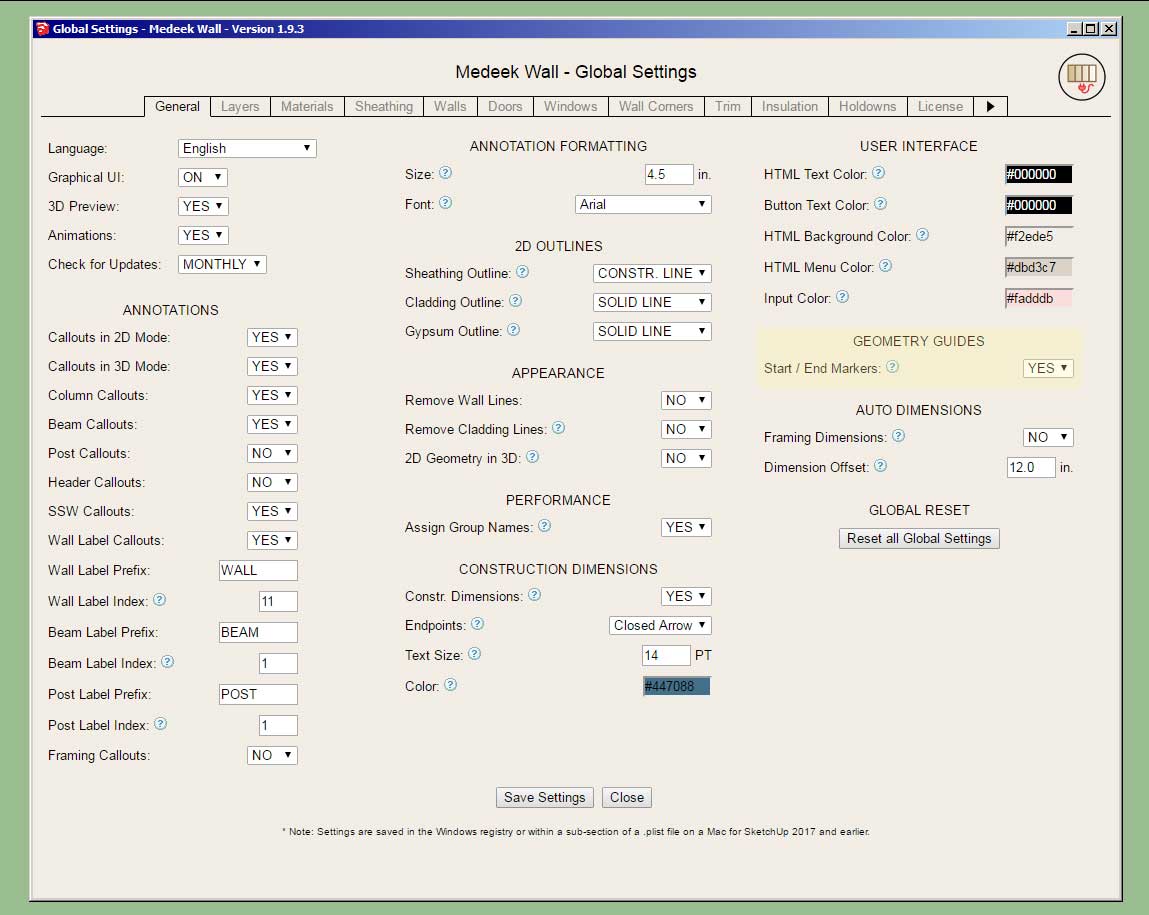
          Version 1.9.1 - 02.27.2021

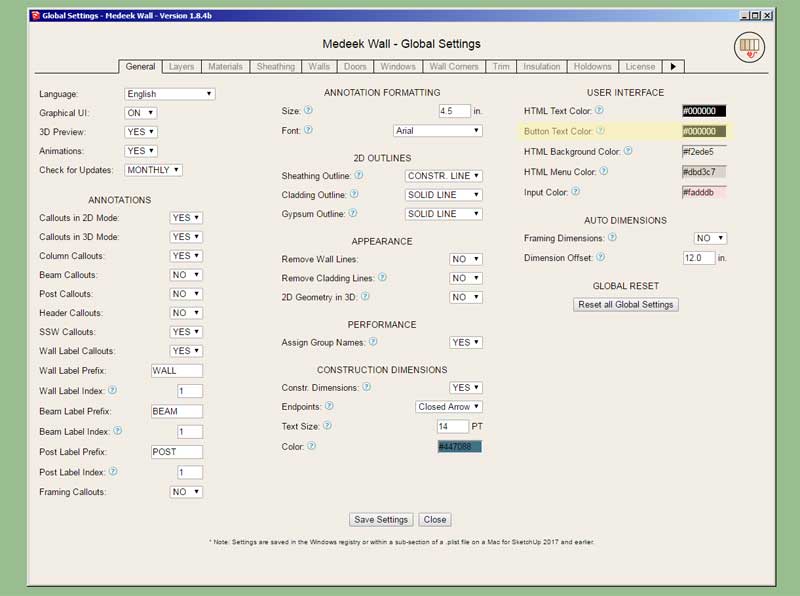
          • Added one additional parameter to the "User Interface" section of the General tab of the global settings. This allows the customization (color) of the text of the HTML buttons.
          http://design.medeek.com/resources/wallplugin/images/wall_su486_800.jpg

          This should also resolve the issue with the "white" text of the HTML buttons for MacOS.

          Nathaniel P. Wilkerson PE
          Medeek Engineering Inc
          design.medeek.com

          1 條回覆 最後回覆 回覆 引用 0
          • medeekM 離線
            medeek
            最後由 編輯

            First look at the new Custom Beam Library. This will allow the user to create custom sized lumber, SCL or Timber beams:

            https://aws1.discourse-cdn.com/sketchup/optimized/3X/1/0/10c6b11a1d350603d484b733907e154087f1f649_2_690x485.jpeg

            Nathaniel P. Wilkerson PE
            Medeek Engineering Inc
            design.medeek.com

            1 條回覆 最後回覆 回覆 引用 0
            • medeekM 離線
              medeek
              最後由 編輯

              Version 1.9.2 - 03.01.2021

              • Added a Custom Beam Library/Manager in the Beams tab of the Global Settings.
              • Enabled custom sizes for Sawn Lumber, Timber and SCL(PSL,LSL,LVL) beams.

              This may seem like a rather minor update but there actually is quite a bit of code behind any of these custom libraries (within the global settings) and their menu systems, hence the three days of programming that was required.

              Since glulam beams use a different sizing system I did not enable custom sizes for that beam type. Additionally, all of the steel profiles are also quite a bit more complicated than a simple width x depth profile (rectangle) so they were also not included in this update. If there are specific wide flange steel beam sizes etc... that you would like to see me add, please feel free to contact me.

              Nathaniel P. Wilkerson PE
              Medeek Engineering Inc
              design.medeek.com

              1 條回覆 最後回覆 回覆 引用 0
              • jujuJ 離線
                juju
                最後由 編輯

                :: OFF TOPIC ::

                Happy cake day Nathaniel.

                Save the Earth, it's the only planet with chocolate.

                1 條回覆 最後回覆 回覆 引用 0
                • medeekM 離線
                  medeek
                  最後由 編輯

                  Yup, I'm 49 today, my kids say I'm oooold. I'll probably still be working on this plugin when I'm 60 at the rate I'm going. 😄

                  Nathaniel P. Wilkerson PE
                  Medeek Engineering Inc
                  design.medeek.com

                  1 條回覆 最後回覆 回覆 引用 0
                  • medeekM 離線
                    medeek
                    最後由 編輯

                    Version 1.9.2b - 03.02.2021

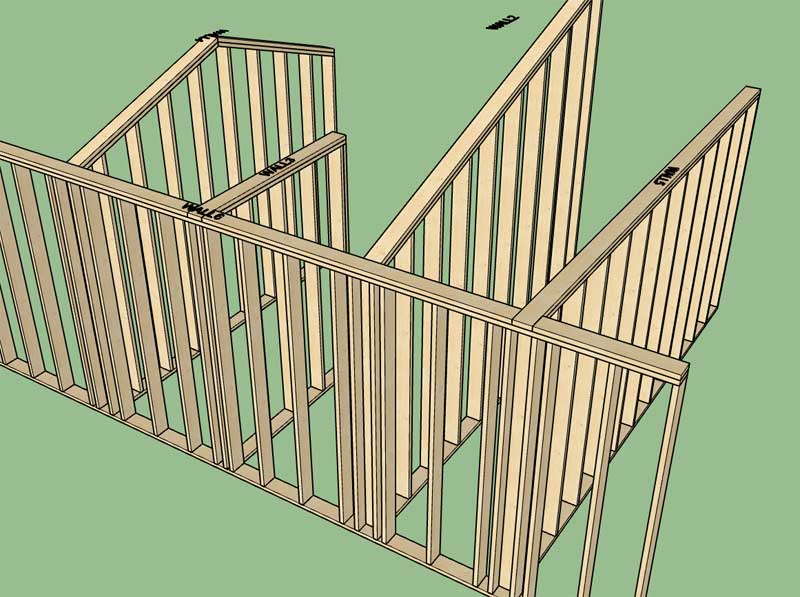
                    • Fixed the framing bug with the top plates of rectangular walls so that they are not cut out when a tee intersection is created with non-rectangular walls.
                    http://design.medeek.com/resources/wallplugin/images/wall_su488_800.jpg

                    Nathaniel P. Wilkerson PE
                    Medeek Engineering Inc
                    design.medeek.com

                    1 條回覆 最後回覆 回覆 引用 0
                    • medeekM 離線
                      medeek
                      最後由 編輯

                      Version 1.9.2c - 03.02.2021

                      • Fixed a bug with tee intersection blocking for gable, shed and hip walls.

                      Nathaniel P. Wilkerson PE
                      Medeek Engineering Inc
                      design.medeek.com

                      1 條回覆 最後回覆 回覆 引用 0
                      • medeekM 離線
                        medeek
                        最後由 編輯

                        Version 1.9.3 - 03.03.2021

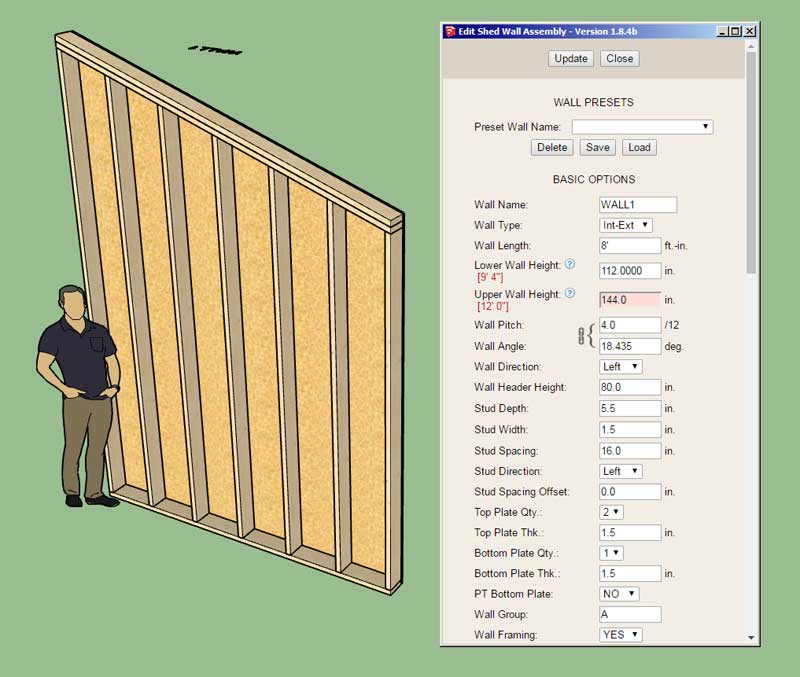
                        • Added the ability to set the lower and upper wall heights of a shed wall within the edit menu.
                        http://design.medeek.com/resources/wallplugin/images/wall_su489_800.jpg

                        Note that the relation between the upper and lower wall heights is a function of the wall length. Therefore if you adjust the wall length the menu will adjust the upper wall height while maintaining the lower wall height.

                        Adjusting the lower wall height will cause the upper wall height to be calculated, based on the current length.
                        Adjusting the upper wall height will cause the lower wall height to be calculated, based on the current length.

                        Nathaniel P. Wilkerson PE
                        Medeek Engineering Inc
                        design.medeek.com

                        1 條回覆 最後回覆 回覆 引用 0
                        • medeekM 離線
                          medeek
                          最後由 編輯

                          Version 1.9.4 - 03.05.2021

                          • Minor adjustment to the tee intersection algorithm (tee blocking and top plate cut outs) for all wall types.

                          This update addresses some issues with tee intersections and walls of differing heights. I think this latest update is an improvement over the previous algorithm however I am still open to further tuning and refinement if there is further call for it.

                          As always I appreciate the constant feedback and testing being performed by the passionate and invested user base, without this valuable feedback the plugin(s) would certainly not have advanced as far as they have.

                          Nathaniel P. Wilkerson PE
                          Medeek Engineering Inc
                          design.medeek.com

                          1 條回覆 最後回覆 回覆 引用 0
                          • medeekM 離線
                            medeek
                            最後由 編輯

                            Version 1.9.5 - 03.07.2021

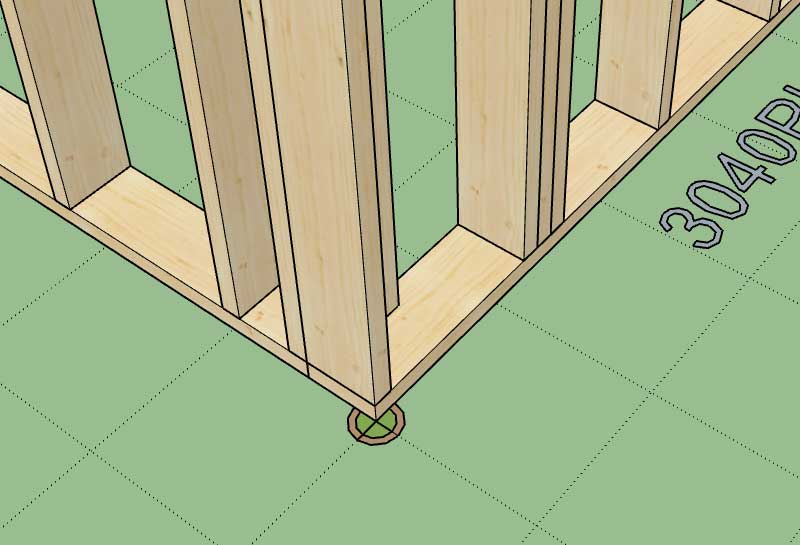
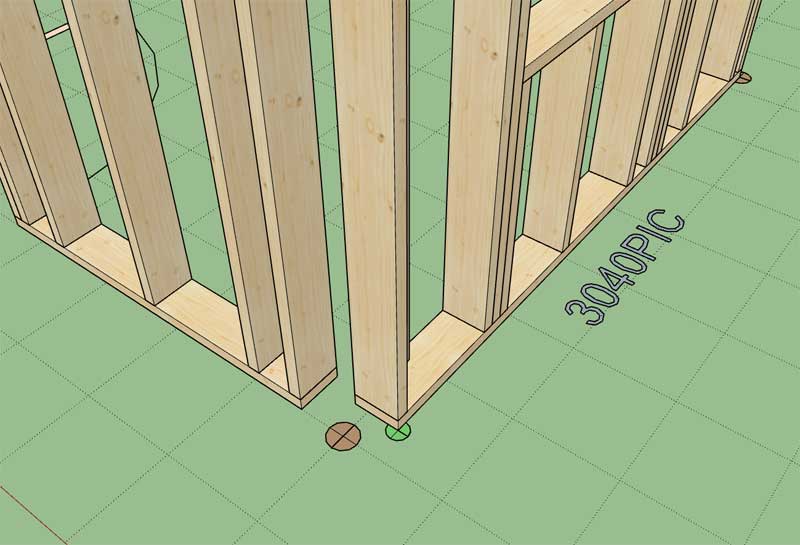
                            • Added an option for "Geometry Guides" at the start and end of all wall types.
                            • Added the "Start / End Marker" parameter to the General tab of the Global Settings.
                            http://design.medeek.com/resources/wallplugin/images/wall_su490_800.jpg

                            http://design.medeek.com/resources/wallplugin/images/wall_su491_800.jpg

                            http://design.medeek.com/resources/wallplugin/images/wall_su492_800.jpg

                            The reason for this "Geometric Guide" feature is to help people understand how wall corners connect to each other (or don't connect). You can turn this on in the global settings and it will help you understand how to connect your wall panels at the ends/corners. I've had a lot of questions on wall corners lately so I hope this will help answer some of those questions.

                            Nathaniel P. Wilkerson PE
                            Medeek Engineering Inc
                            design.medeek.com

                            1 條回覆 最後回覆 回覆 引用 0
                            • medeekM 離線
                              medeek
                              最後由 編輯

                              Version 1.9.6 - 03.09.2021

                              • Added a layer for "symbols" to the miscellaneous layer/tag options (Layer tab of the Global Settings).
                              • Fixed a minor bug in the shed wall edit menu.

                              This update moves the symbols for windows, doors, garage doors, shearwalls, in-wall columns and holdowns to the "wall_symbol" layer/tag.

                              Nathaniel P. Wilkerson PE
                              Medeek Engineering Inc
                              design.medeek.com

                              1 條回覆 最後回覆 回覆 引用 0
                              • medeekM 離線
                                medeek
                                最後由 編輯

                                Version 1.9.7 - 03.12.2021

                                • Fixed a bug involving gable, shed and hips walls that are created adjacent to rectangular walls.
                                • Fixed a minor bug involving regeneration of dissimilar wall types at the same type.

                                Nathaniel P. Wilkerson PE
                                Medeek Engineering Inc
                                design.medeek.com

                                1 條回覆 最後回覆 回覆 引用 0
                                • medeekM 離線
                                  medeek
                                  最後由 編輯

                                  Version 1.9.8 - 03.13.2021

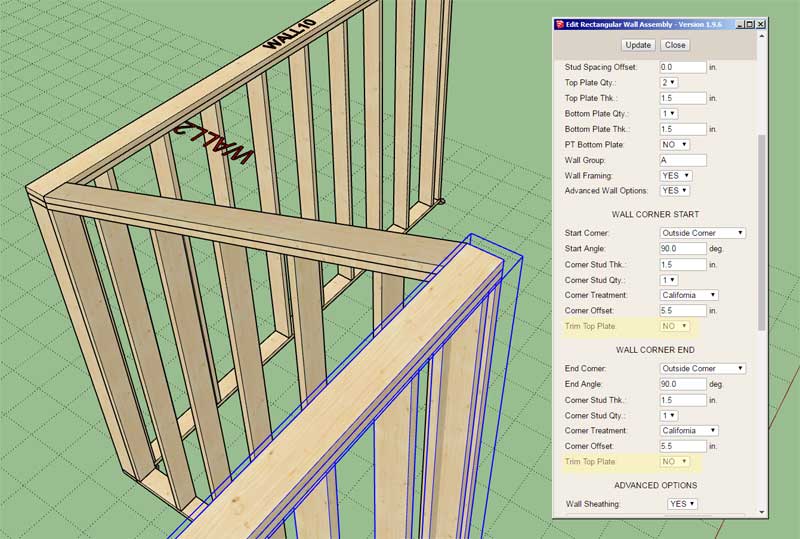
                                  • Added an extra (Trim Top Plate) parameter to the "Start" and "End" configurations of rectangular walls.
                                  http://design.medeek.com/resources/wallplugin/images/wall_su494_800.jpg

                                  **** CAUTION ****
                                  This update adds two new parameters to the rectangular walls and will require the user to delete and recreate any rectangular wall presets. This upgrade does not affect gable wall or any other presets (ie. windows, door, garage, gable wall, shed wall, hip wall).

                                  This parameter (for the start and end of the wall) should normally be assigned to a value of "YES", this is also its default behavior. However, in certain cases (such as a corner with a shed or gable wall) it may be useful to configure its value as "NO", as shown in the image above.

                                  Nathaniel P. Wilkerson PE
                                  Medeek Engineering Inc
                                  design.medeek.com

                                  1 條回覆 最後回覆 回覆 引用 0
                                  • medeekM 離線
                                    medeek
                                    最後由 編輯

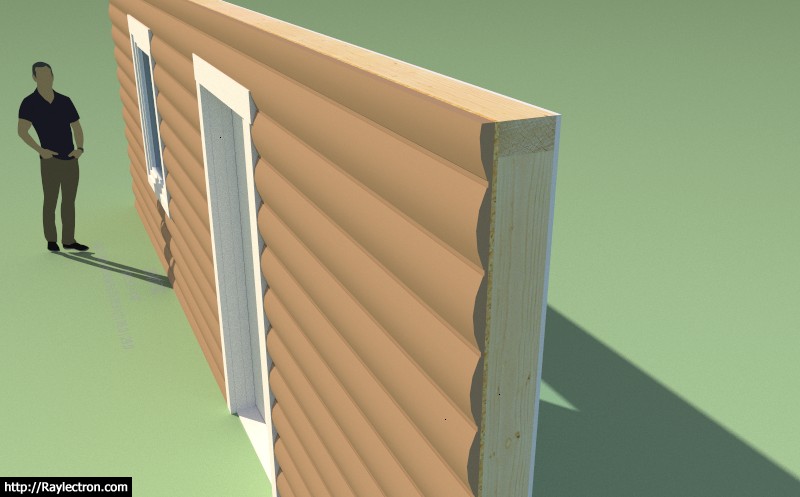
                                    I’ve had some recent interest in a log siding/cladding similar to the shiplap cladding I enabled recently:

                                    https://aws1.discourse-cdn.com/sketchup/original/3X/8/8/8848f4df76b98d11aa7ecb6c0b5050cd0db5b92e.jpeg

                                    Thoughts?

                                    Nathaniel P. Wilkerson PE
                                    Medeek Engineering Inc
                                    design.medeek.com

                                    1 條回覆 最後回覆 回覆 引用 0
                                    • pbacotP 離線
                                      pbacot
                                      最後由 編輯

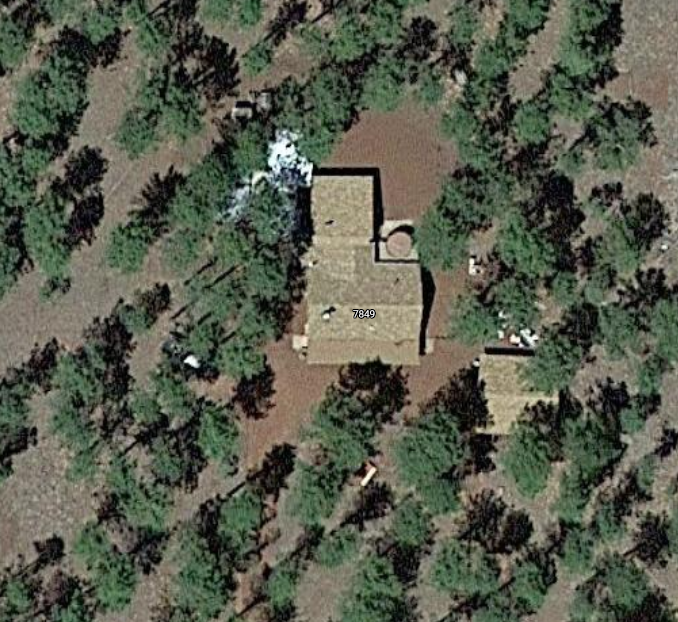
                                      Fond memories of my parents' little old cabin in Arizona (no picture handy-- no street view--still there and little changed). Is the tongue in the ship lap that thin? Maybe so. About half an inch?

                                      Screen Shot 2021-03-18 at 10.54.00 PM.png

                                      MacOSX MojaveSketchUp Pro v19 Twilight v2 Thea v3 PowerCADD

                                      1 條回覆 最後回覆 回覆 引用 0
                                      • medeekM 離線
                                        medeek
                                        最後由 編輯

                                        The example shown is not dimensional correct per se, just representative at this moment.

                                        Nathaniel P. Wilkerson PE
                                        Medeek Engineering Inc
                                        design.medeek.com

                                        1 條回覆 最後回覆 回覆 引用 0
                                        • medeekM 離線
                                          medeek
                                          最後由 編輯

                                          Version 1.9.9 - 03.20.2021

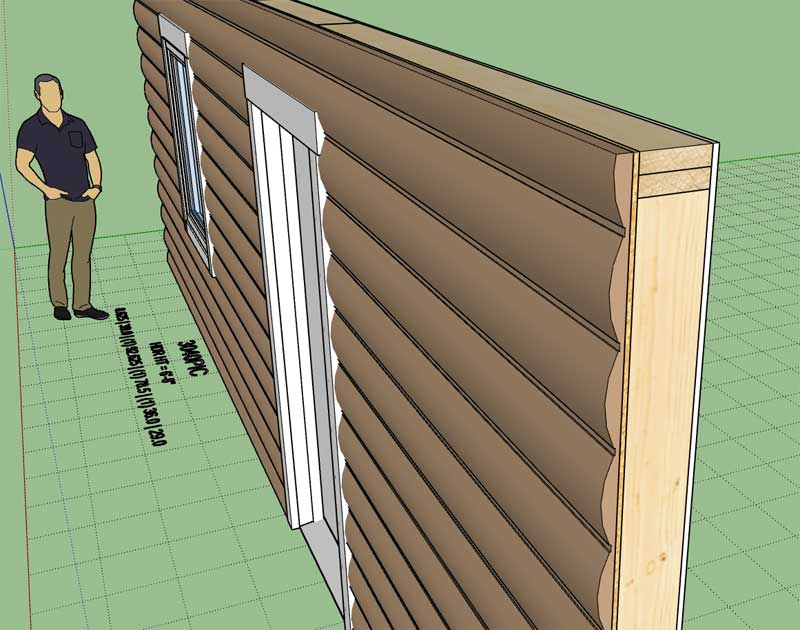
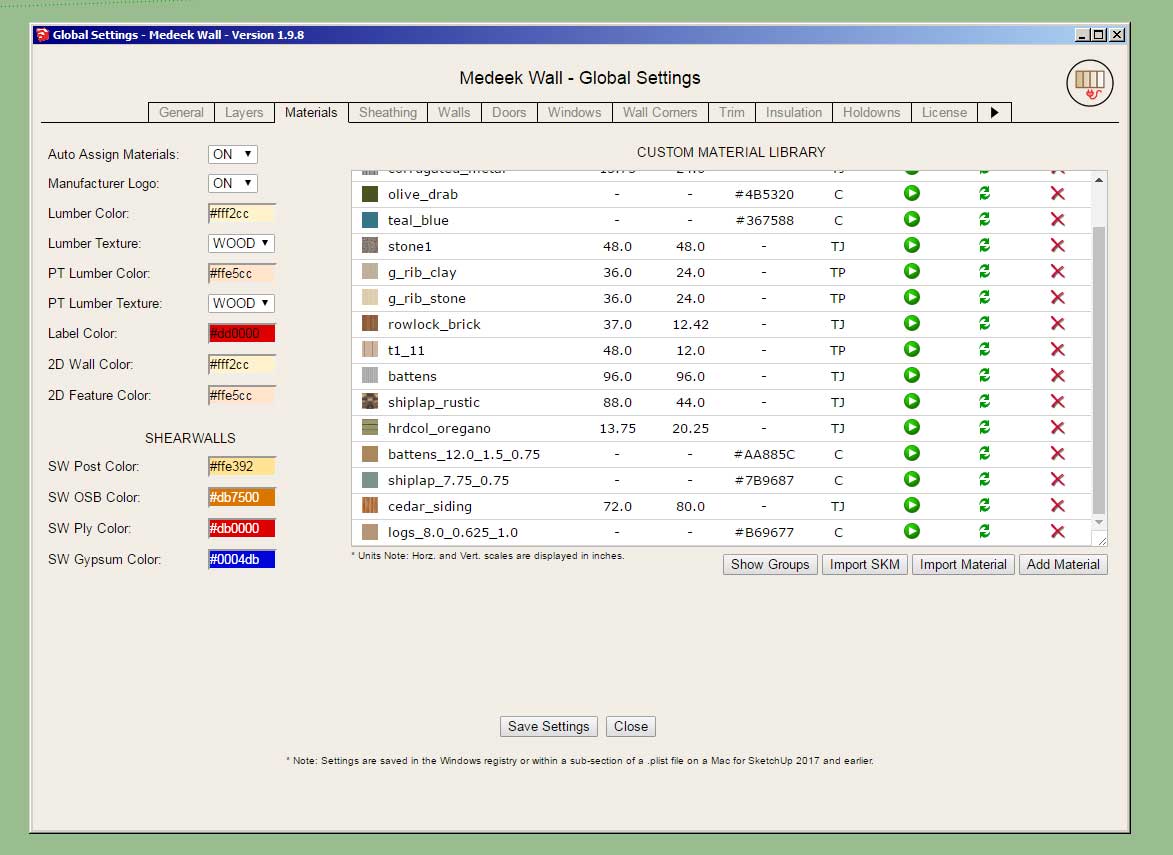
                                          • Added the ability to create custom "Log" wall cladding materials within the Material Library.
                                          • Enabled "3D" Log wall cladding for all wall types: Rectangular, Gable, Shed and Hip.
                                          http://design.medeek.com/resources/wallplugin/images/wall_su497_800.jpg

                                          http://design.medeek.com/resources/wallplugin/images/wall_su495_800.jpg

                                          http://design.medeek.com/resources/wallplugin/images/wall_su496_800.jpg

                                          View model here:

                                          Link Preview Image
                                          3D Warehouse

                                          3D Warehouse is a website of searchable, pre-made 3D models that works seamlessly with SketchUp.

                                          favicon

                                          (3dwarehouse.sketchup.com)

                                          Nathaniel P. Wilkerson PE
                                          Medeek Engineering Inc
                                          design.medeek.com

                                          1 條回覆 最後回覆 回覆 引用 0
                                          • medeekM 離線
                                            medeek
                                            最後由 編輯

                                            Here is an issue with half walls that tee into other walls. Notice how the gypsum is being cut:

                                            https://aws1.discourse-cdn.com/sketchup/original/3X/2/b/2b560a8d2675e5ed5b75a9e4505e9871afb0c766.jpeg

                                            Let's see if I can adjust the gypsum module to rectify this particular situation.

                                            Nathaniel P. Wilkerson PE
                                            Medeek Engineering Inc
                                            design.medeek.com

                                            1 條回覆 最後回覆 回覆 引用 0
                                            • 1
                                            • 2
                                            • 71
                                            • 72
                                            • 73
                                            • 74
                                            • 75
                                            • 74 / 75
                                            • 第一個貼文
                                              最後的貼文
                                            Buy SketchPlus
                                            Buy SUbD
                                            Buy WrapR
                                            Buy eBook
                                            Buy Modelur
                                            Buy Vertex Tools
                                            Buy SketchCuisine
                                            Buy FormFonts

                                            Advertisement