Wish list for Sketchup 2018
-
@pipingguy said:
to Dave's point...I will watch for the next time the edit warning pops up so i can screen-grab it.
As it's not a native SketchUp function to bring up this message, it's within your capability to prevent it from showing.
-
@jonathonlt said:
@john sayers said:
I would like the Windows version to have 2 or more files open at once - I gather the Mac version already has this feature.
see if this works , if I try and move it I PROBARBLY loose it ,,my relavent post is in DEVELOPERS FORUM headed DOC MULTIPLE MODELS the NEW (full) pic did not upload and I am short of line time from Jon
I would try ,,cross reference organiser tho 14 day trial would not load ,,probarbly more than a single user needs,, I still work with my collage A3 drawing board , and can often have many drawings to hand,, multiple SU opened has no flow ,,so here is an idea of how it could possibly work ,if one of those those magic programmer,s "clock it" Jon ,,,
docked models could have a user default size and window position so swapping is immediate ,,successive models ,,the same,, to unclutter the view ,floating model commands ,use the main toolbar choices,,>>> cliq M-doc,, > open doc models folder ( same as model folder) select 1 or more models > cliq open ,,this then loads all reference models needed to M-doc > float over doc to select,> this and a few more intracuss,s er might create a work flow JON ,,trying,,
The Print screen above looks like a bad trip. Heaven forbid!

-
BOX suggests a guide need not be left as a remnant when resizing. I can understand that when the object is rectangular. Just drag the tape measure along an edge from a corner - but what if you wanted to resize a cylinder's diameter?
-
@pipingguy said:
BOX suggests a guide need not be left as a remnant when resizing. - but what if you wanted to resize a cylinder's diameter?
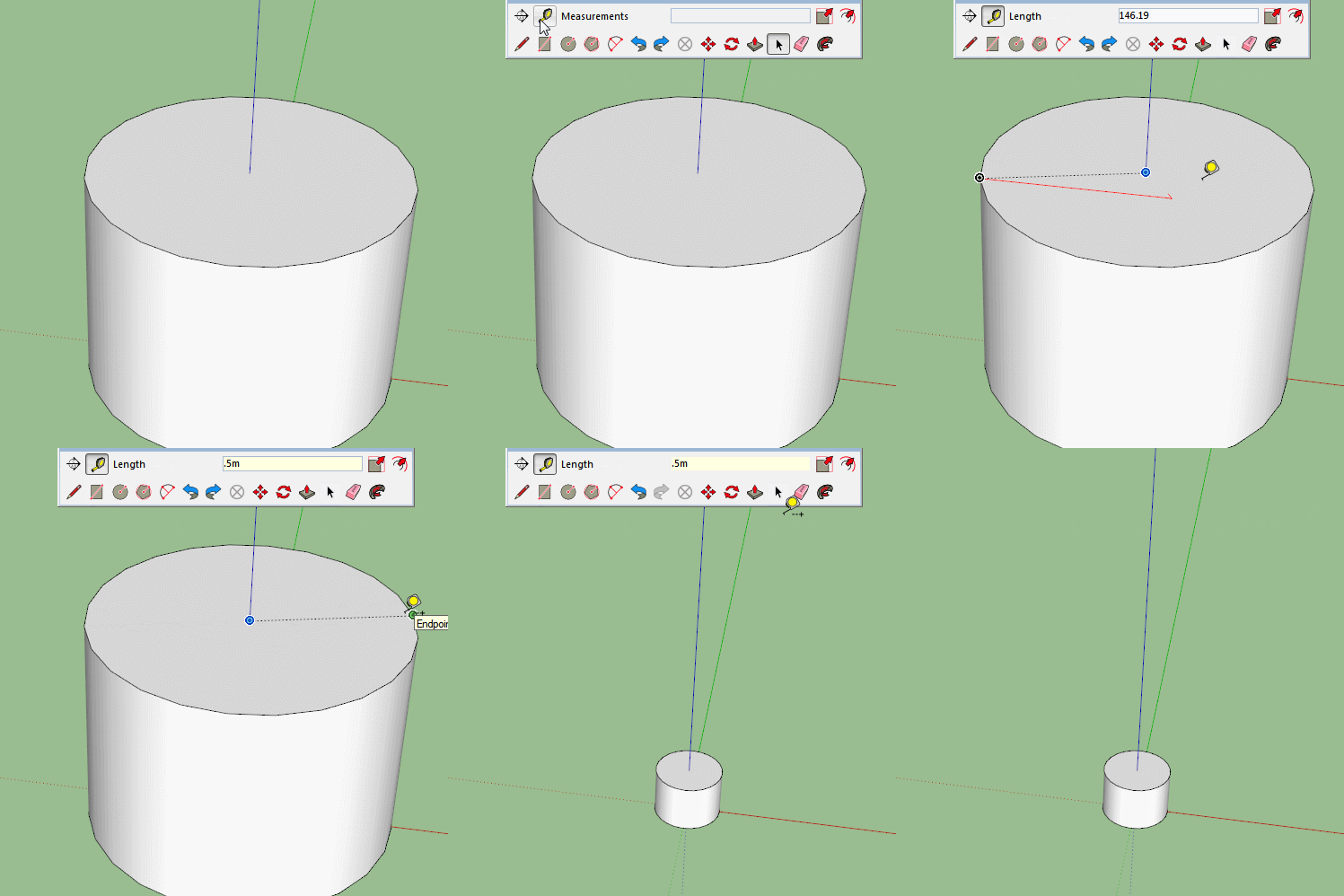
-
@pipingguy said:
BOX suggests a guide need not be left as a remnant when resizing. I can understand that when the object is rectangular. Just drag the tape measure along an edge from a corner - but what if you wanted to resize a cylinder's diameter?
AS Box shows, no guideline needs to be created but even when you do have guidelines to get rid of, why don't you setup a keyboard shortcut to delete guides?
-
Just found this thread and haven't read all the request.
I have a simple request, somehow, make all the "Sketchup toolbars" be listed at the beginning of the view toolbars ahead of all the imported toolbars or at least clustered. Example, rename all the Sketchup toolbars as SK_Construction or SK_Drawing to get them clustered in the SK region.
Now is that too much to ask for?
Ken
-
@unknownuser said:
Just found this thread and haven't read all the request.
I have a simple request, somehow, make all the "Sketchup toolbars" be listed at the beginning of the view toolbars ahead of all the imported toolbars or at least clustered. Example, rename all the Sketchup toolbars as SK_Construction or SK_Drawing to get them clustered in the SK region.
Now is that too much to ask for?
Ken
Is this the same as the menu item "View / Tool Palettes" on the Mac? Mine were never alphanumerically listed. I can't figure out why SketchUp has abandoned A-N listings in various lists. Just annoying to have to scan/search for things in this day and age. The Extensions tab is another example.
-
The main thing I been waiting for is better UV mapping tools.....like many other 3D modeling programs have. When making game assets I have to port everything to Blender to finish. It would be great if we could stay in Sketchup to the end.
-
Unlike Box' GIF, I always get an infinite guideline when i stretch my tape measure tool across a cylinder's end. what am i doing wrong? As for erasing unwanted guidelines and guidepoints with a SHORTCUT KEY - i actually use them as permanent column lines and other points of reference - and so, a global erasure would not serve me well.
-
Wish to nudge objects - like in LayOut.
-
Wish for a search utility in the tray's components panel. (like the search box found in window's file explorer)
-
Wish for fully functional native editable 3D text. I use 3d text to make notes that I later refer to when generating the shop drawing on LayOut. I then erase them to cut down on memory usage. A plugin / extension exists, but it lacks text wrap and the dialogue box always pops up on a different monitor. Also, its text strings exist as a components rather than groups, which are perhaps beneficial to some users, does not work well for me.
-
Can not believe we still can't search component in the model by typing its name.....
@pipingguy said:
Wish for a search utility in the tray's components panel. (like the search box found in window's file explorer)
-
its out









Advertisement