sketchucation logo sketchucation
    • Login
    Oops, your profile's looking a bit empty! To help us tailor your experience, please fill in key details like your SketchUp version, skill level, operating system, and more. Update and save your info on your profile page today!
    ⚠️ Update | Sketchucation Tools 5.0.8 released with licensing improvements and bugfixes Download

    Wish list for Sketchup 2018

    Scheduled Pinned Locked Moved SketchUp Feature Requests
    sketchup
    125 Posts 50 Posters 231.8k Views 50 Watching
    Loading More Posts
    • Oldest to Newest
    • Newest to Oldest
    • Most Votes
    Reply
    • Reply as topic
    Log in to reply
    This topic has been deleted. Only users with topic management privileges can see it.
    • jujuJ
      juju
      last edited by

      @mark_melb said:

      It would be great if the PDF functionality on the Apple version of Sketchup can be had on Windows.

      I may be wrong, but I think that is built into Mac OSX, not into the Mac OSX version of SketchUp.

      Save the Earth, it's the only planet with chocolate.

      1 Reply Last reply
      Reply Quote 0
      • Dave RD
        Dave R
        last edited by

        Juju is correct. It would be great if Microsoft would add the same sort of functionality Apple has for PDF files.

        Etaoin Shrdlu

        %

        (THERE'S NO PLACE LIKE)

        G28 X0.0 Y0.0 Z0.0

        M30

        %

        1 Reply Last reply
        Reply Quote 0
        • P
          pipingguy
          last edited by

          Solve minor issue where you are being notified that you are about to modify a component ("do want to make this unique?"), when in fact, it's really a group. Other times when you attempt to modify a component, the warning does not appear.

          1 Reply Last reply
          Reply Quote 0
          • P
            pipingguy
            last edited by

            Sometimes, when you launch LayOut - or already have it running, but decide to open an additional drawing, you wait and wait until you happen to notice the Windows taskbar icon turned blue, at which point you click it. Let's get that fixed.

            1 Reply Last reply
            Reply Quote 0
            • Dave RD
              Dave R
              last edited by

              @pipingguy said:

              Solve minor issue where you are being notified that you are about to modify a component ("do want to make this unique?"), when in fact, it's really a group. Other times when you attempt to modify a component, the warning does not appear.

              SketchUp doesn't warn you of modifying components natively. Are you sure you don't have a plugin/extension delivering that message?

              AshScott's Edit Flag creates that popup message. You could uninstall it and satisfy one item on your wishlist.

              Etaoin Shrdlu

              %

              (THERE'S NO PLACE LIKE)

              G28 X0.0 Y0.0 Z0.0

              M30

              %

              1 Reply Last reply
              Reply Quote 0
              • P
                pipingguy
                last edited by

                to Dave's point...I will watch for the next time the edit warning pops up so i can screen-grab it.

                1 Reply Last reply
                Reply Quote 0
                • BoxB
                  Box
                  last edited by

                  @pipingguy said:

                  When re-scaling a group or component, the tape measure tool is used. However, more often than not, one needs to go thru the extra step of erasing the resultant guideline before closing the group or component. let's fix that.

                  Done correctly no guideline is created.
                  As I'm on my phone I cannot demonstrate it for you.

                  1 Reply Last reply
                  Reply Quote 0
                  • P
                    pipingguy
                    last edited by

                    When re-scaling (re-sizing) a group or component, the tape measure tool is used. However, more often than not, one needs to go thru the extra step of erasing the resultant guideline before closing the group or component. let's fix that.

                    1 Reply Last reply
                    Reply Quote 0
                    • Dave RD
                      Dave R
                      last edited by

                      @pipingguy said:

                      to Dave's point...I will watch for the next time the edit warning pops up so i can screen-grab it.

                      As it's not a native SketchUp function to bring up this message, it's within your capability to prevent it from showing.

                      Etaoin Shrdlu

                      %

                      (THERE'S NO PLACE LIKE)

                      G28 X0.0 Y0.0 Z0.0

                      M30

                      %

                      1 Reply Last reply
                      Reply Quote 0
                      • R
                        rv1974
                        last edited by

                        @jonathonlt said:

                        @john sayers said:

                        I would like the Windows version to have 2 or more files open at once - I gather the Mac version already has this feature.

                        see if this works , if I try and move it I PROBARBLY loose it ,,my relavent post is in DEVELOPERS FORUM headed DOC MULTIPLE MODELS the NEW (full) pic did not upload and I am short of line time from Jon

                        I would try ,,cross reference organiser tho 14 day trial would not load ,,probarbly more than a single user needs,, I still work with my collage A3 drawing board , and can often have many drawings to hand,, multiple SU opened has no flow ,,so here is an idea of how it could possibly work ,if one of those those magic programmer,s "clock it" Jon ,,,

                        docked models could have a user default size and window position so swapping is immediate ,,successive models ,,the same,, to unclutter the view ,floating model commands ,use the main toolbar choices,,>>> cliq M-doc,, > open doc models folder ( same as model folder) select 1 or more models > cliq open ,,this then loads all reference models needed to M-doc > float over doc to select,> this and a few more intracuss,s er might create a work flow JON ,,trying,,

                        The Print screen above looks like a bad trip. Heaven forbid! 😲

                        1 Reply Last reply
                        Reply Quote 0
                        • P
                          pipingguy
                          last edited by

                          BOX suggests a guide need not be left as a remnant when resizing. I can understand that when the object is rectangular. Just drag the tape measure along an edge from a corner - but what if you wanted to resize a cylinder's diameter?

                          1 Reply Last reply
                          Reply Quote 0
                          • BoxB
                            Box
                            last edited by

                            @pipingguy said:

                            BOX suggests a guide need not be left as a remnant when resizing. - but what if you wanted to resize a cylinder's diameter?
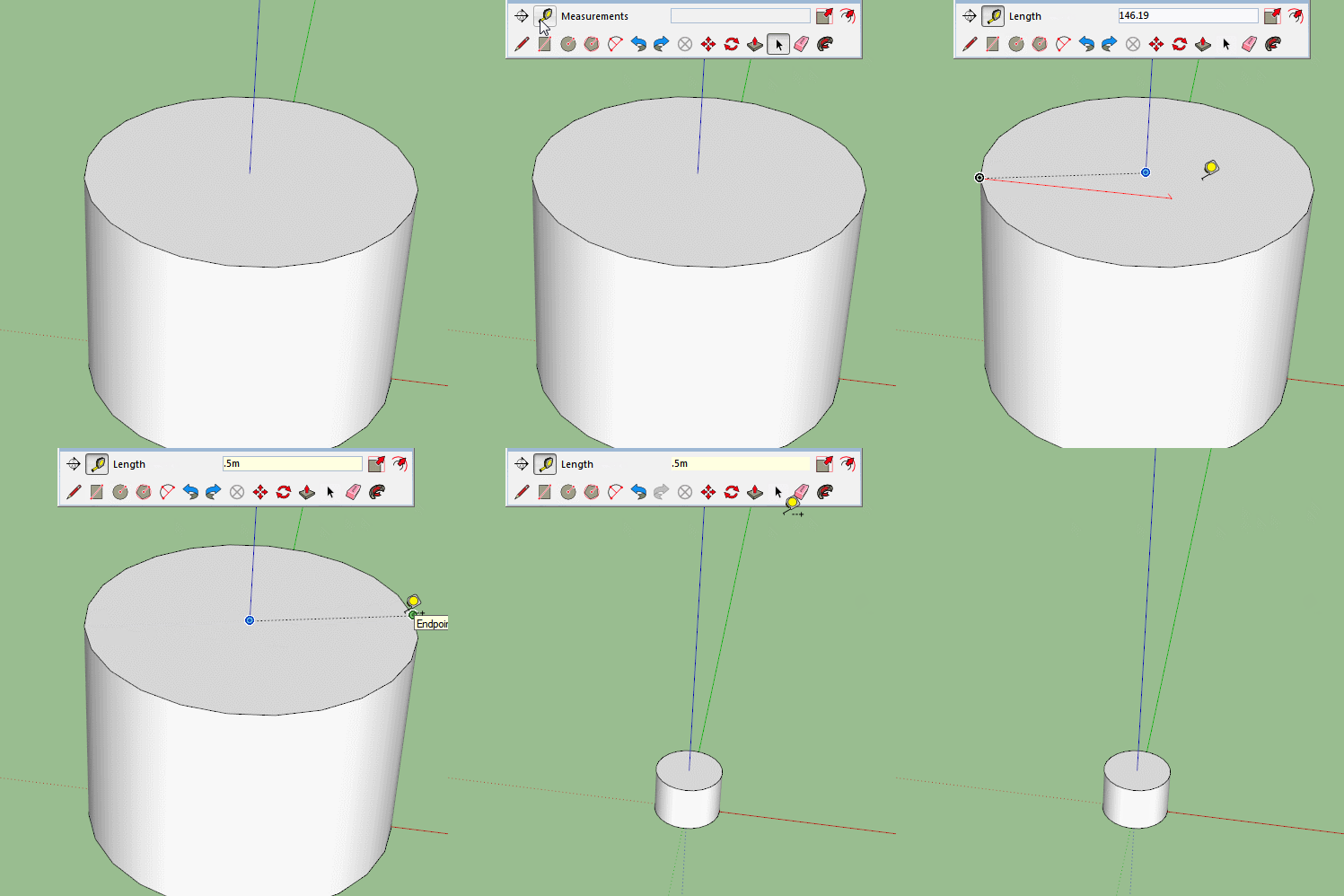

                            Resize.gif

                            1 Reply Last reply
                            Reply Quote 0
                            • Dave RD
                              Dave R
                              last edited by

                              @pipingguy said:

                              BOX suggests a guide need not be left as a remnant when resizing. I can understand that when the object is rectangular. Just drag the tape measure along an edge from a corner - but what if you wanted to resize a cylinder's diameter?

                              AS Box shows, no guideline needs to be created but even when you do have guidelines to get rid of, why don't you setup a keyboard shortcut to delete guides?

                              Etaoin Shrdlu

                              %

                              (THERE'S NO PLACE LIKE)

                              G28 X0.0 Y0.0 Z0.0

                              M30

                              %

                              1 Reply Last reply
                              Reply Quote 0
                              • kenK
                                ken
                                last edited by

                                Just found this thread and haven't read all the request.

                                I have a simple request, somehow, make all the "Sketchup toolbars" be listed at the beginning of the view toolbars ahead of all the imported toolbars or at least clustered. Example, rename all the Sketchup toolbars as SK_Construction or SK_Drawing to get them clustered in the SK region.

                                Now is that too much to ask for?

                                Ken

                                Fight like your the third monkey on Noah's Ark gangway.

                                1 Reply Last reply
                                Reply Quote 0
                                • pbacotP
                                  pbacot
                                  last edited by

                                  @unknownuser said:

                                  Just found this thread and haven't read all the request.

                                  I have a simple request, somehow, make all the "Sketchup toolbars" be listed at the beginning of the view toolbars ahead of all the imported toolbars or at least clustered. Example, rename all the Sketchup toolbars as SK_Construction or SK_Drawing to get them clustered in the SK region.

                                  Now is that too much to ask for?

                                  Ken

                                  Is this the same as the menu item "View / Tool Palettes" on the Mac? Mine were never alphanumerically listed. I can't figure out why SketchUp has abandoned A-N listings in various lists. Just annoying to have to scan/search for things in this day and age. The Extensions tab is another example.

                                  MacOSX MojaveSketchUp Pro v19 Twilight v2 Thea v3 PowerCADD

                                  1 Reply Last reply
                                  Reply Quote 0
                                  • Mistro11M
                                    Mistro11
                                    last edited by

                                    The main thing I been waiting for is better UV mapping tools.....like many other 3D modeling programs have. When making game assets I have to port everything to Blender to finish. It would be great if we could stay in Sketchup to the end.

                                    Structural Integrity is Not Just Physical...It's in the Design and Purpose

                                    1 Reply Last reply
                                    Reply Quote 0
                                    • P
                                      pipingguy
                                      last edited by

                                      Unlike Box' GIF, I always get an infinite guideline when i stretch my tape measure tool across a cylinder's end. what am i doing wrong? As for erasing unwanted guidelines and guidepoints with a SHORTCUT KEY - i actually use them as permanent column lines and other points of reference - and so, a global erasure would not serve me well.

                                      1 Reply Last reply
                                      Reply Quote 0
                                      • P
                                        pipingguy
                                        last edited by

                                        Wish to nudge objects - like in LayOut.

                                        1 Reply Last reply
                                        Reply Quote 0
                                        • P
                                          pipingguy
                                          last edited by

                                          Wish for a search utility in the tray's components panel. (like the search box found in window's file explorer)

                                          1 Reply Last reply
                                          Reply Quote 0
                                          • P
                                            pipingguy
                                            last edited by

                                            Wish for fully functional native editable 3D text. I use 3d text to make notes that I later refer to when generating the shop drawing on LayOut. I then erase them to cut down on memory usage. A plugin / extension exists, but it lacks text wrap and the dialogue box always pops up on a different monitor. Also, its text strings exist as a components rather than groups, which are perhaps beneficial to some users, does not work well for me.


                                            1 Reply Last reply
                                            Reply Quote 0

                                            Hello! It looks like you're interested in this conversation, but you don't have an account yet.

                                            Getting fed up of having to scroll through the same posts each visit? When you register for an account, you'll always come back to exactly where you were before, and choose to be notified of new replies (either via email, or push notification). You'll also be able to save bookmarks and upvote posts to show your appreciation to other community members.

                                            With your input, this post could be even better 💗

                                            Register Login
                                            • 1
                                            • 2
                                            • 3
                                            • 4
                                            • 5
                                            • 6
                                            • 7
                                            • 6 / 7
                                            • First post
                                              Last post
                                            Buy SketchPlus
                                            Buy SUbD
                                            Buy WrapR
                                            Buy eBook
                                            Buy Modelur
                                            Buy Vertex Tools
                                            Buy SketchCuisine
                                            Buy FormFonts

                                            Advertisement

