sketchucation logo sketchucation
    • Login
    Oops, your profile's looking a bit empty! To help us tailor your experience, please fill in key details like your SketchUp version, skill level, operating system, and more. Update and save your info on your profile page today!
    Mac User? | Join the Rayscaper Beta for Mac Learn More

    Introducing Viz - parametric modeling for SketchUp

    Scheduled Pinned Locked Moved Extensions & Applications Discussions
    extensions
    85 Posts 21 Posters 38.3k Views 21 Watching
    Loading More Posts
    • Oldest to Newest
    • Newest to Oldest
    • Most Votes
    Reply
    • Reply as topic
    Log in to reply
    This topic has been deleted. Only users with topic management privileges can see it.
    • F
      fluid
      last edited by

      @Pixero: added to the todo list

      @pilou: Yes, you can use a "GeometrySource" node to get geometry from SketchUp and then perform boolean operations. Keep in mind the solids need to be closed.

      1 Reply Last reply
      Reply Quote 0
      • pilouP
        pilou
        last edited by

        French Version Updated! πŸ˜„

        Frenchy Pilou
        Is beautiful that please without concept!
        My Little site :)

        1 Reply Last reply
        Reply Quote 0
        • pilouP
          pilou
          last edited by

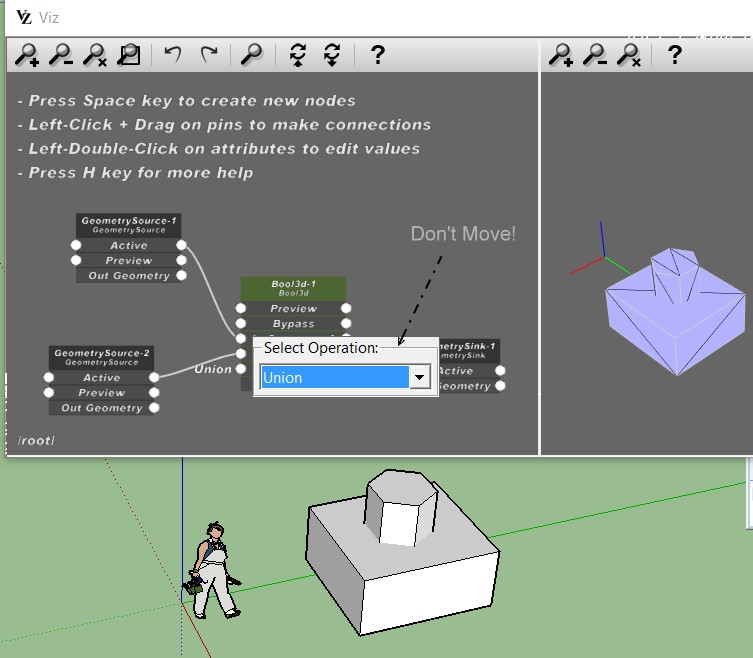
          Does the Boolean Viz works with SU MAKE ?
          Seems not! Even Union! (Maybe it's different than Envelopp ?

          Suggestion : a Box Selection moving for place it for see that is behind! πŸ˜„

          boxmove.jpg

          Frenchy Pilou
          Is beautiful that please without concept!
          My Little site :)

          1 Reply Last reply
          Reply Quote 0
          • F
            fluid
            last edited by

            Did you turn off the preview on node "GeometrySource-1" and "GeometrySource-2"? Otherwise they'll probably cover the result of the boolean operation. Also, you should connect the "Out Geometry" pins to the inputs of the boolean operation, not the "Active" pins.

            1 Reply Last reply
            Reply Quote 0
            • pilouP
              pilou
              last edited by

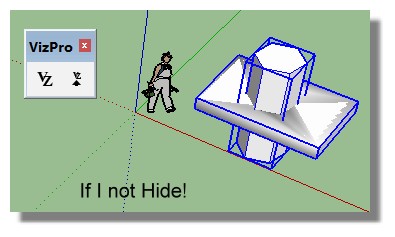
              OK! Better that works in SU MAKE except I must hide existing groups! πŸ˜‰

              not_hide.jpg

              Just something not very clear!
              How attribut easily an existing group to a specific Geometry Source Node?

              Here I create a group then create a Node Source Then click Set Geometry Source
              then I create a second group then a Second Node Source Then Click Set Geometry Source

              It's not possible to select a Node Source existing on the Screen then Click Set Geometry Source? or...
              There is a list a groups of Source objects but how to apply a specific Nodes?
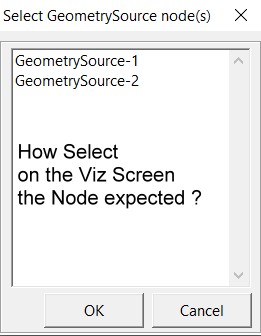
              List_source.jpg

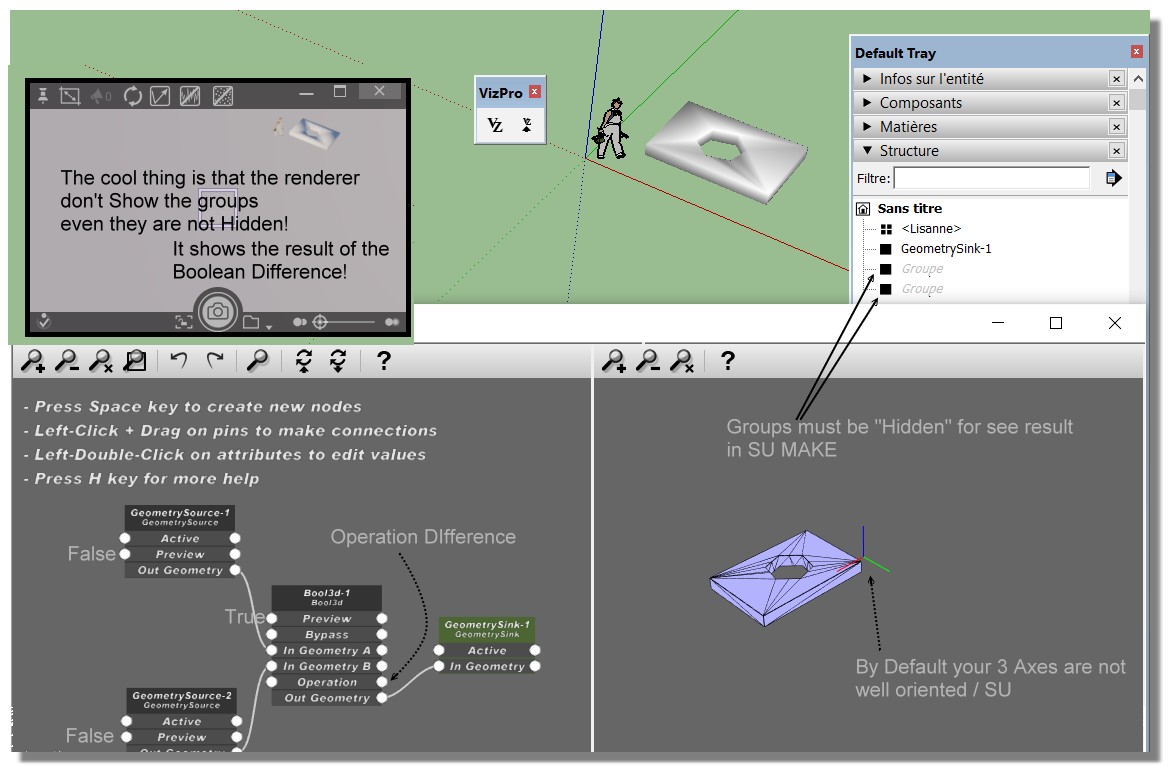
              Verify if your start Viz default axes are in the same orientation than default Axes SU Screen!
              Seems there are not! πŸ˜„
              (Click for Zoom)
              Viz_Diff_ok.jpg

              Frenchy Pilou
              Is beautiful that please without concept!
              My Little site :)

              1 Reply Last reply
              Reply Quote 0
              • F
                fluid
                last edited by

                Currently the to assign SketchUp geometry to a GeometrySource node in Viz you have to select the appropriate GeometrySource in the list, but probably selecting the node directly in Viz would be more practical.
                I'm adding it to the to do list, together with the axis orientation issue.

                Instead of hiding the groups in SketchUp, you can also move the GeometrySink group to a different location, so you'll be able to see both the operands of the boolean operation as well as the results.

                1 Reply Last reply
                Reply Quote 0
                • genki.ttG
                  genki.tt
                  last edited by

                  I just installed v.0.5.0 on mac, but it doesn't start when I click Vz icon or select 'Start Viz' from menu ... what's wrong??

                  SketchUp PRO 2016
                  MacBookPro 15' OSX 10.11.6

                  1 Reply Last reply
                  Reply Quote 0
                  • F
                    fluid
                    last edited by

                    Do you get any error in the ruby console?

                    1 Reply Last reply
                    Reply Quote 0
                    • genki.ttG
                      genki.tt
                      last edited by

                      @fluid said:

                      Do you get any error in the ruby console?

                      Ruby console shows ...

                      Error: #<NoMethodError: undefined method start' for VizPro:Module> /Users/architect7/Library/Application Support/SketchUp 2016/SketchUp/Plugins/VizPro/VizProCore.rb:7:in block in module:VizPro'
                      SketchUp:1:in `call'

                      1 Reply Last reply
                      Reply Quote 0
                      • F
                        fluid
                        last edited by

                        We just released a new version of Viz, you can get it here

                        In this new version:

                        • Improved GraphEditor look
                        • Fixed Mac issue
                        • Added more primitives, such as Cone, Sphere, Teapot, Cylinder
                        • Added a node to create lines from an array of point positions
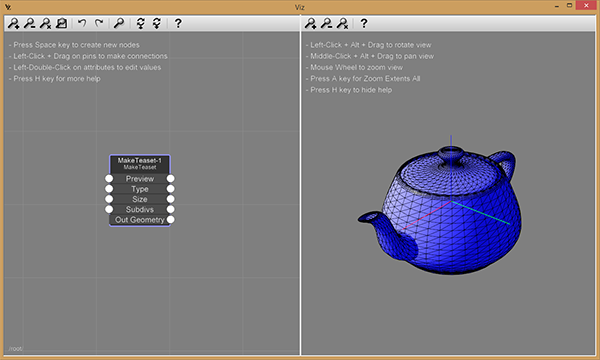
                        http://www.fluidinteractive.com/wordpress/wp-content/uploads/2016/08/MakeTeapot.png

                        1 Reply Last reply
                        Reply Quote 0
                        • genki.ttG
                          genki.tt
                          last edited by

                          Thank you for rapid release !
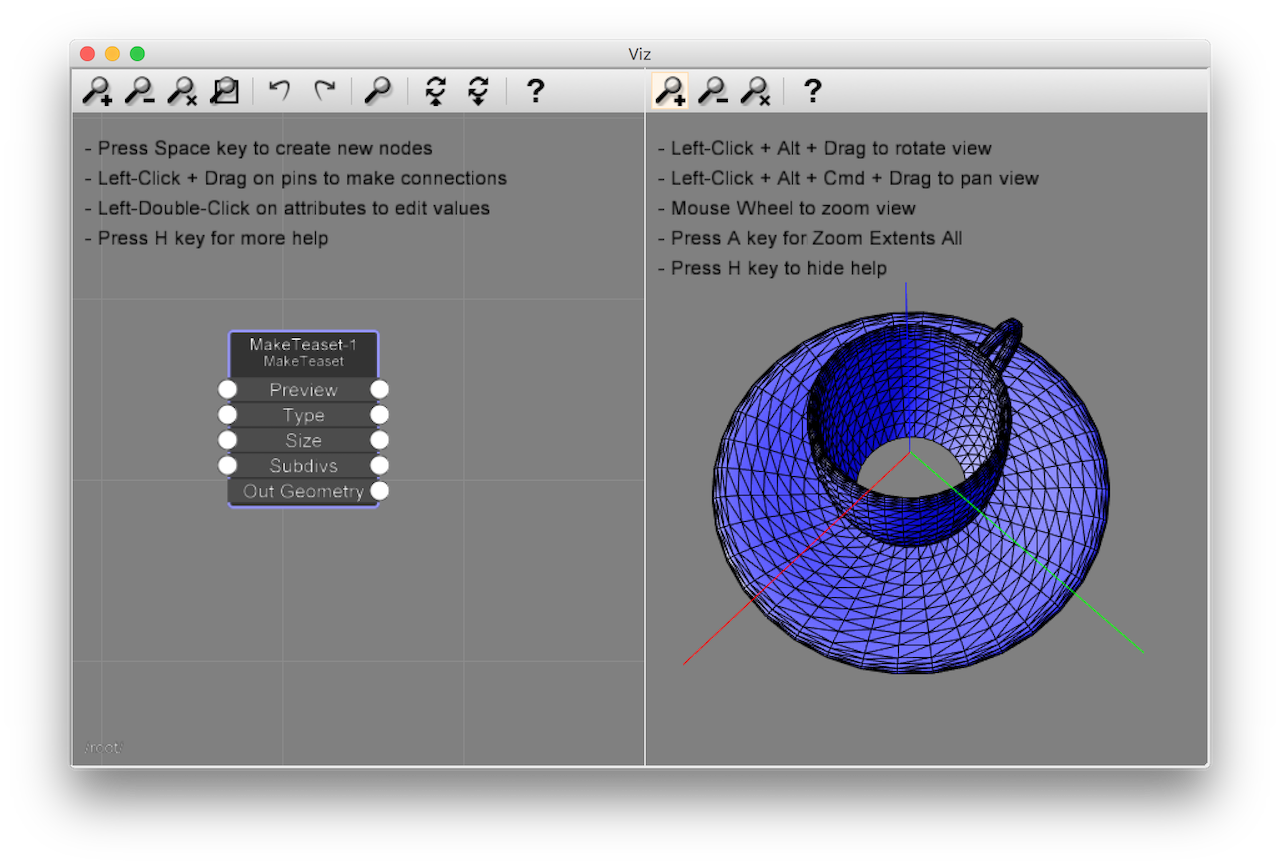
                          I could open VizPro on Mac !
                          I could see the tea cup that has a big hole on bottom !

                          VizPro061_TeaCup.png

                          1 Reply Last reply
                          Reply Quote 0
                          • F
                            fluid
                            last edited by

                            We just released a new version of Viz, you can grab it here.

                            This version highlights:

                            • Added the "Duplicate" node, to copy and instance geometry
                            • Improved node editor look
                            • Bug fixes
                              Viz getting started guide

                            [flash:36jgs09v]https://www.youtube.com/v/MjmTH2uixd4[/flash:36jgs09v]

                            1 Reply Last reply
                            Reply Quote 0
                            • pilouP
                              pilou
                              last edited by

                              Pleasures' Multiplication! 😎
                              Luckily seems the manual is not modified, so no need to update the French one! πŸ˜‰
                              Nevertheless Youtube video added and publicity made! πŸ€“

                              PS With what program do you make your tutorial ?

                              Frenchy Pilou
                              Is beautiful that please without concept!
                              My Little site :)

                              1 Reply Last reply
                              Reply Quote 0
                              • F
                                fluid
                                last edited by

                                For the tutorial we used Camtasia Studio.

                                1 Reply Last reply
                                Reply Quote 0
                                • F
                                  fluid
                                  last edited by

                                  We just released a new version of Viz, you can grab it here.

                                  This version highlights:

                                  • Added support of instancing geometry made itself of components
                                  • Bug fixes
                                  • Added instancing sample
                                    Viz getting started guide

                                  [flash:1cisnfai]https://www.youtube.com/v/t5Zk5PWRZVs[/flash:1cisnfai]

                                  1 Reply Last reply
                                  Reply Quote 0
                                  • pilouP
                                    pilou
                                    last edited by

                                    Skatter challenger! πŸ˜‰

                                    Frenchy Pilou
                                    Is beautiful that please without concept!
                                    My Little site :)

                                    1 Reply Last reply
                                    Reply Quote 0
                                    • F
                                      fluid
                                      last edited by

                                      We just released Viz 1.2.0, you can grab it here.

                                      This version highlights:

                                      • Added new nodes for sampling arbitrary attributes (such as normal, texture coordinates, etc) on geometry surface
                                      • Added a node to filter arrays based on a boolean condition
                                      • Improved UI usability, added connection snapping
                                      • Added a new advanced instancing sample
                                        Viz getting started guide

                                      [flash:3g2bze9l]https://www.youtube.com/v/dtfgFEk-ELI[/flash:3g2bze9l]

                                      1 Reply Last reply
                                      Reply Quote 0
                                      • pilouP
                                        pilou
                                        last edited by

                                        A little cup of tea with some milk? πŸ˜‰

                                        French VIZ manualUp Dated

                                        Frenchy Pilou
                                        Is beautiful that please without concept!
                                        My Little site :)

                                        1 Reply Last reply
                                        Reply Quote 0
                                        • PixeroP
                                          Pixero
                                          last edited by

                                          Thanks for the update. πŸ‘
                                          Now I really got to find some time to try it out a bit more.

                                          1 Reply Last reply
                                          Reply Quote 0
                                          • E
                                            Evers
                                            last edited by

                                            Are there any examples showing the full potential of this plugin?
                                            It's released, but the product site is quite unconvincing.

                                            Is it possible to make a dynamic component out of the Viz definition?

                                            1 Reply Last reply
                                            Reply Quote 0

                                            Hello! It looks like you're interested in this conversation, but you don't have an account yet.

                                            Getting fed up of having to scroll through the same posts each visit? When you register for an account, you'll always come back to exactly where you were before, and choose to be notified of new replies (either via email, or push notification). You'll also be able to save bookmarks and upvote posts to show your appreciation to other community members.

                                            With your input, this post could be even better πŸ’—

                                            Register Login
                                            • 1
                                            • 2
                                            • 3
                                            • 4
                                            • 5
                                            • 4 / 5
                                            • First post
                                              Last post
                                            Buy SketchPlus
                                            Buy SUbD
                                            Buy WrapR
                                            Buy eBook
                                            Buy Modelur
                                            Buy Vertex Tools
                                            Buy SketchCuisine
                                            Buy FormFonts

                                            Advertisement