sketchucation logo sketchucation
    • 登入
    Oops, your profile's looking a bit empty! To help us tailor your experience, please fill in key details like your SketchUp version, skill level, operating system, and more. Update and save your info on your profile page today!
    ⚠️ Important | Libfredo 15.6b introduces important bugfixes for Fredo's Extensions Update

    [Plugin]T2H_EXPORT_WEBGL(Simple Viewer on Web Browser)

    已排程 已置頂 已鎖定 已移動 Plugins
    33 貼文 9 Posters 7.0k 瀏覽 9 Watching
    正在載入更多貼文
    • 從舊到新
    • 從新到舊
    • 最多點贊
    回覆
    • 在新貼文中回覆
    登入後回覆
    此主題已被刪除。只有擁有主題管理權限的使用者可以查看。
    • J 離線
      Jef.Coelho
      最後由 編輯

      I enjoyed the plugin! I am even testing with some customers and the main complaint so far is the difficulty of navigation and mouse control. But the idea is fantastic, with little improvement will become essential!
      Here's an example:
      http://www.jefcoelho.com/scamplastic/

      1 條回覆 最後回覆 回覆 引用 0
      • U 離線
        unearthed
        最後由 編輯

        amazing Tak2hata. This looks like a viable alternative to 3d pdfs. and thanks to Jef.Coelho for the tradestand web example. This'll be fantastic for web presentations.

        Will (or is it possible) to have layer on/off control?

        Is it possible to set navigation constraints so that for instance a viewer can only navigate a model along certain paths, or only go around the outside etc? I'm thinking of where one sends this to a client and ensuring they only see a defined set of possible views.

        Growplan - People ∩ Plants ∩ Place

        windows 7 64b, 4GB RAM, SU 8.0.16846
        Gimp, QGIS, Vectorworks 12, Bricscad 11

        1 條回覆 最後回覆 回覆 引用 0
        • ntxdaveN 離線
          ntxdave
          最後由 編輯

          @jef.coelho said:

          I enjoyed the plugin! I am even testing with some customers and the main complaint so far is the difficulty of navigation and mouse control. But the idea is fantastic, with little improvement will become essential!
          Here's an example:
          http://www.jefcoelho.com/scamplastic/

          Could not get the example to work in IE 11 (it never showed up). It did work in both Chrome and MS Edge. In both of those instances, movement was pretty jerky even if I changed the Walk Thru speed.

          Additional comments/observations:

          • In the example, the model did not seem to be centered so that when I tried to orbit (left mouse button - I assume), I could never seem to get to the back.
          • The axis shown in the model did not conform to what I see in SU. In SU, the vertical axis is the blue line, red axis is the horizontal axis and green is the "depth" axis. None of those confirm to what I saw in the sample model.

          I think this is a start in the right direction though.......look forward to see where this ends up.

          OK - I just tried again in IE 11 and it finally showed up but as soon as I clicked on it, it disappeared again 😞

          1 條回覆 最後回覆 回覆 引用 0
          • J 離線
            Jef.Coelho
            最後由 編輯

            Despite not knowing programming, offer help in any way possible, tests may .. It would be nice to see that perfect plugin!

            1 條回覆 最後回覆 回覆 引用 0
            • B 離線
              Ben Ritter
              最後由 編輯

              TAK2HATA - Thank you very much

              1 條回覆 最後回覆 回覆 引用 0
              • facerF 離線
                facer
                最後由 編輯

                +1 TAK2HATA - Thank you for your efforts.
                I look forward to next version.

                1 條回覆 最後回覆 回覆 引用 0
                • T 離線
                  tak2hata
                  最後由 編輯

                  Hi,everyone.

                  I update in 2016.1.31 here.
                  0.9.7#2016/01/06 - Modified by TAK2HATA.AlphaTest Add.v0.9.7.
                  0.9.8#2016/01/24 - Modified by TAK2HATA.Improve Scene Select.v0.9.8.
                  0.9.9#2016/01/29 - Modified by TAK2HATA.Camera FOV support.Able to run on IE.Select showing axes.v0.9.9.

                  Enjoy! 😉


                  by TAK2HATA

                  1 條回覆 最後回覆 回覆 引用 0
                  • ntxdaveN 離線
                    ntxdave
                    最後由 編輯

                    @faust07 it would be nice to see a link to this so we could view it in our browser (not a jpg image).

                    1 條回覆 最後回覆 回覆 引用 0
                    • T 離線
                      tak2hata
                      最後由 編輯

                      @faust07.
                      IE10 higher supports Webgl.

                      In chrome,the texture image is not supported in local storage.
                      So use "as JS file" option of texture export.
                      Or place all of them in network storage.

                      The transparency is enabled When the Alpha value of pixel is 50% higher.
                      Thanks.


                      by TAK2HATA

                      1 條回覆 最後回覆 回覆 引用 0
                      • F 離線
                        faust07
                        最後由 編輯

                        Now it works fine in Firefox. The non-transparent textures were caused by my mistake. The opacity of the materials with Alpha-PNG-textures must be at least 98% (not 100%).
                        👍 👍 👍
                        Don't know how to set IE and Chrome to get a good result... In IE the whole viewport is black and in chrome most of the materials are black.
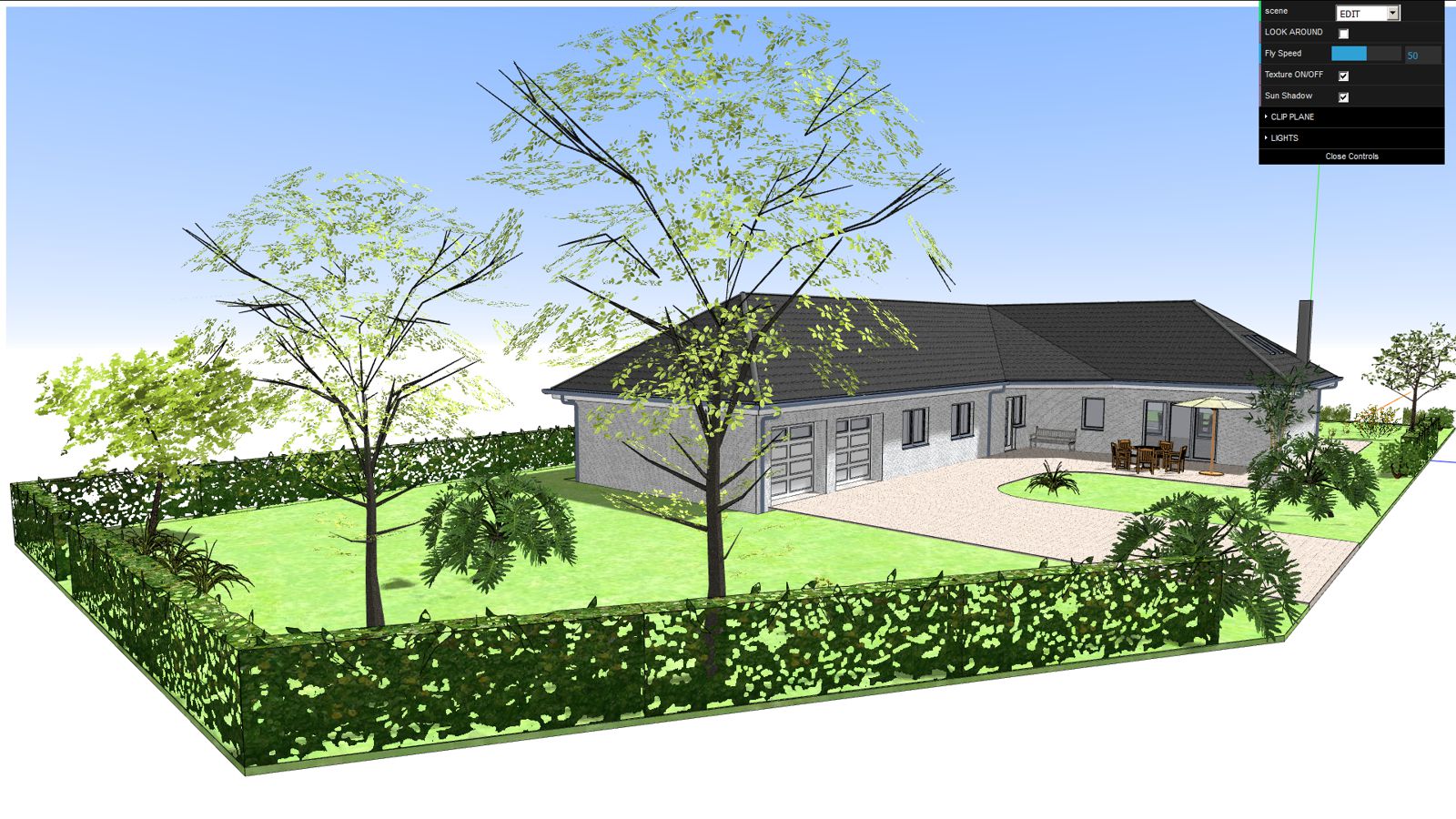

                        WebGL-Test05.jpg

                        1 條回覆 最後回覆 回覆 引用 0
                        • F 離線
                          faust07
                          最後由 編輯

                          After reducing the html-file to the limits (2 MB) with the help of "Texture Resizer" (Plugin by Aerilius) I realized that it isn't allowed to post html-files (and there was a big viral-warning). Sorry, I have no website to post a link. I only wanted to test the reproduction of the plant materials (it should not be an example of sophisticated architecture ...). And it works fine in Firefox, Chrome and IE11 now. In IE11 I have no menu but I think its a question of preferences. As mentioned before, this is a fine solution to communicate models with clients. This will be tested next. A zoom-limits function in the menu would be great, because the models often runs out of the viewport.
                          The scene-select function is great! 👍
                          Thanks again TAK2HATA! ☀

                          1 條回覆 最後回覆 回覆 引用 0
                          • D 離線
                            driven
                            最後由 編輯

                            if you zip the html file it should upload and open in the local browser after download...

                            john

                            learn from the mistakes of others, you may not live long enough to make them all yourself...

                            1 條回覆 最後回覆 回覆 引用 0
                            • F 離線
                              faust07
                              最後由 編輯

                              Here it is (.html in the .zip). Thanks driven for the advice!
                              It would be great, if someone could test it in IE11.


                              EFH-WebGL-Test_09.zip

                              1 條回覆 最後回覆 回覆 引用 0
                              • D 離線
                                driven
                                最後由 編輯

                                not IE but, runs ok on Safari, a little jerky quite presentable...

                                learn from the mistakes of others, you may not live long enough to make them all yourself...

                                1 條回覆 最後回覆 回覆 引用 0
                                • F 離線
                                  faust07
                                  最後由 編輯

                                  Thanks!

                                  1 條回覆 最後回覆 回覆 引用 0
                                  • ntxdaveN 離線
                                    ntxdave
                                    最後由 編輯

                                    I was able to view the file in both IE 11 and Edge on Windows 10. I was able to even get inside the house although navigation got a little tougher once inside the house.

                                    I also got it to work in Chrome. Interesting that in Chrome the tools window shows up but it does not show up in IE or Edge. Not sure I fully understand what the Look Around checkbox accomplishes but it is all very interesting.

                                    Silly question, is there a way to Pan? I am able to rotate fine with the mouse and the arrow keys on my keyboard.

                                    This is pretty neat. I think I would change the name though to something more like just Export2WegGL.

                                    This thing has some real potential in my view. Has anyone tried this with a rendered model. It would also be interesting to see if any of this could work with any of the animation tools or SU scenes!

                                    1 條回覆 最後回覆 回覆 引用 0
                                    • F 離線
                                      faust07
                                      最後由 編輯

                                      You are right - real potential! Look Around works like the same function in SketchUp. Pan you can do if you have a wheel mouse. Yes - the IE 11 question. Thanks for testing and thanks again to Tak2hata.

                                      1 條回覆 最後回覆 回覆 引用 0
                                      • ntxdaveN 離線
                                        ntxdave
                                        最後由 編輯

                                        @tak2hata please look at this thread:
                                        http://sketchucation.com/forums/viewtopic.php?f=323%26amp;t=64055
                                        It is a discussion about a new animation plugin Fredo is working on and the possibility of displaying his animated model in a web browser via WebGL

                                        1 條回覆 最後回覆 回覆 引用 0
                                        • facerF 離線
                                          facer
                                          最後由 編輯

                                          Look Around checkbox

                                          This button should be ticked when in a room that you want to explore
                                          It allows easy "Look Around" functions which are difficult in the main mode.

                                          Good tip on zipping html files. Thank you.

                                          Model by faust07 came up on Google Chrome quite well, no real issues.

                                          Seems to be more fluid now, good work T2H.

                                          1 條回覆 最後回覆 回覆 引用 0
                                          • F 離線
                                            faust07
                                            最後由 編輯

                                            Tested it again and can say that "Orbit View" in "Scene Select" is a good solution to bring the model back and to navigate around without problems. 👍

                                            1 條回覆 最後回覆 回覆 引用 0
                                            • 1
                                            • 2
                                            • 1 / 2
                                            • 第一個貼文
                                              最後的貼文
                                            Buy SketchPlus
                                            Buy SUbD
                                            Buy WrapR
                                            Buy eBook
                                            Buy Modelur
                                            Buy Vertex Tools
                                            Buy SketchCuisine
                                            Buy FormFonts

                                            Advertisement