sketchucation logo sketchucation
    • 登入
    Oops, your profile's looking a bit empty! To help us tailor your experience, please fill in key details like your SketchUp version, skill level, operating system, and more. Update and save your info on your profile page today!
    ⚠️ Important | Libfredo 15.6b introduces important bugfixes for Fredo's Extensions Update

    3D Truss Models

    已排程 已置頂 已鎖定 已移動 Plugins
    1.5k 貼文 31 Posters 924.6k 瀏覽 30 Watching
    正在載入更多貼文
    • 從舊到新
    • 從新到舊
    • 最多點贊
    回覆
    • 在新貼文中回覆
    登入後回覆
    此主題已被刪除。只有擁有主題管理權限的使用者可以查看。
    • jujuJ 離線
      juju
      最後由 編輯

      @medeek said:

      @juju said:

      Good work! Can you do it so the truss created is a grouped as a component (obviously other trusses generated are copies of the component).

      I think I get what you are asking here. Create the geometry of the first truss in the array as a component and then simply copy the original truss to make the others that way each truss can be manipulated as an entity. Let me look into this.

      most trusses end up looking the same, if the need arises to modify one, it can be made unique and modified; this way it's faster to change things and also results in smaller file sizes

      Save the Earth, it's the only planet with chocolate.

      1 條回覆 最後回覆 回覆 引用 0
      • medeekM 離線
        medeek
        最後由 編輯

        @juju said:

        Good work! Can you do it so the truss created is a grouped as a component (obviously other trusses generated are copies of the component).

        I think I get what you are asking here. Create the geometry of the first truss in the array as a component and then simply copy the original truss to make the others that way each truss can be manipulated as an entity yet if one truss is modified (the component) they will all be modified. Let me look into this.

        Nathaniel P. Wilkerson PE
        Medeek Engineering Inc
        design.medeek.com

        1 條回覆 最後回覆 回覆 引用 0
        • medeekM 離線
          medeek
          最後由 編輯

          Thank-you for bringing me up to speed. I'm still wrapping my head around SketchUp, as most of my experience is with AutoCAD. I didn't even realize that SketchUp had the ability for "blocks", very cool.

          Nathaniel P. Wilkerson PE
          Medeek Engineering Inc
          design.medeek.com

          1 條回覆 最後回覆 回覆 引用 0
          • studio43S 離線
            studio43
            最後由 編輯

            I purchased the plugin How do I download the most current version?

            1 條回覆 最後回覆 回覆 引用 0
            • medeekM 離線
              medeek
              最後由 編輯

              @studio43 said:

              I purchased the plugin How do I download the most current version?

              You can always grab the latest version in the Medeek Account Manager, Login and navigate to the plugin page, the download button will have the latest version.

              I'm working on the group/component issue and hopefully should have that up later today.

              SketchUp is actually pretty full featured, I'm pleasantly surprised.

              Nathaniel P. Wilkerson PE
              Medeek Engineering Inc
              design.medeek.com

              1 條回覆 最後回覆 回覆 引用 0
              • medeekM 離線
                medeek
                最後由 編輯

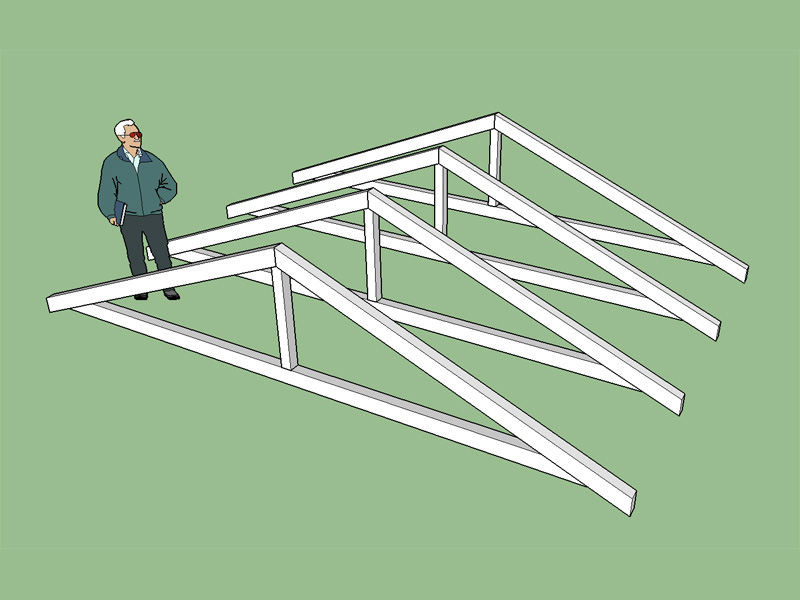
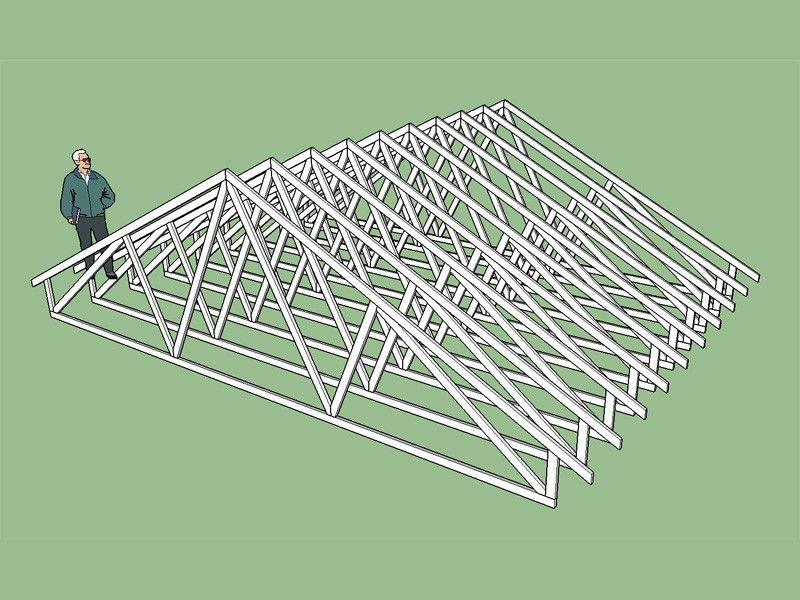
                Trusses are now created as components with each individual member of the truss a group. Arrays of trusses are multiple instances of the same component.

                I think this plugin may actually have some potential now.

                A couple more screenshots for fun. A well designed truss is a beautiful thing to behold:
                http://design.medeek.com/resources/images/truss_su5_800.jpg

                http://design.medeek.com/resources/images/truss_su6_800.jpg

                I really appreciate everyone's feedback, this has helped guide me in the right direction on all of this and improved my understanding of SketchUp immensely.

                Nathaniel P. Wilkerson PE
                Medeek Engineering Inc
                design.medeek.com

                1 條回覆 最後回覆 回覆 引用 0
                • jemagnussenJ 離線
                  jemagnussen
                  最後由 編輯

                  Hi Medeek,

                  Super plugin, just bought it... 😄

                  Would you consider a metric version in the near future? It would be very helpfull to the "metric world" of designers.

                  Best regards
                  Jesper

                  HP ZBook 15, Windows 10 64 bit
                  Intel Core i7-6820HQ @ 2.70GHz
                  32 GB Ram
                  NVIDIA Quadro M2000M

                  1 條回覆 最後回覆 回覆 引用 0
                  • jujuJ 離線
                    juju
                    最後由 編輯

                    @jemagnussen said:

                    Would you consider a metric version in the near future? It would be very helpfull to the "metric world" of designers.
                    Jesper

                    yes please! also the pitch of the truss in degrees instead of the x-in-12 system.

                    Save the Earth, it's the only planet with chocolate.

                    1 條回覆 最後回覆 回覆 引用 0
                    • medeekM 離線
                      medeek
                      最後由 編輯

                      @jemagnussen said:

                      Hi Medeek,

                      Super plugin, just bought it... 😄

                      Would you consider a metric version in the near future? It would be very helpfull to the "metric world" of designers.

                      Best regards
                      Jesper

                      I don't think a metric version would be too hard to create. It would be cool if I could somehow have a configuration file of sorts so that imperial or metric could be semi-permanent setting that can be switched within SketchUp. Not really sure how to do this within the API but I will add that to the todo list.

                      I'm assuming the units of interest would be millimeters, correct me if I'm wrong. I think I will also open up the pitch variable so any pitch can be chosen instead of limiting it. I would also like have it in the settings where someone can manage the default values and choose between degrees or x/12 for the pitch.

                      I'm not really familiar with the metric lumber sizes. Would you want the variable completely open or limited to certain metric standard sizes?

                      Nathaniel P. Wilkerson PE
                      Medeek Engineering Inc
                      design.medeek.com

                      1 條回覆 最後回覆 回覆 引用 0
                      • jujuJ 離線
                        juju
                        最後由 編輯

                        can it not reference the sketchup session to see which units are being used and then use that?

                        Save the Earth, it's the only planet with chocolate.

                        1 條回覆 最後回覆 回覆 引用 0
                        • jemagnussenJ 離線
                          jemagnussen
                          最後由 編輯

                          Hi again,

                          JuJu's proposal of using the units being used by Sketchup would be the most intuitive. For using standard sizes I would imagine that an open approach would suit most users.

                          Best regards
                          Jesper

                          HP ZBook 15, Windows 10 64 bit
                          Intel Core i7-6820HQ @ 2.70GHz
                          32 GB Ram
                          NVIDIA Quadro M2000M

                          1 條回覆 最後回覆 回覆 引用 0
                          • medeekM 離線
                            medeek
                            最後由 編輯

                            It's kind of funny how everyone else in the world is metric yet the USA is still using the old English units.

                            Nathaniel P. Wilkerson PE
                            Medeek Engineering Inc
                            design.medeek.com

                            1 條回覆 最後回覆 回覆 引用 0
                            • medeekM 離線
                              medeek
                              最後由 編輯

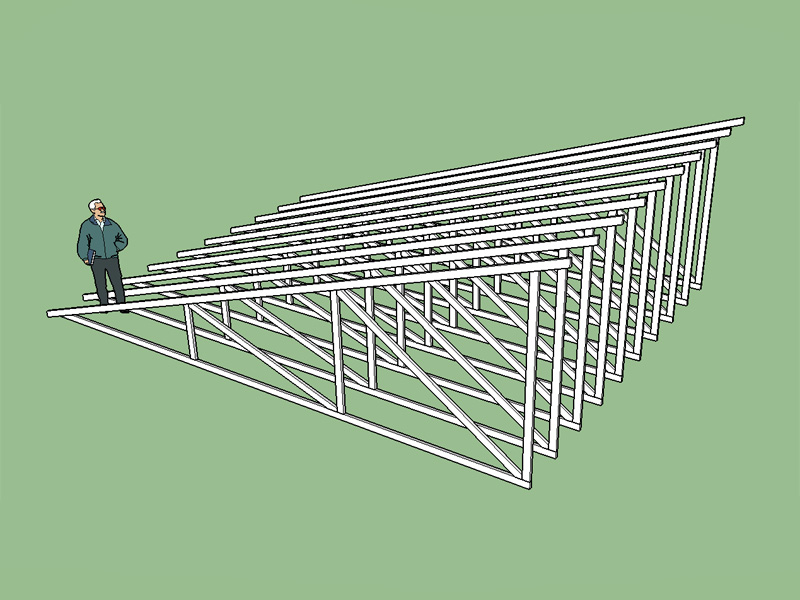
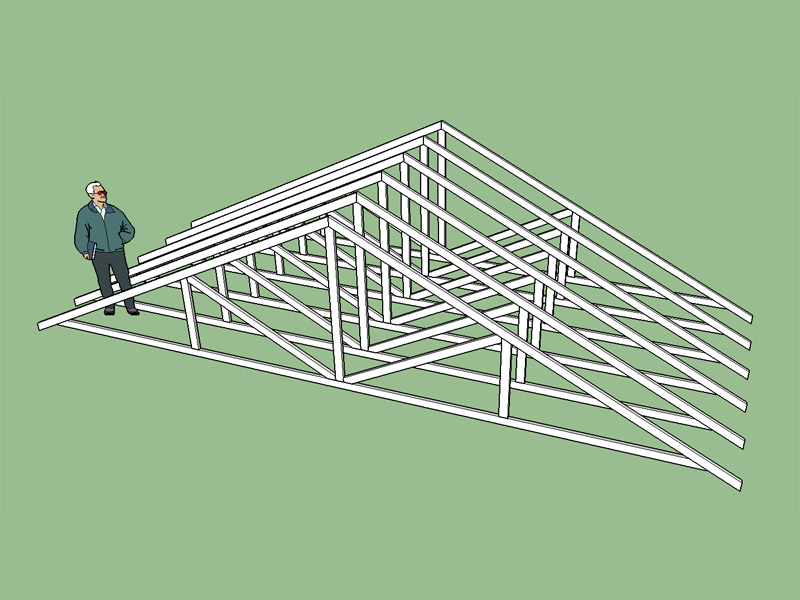
                              Howe truss type is now active.

                              The latest plugin version is 1.0.4. I would highly recommend downloading the latest version since I have also spent some time this morning cleaning up my code and removing global methods and variables so that I don't clash with other extensions or modules.
                              http://design.medeek.com/resources/images/truss_su7_800.jpg

                              Nathaniel P. Wilkerson PE
                              Medeek Engineering Inc
                              design.medeek.com

                              1 條回覆 最後回覆 回覆 引用 0
                              • medeekM 離線
                                medeek
                                最後由 編輯

                                Monopitch trusses are also now live:

                                http://design.medeek.com/resources/images/truss_su8_800.jpg

                                Currently the 2/2 and 3/3 configurations are available, more of this truss family will be added after I address the metric issue and a few of the other requested items.

                                Nathaniel P. Wilkerson PE
                                Medeek Engineering Inc
                                design.medeek.com

                                1 條回覆 最後回覆 回覆 引用 0
                                • jujuJ 離線
                                  juju
                                  最後由 編輯

                                  thanks for the active development, looking forward to the metric version

                                  Save the Earth, it's the only planet with chocolate.

                                  1 條回覆 最後回覆 回覆 引用 0
                                  • jujuJ 離線
                                    juju
                                    最後由 編輯

                                    If I may list a request, the way your tool currently works seems fine, but it could be more helpful (faster modeling) if one had the option of indicating the area of the trusses (with it auto-calculating the truss centers, with a maximum parameter setting) much in the same way tomot's truss tool does it.

                                    *** EDIT ***

                                    and maybe a quick launch icon that one can locate on the toolbar?

                                    Save the Earth, it's the only planet with chocolate.

                                    1 條回覆 最後回覆 回覆 引用 0
                                    • medeekM 離線
                                      medeek
                                      最後由 編輯

                                      Currently I am dumping the trusses at the origin (0,0,0) since that seemed like the most natural thing to do but I can see where a more intuitive placement system makes more sense and would eliminate the additional steps needed to move the array of trusses into place and possibly rotating them.

                                      I like the idea of selecting a rectangle which auto-sizes and orients the trusses.

                                      Adding a quick launch icon should not be too much trouble either.

                                      Nathaniel P. Wilkerson PE
                                      Medeek Engineering Inc
                                      design.medeek.com

                                      1 條回覆 最後回覆 回覆 引用 0
                                      • pbacotP 離線
                                        pbacot
                                        最後由 編輯

                                        You're on fire! Good work.

                                        MacOSX MojaveSketchUp Pro v19 Twilight v2 Thea v3 PowerCADD

                                        1 條回覆 最後回覆 回覆 引用 0
                                        • medeekM 離線
                                          medeek
                                          最後由 編輯

                                          I've added a toolbar/icon which admittedly is more convenient than having to open up the extensions menu item.

                                          I'm not entirely sure I'm happy with the icon set I've created but it is really hard to make much of a 24x24 or 16x16 square.

                                          http://design.medeek.com/calculator/sketchup/images/mdkplg_tool_icon16_2.png

                                          http://design.medeek.com/calculator/sketchup/images/mdkplg_tool_icon24_2.png

                                          Nathaniel P. Wilkerson PE
                                          Medeek Engineering Inc
                                          design.medeek.com

                                          1 條回覆 最後回覆 回覆 引用 0
                                          • medeekM 離線
                                            medeek
                                            最後由 編輯

                                            I'm looking at adding in scissor trusses. Below is a matrix of common scissor truss configurations. Once they get much larger than a 6/6 I think they probably go to site assembled half trusses, I'm not entirely sure since I don't have any drawings or diagrams of anything larger than a 6/6.


                                            http://design.medeek.com/images/MISC/scissortrusses1024.jpg

                                            Nathaniel P. Wilkerson PE
                                            Medeek Engineering Inc
                                            design.medeek.com

                                            1 條回覆 最後回覆 回覆 引用 0
                                            • 1
                                            • 2
                                            • 45
                                            • 46
                                            • 47
                                            • 48
                                            • 49
                                            • 74
                                            • 75
                                            • 47 / 75
                                            • 第一個貼文
                                              最後的貼文
                                            Buy SketchPlus
                                            Buy SUbD
                                            Buy WrapR
                                            Buy eBook
                                            Buy Modelur
                                            Buy Vertex Tools
                                            Buy SketchCuisine
                                            Buy FormFonts

                                            Advertisement