sketchucation logo sketchucation
    • 登入
    Oops, your profile's looking a bit empty! To help us tailor your experience, please fill in key details like your SketchUp version, skill level, operating system, and more. Update and save your info on your profile page today!
    ⚠️ Important | Libfredo 15.6b introduces important bugfixes for Fredo's Extensions Update

    [Plugin] EP_Fasteners. Creates 3d printable threaded UPDATED

    已排程 已置頂 已鎖定 已移動 Plugins
    39 貼文 19 Posters 18.8k 瀏覽 19 Watching
    正在載入更多貼文
    • 從舊到新
    • 從新到舊
    • 最多點贊
    回覆
    • 在新貼文中回覆
    登入後回覆
    此主題已被刪除。只有擁有主題管理權限的使用者可以查看。
    • D 離線
      d12dozr
      最後由 編輯

      Looks really nice! I could have used this on a project about 2 years ago 😄

      How do the threads turn out on your Formlabs? Are supports required, and if so are the threads usable without post-processing?

      3D Printing with SketchUp Book
      http://goo.gl/f7ooYh

      1 條回覆 最後回覆 回覆 引用 0
      • pagejaws2P 離線
        pagejaws2
        最後由 編輯

        @d12dozr said:

        Looks really nice! I could have used this on a project about 2 years ago 😄

        How do the threads turn out on your Formlabs? Are supports required, and if so are the threads usable without post-processing?

        Hi! They print quite nicely in the black resin. didn't need any interior or exterior supports on my vertical tests. The black resin is being a bit touchy in general sometimes it just doesn't setup regardless of supports. Don't know if it was just the one batch or a laser power issue. The blue castable resin works great everytime! Though its a little rubbery to use the threads directly. Haven't tried casting the threads yet, but the finish looks really good.

        1 條回覆 最後回覆 回覆 引用 0
        • Dave RD 離線
          Dave R
          最後由 編輯

          Any chance you'll make it use more segments to create smoother curves? They still seem pretty rough to me.

          Etaoin Shrdlu

          %

          (THERE'S NO PLACE LIKE)

          G28 X0.0 Y0.0 Z0.0

          M30

          %

          1 條回覆 最後回覆 回覆 引用 0
          • H 離線
            HENRYREYES
            最後由 編輯

            Hi!
            FOr some reason, at the main Screen all icons appear double one of them is the normal icon and the other is the selected icon(blueish color). Uninstalled from the root of the SU2015 folder and reinstalled again but nothing happens.
            Pretty good pluggin and so far the unique one that does this but still have some glitches.
            Too bad I cant reply with a solution.

            1 條回覆 最後回覆 回覆 引用 0
            • D 離線
              driven
              最後由 編輯

              Henry,
              can you add a screenshot?

              learn from the mistakes of others, you may not live long enough to make them all yourself...

              1 條回覆 最後回覆 回覆 引用 0
              • pagejaws2P 離線
                pagejaws2
                最後由 編輯

                @dave r said:

                Any chance you'll make it use more segments to create smoother curves? They still seem pretty rough to me.

                Hi, I added a Quality dropdown on the main menu where you can select higher segment counts...

                Jay

                1 條回覆 最後回覆 回覆 引用 0
                • pagejaws2P 離線
                  pagejaws2
                  最後由 編輯

                  @henryreyes said:

                  Hi!
                  FOr some reason, at the main Screen all icons appear double one of them is the normal icon and the other is the selected icon(blueish color). Uninstalled from the root of the SU2015 folder and reinstalled again but nothing happens.

                  Hi! That would happen if the Javascript or JQuery doesn't run... Can you please tell us what your OS and Sketchup versions are?

                  Thanks! Jay

                  1 條回覆 最後回覆 回覆 引用 0
                  • tibetT 離線
                    tibet
                    最後由 編輯

                    hi,
                    thanks for your excellent plugin!
                    i´m glad, because it starts working... 👍
                    i´ve found that it cuts hole through unclosed model, is there any
                    way how to make it cuts through component or a group please?
                    wondering, if is there any chance in the future version to make our unique eg.nuts or bolts please? ( something like profile builder ruby )
                    keep working!

                    http://s23.postimg.org/jd9fnpavf/sketch_logo.png

                    SU 2015 Pro on Win10 x64

                    1 條回覆 最後回覆 回覆 引用 0
                    • M 離線
                      mroek
                      最後由 編輯

                      Just wanted to say thanks for creating this extension, and to ask why the version in the Extension Warehouse (which is 1.0.0) is older than the one posted here?

                      I first installed via the warehouse, but it didn't work properly, so it was a relief to find that the one posted here worked as expected.

                      Thanks again.

                      1 條回覆 最後回覆 回覆 引用 0
                      • J 離線
                        junaramaro
                        最後由 編輯

                        Hello sir i found your plugin amazing even though i cant use it..coz the icon in the html are not aligned properly..maybe coz im using ie8 in xp..i cant buy anew laptop...coz in the phil. only the rich can afford it..^^, hope i can use it when i have a new one... best plug in ... i,ve seen the preview^^,

                        1 條回覆 最後回覆 回覆 引用 0
                        • M 離線
                          MrAP
                          最後由 編輯

                          Great work!!!

                          Is it possible to add left turn treads

                          //Affe

                          1 條回覆 最後回覆 回覆 引用 0
                          • S 離線
                            SchonVergeben
                            最後由 編輯

                            With this update it works sweet!

                            I salute you Sir! 🤓

                            1 條回覆 最後回覆 回覆 引用 0
                            • F 離線
                              francoisinnuedo
                              最後由 編輯

                              Hi everybody,

                              @oxer said:

                              ]

                              And the EyePhisics Fastener Menu window isn't refreshed automatically when you reopen it, see the image below.

                              [attachment=0:gf7e5eye]<!-- ia0 -->Fastener Menu window.jpg<!-- ia0 -->[/attachment:gf7e5eye]

                              @driven said:

                              This will reset the dialog on a mac

                                    @@dialog.show()
                              >       @@dialog.execute_script('location.reload(true);')
                              

                              The issue I have is with threaded thru holes, both breeds...
                              the first threaded thru hole takes minutes [many], a second of the same is instant...
                              a change in the params will revert to slow-mo...

                              BTW: what are the observers for, if possible it is best not to have them on mac SU...
                              john

                              I have the same problem than Oxer, (me menu box doesn't refresh...)
                              I don't understand how to reset with this code in the ruby console...
                              Can someone clearly explain to me ( /us ) how to reset the dialog box????

                              thanks!
                              Francois

                              1 條回覆 最後回覆 回覆 引用 0
                              • OxerO 離線
                                Oxer
                                最後由 編輯

                                I do it manually, right-click over the window and refresh.

                                "The result is the end what is important is the process" by Oxer
                                [http://www.oxervision.blogspot.com/(http://www.oxervision.blogspot.com/)]

                                1 條回覆 最後回覆 回覆 引用 0
                                • F 離線
                                  francoisinnuedo
                                  最後由 編輯

                                  It had to be said ...

                                  Thank you very much, I could look for so long it was obvious 😳

                                  And many thanks for this great plugin!

                                  1 條回覆 最後回覆 回覆 引用 0
                                  • OxerO 離線
                                    Oxer
                                    最後由 編輯

                                    Nobody help us with the code so I used a rapid solution. 😉

                                    "The result is the end what is important is the process" by Oxer
                                    [http://www.oxervision.blogspot.com/(http://www.oxervision.blogspot.com/)]

                                    1 條回覆 最後回覆 回覆 引用 0
                                    • B 離線
                                      BallBearing
                                      最後由 編輯

                                      The menu does not work at all. Win8 SU 2016. v1.04.
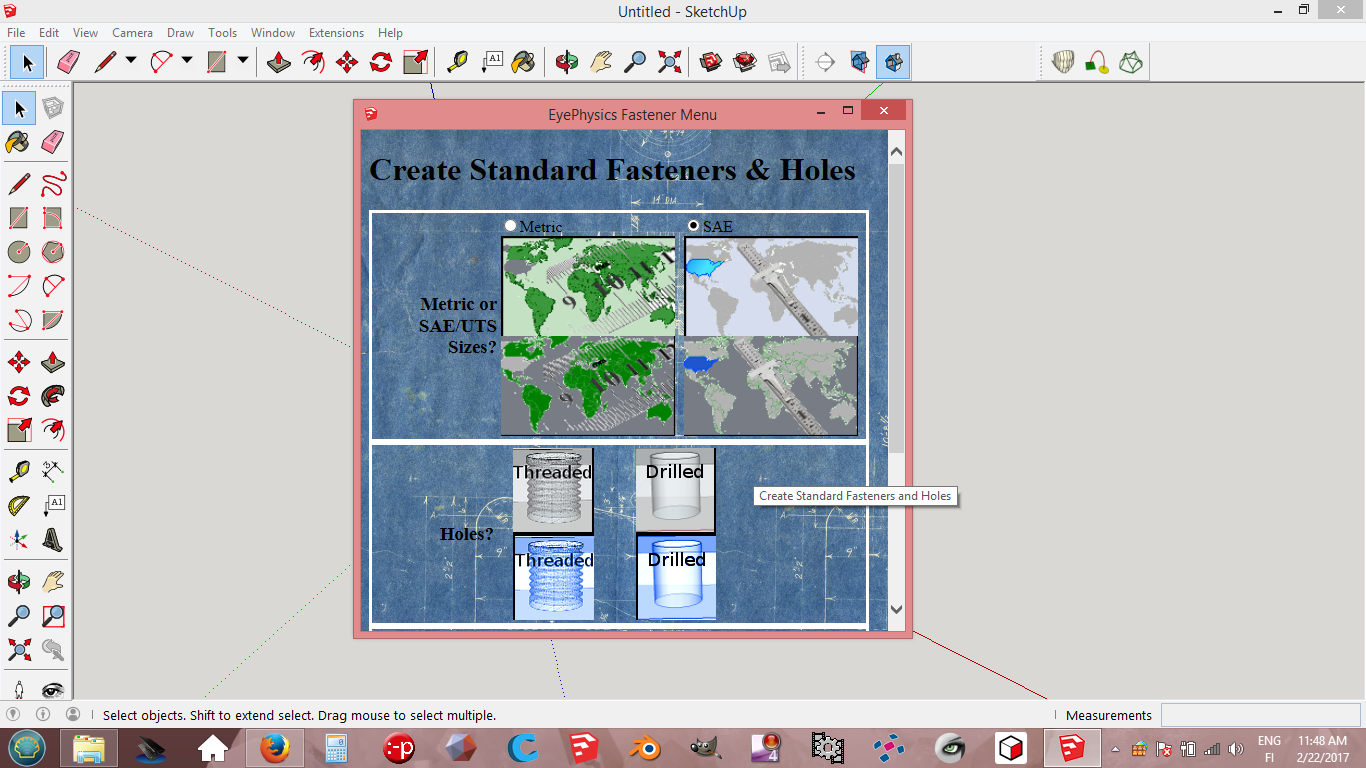
                                      FastenersNotWorking.jpg

                                      SketchUp, 3D printing stuff and more:
                                      http://www.youtube.com/user/CinemaTablet

                                      1 條回覆 最後回覆 回覆 引用 0
                                      • M 離線
                                        makacharya
                                        最後由 編輯

                                        Hello,

                                        I have used your tool EP Softwares and works well with 2016 sketchup.

                                        I have an application where I have to use metric LEFT hand threads both internal and external.

                                        How can I use EP Tool for metric LEFT hand threads making.

                                        Please help me to understand.

                                        Thanks & Regards,
                                        Makarand Acharya
                                        makacharya48@gmail.com

                                        1 條回覆 最後回覆 回覆 引用 0
                                        • T 離線
                                          T_om
                                          最後由 編輯

                                          I am using Sketchup 2016, which others here seem to have no problem with. However, the plugin will not drill threaded holes though a solid. If I make a box 2"x2"x2", I cannot drop a threaded hole through the thing. I place the "circle" on a face, but then nothing happens.

                                          HOWEVER, if I pick a length, like for a blind hole, and set the depth to 2", it does fine. Goes right through.

                                          Any idea why the threaded through hole is not working?

                                          1 條回覆 最後回覆 回覆 引用 0
                                          • 1
                                          • 2
                                          • 2 / 2
                                          • 第一個貼文
                                            最後的貼文
                                          Buy SketchPlus
                                          Buy SUbD
                                          Buy WrapR
                                          Buy eBook
                                          Buy Modelur
                                          Buy Vertex Tools
                                          Buy SketchCuisine
                                          Buy FormFonts

                                          Advertisement


