sketchucation logo sketchucation
    • 登入
    Oops, your profile's looking a bit empty! To help us tailor your experience, please fill in key details like your SketchUp version, skill level, operating system, and more. Update and save your info on your profile page today!
    🔌 Smart Spline | Fluid way to handle splines for furniture design and complex structures. Download

    [Plugin][$] Profile Builder 2

    已排程 已置頂 已鎖定 已移動 Plugins
    219 貼文 40 Posters 58.7k 瀏覽 40 Watching
    正在載入更多貼文
    • 從舊到新
    • 從新到舊
    • 最多點贊
    回覆
    • 在新貼文中回覆
    登入後回覆
    此主題已被刪除。只有擁有主題管理權限的使用者可以查看。
    • A 離線
      AcesHigh
      最後由 編輯

      Has anyone tried to use Profile Builder 2 to build curtain walls?

      I guess we could set components for mullions and such... not sure how to make the glass (specially if you want single planes as glass to render using "architectural glass" material (instead of using heavier materials for glass where the render will calculate light dispersion and such)

      I guess vertical mullions as components and horizontal mullions AND glass as profiles?

      1 條回覆 最後回覆 回覆 引用 0
      • JClementsJ 離線
        JClements
        最後由 編輯

        A few quirks.

        I kind of expected issues 2 and 3 to happen, but issue 1 is a surprise (I think it is fixable).
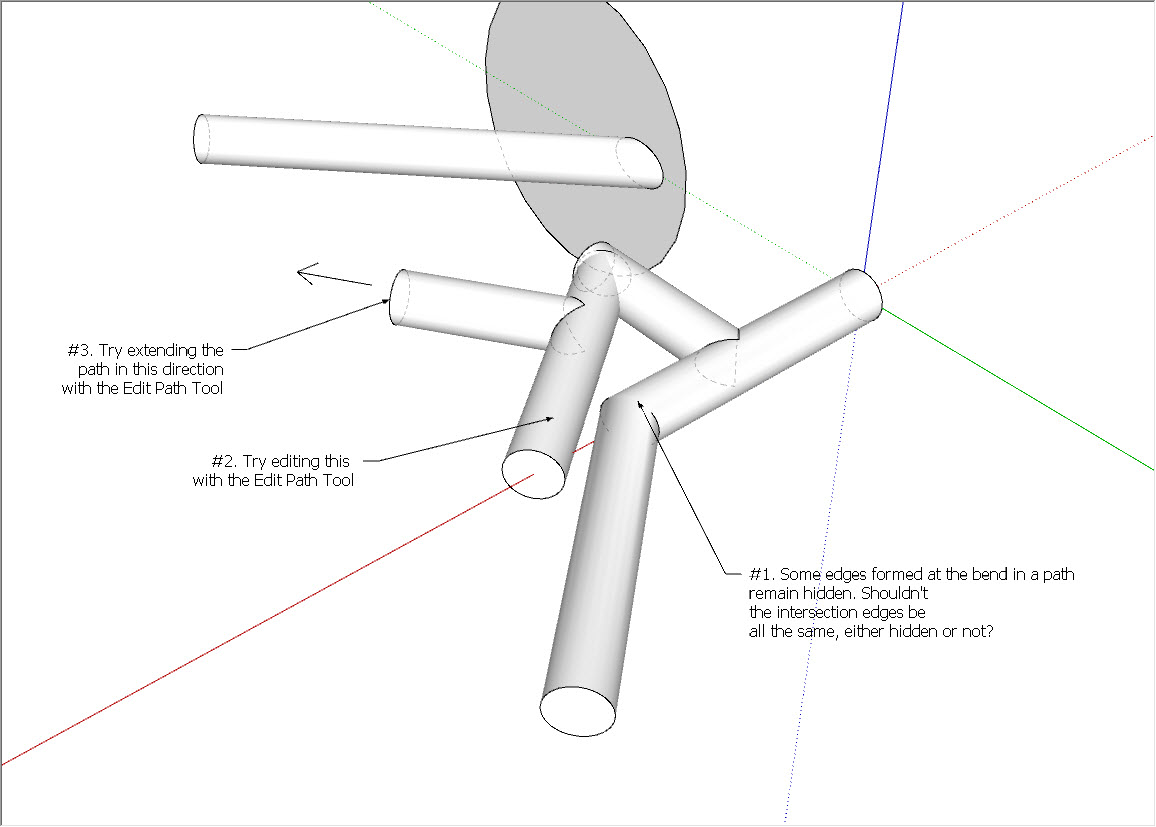
        trim to solid issue.jpg


        trim to solid issue.skp

        John | Illustrator | Beaverton, Oregon

        1 條回覆 最後回覆 回覆 引用 0
        • W 離線
          Whaat
          最後由 編輯

          @jclements said:

          A few quirks.

          I kind of expected issues 2 and 3 to happen, but issue 1 is a surprise (I think it is fixable).

          [attachment=1:eaqqxjit]<!-- ia1 -->trim to solid issue.jpg<!-- ia1 -->[/attachment:eaqqxjit]

          Thanks John - I'll take a look

          SketchUp Plugins for Professionals

          1 條回覆 最後回覆 回覆 引用 0
          • R 離線
            rv1974
            最後由 編輯

            Whaat, If I'm not mistaken there's important feature missing- Follow'n'Keep mode:
            http://sketchucation.com/forums/viewtopic.php?f=323%26amp;t=16465
            Would it be possible to add this humble check box (in PB andAssembler Dialog) in near future?

            1 條回覆 最後回覆 回覆 引用 0
            • W 離線
              Whaat
              最後由 編輯

              @rv1974 said:

              Whaat, If I'm not mistaken there's important feature missing- Follow'n'Keep mode:
              http://sketchucation.com/forums/viewtopic.php?f=323%26amp;t=16465
              Would it be possible to add this humble check box (in PB andAssembler Dialog) in near future?

              PB2 is designed to make this process automatic. For non-planar paths (like a helix) PB2 will use a method similar to Follow'n'Keep. Otherwise, it works similar to the SketchUp follow-me tool.

              Are you finding this to be a significant limitation?

              SketchUp Plugins for Professionals

              1 條回覆 最後回覆 回覆 引用 0
              • R 離線
                rv1974
                最後由 編輯

                For instance, tilted curb stones on sloped roads\ramps look weird. There are lot of similar cases- 7 pages of vivid 'thank you' discussion surely prove it.

                1 條回覆 最後回覆 回覆 引用 0
                • utilerU 離線
                  utiler
                  最後由 編輯

                  Hi Dale, not sure what's going on here: for some reason a profile from either a face or polyline won't execute....?


                  PB2-issue.wmv

                  Just Curious...

                  1 條回覆 最後回覆 回覆 引用 0
                  • R 離線
                    rv1974
                    最後由 編輯

                    @utiler said:

                    Hi Dale, not sure what's going on here: for some reason a profile from either a face or polyline won't execute....?

                    try to remove smartdrop.rb

                    1 條回覆 最後回覆 回覆 引用 0
                    • W 離線
                      Whaat
                      最後由 編輯

                      @rv1974 said:

                      @utiler said:

                      Hi Dale, not sure what's going on here: for some reason a profile from either a face or polyline won't execute....?

                      try to remove smartdrop.rb

                      Yes, it looks like you have a conflicting plugin installed (possibly smartdrop). Open the Ruby Console Window and checked for errors. It should give you a clue about which plugin is causing the problem.

                      SketchUp Plugins for Professionals

                      1 條回覆 最後回覆 回覆 引用 0
                      • R 離線
                        raineysky
                        最後由 編輯

                        Dale,

                        I can't get the pipe segments to align properly. What's the trick?

                        Thanks,

                        Paul
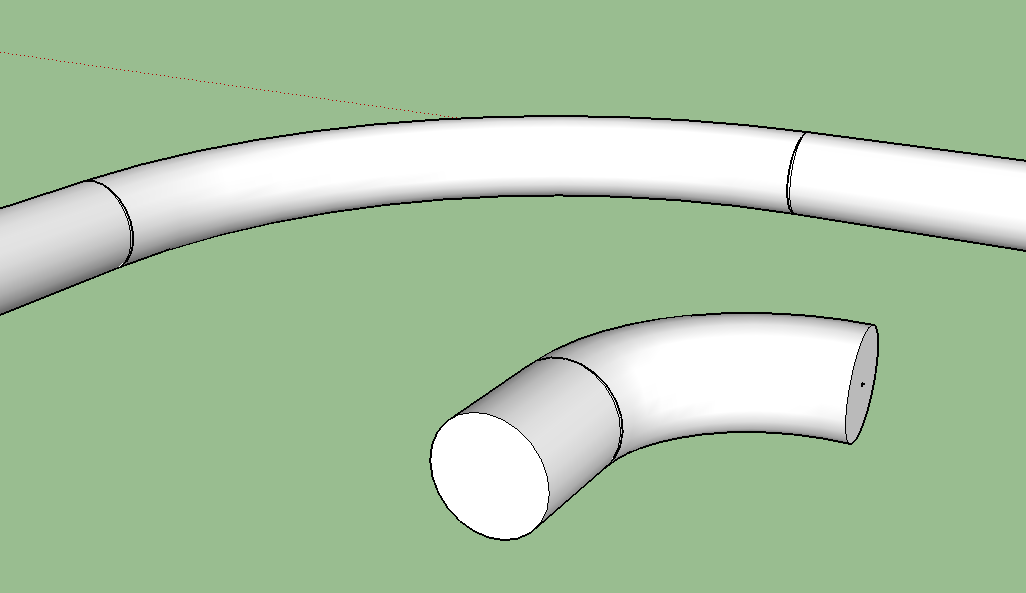

                        Pipe.PNG

                        1 條回覆 最後回覆 回覆 引用 0
                        • W 離線
                          Whaat
                          最後由 編輯

                          @raineysky said:

                          Dale,

                          I can't get the pipe segments to align properly. What's the trick?

                          Thanks,

                          Paul

                          Add a small extension to your arcs in the direction of the joining pieces.

                          SketchUp Plugins for Professionals

                          1 條回覆 最後回覆 回覆 引用 0
                          • R 離線
                            raineysky
                            最後由 編輯

                            Dale,

                            That's the trick

                            Thank You,

                            Paul

                            1 條回覆 最後回覆 回覆 引用 0
                            • W 離線
                              Whaat
                              最後由 編輯

                              @jclements said:

                              A few quirks.

                              I kind of expected issues 2 and 3 to happen, but issue 1 is a surprise (I think it is fixable).

                              [attachment=1:1glim78o]<!-- ia1 -->trim to solid issue.jpg<!-- ia1 -->[/attachment:1glim78o]

                              Thanks for the feedback John.

                              1. Is this an issue? The smoothing of edges is based on the angle between adjacent faces. If it is less than 30 degrees the edge gets smoothed
                              2. This is a bug that I hope to fix soon.
                              3. I couldn't see any issue here. The path could be edited as expected. Could you clarify the problem you noticed.

                              SketchUp Plugins for Professionals

                              1 條回覆 最後回覆 回覆 引用 0
                              • Mistro11M 離線
                                Mistro11
                                最後由 編輯

                                I have the 1st version and I love it.Really looking forward to this one. But why no PayPal? Just curious.

                                i7-4930k @3.4/3.7GHz, 32Gb RAM, NVidia GTX 980Ti 6Gb, Windows 7 Pro 64bit
                                Structural Integrity is Not Just Physical...It's in the Design and Purpose

                                1 條回覆 最後回覆 回覆 引用 0
                                • utilerU 離線
                                  utiler
                                  最後由 編輯

                                  @rv1974 said:

                                  @utiler said:

                                  Hi Dale, not sure what's going on here: for some reason a profile from either a face or polyline won't execute....?

                                  try to remove smartdrop.rb

                                  Thanks mate, worked! 👍

                                  Just Curious...

                                  1 條回覆 最後回覆 回覆 引用 0
                                  • pep75P 離線
                                    pep75
                                    最後由 編輯

                                    Just bought it...what an amazing plugin! Great work Dale!

                                    1 條回覆 最後回覆 回覆 引用 0
                                    • A 離線
                                      AcesHigh
                                      最後由 編輯

                                      Anyone knows where the Plugin stores it´s library of profiles?

                                      I find no way to select different profiles, and when clicking "browse" (the mag glass button) it takes me to "My Documents" folder, where there are several skp files but no library as far as I know.

                                      1 條回覆 最後回覆 回覆 引用 0
                                      • K 離線
                                        kaas
                                        最後由 編輯

                                        its in the sketchup plugins folder - > DM_profileBuilder2 - Libraries

                                        1 條回覆 最後回覆 回覆 引用 0
                                        • W 離線
                                          Whaat
                                          最後由 編輯

                                          @deaneau said:

                                          I can only pay via paypal and would pay this plugin... could anybody tell me a way how i can purchase via paypal?

                                          Hi,
                                          Unfortunately, there is currently no way to purchase via paypal. All payments are handled through SketchUp's payment system (which does not currently support Paypal).

                                          SketchUp Plugins for Professionals

                                          1 條回覆 最後回覆 回覆 引用 0
                                          • utilerU 離線
                                            utiler
                                            最後由 編輯

                                            Hi Dale, quick question re: libraries...

                                            Are we able to file profiles and assemblies in specific folders..? [say Curbs, Steel, purlins, etc..]


                                            Just Curious...

                                            1 條回覆 最後回覆 回覆 引用 0
                                            • 1
                                            • 2
                                            • 3
                                            • 4
                                            • 5
                                            • 10
                                            • 11
                                            • 2 / 11
                                            • 第一個貼文
                                              最後的貼文
                                            Buy SketchPlus
                                            Buy SUbD
                                            Buy WrapR
                                            Buy eBook
                                            Buy Modelur
                                            Buy Vertex Tools
                                            Buy SketchCuisine
                                            Buy FormFonts

                                            Advertisement