sketchucation logo sketchucation
    • 登入
    Oops, your profile's looking a bit empty! To help us tailor your experience, please fill in key details like your SketchUp version, skill level, operating system, and more. Update and save your info on your profile page today!
    🔌 Smart Spline | Fluid way to handle splines for furniture design and complex structures. Download

    [Plugin][$] Profile Builder 2

    已排程 已置頂 已鎖定 已移動 Plugins
    219 貼文 40 Posters 58.8k 瀏覽 40 Watching
    正在載入更多貼文
    • 從舊到新
    • 從新到舊
    • 最多點贊
    回覆
    • 在新貼文中回覆
    登入後回覆
    此主題已被刪除。只有擁有主題管理權限的使用者可以查看。
    • E 離線
      eselick
      最後由 編輯

      Hi Whaat

      My assemblies are getting complicated and I wonder if there is any way to automatically combine them?

      This would make it much easier to get amazing results since they could be created in a modular fashion and debugged and re-used more easily.

      If this cannot be done, can you think of any way to get a report on the assembly that would contain a listing of components and the dialog attributes such as elevation etc.?

      Thanks again for all the fun.
      Elliot

      1 條回覆 最後回覆 回覆 引用 0
      • W 離線
        Whaat
        最後由 編輯

        @eselick said:

        Hi Whaat

        My assemblies are getting complicated and I wonder if there is any way to automatically combine them?

        This would make it much easier to get amazing results since they could be created in a modular fashion and debugged and re-used more easily.

        If this cannot be done, can you think of any way to get a report on the assembly that would contain a listing of components and the dialog attributes such as elevation etc.?

        Thanks again for all the fun.
        Elliot

        Sorry, I am not understanding what you mean by 'combine them'. can you elaborate?

        SketchUp Plugins for Professionals

        1 條回覆 最後回覆 回覆 引用 0
        • E 離線
          eselick
          最後由 編輯

          Hi Whaat

          By combining I mean adding two pre-existing assemblies together. These would be assemblies that had been created to be used together.

          I just made a combination exterior siding and stud wall. I dumped the siding assembly into a model where the wall assembly was open. I then added profiles and components from the siding assembly in the model to the wall assembly. I used eye dropper tool which did save some time.

          But I'm lazy and would have preferred to the use an eyedropper like tool with a "+" symbol that would have just "combined" the second assembly into the first with one click. This would have saved me some quite a bit of work and been guaranteed to be error-free.

          Hope that explains it

          Elliot

          1 條回覆 最後回覆 回覆 引用 0
          • pilouP 離線
            pilou
            最後由 編輯

            French Manual of Profil Builder 2! 😉

            pbf2vf1.jpg

            Frenchy Pilou
            Is beautiful that please without concept!
            My Little site :)

            1 條回覆 最後回覆 回覆 引用 0
            • T 離線
              TBoy
              最後由 編輯

              When I open library folder, only last row of profiles can be selected, no matter how long is the table of thumbnails-only last row. Anybody to tell me how to resolve this ?
              Trial version installed on 64 bit Windows8.1, same on Windows 10-64 bit.

              1 條回覆 最後回覆 回覆 引用 0
              • W 離線
                Whaat
                最後由 編輯

                @tboy said:

                When I open library folder, only last row of profiles can be selected, no matter how long is the table of thumbnails-only last row. Anybody to tell me how to resolve this ?
                Trial version installed on 64 bit Windows8.1, same on Windows 10-64 bit.

                Hi,

                That is a strange report. Can you please open the Ruby Console Window (Window->Ruby Console) and then try to select the profile thumbnails in the upper rows. Then, let me know if you see any error messages.

                Also, could you please ZIP your library folder and send to me for testing? My email address can be found here (see Customer Support):
                http://extensions.sketchup.com/en/content/profile-builder-2

                Thanks!

                SketchUp Plugins for Professionals

                1 條回覆 最後回覆 回覆 引用 0
                • O 離線
                  optimaforever
                  最後由 編輯

                  Hello whaat,

                  Do you think there's a way to program PB to do something like this?
                  https://www.youtube.com/watch?v=V7vshlm06EE
                  It's book manager for 3dsmax; it work with selections of polys but in PB it could be replaced by smart paths.
                  Is there a way to random seed components inside an assembly?

                  1 條回覆 最後回覆 回覆 引用 0
                  • T 離線
                    TBoy
                    最後由 編輯

                    @tboy said:

                    When I open library folder, only last row of profiles can be selected, no matter how long is the table of thumbnails-only last row. Anybody to tell me how to resolve this ?
                    Trial version installed on 64 bit Windows8.1, same on Windows 10-64 bit.

                    Hellow whaat,
                    I found the reason - I was testing on some kind of portable version of SkethcUp.
                    In installed Sketchup everything is OK.
                    As a new user I'm testing a lot of plugins. ProfileBuilder2 is one of the best (possibly most useful). Professionally made, adding additional functionality to SketchUp. Congratulations for your work.

                    1 條回覆 最後回覆 回覆 引用 0
                    • O 離線
                      optimaforever
                      最後由 編輯

                      Hello Dale,

                      To create an assembly for this bench, is there a way to extrude a multi-profile for the wooden lattice (a profile composed of several discrete surfaces, not linked between them) or have I to add x multiples of the same square profile each moved and rotated accordingly to get the complete shape?

                      http://img.archiexpo.com/images_ae/photo-g/54663-4962911.jpg

                      Thanks in advance,

                      1 條回覆 最後回覆 回覆 引用 0
                      • O 離線
                        optimaforever
                        最後由 編輯

                        Ok. done.
                        Yet I'd like to have an option to randomize UV tiling without having to group all the profiles, explode them and use Julia's UV depatternize script...

                        It took me a while to get the positioning of each profile right.
                        it has to be done manually.
                        I'd have liked to have the possibility to place the profiles along a predefined shape (spline) with the option of aligning the profile along the shape, and parametric interdistance.

                        It would be cool to have the possibility of interrupting the profiles (in the case of this bench, I'll have to cut the profiles with su4you's incredible slice to create some realistic lengths (there is no manufacturer who can make wooden profile in that shape and that length) 😎


                        Citydesign_Flow_banc_WIP.jpg

                        1 條回覆 最後回覆 回覆 引用 0
                        • W 離線
                          Whaat
                          最後由 編輯

                          @optimaforever said:

                          Ok. done.
                          Yet I'd like to have an option to randomize UV tiling without having to group all the profiles, explode them and use Julia's UV depatternize script...

                          It took me a while to get the positioning of each profile right.
                          it has to be done manually.
                          I'd have liked to have the possibility to place the profiles along a predefined shape (spline) with the option of aligning the profile along the shape, and parametric interdistance.

                          It would be cool to have the possibility of interrupting the profiles (in the case of this bench, I'll have to cut the profiles with su4you's incredible slice to create some realistic lengths (there is no manufacturer who can make wooden profile in that shape and that length) 😎
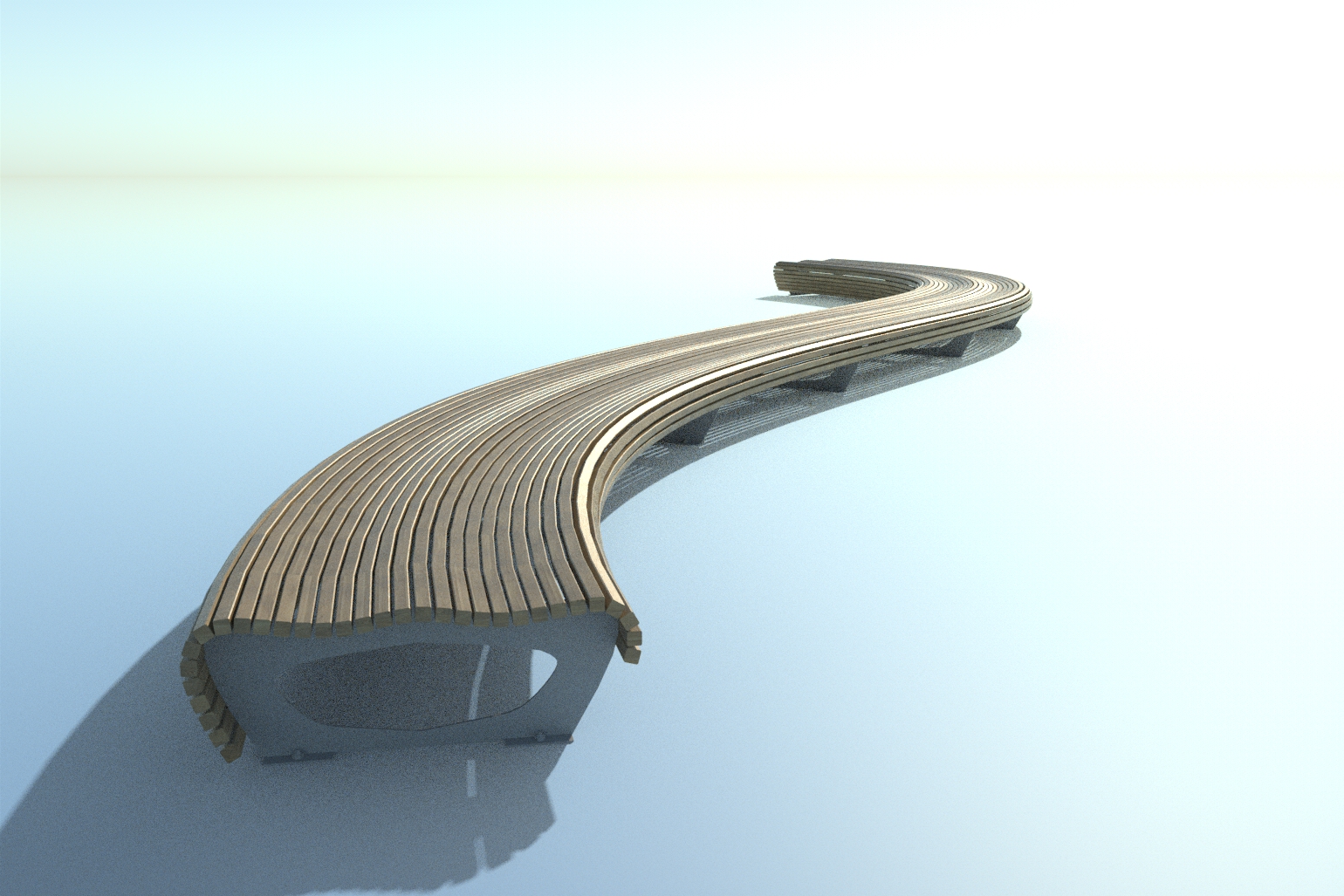
                          Nice work! Thanks for the suggestions!

                          SketchUp Plugins for Professionals

                          1 條回覆 最後回覆 回覆 引用 0
                          • R 離線
                            rv1974
                            最後由 編輯

                            Whaat, its rather tedious the dig into the context to edit the path. Could it 'feel' the path regardless the context?
                            Thanks
                            P.S. Are you planning some updates\new versions in the near future?

                            1 條回覆 最後回覆 回覆 引用 0
                            • Bob JamesB 離線
                              Bob James
                              最後由 編輯

                              Off Topic Nit Pick

                              @optimaforever said:

                              su4you's incredible slice

                              Isn't Slice made by TIG? 😎

                              i7-4930K 3.4Ghz, 2x GTX780 6GB, 32GB DDR3-1600 ECC, OCZ Vertex 4 500GB, WD Black 3TB, 32TB NAS, 4x 27" Monitors, SpaceMouse Pro, X-keys XK-60

                              1 條回覆 最後回覆 回覆 引用 0
                              • R 離線
                                rv1974
                                最後由 編輯

                                there are different tools. beware of su4you's one- it's extremely addictive, simply genius.

                                1 條回覆 最後回覆 回覆 引用 0
                                • O 離線
                                  optimaforever
                                  最後由 編輯

                                  @bob james said:

                                  Off Topic Nit Pick

                                  @optimaforever said:

                                  su4you's incredible slice

                                  Isn't Slice made by TIG? 😎

                                  TIG's "sliceR" I think.

                                  1 條回覆 最後回覆 回覆 引用 0
                                  • W 離線
                                    Whaat
                                    最後由 編輯

                                    @rv1974 said:

                                    P.S. Are you planning some updates\new versions in the near future?

                                    Actually...yes. I am nearing the release of a significant update. Stay tuned 😄

                                    SketchUp Plugins for Professionals

                                    1 條回覆 最後回覆 回覆 引用 0
                                    • jujuJ 離線
                                      juju
                                      最後由 編輯

                                      @whaat said:

                                      Actually...yes. I am nearing the release of a significant update. Stay tuned 😄

                                      Do tell!

                                      Save the Earth, it's the only planet with chocolate.

                                      1 條回覆 最後回覆 回覆 引用 0
                                      • R 離線
                                        rv1974
                                        最後由 編輯

                                        1. Multiple not connected edges as one path.
                                        2. Move\scale\rotate randomization for assembly parts.
                                        3. Easy path access.

                                        I'd buy the upcoming version 3 times for those ones 😎

                                        1 條回覆 最後回覆 回覆 引用 0
                                        • W 離線
                                          Whaat
                                          最後由 編輯

                                          @juju said:

                                          @whaat said:

                                          Actually...yes. I am nearing the release of a significant update. Stay tuned 😄

                                          Do tell!

                                          very soon...I'll probably be posting a promo video within the next few days.

                                          SketchUp Plugins for Professionals

                                          1 條回覆 最後回覆 回覆 引用 0
                                          • O 離線
                                            optimaforever
                                            最後由 編輯

                                            One thing that frustrates me now:

                                            When trying to save a profile or an assembly on the local drive (C:\userXXX\AppData\Roaming\SketchUp\SketchUp 2016\SketchUp\Plugins\DM_ProfileBuilder2\Libraries)
                                            Windows 7 never allows me to write the file there unless I launch SU as an admin (which is pretty annoying as Win7 keeps me asking "are you sure?" non stop).

                                            Now my workaround is to save the profile/aseembly to the desktop (which is surprisingly "writeable" through SU) and then remove the file to the right place with the help of Explorer.exe ...

                                            Is there a hack to enable direct file-writing in the AppData section without having to be in Admin mode?

                                            Another request:

                                            Is it possible to get a LOD approach in the profiles?
                                            By default in your Profiles Library, a circle is made of 24 edges.
                                            If I use it for a complex assembly, I end up with a very highpoly mesh.

                                            For Close-ups it would be a good thing.
                                            For long-range, it will be a total overkill.

                                            With a LOD option, I'd select a circle preset (instead of crawling through endless dimension-basenamed different circle presets like DIA5090 DIA5100 etc.), enter the diameter, enter the precision (number of edges) and the profile generated would be ideally suited to all types of cases.


                                            1 條回覆 最後回覆 回覆 引用 0
                                            • 1
                                            • 2
                                            • 3
                                            • 4
                                            • 5
                                            • 6
                                            • 10
                                            • 11
                                            • 4 / 11
                                            • 第一個貼文
                                              最後的貼文
                                            Buy SketchPlus
                                            Buy SUbD
                                            Buy WrapR
                                            Buy eBook
                                            Buy Modelur
                                            Buy Vertex Tools
                                            Buy SketchCuisine
                                            Buy FormFonts

                                            Advertisement
