sketchucation logo sketchucation
    • 登入
    Oops, your profile's looking a bit empty! To help us tailor your experience, please fill in key details like your SketchUp version, skill level, operating system, and more. Update and save your info on your profile page today!
    🔌 Smart Spline | Fluid way to handle splines for furniture design and complex structures. Download

    [Plugin] 3 point Window

    已排程 已置頂 已鎖定 已移動 Plugins
    37 貼文 15 Posters 8.8k 瀏覽 15 Watching
    正在載入更多貼文
    • 從舊到新
    • 從新到舊
    • 最多點贊
    回覆
    • 在新貼文中回覆
    登入後回覆
    此主題已被刪除。只有擁有主題管理權限的使用者可以查看。
    • PixeroP 離線
      Pixero
      最後由 編輯

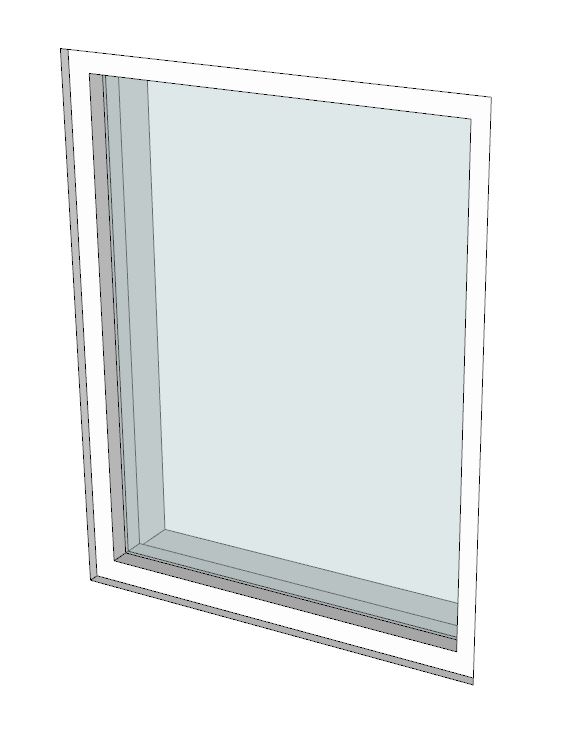
      A plugin that creates a rectangular window as a component and adds frame and glass material with just three clicks.
      Settings for window inset, frame width, frame thickness, glass thickness and glass inset.

      Choose your window settings, click top left, top right and bottom right corner.
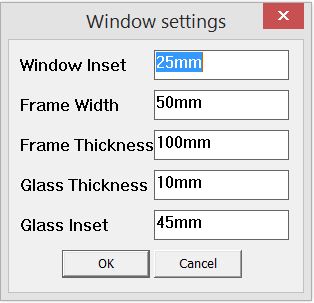
      3pt_Window_settings.JPG

      3pt_Window_result.JPG

      Download: http://sketchucation.com/pluginstore?pln=3pt_Window

      1 條回覆 最後回覆 回覆 引用 0
      • Rich O BrienR 離線
        Rich O Brien Moderator
        最後由 編輯

        Nice !

        Download the free D'oh Book for SketchUp 📖

        1 條回覆 最後回覆 回覆 引用 0
        • K 離線
          kaas
          最後由 編輯

          Nice Pixero. Quite useful. You also incorporated the materials. Is this the final version or do you have more plans with this plugin?

          1 條回覆 最後回覆 回覆 引用 0
          • PixeroP 離線
            Pixero
            最後由 編輯

            I have some ideas but no time frame. It maybe doesn't have all the bells and whistles but it's one of those scripts that will save time for me and hopefully others as well.

            A good thing is that you can edit the materials and it will be smart enough to use the updated material instead of creating a new.
            Or if you want some windows with different material just rename the existing material and the script will create a new on the next use.

            It also creates the window as a component with a correct axis. Makes it easier to edit and move.

            1 條回覆 最後回覆 回覆 引用 0
            • B 離線
              Ben Ritter
              最後由 編輯

              Thank you Pixero. 👍

              1 條回覆 最後回覆 回覆 引用 0
              • B 離線
                Ben Ritter
                最後由 編輯

                Thank you Pixero. 👍

                However, I get a Bugsplat every time I use it.

                Windows 7 - 64 bit, SU 8.0.15158

                1 條回覆 最後回覆 回覆 引用 0
                • PixeroP 離線
                  Pixero
                  最後由 編輯

                  Ok I never tested it with SU 8. 😳

                  1 條回覆 最後回覆 回覆 引用 0
                  • PixeroP 離線
                    Pixero
                    最後由 編輯

                    Hmm... just tested it with SketchUp 8 and it works without errors for me.

                    1 條回覆 最後回覆 回覆 引用 0
                    • B 離線
                      Ben Ritter
                      最後由 編輯

                      A conflict with another plugin perhaps?

                      1 條回覆 最後回覆 回覆 引用 0
                      • A 離線
                        agrazdi
                        最後由 編輯

                        Mr. Pixero

                        Great plugin, thanks.

                        It would be of a great help to have a 3 point door plugin. ( as simple as this one, for fast proyects )

                        Hope one day you can develope it.

                        Thanks

                        agrazdi

                        1 條回覆 最後回覆 回覆 引用 0
                        • brewskyB 離線
                          brewsky
                          最後由 編輯

                          I like this! 😄

                          I got one problem when testing it in SU2015, the glass is placed just outside the window frame.
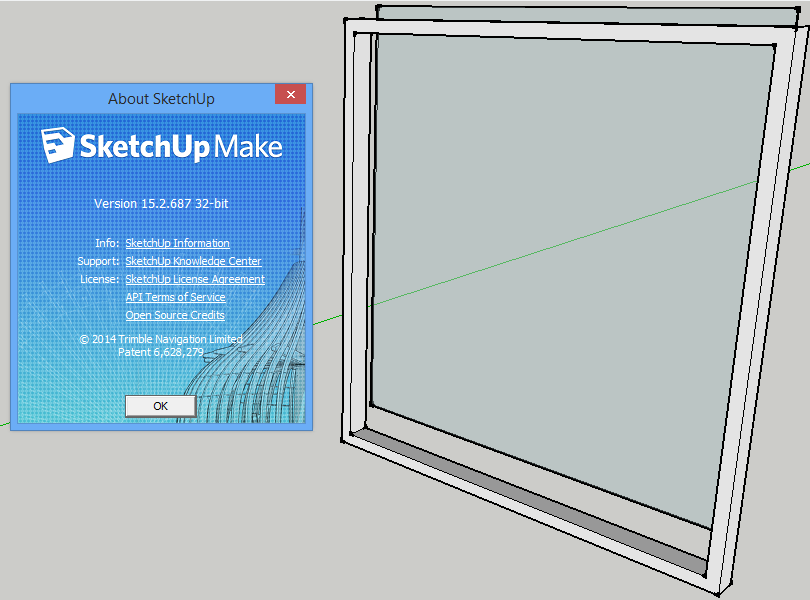
                          3pw.png
                          If you could make the window a cutting component, it would work great with my bim-tools plugin 😉

                          Cheers!
                          Jan

                          Sketchup BIM-Tools - http://sketchucation.com/forums/viewtopic.php?p=299107

                          1 條回覆 最後回覆 回覆 引用 0
                          • PixeroP 離線
                            Pixero
                            最後由 編輯

                            Yes I have found a bug at certain angles and am working on a fix.

                            1 條回覆 最後回覆 回覆 引用 0
                            • PixeroP 離線
                              Pixero
                              最後由 編輯

                              It should be under: View -> Toolbars -> 3 point Window.

                              Updated to v1.0.1. Fixed a bug that caused axis problems when drawn at certain angles.

                              1 條回覆 最後回覆 回覆 引用 0
                              • D 離線
                                DonVid
                                最後由 編輯

                                Look nice.
                                I installed it in Sketchup 2014 but I can not find it in plugings list.
                                I also noticed that the the window does not cut the wall (See through the glass).
                                Thank you.
                                Don

                                1 條回覆 最後回覆 回覆 引用 0
                                • PixeroP 離線
                                  Pixero
                                  最後由 編輯

                                  This version doesn't cut a hole since my preferred workflow is to make walls with holes.
                                  Who knows what the future brings? I have ideas but no time frame.

                                  1 條回覆 最後回覆 回覆 引用 0
                                  • D 離線
                                    db11
                                    最後由 編輯

                                    First off Pixero, thanks for a great plug-in. Its simplicity and speed in custom window creation is awesome.

                                    One thing that slows me down is having to over-write the pre-sets each time I re-open the tool. I was thinking no problem, I'll just open the script and modify the parameters... but it's .rbs not .rb, therefore uneditable.

                                    I would like to set the frame and window dimensions once (based on manufacturer specs for the current project) and have it remember them — rather than over-writing with default values on each new use.

                                    So, if you had a way of saving new pre-set values, it would be great. Even better would be multiple pre-sets... for fixed-pane vs operable windows vs window-walls etc.

                                    Request 2 is an option for triple pane windows. (my current projects are both PassivHaus)

                                    I understand not wanting feature-bloat to ruin a simple approach, but each of these features would extend functionality without impeding usability. (though they would obviously make the script itself more complex, so I would understand not wanting to)

                                    Thanks for the consideration.

                                    1 條回覆 最後回覆 回覆 引用 0
                                    • PixeroP 離線
                                      Pixero
                                      最後由 編輯

                                      Remembering settings, it's is on my to do list. 👍

                                      1 條回覆 最後回覆 回覆 引用 0
                                      • D 離線
                                        db11
                                        最後由 編輯

                                        @pixero said:

                                        Remembering settings, it's is on my to do list. 👍

                                        Perfect! Will look forward to upcoming releases.

                                        1 條回覆 最後回覆 回覆 引用 0
                                        • PixeroP 離線
                                          Pixero
                                          最後由 編輯

                                          v1.0.2
                                          Added session memory of settings.

                                          1 條回覆 最後回覆 回覆 引用 0
                                          • D 離線
                                            db11
                                            最後由 編輯

                                            @pixero said:

                                            v1.0.2
                                            Added session memory of settings.

                                            Perfect. Makes a great tool even better. Thanks!

                                            1 條回覆 最後回覆 回覆 引用 0
                                            • 1
                                            • 2
                                            • 1 / 2
                                            • 第一個貼文
                                              最後的貼文
                                            Buy SketchPlus
                                            Buy SUbD
                                            Buy WrapR
                                            Buy eBook
                                            Buy Modelur
                                            Buy Vertex Tools
                                            Buy SketchCuisine
                                            Buy FormFonts

                                            Advertisement