sketchucation logo sketchucation
    • Login
    Oops, your profile's looking a bit empty! To help us tailor your experience, please fill in key details like your SketchUp version, skill level, operating system, and more. Update and save your info on your profile page today!
    ⚠️ Update | Sketchucation Tools 5.0.8 released with licensing improvements and bugfixes Download

    Want to see what SketchUp looks like on a 5K iMac?

    Scheduled Pinned Locked Moved SketchUp Discussions
    sketchup
    17 Posts 7 Posters 3.3k Views 7 Watching
    Loading More Posts
    • Oldest to Newest
    • Newest to Oldest
    • Most Votes
    Reply
    • Reply as topic
    Log in to reply
    This topic has been deleted. Only users with topic management privileges can see it.
    • D
      d12dozr
      last edited by

      Here's a link to the hi-res version: http://i198.photobucket.com/albums/aa47/timdanaher/ScreenShot2014-11-30at101900_zps2e3a28a4.png~original

      Dayum, that's nice! πŸ˜„

      3D Printing with SketchUp Book
      http://goo.gl/f7ooYh

      1 Reply Last reply
      Reply Quote 0
      • Tim DanaherT
        Tim Danaher
        last edited by

        Cheers, D12... It almost makes up for the lack of FSAA... Actually, that link isn't to a full-res screenshot. The real one is twice the size of that...

        Cheers,

        Tim

        http://vizarch.blogspot.com

        1 Reply Last reply
        Reply Quote 0
        • pbacotP
          pbacot
          last edited by

          That's a retina display? I find on my MBP that what it does is make the lines so thin the lack of AA is not so bad, but it's hard to see many things including selection indicators for edges and faces-and if you are using another non-retina display SU AA hasn't improved.

          MacOSX MojaveSketchUp Pro v19 Twilight v2 Thea v3 PowerCADD

          1 Reply Last reply
          Reply Quote 0
          • Tim DanaherT
            Tim Danaher
            last edited by

            Yup. Retina 5120 x 2880 27"... I know what you mean about end-point indicators, etc.... they're a quarter the size! Trimble should be able to get a fix fairly easily, though. Custom Edge weights would help, too...

            Cheers,

            Tim

            http://vizarch.blogspot.com

            1 Reply Last reply
            Reply Quote 0
            • pbacotP
              pbacot
              last edited by

              What method did you use for your screenshot? Native OS tool?

              MacOSX MojaveSketchUp Pro v19 Twilight v2 Thea v3 PowerCADD

              1 Reply Last reply
              Reply Quote 0
              • Tim DanaherT
                Tim Danaher
                last edited by

                Yep. Cmd-Shift-4... Does that downsize it?

                Cheers,

                Tim

                http://vizarch.blogspot.com

                1 Reply Last reply
                Reply Quote 0
                • jeff hammondJ
                  jeff hammond
                  last edited by

                  @tim danaher said:

                  Yep. Cmd-Shift-4... Does that downsize it?

                  it's 4322x2716 so (i imagine) the size of your sketchup window.
                  cmmd-shift-3 shoots the whole screen.

                  dotdotdot

                  1 Reply Last reply
                  Reply Quote 0
                  • olisheaO
                    olishea
                    last edited by

                    @jeff hammond said:

                    @tim danaher said:

                    Yep. Cmd-Shift-4... Does that downsize it?

                    it's 4322x2716 so (i imagine) the size of your sketchup window.
                    cmmd-shift-3 shoots the whole screen.

                    I did not know that!

                    I thought the only screenshot shortcut was cmd-shift-4

                    and cmd-shift-4 then space bar to snap a full window.

                    learn something new every day! πŸ˜†

                    oli

                    1 Reply Last reply
                    Reply Quote 0
                    • jeff hammondJ
                      jeff hammond
                      last edited by

                      @olishea said:

                      learn something new every day! πŸ˜†

                      heh.. nice

                      one more that i know about is adding the control key in combination with any of the screenshots will copy it to the clipboard instead of creating a file.

                      dotdotdot

                      1 Reply Last reply
                      Reply Quote 0
                      • pbacotP
                        pbacot
                        last edited by

                        I did some tests and was getting about 2200 px across doing selection on my MBP. it's comparable to a png export (with AA) of the same size but maybe a little better, if that makes any sense. Also I have the AA up'd to (4) in SU--haven't checked at the default(0). So if the res is OK with you it's faster than an export png.

                        MacOSX MojaveSketchUp Pro v19 Twilight v2 Thea v3 PowerCADD

                        1 Reply Last reply
                        Reply Quote 0
                        • pbacotP
                          pbacot
                          last edited by

                          Hijack in process. This image was made with command-shif F4 then hitting the space bar (camera icon) then clicking on highlit windowScreen Shot 2014-11-30 at 4.15.57 PM.png

                          MacOSX MojaveSketchUp Pro v19 Twilight v2 Thea v3 PowerCADD

                          1 Reply Last reply
                          Reply Quote 0
                          • jeff hammondJ
                            jeff hammond
                            last edited by

                            @pbacot said:

                            it's comparable to a png export (with AA)

                            weird.. i always thought the AA was broken for 2D exports but just tried some tests and yeah, AA works upon 2D exports β˜€

                            @pbacot said:

                            Hijack in process. This image was made with command-shif F4 then hitting the space bar (camera icon) then clicking on highlit window
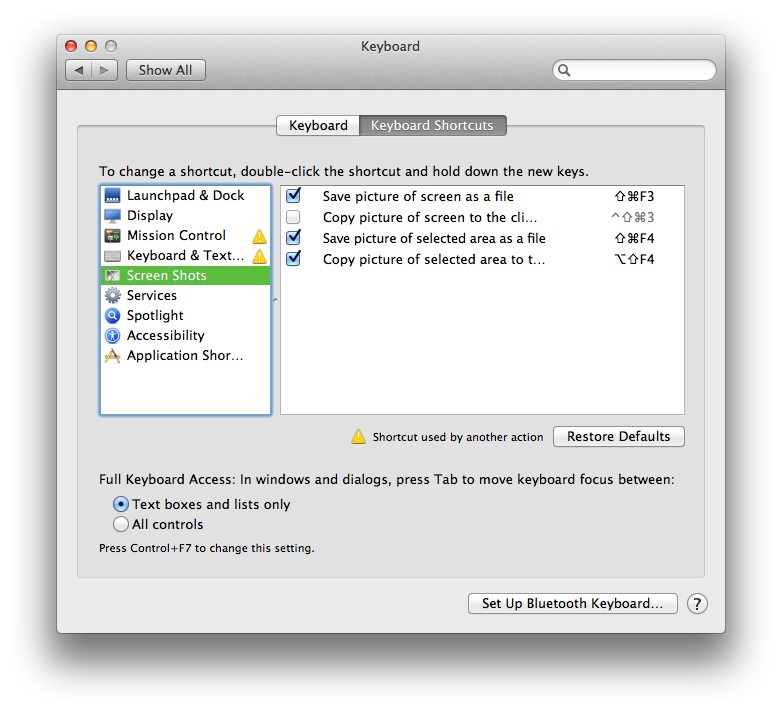
                            that's weird too.. did you change those to the F keys?
                            default for me is:
                            (and it's always been this way as long as i can remember)
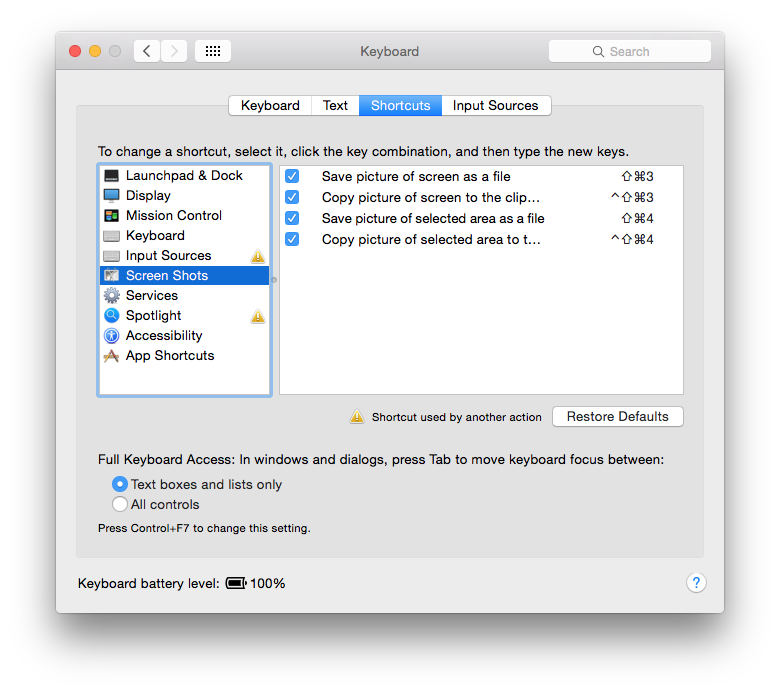
                            Screen Shot 2014-11-30 at 8.21.19 PM.png

                            dotdotdot

                            1 Reply Last reply
                            Reply Quote 0
                            • D
                              driven
                              last edited by

                              @pbacot said:

                              ...So if the res is OK with you it's faster than an export png.

                              the main difference is if you want the window frame or just the content...
                              export will give you content...
                              also some types of floating window will be included in screen captures from system shortcuts...
                              john

                              learn from the mistakes of others, you may not live long enough to make them all yourself...

                              1 Reply Last reply
                              Reply Quote 0
                              • pbacotP
                                pbacot
                                last edited by

                                Sorry for the confusion. I meant to point to the shortcuts screen, but yeah I DID change them because they conflicted with shortcuts I already set years and years ago. Point is, Oli, there's a few different screenshot options to choose from. You can change the key commands of course

                                MacOSX MojaveSketchUp Pro v19 Twilight v2 Thea v3 PowerCADD

                                1 Reply Last reply
                                Reply Quote 0
                                • olisheaO
                                  olishea
                                  last edited by

                                  thanks! I've not had issues with AA turned on for 2D exports....at least I don't think I have? I normally double export resolution then reduce afterwards as the AA isn't amazing. You also get thinner, crisper lines when you export at double size resolution and then reduce.

                                  oli

                                  1 Reply Last reply
                                  Reply Quote 0
                                  • M
                                    mk11
                                    last edited by

                                    iMac related question. Are you running the i5 version or did you upgrade to the i7? In the process of buying a iMac and wondering if the new i7 upgrade is necessary.

                                    Marc Kleinmann
                                    SU Pro 2015
                                    Mac & Win

                                    1 Reply Last reply
                                    Reply Quote 0

                                    Hello! It looks like you're interested in this conversation, but you don't have an account yet.

                                    Getting fed up of having to scroll through the same posts each visit? When you register for an account, you'll always come back to exactly where you were before, and choose to be notified of new replies (either via email, or push notification). You'll also be able to save bookmarks and upvote posts to show your appreciation to other community members.

                                    With your input, this post could be even better πŸ’—

                                    Register Login
                                    • 1 / 1
                                    • First post
                                      Last post
                                    Buy SketchPlus
                                    Buy SUbD
                                    Buy WrapR
                                    Buy eBook
                                    Buy Modelur
                                    Buy Vertex Tools
                                    Buy SketchCuisine
                                    Buy FormFonts

                                    Advertisement

