sketchucation logo sketchucation
    • 登入
    Oops, your profile's looking a bit empty! To help us tailor your experience, please fill in key details like your SketchUp version, skill level, operating system, and more. Update and save your info on your profile page today!
    🔌 Smart Spline | Fluid way to handle splines for furniture design and complex structures. Download

    Styles won't save? YES THEY DO!

    已排程 已置頂 已鎖定 已移動 SketchUp Discussions
    sketchup
    26 貼文 6 Posters 7.2k 瀏覽 6 Watching
    正在載入更多貼文
    • 從舊到新
    • 從新到舊
    • 最多點贊
    回覆
    • 在新貼文中回覆
    登入後回覆
    此主題已被刪除。只有擁有主題管理權限的使用者可以查看。
    • pbacotP 離線
      pbacot
      最後由 pbacot 編輯

      Revisiting a little old problem. I've never been able to save styles. I have to use what I have in my template, and if I like a style I have adjusted in one file, I have to do all the steps to create it again in a new file. I decided to work on it again in v.2015. Still when I go to save a style I get the message the "file could not be saved" for any style, saving to any directory. Any ideas?

      MacOSX MojaveSketchUp Pro v19 Twilight v2 Thea v3 PowerCADD

      1 條回覆 最後回覆 回覆 引用 0
      • Dave RD 離線
        Dave R
        最後由 編輯

        What method are you using when you attempt to save the style?

        Etaoin Shrdlu

        %

        (THERE'S NO PLACE LIKE)

        G28 X0.0 Y0.0 Z0.0

        M30

        %

        1 條回覆 最後回覆 回覆 引用 0
        • pbacotP 離線
          pbacot
          最後由 編輯

          Right click on style under "select" and choose save as.

          MacOSX MojaveSketchUp Pro v19 Twilight v2 Thea v3 PowerCADD

          1 條回覆 最後回覆 回覆 引用 0
          • D 離線
            driven
            最後由 編輯

            I just did a test, which seemed to fail, but on checking it had saved in my v14 'Styles' folder...
            I didn't realise the save dialog was pointing at v14, as I have the same set in both...

            I reset it by 'carefully' saving to the v15 location, but there is still something screwy going on...

            john

            learn from the mistakes of others, you may not live long enough to make them all yourself...

            1 條回覆 最後回覆 回覆 引用 0
            • pbacotP 離線
              pbacot
              最後由 編輯

              I suspected that can happen driven. I think it has happened for me with materials. When I first tried to solve this on an earlier version I removed all previous version support folders and all previous SU software.

              Also the dialog takes me to the target folder. Navigating is possible but the file does not show up whatever folder I try to save to, whether a "Styles" folder or a new folder or the desktop. Nada. Are you getting the error message?

              MacOSX MojaveSketchUp Pro v19 Twilight v2 Thea v3 PowerCADD

              1 條回覆 最後回覆 回覆 引用 0
              • D 離線
                driven
                最後由 編輯

                no errors, and it is saving to the correct folder now.

                It seemed to take a couple of restarts for it to work as expected...

                'favourites' is messed up showing v14 and v15 folders, remove them doesn't seem to work...

                learn from the mistakes of others, you may not live long enough to make them all yourself...

                1 條回覆 最後回覆 回覆 引用 0
                • Dave RD 離線
                  Dave R
                  最後由 編輯

                  Peter, have you tried the drag and drop method from the primary to secondary windows?

                  Etaoin Shrdlu

                  %

                  (THERE'S NO PLACE LIKE)

                  G28 X0.0 Y0.0 Z0.0

                  M30

                  %

                  1 條回覆 最後回覆 回覆 引用 0
                  • pbacotP 離線
                    pbacot
                    最後由 編輯

                    Yes. Dragging a style down, the lower pane highlights (thin green line at the top. Letting go of the mouse button, nothing happens. Refresh does not make a difference.

                    MacOSX MojaveSketchUp Pro v19 Twilight v2 Thea v3 PowerCADD

                    1 條回覆 最後回覆 回覆 引用 0
                    • D 離線
                      driven
                      最後由 編輯

                      try this in 'Ruby Console' and post result [or PM if you prefer]

                      last_visit = %x(defaults read ~/Library/Preferences/com.sketchup.SketchUp.2015.plist "SketchUp.DefaultFolder.Styles" )
                      favs = %x(defaults read ~/Library/Preferences/com.sketchup.SketchUp.2015.plist UserStyleFolders6 )
                      puts last_visit
                      puts favs
                      

                      learn from the mistakes of others, you may not live long enough to make them all yourself...

                      1 條回覆 最後回覆 回覆 引用 0
                      • pbacotP 離線
                        pbacot
                        最後由 編輯

                        It lists the desktop location and then the locations of two favorite styles folder I've made (both of which are empty). No change to the styles window in SU.

                        MacOSX MojaveSketchUp Pro v19 Twilight v2 Thea v3 PowerCADD

                        1 條回覆 最後回覆 回覆 引用 0
                        • H 離線
                          Heaps
                          最後由 編輯

                          Just tried saving a new style (for the first time) by the right click method and getting the same 'Error saving the style file. The file could not be saved.' message
                          OS 10.14.6 SU 20.1.228

                          1 條回覆 最後回覆 回覆 引用 0
                          • Dave RD 離線
                            Dave R
                            最後由 編輯

                            Where were you trying to save it to?

                            Did you try the drag and drop method?

                            Etaoin Shrdlu

                            %

                            (THERE'S NO PLACE LIKE)

                            G28 X0.0 Y0.0 Z0.0

                            M30

                            %

                            1 條回覆 最後回覆 回覆 引用 0
                            • H 離線
                              Heaps
                              最後由 編輯

                              Not sure what is meant by that, can you elaborate?

                              1 條回覆 最後回覆 回覆 引用 0
                              • Dave RD 離線
                                Dave R
                                最後由 編輯

                                If you right click on the style to save it, you have to choose where it's going to be saved. What location are you trying to use?

                                The drag and drop method involves opening the second pane in the Styles panel. Little button top right corner above Create New Style. Set the primary pane to In Model and the secondary pane to the desired style library then drag the style thumbnail from the top pane to the bottom one.
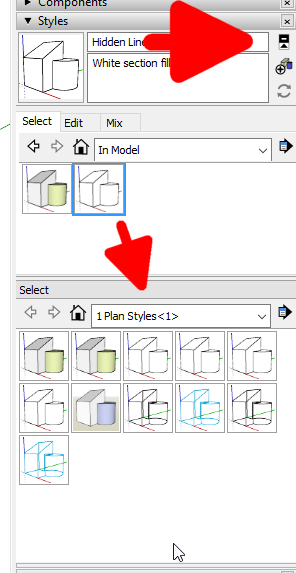
                                Screenshot - 5_22_2020 , 7_09_38 AM.png

                                Etaoin Shrdlu

                                %

                                (THERE'S NO PLACE LIKE)

                                G28 X0.0 Y0.0 Z0.0

                                M30

                                %

                                1 條回覆 最後回覆 回覆 引用 0
                                • H 離線
                                  Heaps
                                  最後由 編輯

                                  Sorry for delayed response, family and work interuptions. Lockdown is strange.
                                  Trying to save to Library/Application Support/SketchUp 2020/SketchUp/Styles.
                                  Have tried drag and drop, the green+ indicator appears, but no copy forms in window and I cannot find a copy in the folder( or by attempting find on the computer)

                                  1 條回覆 最後回覆 回覆 引用 0
                                  • Dave RD 離線
                                    Dave R
                                    最後由 編輯

                                    Are you going to User/Library/Application Support...?

                                    Etaoin Shrdlu

                                    %

                                    (THERE'S NO PLACE LIKE)

                                    G28 X0.0 Y0.0 Z0.0

                                    M30

                                    %

                                    1 條回覆 最後回覆 回覆 引用 0
                                    • H 離線
                                      Heaps
                                      最後由 編輯

                                      Yes, that is the route as shown when I try via right click- save as

                                      1 條回覆 最後回覆 回覆 引用 0
                                      • pbacotP 離線
                                        pbacot
                                        最後由 編輯

                                        I think this is the case where you need to drag the icon view version to the second pane. Other methods do not work on the Mac (Still?). I thought we solved this somewhere on the forum before. (Shows how much I manage styles these days.).

                                        I just tried it. I have a folder called "My Styles" that I created by the prescribed method, show it in the lower pane and dragged a style icon from the upper pane to the lower. And it works.

                                        Instead of saving to */Styles, you need to create a new collection and save it there. or did you try that? Sorry--juggling emails and first cup.

                                        MacOSX MojaveSketchUp Pro v19 Twilight v2 Thea v3 PowerCADD

                                        1 條回覆 最後回覆 回覆 引用 0
                                        • H 離線
                                          Heaps
                                          最後由 編輯

                                          Tried that, I'm still having no success.
                                          I'll try restarting and recheck what I'm doing and digging a little further.
                                          Thanks for your help in this case, it's the first time we have conversed, but I have appreciated your sound advice over the years as I have followed other Forum threads.
                                          I'll let you know how I get on.

                                          1 條回覆 最後回覆 回覆 引用 0
                                          • pbacotP 離線
                                            pbacot
                                            最後由 編輯

                                            I'm using 2019 by the way, so your results may vary. Have you also looked under Preferences ? Files to see where your styles folder is designated?


                                            MacOSX MojaveSketchUp Pro v19 Twilight v2 Thea v3 PowerCADD

                                            1 條回覆 最後回覆 回覆 引用 0
                                            • 1
                                            • 2
                                            • 2 / 2
                                            • 第一個貼文
                                              最後的貼文
                                            Buy SketchPlus
                                            Buy SUbD
                                            Buy WrapR
                                            Buy eBook
                                            Buy Modelur
                                            Buy Vertex Tools
                                            Buy SketchCuisine
                                            Buy FormFonts

                                            Advertisement