sketchucation logo sketchucation
    • Login
    Oops, your profile's looking a bit empty! To help us tailor your experience, please fill in key details like your SketchUp version, skill level, operating system, and more. Update and save your info on your profile page today!
    ⚠️ Update | Sketchucation Tools 5.0.8 released with licensing improvements and bugfixes Download

    Styles won't save? YES THEY DO!

    Scheduled Pinned Locked Moved SketchUp Discussions
    sketchup
    26 Posts 6 Posters 8.4k Views 6 Watching
    Loading More Posts
    • Oldest to Newest
    • Newest to Oldest
    • Most Votes
    Reply
    • Reply as topic
    Log in to reply
    This topic has been deleted. Only users with topic management privileges can see it.
    • D
      driven
      last edited by

      I just did a test, which seemed to fail, but on checking it had saved in my v14 'Styles' folder...
      I didn't realise the save dialog was pointing at v14, as I have the same set in both...

      I reset it by 'carefully' saving to the v15 location, but there is still something screwy going on...

      john

      learn from the mistakes of others, you may not live long enough to make them all yourself...

      1 Reply Last reply
      Reply Quote 0
      • pbacotP
        pbacot
        last edited by

        I suspected that can happen driven. I think it has happened for me with materials. When I first tried to solve this on an earlier version I removed all previous version support folders and all previous SU software.

        Also the dialog takes me to the target folder. Navigating is possible but the file does not show up whatever folder I try to save to, whether a "Styles" folder or a new folder or the desktop. Nada. Are you getting the error message?

        MacOSX MojaveSketchUp Pro v19 Twilight v2 Thea v3 PowerCADD

        1 Reply Last reply
        Reply Quote 0
        • D
          driven
          last edited by

          no errors, and it is saving to the correct folder now.

          It seemed to take a couple of restarts for it to work as expected...

          'favourites' is messed up showing v14 and v15 folders, remove them doesn't seem to work...

          learn from the mistakes of others, you may not live long enough to make them all yourself...

          1 Reply Last reply
          Reply Quote 0
          • Dave RD
            Dave R
            last edited by

            Peter, have you tried the drag and drop method from the primary to secondary windows?

            Etaoin Shrdlu

            %

            (THERE'S NO PLACE LIKE)

            G28 X0.0 Y0.0 Z0.0

            M30

            %

            1 Reply Last reply
            Reply Quote 0
            • pbacotP
              pbacot
              last edited by

              Yes. Dragging a style down, the lower pane highlights (thin green line at the top. Letting go of the mouse button, nothing happens. Refresh does not make a difference.

              MacOSX MojaveSketchUp Pro v19 Twilight v2 Thea v3 PowerCADD

              1 Reply Last reply
              Reply Quote 0
              • D
                driven
                last edited by

                try this in 'Ruby Console' and post result [or PM if you prefer]

                last_visit = %x(defaults read ~/Library/Preferences/com.sketchup.SketchUp.2015.plist "SketchUp.DefaultFolder.Styles" )
                favs = %x(defaults read ~/Library/Preferences/com.sketchup.SketchUp.2015.plist UserStyleFolders6 )
                puts last_visit
                puts favs
                

                learn from the mistakes of others, you may not live long enough to make them all yourself...

                1 Reply Last reply
                Reply Quote 0
                • pbacotP
                  pbacot
                  last edited by

                  It lists the desktop location and then the locations of two favorite styles folder I've made (both of which are empty). No change to the styles window in SU.

                  MacOSX MojaveSketchUp Pro v19 Twilight v2 Thea v3 PowerCADD

                  1 Reply Last reply
                  Reply Quote 0
                  • H
                    Heaps
                    last edited by

                    Just tried saving a new style (for the first time) by the right click method and getting the same 'Error saving the style file. The file could not be saved.' message
                    OS 10.14.6 SU 20.1.228

                    1 Reply Last reply
                    Reply Quote 0
                    • Dave RD
                      Dave R
                      last edited by

                      Where were you trying to save it to?

                      Did you try the drag and drop method?

                      Etaoin Shrdlu

                      %

                      (THERE'S NO PLACE LIKE)

                      G28 X0.0 Y0.0 Z0.0

                      M30

                      %

                      1 Reply Last reply
                      Reply Quote 0
                      • H
                        Heaps
                        last edited by

                        Not sure what is meant by that, can you elaborate?

                        1 Reply Last reply
                        Reply Quote 0
                        • Dave RD
                          Dave R
                          last edited by

                          If you right click on the style to save it, you have to choose where it's going to be saved. What location are you trying to use?

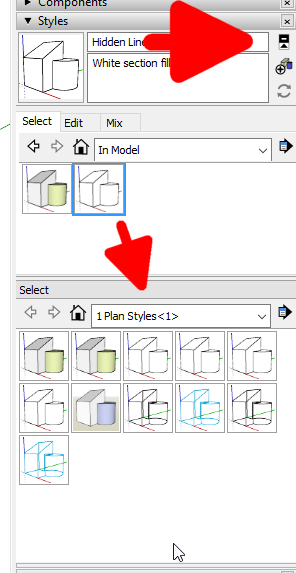
                          The drag and drop method involves opening the second pane in the Styles panel. Little button top right corner above Create New Style. Set the primary pane to In Model and the secondary pane to the desired style library then drag the style thumbnail from the top pane to the bottom one.
                          Screenshot - 5_22_2020 , 7_09_38 AM.png

                          Etaoin Shrdlu

                          %

                          (THERE'S NO PLACE LIKE)

                          G28 X0.0 Y0.0 Z0.0

                          M30

                          %

                          1 Reply Last reply
                          Reply Quote 0
                          • H
                            Heaps
                            last edited by

                            Sorry for delayed response, family and work interuptions. Lockdown is strange.
                            Trying to save to Library/Application Support/SketchUp 2020/SketchUp/Styles.
                            Have tried drag and drop, the green+ indicator appears, but no copy forms in window and I cannot find a copy in the folder( or by attempting find on the computer)

                            1 Reply Last reply
                            Reply Quote 0
                            • Dave RD
                              Dave R
                              last edited by

                              Are you going to User/Library/Application Support...?

                              Etaoin Shrdlu

                              %

                              (THERE'S NO PLACE LIKE)

                              G28 X0.0 Y0.0 Z0.0

                              M30

                              %

                              1 Reply Last reply
                              Reply Quote 0
                              • H
                                Heaps
                                last edited by

                                Yes, that is the route as shown when I try via right click- save as

                                1 Reply Last reply
                                Reply Quote 0
                                • pbacotP
                                  pbacot
                                  last edited by

                                  I think this is the case where you need to drag the icon view version to the second pane. Other methods do not work on the Mac (Still?). I thought we solved this somewhere on the forum before. (Shows how much I manage styles these days.).

                                  I just tried it. I have a folder called "My Styles" that I created by the prescribed method, show it in the lower pane and dragged a style icon from the upper pane to the lower. And it works.

                                  Instead of saving to */Styles, you need to create a new collection and save it there. or did you try that? Sorry--juggling emails and first cup.

                                  MacOSX MojaveSketchUp Pro v19 Twilight v2 Thea v3 PowerCADD

                                  1 Reply Last reply
                                  Reply Quote 0
                                  • H
                                    Heaps
                                    last edited by

                                    Tried that, I'm still having no success.
                                    I'll try restarting and recheck what I'm doing and digging a little further.
                                    Thanks for your help in this case, it's the first time we have conversed, but I have appreciated your sound advice over the years as I have followed other Forum threads.
                                    I'll let you know how I get on.

                                    1 Reply Last reply
                                    Reply Quote 0
                                    • pbacotP
                                      pbacot
                                      last edited by

                                      I'm using 2019 by the way, so your results may vary. Have you also looked under Preferences ? Files to see where your styles folder is designated?

                                      MacOSX MojaveSketchUp Pro v19 Twilight v2 Thea v3 PowerCADD

                                      1 Reply Last reply
                                      Reply Quote 0
                                      • H
                                        Heaps
                                        last edited by

                                        /Users/******/Library/Application Support/SketchUp 2020/SketchUp/Styles

                                        1 Reply Last reply
                                        Reply Quote 0
                                        • B
                                          bruorlando
                                          last edited by

                                          I've once run into something similar - not being able to save files .styles
                                          I use Sketchup For MAC and what I have found out was a sort of bug-ish:

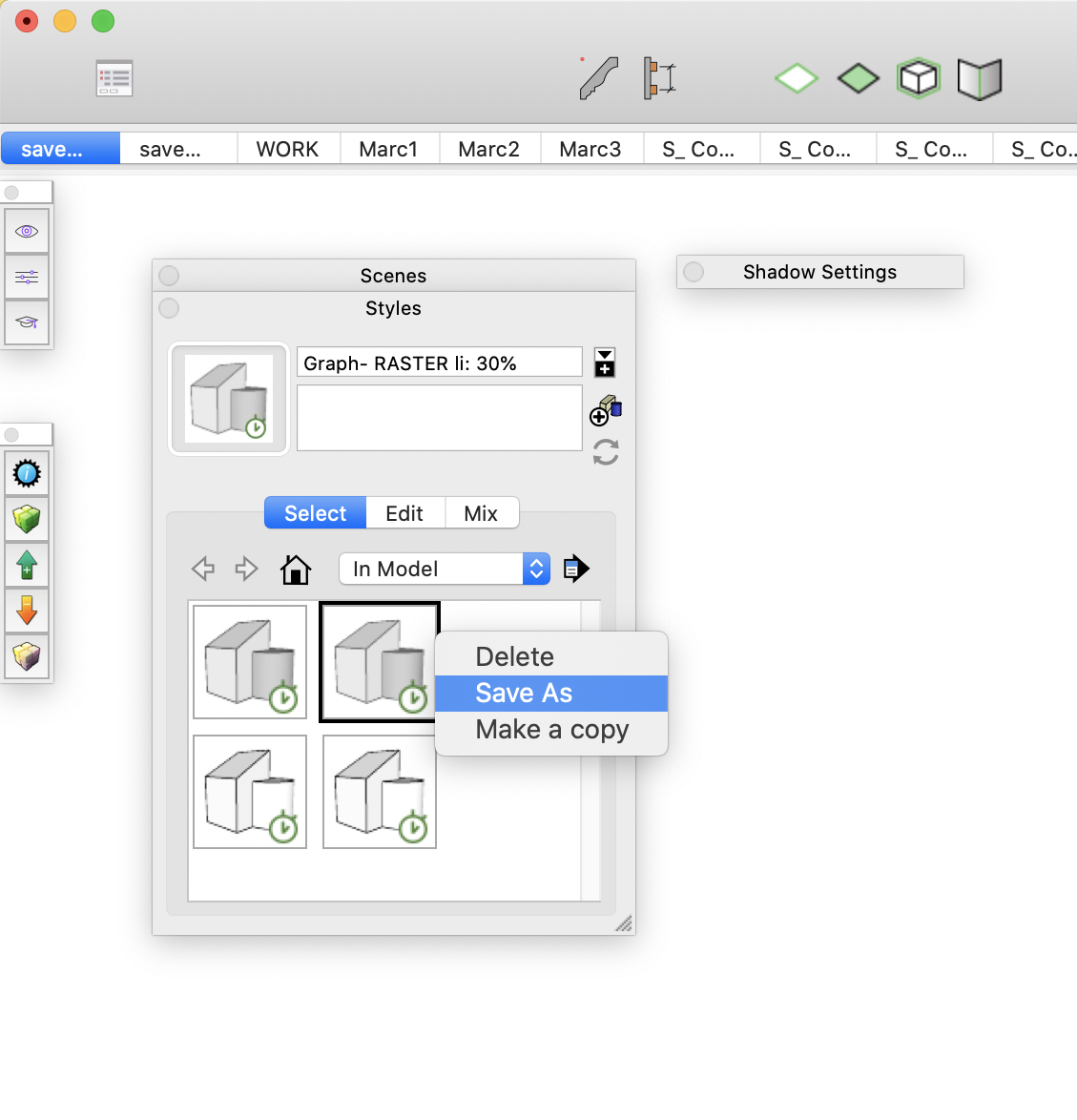
                                          • I normally use the LIST VIEW for my style window. That was the problem. I dont know why, but SU won't save any style if the window is with LIST VIEW...

                                          • I just switched to LARGE ICON view and it worked.

                                          How knows?... It might work for you as well.

                                          Captura de Tela 2020-06-02 às 17.41.49.png


                                          Captura de Tela 2020-06-02 às 17.41.20.png

                                          1 Reply Last reply
                                          Reply Quote 0
                                          • Dave RD
                                            Dave R
                                            last edited by

                                            Hi Bruno, welcome to SketchUcation.

                                            FWIW, this behavior has been like this for more than a decade.

                                            Etaoin Shrdlu

                                            %

                                            (THERE'S NO PLACE LIKE)

                                            G28 X0.0 Y0.0 Z0.0

                                            M30

                                            %

                                            1 Reply Last reply
                                            Reply Quote 0

                                            Hello! It looks like you're interested in this conversation, but you don't have an account yet.

                                            Getting fed up of having to scroll through the same posts each visit? When you register for an account, you'll always come back to exactly where you were before, and choose to be notified of new replies (either via email, or push notification). You'll also be able to save bookmarks and upvote posts to show your appreciation to other community members.

                                            With your input, this post could be even better 💗

                                            Register Login
                                            • 1
                                            • 2
                                            • 1 / 2
                                            • First post
                                              Last post
                                            Buy SketchPlus
                                            Buy SUbD
                                            Buy WrapR
                                            Buy eBook
                                            Buy Modelur
                                            Buy Vertex Tools
                                            Buy SketchCuisine
                                            Buy FormFonts

                                            Advertisement