[Plugin] SketchUcation Tools 2.6.1
-
I've just downloaded and installed the current version of the Tools in SU2015 Pro 64 bit, on Windows 7 64 bit.
When I tried to AutoInstall TIG's Mirror 4.2 plugin, I get a window popping up saying I have a choice of installation folder - the default, and a custom folder.
Nothing happens when I click on either, or select either and press {Enter}. Does this version of the Tools not work on 64 bit SU?
After it first happened, I restarted the machine in case that might help. No difference.
I can install the Mirror plugin by download of the RBZ file, but I'm curious to know if AutoInstall ought to work, and if there's anything I can do to make it work.
-
@johnwmcc said:
I've just downloaded and installed the current version of the Tools in SU2015 Pro 64 bit, on Windows 7 64 bit.
When I tried to AutoInstall TIG's Mirror 4.2 plugin, I get a window popping up saying I have a choice of installation folder - the default, and a custom folder.
Nothing happens when I click on either, or select either and press {Enter}. Does this version of the Tools not work on 64 bit SU?
After it first happened, I restarted the machine in case that might help. No difference.
I can install the Mirror plugin by download of the RBZ file, but I'm curious to know if AutoInstall ought to work, and if there's anything I can do to make it work.
It's probable that your 'folder-choice' dialog has initially got made 'too small'.
This has been reported on a handful PCs - for a while, not just in this version, it tries to set a minimum height but on some setups it seems to balk.

In that dialog, as well as the top drop-down list of installation destinations - from which you can choose a folder other than the initial default of your user's standard Plugins folder - there should be a button at the bottom of the dialog, which you need to click to submit your choice - otherwise it thinks you have canceled !
Drag the bottom edge of the dialog down to reveal all.
Then it should work with a selection from the list [or leave the default highlighted] and then a simple button click...
Its new size should also be remembered in future usage...
Let us know if this works OR not ! -
Thanks so much - that has solved my problem. The window is indeed too small, and I didn't realise there was a button to click. It is visible when I drag the bottom border of the window down, and a click on it then completes the installation.
Could a double click on an element in the list perform the same action? That way, it wouldn't matter if the button is invisible.
-
Hi all,
Is there a way to edit the bundles created? I'm trying to delete a bundle and create a custom one with the extensions I want but I can't see how.
Thanks
-
@antonio.calvo said:
Hi all,
Is there a way to edit the bundles created? I'm trying to delete a bundle and create a custom one with the extensions I want but I can't see how.Thanks
Can you not 'copy' a Bundle and edit that ?
You cannot [currently] 'add' to a Bundle - you can only 'clone' an existing Bundle, and then remove unwanted items from the new Bundle...
You can delete any Bundle you have made [the preset Bundles relate to what you had/have installed on a given Computer/SUpVersion, so they are 'fixed'... they can be 'cloned'...]
I appreciate that if you accidentally remove a plugin from a Bundle's list you can't reinstate it !
That's life... -
@tig said:
@antonio.calvo said:
Hi all,
Is there a way to edit the bundles created? I'm trying to delete a bundle and create a custom one with the extensions I want but I can't see how.Thanks
Can you not 'copy' a Bundle and edit that ?
You cannot [currently] 'add' to a Bundle - you can only 'clone' an existing Bundle, and then remove unwanted items from the new Bundle...
You can delete any Bundle you have made [the preset Bundles relate to what you had/have installed on a given Computer/SUpVersion, so they are 'fixed'... they can be 'cloned'...]
I appreciate that if you accidentally remove a plugin from a Bundle's list you can't reinstate it !
That's life...Thanks TIG,
I have "clone" the bundle and now I'm able to edit it. That is what I was trying to do. Still haven't figure out how to remove old bundles, I suppose I just leave then there.Just one last comment, It will be great if there were only ONE "extension shop/store" where you could backup ALL your plugins. Is a bit of a mess, some plugins from extension warehouse, some from plugins store, some independents, some pro plugins like Profile builders where you can only download the free version and doesn't recognize that you own a pro license,,
Nothing again you guys, I really think all of you guys at Sketchucation are doing a fantastic work but, there is always room to improvement and it'nice to get new challenges!Keep up with your fantastic work

-
A 'frozen' Bundle relates to an existing Computer-name or SUp version, and it has three buttons:
-
AutoInstall the Bundle's list
-
Duplicate [i.e. Copy] the Bundle
-
Expand the list so you can see what's in it...
A 'copied' Bundle has those buttons too, but it also has one extra button [it's a circle with an X] -
Used to Remove the [copied] Bundle [i.e. delete it ! ]

-
-
I used to have only the plugins that do not run in other than the primary plugins in the primary folder (C:\Users\jamesb\AppData\Roaming\SketchUp\SketchUp 2015\SketchUp\Plugins).
The rest I had in a Dropbox folder and used !AdditionalPluginFolders.rb.At the moment I have all of my plugins in the primary folder as the first step in cleaning up my plugins.
I would like to go back to the original scheme, but using SketchUcloud in place of Dropbox.
Also, my bundles are a Hodge-podge mess. How can I delete ALL of my bundles and start over again?
-
There are a plugins manager and an extensions manager--both in Sketchucation tools. A plugin can be disabled in either and would not show disabled in the other. Or a plugin disabled in one might not even be listed in the other. What is the method to use these and avoid confusion?
-
@pbacot said:
There are a plugins manager and an extensions manager--both in Sketchucation tools. A plugin can be disabled in either and would not show disabled in the other. Or a plugin disabled in one might not even be listed in the other. What is the method to use these and avoid confusion?
A Disabled Plugin will not load when SketchUp restarts [right-column/red].
A Loaded/Enabled Plugin will always load when SketchUp starts [left-column/green].
A Plugin that is already Disabled can be Temporarily Loaded for that session only [right-column/orange], when SketchUp restarts it will be Disabled, and so it will not load.In the latest versions of the toolset, if a Plugin is loaded but its related Extension is disabled its entry in the dialog is highlighted in gray.
Some Plugins are made as 'Extensions'. They are all still 'Plugins'...
Disabled Extensions will not load when SketchUp restarts [right-column/red].
A Loaded/Enabled Extensions will always load when SketchUp starts [left-column/green].
An Extensions that is already Disabled can be Temporarily Loaded for that session only [right-column/orange], when SketchUp restarts it will be Disabled, and so it will not load.In the latest versions of the toolset, if an Extensions is loaded, but its related Plugin is disabled its entry in the dialog is highlighted in gray.
So... if a Plugin is Disabled it never gets a chance to create its related Extension [if any]...
If you have Extensions you use quite often, but you do not want them loaded every session Disable them and then Load or Temporarily-Load them as needed.
If you have Plugins you use quite often, but you do not want them loaded every session Disable them and then Load or Temporarily-Load them as needed.
Another point is that in the SketchUcation Uninstaller submenu dialog any Plugin entries that have duplicate entries - in any custom-plugins-folders - are highlighted in pink, and so you can choose the folder from the drop-down and Uninstall the duplicate version you do not want loading, which of course would slow SketchUp's startup, and could even cause issues/errors if both of the scripts' versions were different !
-
Thank you for the reply, TIG. I suppose I'll tread cautiously as there are so many options and I have never figured out plugins vs. extensions and why the old Plugin menu is now Extensions. I can probably get most of the function I need by leaving the extensions manager alone.
For now I'll leave off creating loaded or unloaded bundles that may or may not have disabled or enabled plugins or extensions in separate custom plugin folders and may or may not be on Dropbox or Sketchucloud or some other server somewhere.
-
Trimble's decision to rename the Plugins folder 'Extensions' was inane.

All Plugins can make new menu entries wherever they like.
The 'Plugins' menu was just a default menu location.
Now, many use plugins use Tools, Draw or the Context-menu - or just Toolbars !
Some Plugins are also created by their authors as 'Extensions'.
These can be switched on/off in the Preferences > Extensions dialog.
They are no different from a basic Plugin [they can 'appear anywhere'] except for the fact that they have a special 'Extension' property which allows this switching on/off when SketchUp is restarted...With the advent of the SketchUcation Toolset you can manage your Extensions on/off state from the 'Extensions Manager' - in a similar way to the 'Preferences' options... although it allows you to temporarily load an extension for that session only, which would be convoluted using the native tool...
Managing extensions can be a little clearer since the Extensions name might be more obvious that it's .RB file name !
The SketchUcation Toolset also allows you to use the 'Plugins Manager' - this lets you disable/enable/temporarily-load Plugins using just their file-name [i.e. even the hundreds that are not setup to be an Extension!]... Although that file-name is not necessarily as obvious as an Extension's name, if the RB has an entry at SketchUcation then there will be a useful description for the selected item...
Also the few other 'helpers' etc that might not be directly available from the SketchUcation PluginStore are usually listed/explained too...
If they are not you got that RB from somewhere else, and so at least you know where to look for updates/help -
Whatever happened to version 2.6.2?
I had it running for a while, but it got deleted in one of my attempts to "clean house" -
@bob james said:
Whatever happened to version 2.6.2?
I had it running for a while, but it got deleted in one of my attempts to "clean house"It's not in this thread Bob, the most recent in the forum is over here.
http://sketchucation.com/forums/viewtopic.php?f=372%26amp;t=59539#p549217 -
Thank you, Box
-
How can I delete the bundles? From what I read, only copied one can be deleted at this moment.
I have 2 more bundles that are useless and I want to get rid of them. -
@derei said:
How can I delete the bundles? From what I read, only copied one can be deleted at this moment.
I have 2 more bundles that are useless and I want to get rid of them.
Locked Bundles relate to other computers or SUpVersions.
You can only delete copies.
PM Gábor and ask for your database entries to be tidied up [specify what you no longer want to keep!]...
I think he should adjust the code to allow simple deletion of 'copied bundles' and a deletion of 'fixed bundles', with an intervening 'are you really sure you want to delete this bundle?', so you don't do it by accident. -
I agree... eventually a secure deletion backed up with password (to ask for account password on deletion). Because once logged in, everyone who has access to SU can delete them. And second, introducing a password is nothing like "accidentally hit delete".
For now I'm fine... is only two that I need purged and they don't bother me that much. If there will be more, then I will either ask for cleaning, or hopefully a new version of the app will be available and I will be able to do it myself. -
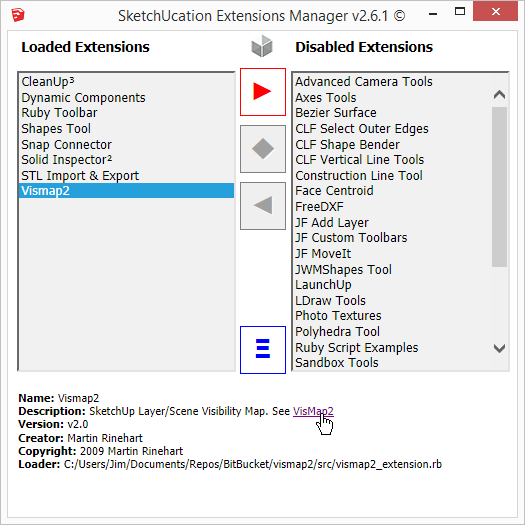
If you are to allow html in the Extensions manager, maybe open the links in the default browser.
-
flagged...thanks








Advertisement