sketchucation logo sketchucation
    • Login
    Oops, your profile's looking a bit empty! To help us tailor your experience, please fill in key details like your SketchUp version, skill level, operating system, and more. Update and save your info on your profile page today!
    ⚠️ Update | Sketchucation Tools 5.0.8 released with licensing improvements and bugfixes Download

    How did the great Alex Hogrefe do it ?

    Scheduled Pinned Locked Moved Post Processing
    39 Posts 3 Posters 24.7k Views 3 Watching
    Loading More Posts
    • Oldest to Newest
    • Newest to Oldest
    • Most Votes
    Reply
    • Reply as topic
    Log in to reply
    This topic has been deleted. Only users with topic management privileges can see it.
    • massimoM
      massimo Moderator
      last edited by

      @unknownuser said:

      Hmm wait, set a white color to the sun or to the sky ?

      Both.

      @unknownuser said:

      there's something other than this ?

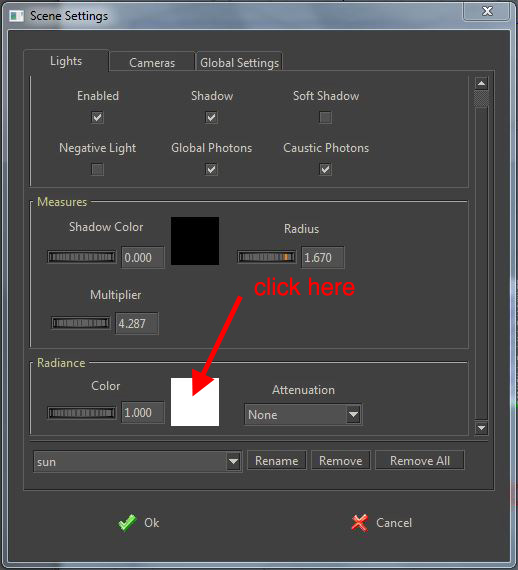
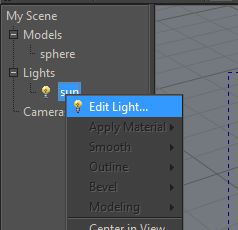
      That's the sky color. To change the sun's color right click on the sun and follow the pictures below.
      Cattura.JPG
      Cattura_01.JPG

      @unknownuser said:

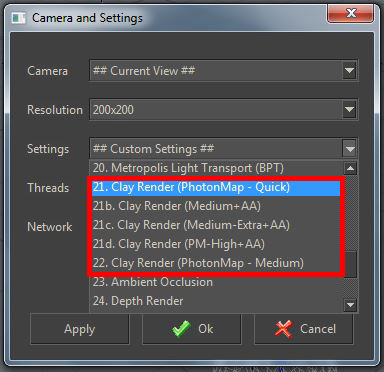
      What's a Clay preset ?

      That will automatically assign a white/grey material to all your models.
      Click on the "start render button" and choose a clay preset.
      Cattura_02.JPG

      1 Reply Last reply
      Reply Quote 0
      • alexjoA
        alexjo
        last edited by

        Yeah, I checked the sun's color before I saw your post and it was white by default.

        It is definitely the preset then. Thanks tons, I think it's working now. Is this decent ?

        http://i.minus.com/jI2M7hv6aSIpN.jpg

        & I have one little issue now. I do not like how unrealistic the shadows look, no matter how much I move the model around the sun. Do you change the location/time like 3dsMax Mental Ray, or do you just keep testing different radius values ?

        1 Reply Last reply
        Reply Quote 0
        • massimoM
          massimo Moderator
          last edited by

          @unknownuser said:

          I think it's working now. Is this decent ?

          πŸ‘

          @unknownuser said:

          I do not like how unrealistic the shadows look, no matter how much I move the model around the sun

          If with "unrealistic" you mean "hard" then yes, tick "soft shadow" in the scene settings panel and play with sun's radius and multiplier.

          1 Reply Last reply
          Reply Quote 0
          • massimoM
            massimo Moderator
            last edited by

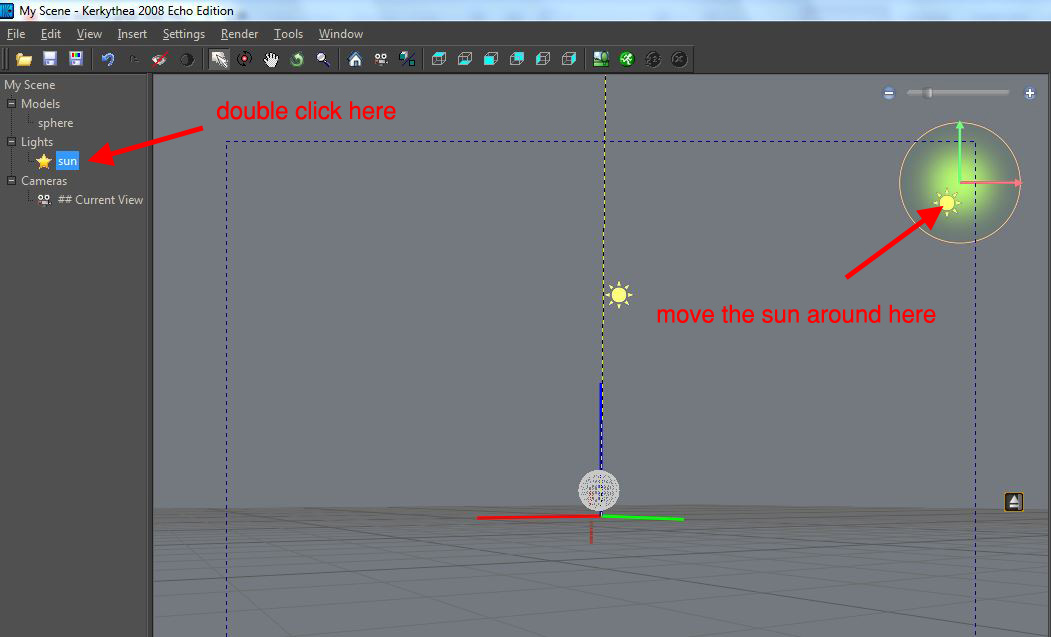
            If you want to change the sun's position then..
            Cattura.JPG

            1 Reply Last reply
            Reply Quote 0
            • alexjoA
              alexjo
              last edited by

              Ugh, thanks. That last tip was needed.

              Btw, the 4 Clay presets differ in quality and render time, right ?

              have you changed the gamma correction for your render sample ?

              1 Reply Last reply
              Reply Quote 0
              • massimoM
                massimo Moderator
                last edited by

                @unknownuser said:

                Btw, the 4 Clay presets differ in quality and render time, right ?

                Right.

                @unknownuser said:

                have you changed the gamma correction for your render sample ?

                No. I didn't change anything.

                1 Reply Last reply
                Reply Quote 0
                • alexjoA
                  alexjo
                  last edited by

                  Hmm, best so far.

                  http://i5.minus.com/jX0c9NPKRbu0D.jpg

                  1 Reply Last reply
                  Reply Quote 0
                  • massimoM
                    massimo Moderator
                    last edited by

                    Well if you want to try to match the look of the pic you posted in your first post you have to use softer shadows I guess.

                    1 Reply Last reply
                    Reply Quote 0
                    • alexjoA
                      alexjo
                      last edited by

                      Oh oh, did my post get deleted lol

                      1 Reply Last reply
                      Reply Quote 0
                      • massimoM
                        massimo Moderator
                        last edited by

                        No post was deleted. You sent a PM to me. πŸ˜‰
                        Here is what I replied: have you tried what I suggested? Tick "soft shadow" and increase the sun's radius?

                        1 Reply Last reply
                        Reply Quote 0
                        • alexjoA
                          alexjo
                          last edited by

                          Lmao, that was confusing.My bad.

                          I actually did that right off the bat. But saw no difference. The radius changes the position of the sun, and it takes me a couple of minutes to get it back where i want it to be.

                          1 Reply Last reply
                          Reply Quote 0
                          • massimoM
                            massimo Moderator
                            last edited by

                            @unknownuser said:

                            The radius changes the position of the sun,

                            Odd, that should not happen. Would you mind to post the scene?

                            1 Reply Last reply
                            Reply Quote 0
                            • olisheaO
                              olishea
                              last edited by

                              larger radius does not change the sun position. Large radius = softer shadows. Small radius = sharper shadows. You must have soft shadows checked to see the effect of changing the sun's radius.

                              I really love how this project is going, I find plan shadow studies very pleasing on the eye.

                              oli

                              1 Reply Last reply
                              Reply Quote 0
                              • alexjoA
                                alexjo
                                last edited by

                                Sure.


                                Scene3.rar

                                1 Reply Last reply
                                Reply Quote 0
                                • massimoM
                                  massimo Moderator
                                  last edited by

                                  Ok, here is a try. Raw KT output.
                                  Of course, as I said before, you can change the softness of the shadows by changing the radius of the sun.
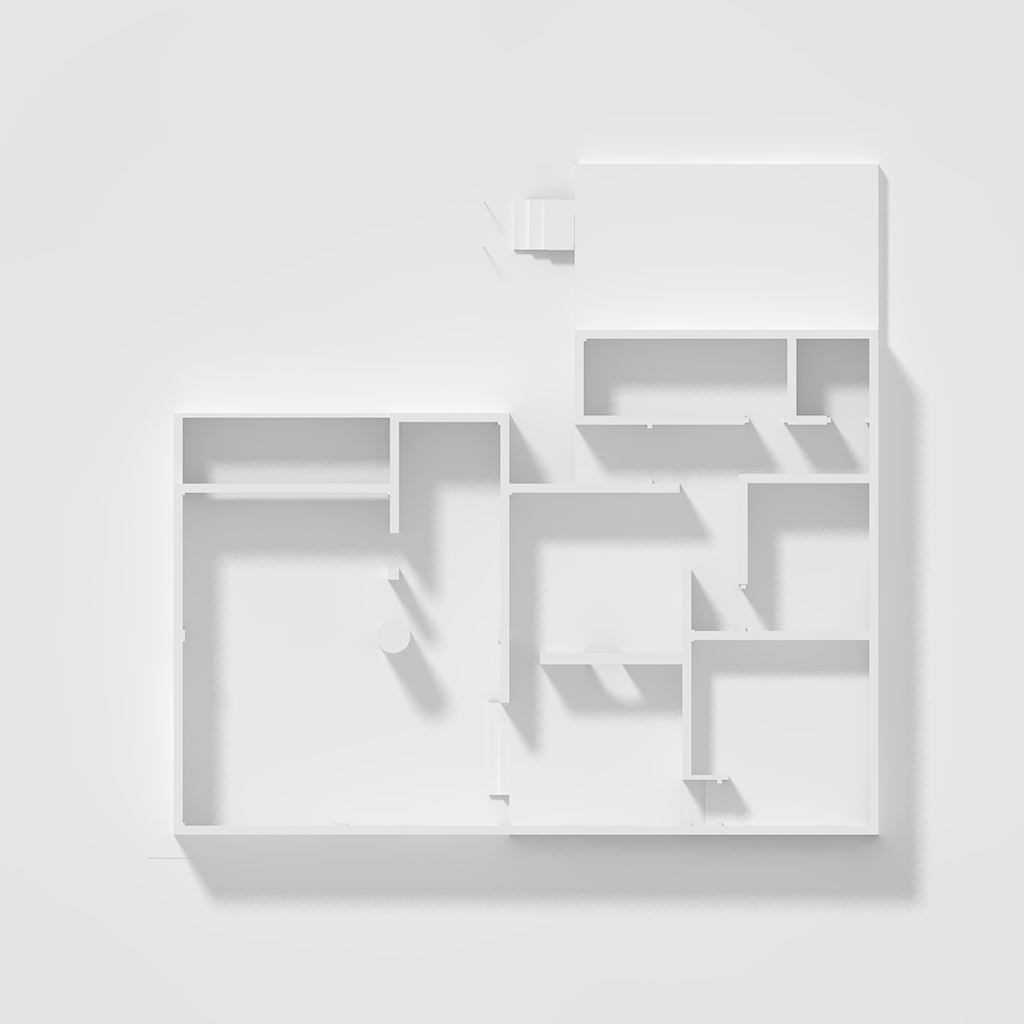
                                  scene_3.jpg
                                  scene_3.zip

                                  1 Reply Last reply
                                  Reply Quote 0
                                  • alexjoA
                                    alexjo
                                    last edited by

                                    Legit amazing.

                                    1 Reply Last reply
                                    Reply Quote 0
                                    • alexjoA
                                      alexjo
                                      last edited by

                                      Could you pleas tell me how you managed to achieve that clear white look ?

                                      & I see you have arranged the file, and added other elements.

                                      1 Reply Last reply
                                      Reply Quote 0
                                      • massimoM
                                        massimo Moderator
                                        last edited by

                                        Well I've posted the scene, have a look at it. The render is a raw output of that scene, so just pick a clay render preset (I think I've used the 22 if I remember well, but more or less any clay preset will work) and render it. I added nothing, just tuned sun's multiplier and radius.

                                        1 Reply Last reply
                                        Reply Quote 0
                                        • massimoM
                                          massimo Moderator
                                          last edited by

                                          Oh and, if i remember well, also reduced the gamma from 1.5 to 1.2. Anyway you have the scene to look at.

                                          1 Reply Last reply
                                          Reply Quote 0
                                          • alexjoA
                                            alexjo
                                            last edited by

                                            @massimo said:

                                            Well I've posted the scene, have a look at it. The render is a raw output of that scene, so just pick a clay render preset (I think I've used the 22 if I remember well, but more or less any clay preset will work) and render it. I added nothing, just tuned sun's multiplier and radius.

                                            Much appreciated, sir.

                                            Have a nice day.

                                            1 Reply Last reply
                                            Reply Quote 0

                                            Hello! It looks like you're interested in this conversation, but you don't have an account yet.

                                            Getting fed up of having to scroll through the same posts each visit? When you register for an account, you'll always come back to exactly where you were before, and choose to be notified of new replies (either via email, or push notification). You'll also be able to save bookmarks and upvote posts to show your appreciation to other community members.

                                            With your input, this post could be even better πŸ’—

                                            Register Login
                                            • 1
                                            • 2
                                            • 2 / 2
                                            • First post
                                              Last post
                                            Buy SketchPlus
                                            Buy SUbD
                                            Buy WrapR
                                            Buy eBook
                                            Buy Modelur
                                            Buy Vertex Tools
                                            Buy SketchCuisine
                                            Buy FormFonts

                                            Advertisement