[Plugin] Skalp for SketchUp v2.0 (live section plugin)
-
@bsfranza said:
looks ´promising - waiting for the trial though...
Trials wil come in a couple of weeks.
The Skalp Team
-
@bsfranza said:
good thing is it looks like its as simple as it gets=) not so cumbersome like some other plugins around...
Our main goal is to create a generic and easy to use tool... but with the ability to be extremely powerful.
The Skalp Team
-
Skalp is a generic live section tool, it can work nicely together with a lot of other architectural modeling plugins.
For Example BuildEdge (www.buildedge.com)
The Skalp Team.
-
We try to post daily a new Skalp Video Tutorial. You can watch this tutorial videos on our youtube channel:
-
As a Native American, both the name and logo are very pleasing to me...
-
@krisidious said:
As a Native American, both the name and logo are very pleasing to me...
I see what you did there.

-
as an early buyer who complained about the lack of tutorials and guides it is only fair that I come here to say that the Skalp people have been posting very instructive short videos and in large number, covering many aspects of the plugin. at this rate, they will surely cover all of it.
besides, the latest user guide is superb in that it covers in detail all the features and tells us things that are not (yet?) in the videos.
skalp is a hugely useful plugin and is worth every cent you pay for it.
-
@edson said:
as an early buyer who complained about the lack of tutorials and guides it is only fair that I come here to say that the Skalp people have been posting very instructive short videos and in large number, covering many aspects of the plugin. at this rate, they will surely cover all of it.
besides, the latest user guide is superb in that it covers in detail all the features and tells us things that are not (yet?) in the videos.
skalp is a hugely useful plugin and is worth every cent you pay for it.
Thank you Edson. We appreciate this comment very hard.
More videos tutorials will follow daily until we cover every aspect of Skalp.Skalp for SketchUp Video Tutorials
We continue to work hard to make Skalp even beter. We just made a breakthrough in sectioning non-solids in SketchUp! Watch out to the upcoming betas...
We develop Skalp full-time with 2 people. It's our goal to make it the best section plugin there is.
The Skalp Team.
-
you are welcome and deserving of this praise.
a lengthy tutorial on the advanced use you describe from page 25 of the user guide would be very appreciated. everyone using Skalp professionally would thank you for that.
best regards.
-
@edson said:
you are welcome and deserving of this praise.
a lengthy tutorial on the advanced use you describe from page 25 of the user guide would be very appreciated. everyone using Skalp professionally would thank you for that.
best regards.
Edson,
It's my own favorite way of working which we use must of the time in our architectural office. Special for you I will make my next Video Tutorial on this advanced way of working.
The Skalp Team.
-
Great!
-
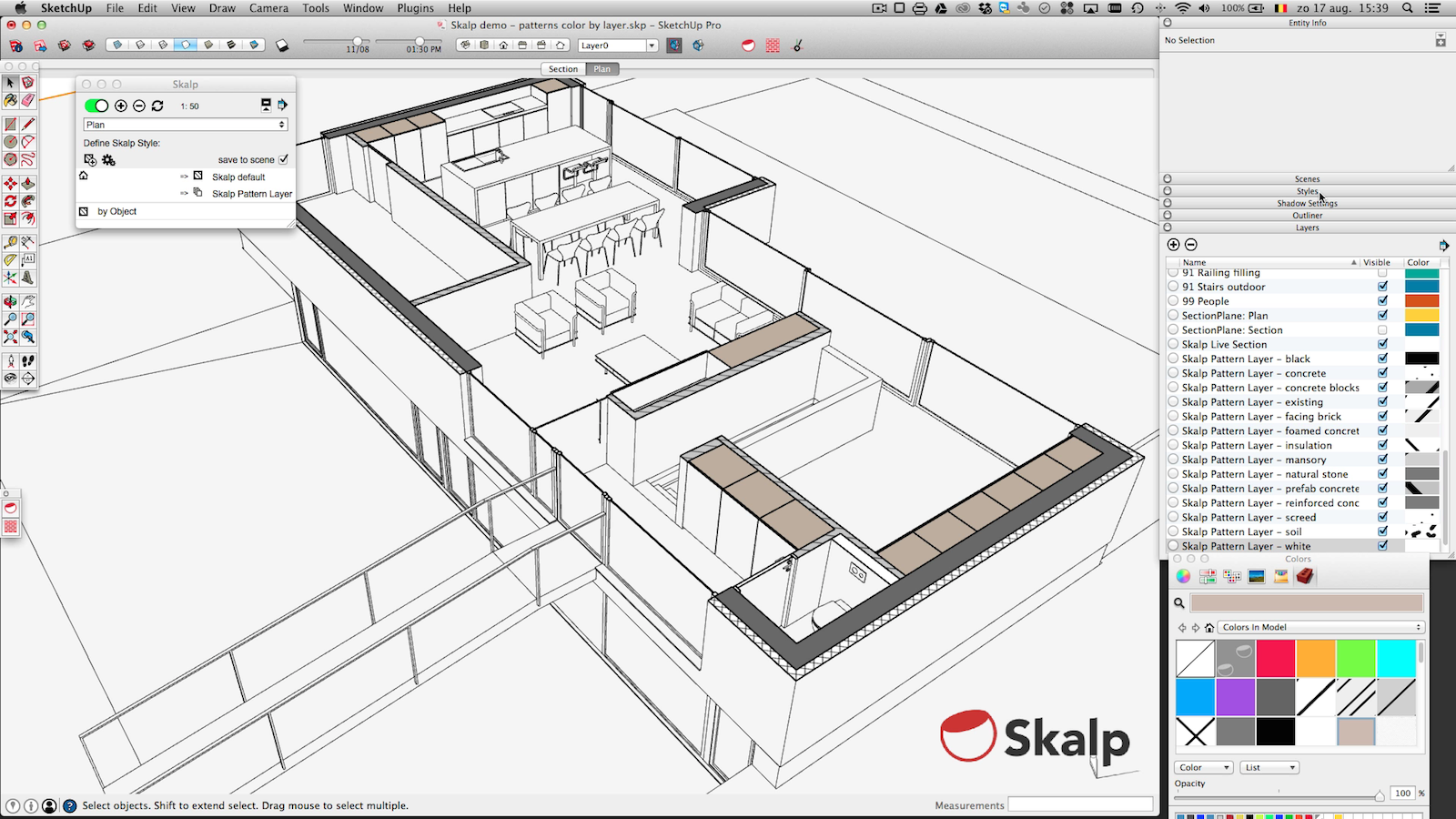
On special request a Video Tutorial about Skalp Pattern Layers (color by layer).
Skalp Pattern Layers uses an undocumented feature of Color by Layer in combination with the hidden line render mode to create an architectural section with everything white in the model except the section.
-
very good! I know this was explained in the user guide but seeing you do it completes the information.
if I may suggest another topic for a video, how about one on how to save skalp settings to a sketchup template?
regards.
-
@edson said:
very good! I know this was explained in the user guide but seeing you do it completes the information.
if I may suggest another topic for a video, how about one on how to save skalp settings to a sketchup template?
regards.
Edson,
After you setup a full Skalp model you can delete all entities, except the section planes and save it in a standard sketchup template.
The Skalp Team.
-
@skalp said:
@edson said:
very good! I know this was explained in the user guide but seeing you do it completes the information.
if I may suggest another topic for a video, how about one on how to save skalp settings to a sketchup template?
regards.
Edson,
After you setup a full Skalp model you can delete all entities, except the section planes and save it in a standard sketchup template.
The Skalp Team.
so the template will have a couple of section planes that section nothing? like ghost section planes? how does one deal with those section planes in a new model?
-
@edson said:
@skalp said:
@edson said:
very good! I know this was explained in the user guide but seeing you do it completes the information.
if I may suggest another topic for a video, how about one on how to save skalp settings to a sketchup template?
regards.
Edson,
After you setup a full Skalp model you can delete all entities, except the section planes and save it in a standard sketchup template.
The Skalp Team.
so the template will have a couple of section planes that section nothing? like ghost section planes? how does one deal with those section planes in a new model?
Edson,
From the moment you model something and the section plane intersect with the new model it will section the model. You can easy activate the different sections from the dialog box even if they don't section elements.
The Skalp Team.
-
@skalp said:
On special request a Video Tutorial about Skalp Pattern Layers (color by layer).
Skalp Pattern Layers uses an undocumented feature of Color by Layer in combination with the hidden line render mode to create an architectural section with everything white in the model except the section.
I see in your video that you add a bunch of layers. I guess you can get to high numbers of layers if you have a lot of different section patterns?
Maybe you could make your plugin work with Layers Panel, to automatically put all those layers in a layer group, and automatically collapse it so that they don't take much space in the dialog.
You can use LP's API for that : http://sketchucation.com/forums/viewtopic.php?f=180%26amp;t=57777 -
@jiminy-billy-bob said:
@skalp said:
On special request a Video Tutorial about Skalp Pattern Layers (color by layer).
Skalp Pattern Layers uses an undocumented feature of Color by Layer in combination with the hidden line render mode to create an architectural section with everything white in the model except the section.
I see in your video that you add a bunch of layers. I guess you can get to high numbers of layers if you have a lot of different section patterns?
Maybe you could make your plugin work with Layers Panel, to automatically put all those layers in a layer group, and automatically collapse it so that they don't take much space in the dialog.
You can use LP's API for that : http://sketchucation.com/forums/viewtopic.php?f=180%26amp;t=57777Thank,
Sounds like a good idea and we will look at it.
The Skalp Team.
-
@skalp said:
Thank,
Sounds like a good idea and we will look at it.
The Skalp Team.
I just realised I haven't added the "collapse_group" method, yet. I'll add it in the next version. And I broke "nest_into" like an idiot by renaming some methods in v1.2.0. So the below code is designed to run on version higher than v1.2.0, sorry about that.
You can do something like this in SU2014 (Skalp only works in 2014, right?):<span class="syntaxdefault">begin </span><span class="syntaxcomment">#In a rescue block so that it will silently not run if Layers Panel is not installed<br /></span><span class="syntaxdefault"> if Gem</span><span class="syntaxkeyword">;;</span><span class="syntaxdefault">Version</span><span class="syntaxkeyword">.new(</span><span class="syntaxdefault">JBB_LayersPanel</span><span class="syntaxkeyword">.</span><span class="syntaxdefault">version</span><span class="syntaxkeyword">.</span><span class="syntaxdefault">to_s</span><span class="syntaxkeyword">)</span><span class="syntaxdefault"> </span><span class="syntaxkeyword">></span><span class="syntaxdefault"> Gem</span><span class="syntaxkeyword">;;</span><span class="syntaxdefault">Version</span><span class="syntaxkeyword">.new(</span><span class="syntaxstring">'1.2.0'</span><span class="syntaxkeyword">)</span><span class="syntaxdefault"> <br /> groupID </span><span class="syntaxkeyword">=</span><span class="syntaxdefault"> JBB_LayersPanel</span><span class="syntaxkeyword">.</span><span class="syntaxdefault">add_group</span><span class="syntaxkeyword">(</span><span class="syntaxstring">"Skalp"</span><span class="syntaxkeyword">)<br /></span><span class="syntaxdefault"> skalp_layers</span><span class="syntaxkeyword">.</span><span class="syntaxdefault">each</span><span class="syntaxkeyword">{|</span><span class="syntaxdefault">layer</span><span class="syntaxkeyword">|<br /></span><span class="syntaxdefault"> layerID </span><span class="syntaxkeyword">=</span><span class="syntaxdefault"> JBB_LayersPanel</span><span class="syntaxkeyword">.</span><span class="syntaxdefault">get_layerID</span><span class="syntaxkeyword">(</span><span class="syntaxdefault">layer</span><span class="syntaxkeyword">)<br /></span><span class="syntaxdefault"> JBB_LayersPanel</span><span class="syntaxkeyword">.</span><span class="syntaxdefault">nest_into</span><span class="syntaxkeyword">(</span><span class="syntaxdefault">layerID</span><span class="syntaxkeyword">,</span><span class="syntaxdefault"> groupID</span><span class="syntaxkeyword">)<br /></span><span class="syntaxdefault"> </span><span class="syntaxkeyword">}<br /></span><span class="syntaxdefault"> JBB_LayersPanel</span><span class="syntaxkeyword">.</span><span class="syntaxdefault">collapse_group</span><span class="syntaxkeyword">(</span><span class="syntaxdefault">groupID</span><span class="syntaxkeyword">)<br /></span><span class="syntaxdefault"> end</span><span class="syntaxcomment">#if<br /></span><span class="syntaxdefault">rescue<br />end</span> -
@jiminy-billy-bob said:
@skalp said:
On special request a Video Tutorial about Skalp Pattern Layers (color by layer).
Skalp Pattern Layers uses an undocumented feature of Color by Layer in combination with the hidden line render mode to create an architectural section with everything white in the model except the section.
I see in your video that you add a bunch of layers. I guess you can get to high numbers of layers if you have a lot of different section patterns?
Maybe you could make your plugin work with Layers Panel, to automatically put all those layers in a layer group, and automatically collapse it so that they don't take much space in the dialog.
You can use LP's API for that : http://sketchucation.com/forums/viewtopic.php?f=180%26amp;t=57777after realising how this method works I immediately thought of creating a group for the Skalp layers in LP. if this can be made automatically so much the better.







Advertisement