Can't save layout file
-
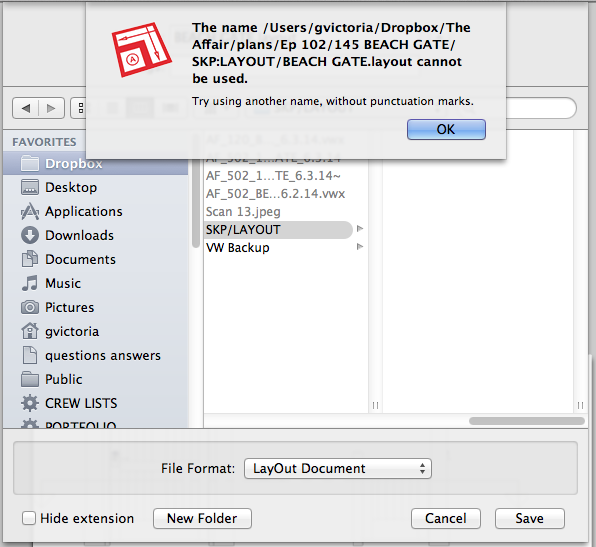
When I try to save the a layout file I get a message that I can't because the program is trying to name the file w punctuation - there's some pre-recorded keychain that I don't know how to override- or reprogram -
suggestions -- thanks -
I'm including a screen grab of the message I'm getting
-
I gather it is the /SKP:LAYOUT/ That is causing the problem? I wonder why it is showing SKP/LAYOUT in Finder (which would indicate two folders). Rename the folder from SKP/LAYOUT to SKP_LAYOUT. What happens if you save the file locally instead?
-
I've gotten that before in LO, try to change file name or as Dave said, save locally.
-
In cross-platform file naming...
You cannot use: / \ * ? " < > |characters in file names [:is precluded in OSX]...
Also avoid any character typed using the Ctrl/Cmd key etc...
Also avoid allowed, but potentially problematic/confusing{ } ' \ = + @
Also avoid starting/ending a file/folder-name with a<space>or a.
Or starting with a.unless it's to be a hidden file [but also disallowed under OSX].
The^is also best avoided for files to be used on a FAT Window systems...
The file namescom1, com2, com3, com4, com5, com6, com7, com8, com9, lpt1, lpt2, lpt3, lpt4, lpt5, lpt6, lpt7, lpt8, lpt9, con, nul,andprnall are reserved names under Windows systems...


Hello! It looks like you're interested in this conversation, but you don't have an account yet.
Getting fed up of having to scroll through the same posts each visit? When you register for an account, you'll always come back to exactly where you were before, and choose to be notified of new replies (either via email, or push notification). You'll also be able to save bookmarks and upvote posts to show your appreciation to other community members.
With your input, this post could be even better 💗
Register Login


Advertisement