Can't make a face
-
I have been trying to make a drawing of my home & property to eventually create a landscape design from.
I have a layer created as driveway which include the driveway, side walk & patio.
I can not get this to become a face.
I have ran the script Make Faces 1.4 which comes back saying there is 1 non edge. But it says it made 1 face. I would have expected the whole shape to become blue but it did not & I am still not able to fill the shape with the concrete texture.I should mention that I also ran stray lines which showed 2 issues that I fixed. Once I did that make faces worked & made the 1 face.
any help is greatly appreciated. -
You should upload your model or a part of it...
-
-
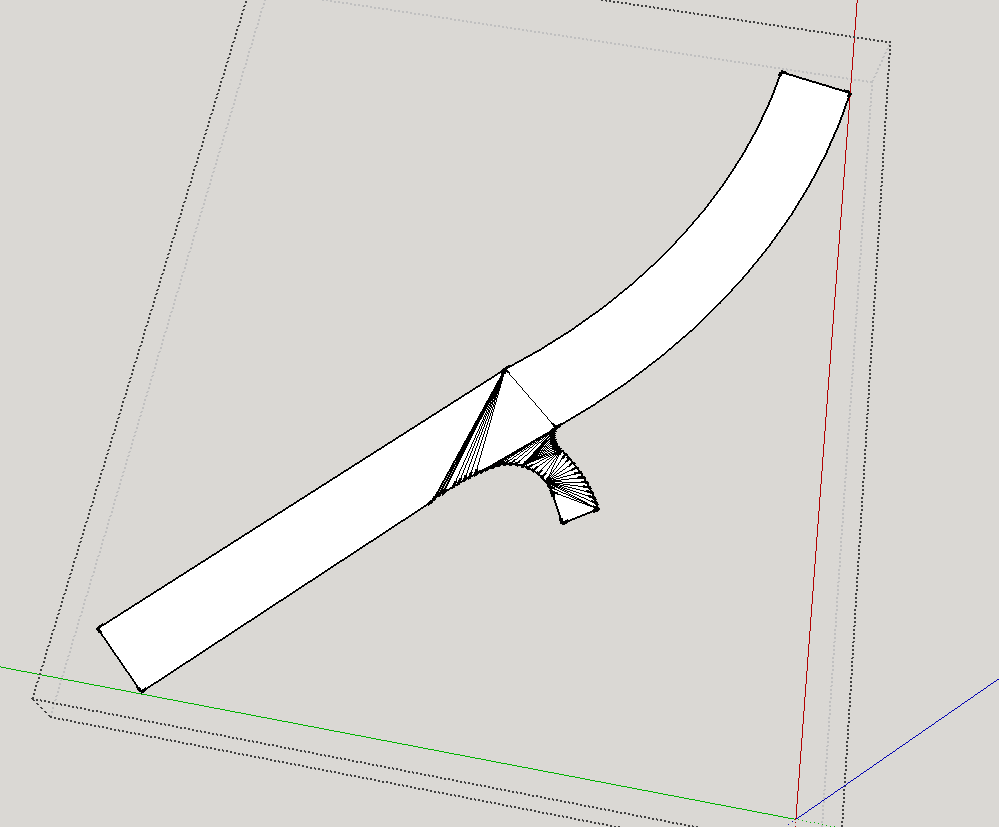
The edges forming the outline of the drive are not coplanar.
Therefore they cannot support faces without further edges being added, which then triangulate to for viable faces...
See the attached image.
If you want the drive to be flat you must draw its outline flat - or at least use a tool to 'flatten' those edges so they all use the same 'z'.Incidentally, please leave your active-layer as Layer0 AND model all raw geometry on Layer0 [probably making it within a group or component to separate it from other geometry]... and then assign a layer to control the visibility of that group or component containing that geometry.
I noticed that your example SKP diverges from the received wisdom of the ages
-
I'm self teaching so I appreciate the comments on conventional wisdom. For that, your saying to draw everything on layer 0 then group sections of it & move each group over to a new layer as needed?
So how did you fix the driveway. Was it done by drawing that line across the drive at the locations where all of those lines are know shown? If so, how did you pick the points to make the line. I tried a bunch of places but none are doing anything besides drawing the line. How did you determine the problem...rotating the image in some specific manner?
thanks -
@jwalter007 said:
I'm self teaching so I appreciate the comments on conventional wisdom. For that, your saying to draw everything on layer 0 then group sections of it & move each group over to a new layer as needed?
Regarding layers, you should read this first. It ought to be required reading for anyone using SketchUp.
I'll leave it to TIG to tell you what he did.
-
I used a Style with Endpoints, so I could see the ends to snap onto.
Some of the 'curves' are made from bound segments.
I selected each in turn and context-menu Explode-Curve.
Then the Endpoints of those segments show up too.
Then I simple drew lines from a point to the next point along to make a triangle.
The triangles built up until you have the surface.
As I have shewn...
You can then 'Smooth' [context-menu] the surface so that the intermediate lines are 'hidden'.If you want the drive completely flat consider making a group of a large flat rectangle and then Sandbox > Drape the drive-container onto that.
The new edges should them be all coplanar and take a face - you might need to use Intersect [context-menu] to achieve this...If you want to 'project' what you have drawn onto a 3d surface [already existing terrain mesh etc], then again Drape will do that...
-
Maybe Ill try to redraw it on layer 0. Thanks for the info.



Hello! It looks like you're interested in this conversation, but you don't have an account yet.
Getting fed up of having to scroll through the same posts each visit? When you register for an account, you'll always come back to exactly where you were before, and choose to be notified of new replies (either via email, or push notification). You'll also be able to save bookmarks and upvote posts to show your appreciation to other community members.
With your input, this post could be even better 💗
Register Login


Advertisement