sketchucation logo sketchucation
    • Login
    Oops, your profile's looking a bit empty! To help us tailor your experience, please fill in key details like your SketchUp version, skill level, operating system, and more. Update and save your info on your profile page today!
    Mac User? | Join the Rayscaper Beta for Mac Learn More

    SUbD - Non-destructive subdivision with creases and quads

    Scheduled Pinned Locked Moved Plugins
    79 Posts 25 Posters 19.4k Views 25 Watching
    Loading More Posts
    • Oldest to Newest
    • Newest to Oldest
    • Most Votes
    Reply
    • Reply as topic
    Log in to reply
    This topic has been deleted. Only users with topic management privileges can see it.
    • thomthomT
      thomthom
      last edited by

      @jolran said:

      Are you using your "drawcache" class and hiding the original, or is the original geometry altered back and forth?

      I did that in my very first prototype: https://www.youtube.com/watch?v=19BnGnR7bSs

      But for this I've not had to yield to tricks like that. It's all native SketchUp geometry.

      Thomas Thomassen β€” SketchUp Monkey & Coding addict
      List of my plugins and link to the CookieWare fund

      1 Reply Last reply
      Reply Quote 0
      • jolranJ
        jolran
        last edited by

        Yeah, I figured that. I had to ask, since I remember you did do so before(the link) and I thought somehow Sketchup now could render shaded mode in Tools drawing methods πŸ˜„

        Nevertheless, It's even more impressive doing it the way you do now..

        1 Reply Last reply
        Reply Quote 0
        • thomthomT
          thomthom
          last edited by

          @jolran said:

          Yeah, I figured that. I had to ask, since I remember you did do so before(the link) and I thought somehow Sketchup now could render shaded mode in Tools drawing methods πŸ˜„

          Ah - I wish!

          Thomas Thomassen β€” SketchUp Monkey & Coding addict
          List of my plugins and link to the CookieWare fund

          1 Reply Last reply
          Reply Quote 0
          • R
            reymond
            last edited by

            Sketchup & Vray Trainer

            1 Reply Last reply
            Reply Quote 0
            • panixiaP
              panixia
              last edited by

              @thomthom said:

              This is very early development preview. It's not even alpha stage.

              oh my god! this is awesome!!
              I have two questions:

              1. Where is the "Buy now" button?
              2. What's that pencil? πŸ‘Ώ
              1 Reply Last reply
              Reply Quote 0
              • thomthomT
                thomthom
                last edited by

                @panixia said:

                1. Where is the "Buy now" button?

                Last on the todo list.

                @panixia said:

                1. What's that pencil? πŸ‘Ώ

                The one in the QuadFace Tools toolbar?

                Thomas Thomassen β€” SketchUp Monkey & Coding addict
                List of my plugins and link to the CookieWare fund

                1 Reply Last reply
                Reply Quote 0
                • Rich O BrienR
                  Rich O Brien Moderator
                  last edited by

                  The pencil is awesome. That's what it is.

                  Download the free D'oh Book for SketchUp πŸ“–

                  1 Reply Last reply
                  Reply Quote 0
                  • pilouP
                    pilou
                    last edited by

                    Play piano during a sketchup session is a real task! πŸ’š
                    Seems you master the 2 actions with brio! β˜€

                    Does all this Ruby 2 ?

                    Frenchy Pilou
                    Is beautiful that please without concept!
                    My Little site :)

                    1 Reply Last reply
                    Reply Quote 0
                    • panixiaP
                      panixia
                      last edited by

                      @thomthom said:

                      Last on the todo list.

                      😒

                      @thomthom said:

                      The one in the QuadFace Tools toolbar?

                      yes.. that one.. 😎

                      1 Reply Last reply
                      Reply Quote 0
                      • thomthomT
                        thomthom
                        last edited by

                        @unknownuser said:

                        Play piano during a sketchup session is a real task! πŸ’š
                        Seems you master the 2 actions with brio! β˜€

                        Well, you know - I have so much spare time to kill that I figured - "why not?". πŸ˜‰

                        @unknownuser said:

                        Does all this Ruby 2 ?

                        I've only been developing in SU2014 Windows. Other platforms and SketchUp versions will be tested once I reach the stage of beta testing.
                        At the moment I'm not sure if it will require SketchUp 2014 or not.

                        Thomas Thomassen β€” SketchUp Monkey & Coding addict
                        List of my plugins and link to the CookieWare fund

                        1 Reply Last reply
                        Reply Quote 0
                        • thomthomT
                          thomthom
                          last edited by

                          @panixia said:

                          @thomthom said:

                          Last on the todo list.

                          😒

                          Hey, if you insist on throwing money at me before it's done - by all means! πŸ˜„

                          @panixia said:

                          @thomthom said:

                          The one in the QuadFace Tools toolbar?

                          yes.. that one.. 😎

                          It's a tool to draw non-planar quads. It's still in beta stage, but works ok.

                          Thomas Thomassen β€” SketchUp Monkey & Coding addict
                          List of my plugins and link to the CookieWare fund

                          1 Reply Last reply
                          Reply Quote 0
                          • panixiaP
                            panixia
                            last edited by

                            πŸ˜† I would have bought it since day -1.. as far as i can see is just as perfect as it is to buy..

                            1 Reply Last reply
                            Reply Quote 0
                            • pbacotP
                              pbacot
                              last edited by

                              Keep coming back to this thread, but each time there's only more drool on the floor.

                              MacOSX MojaveSketchUp Pro v19 Twilight v2 Thea v3 PowerCADD

                              1 Reply Last reply
                              Reply Quote 0
                              • andybotA
                                andybot
                                last edited by

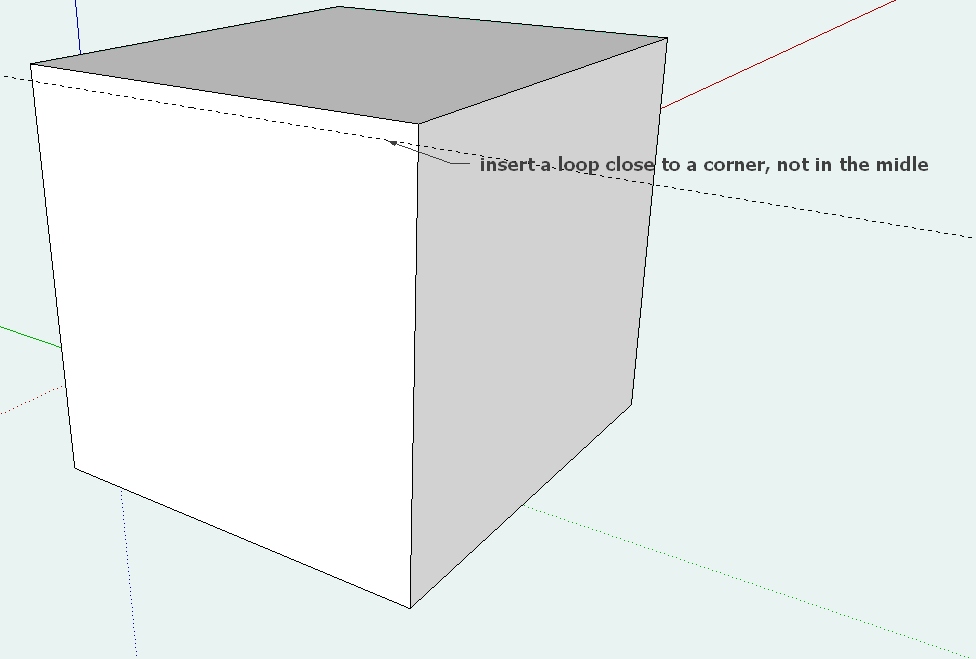
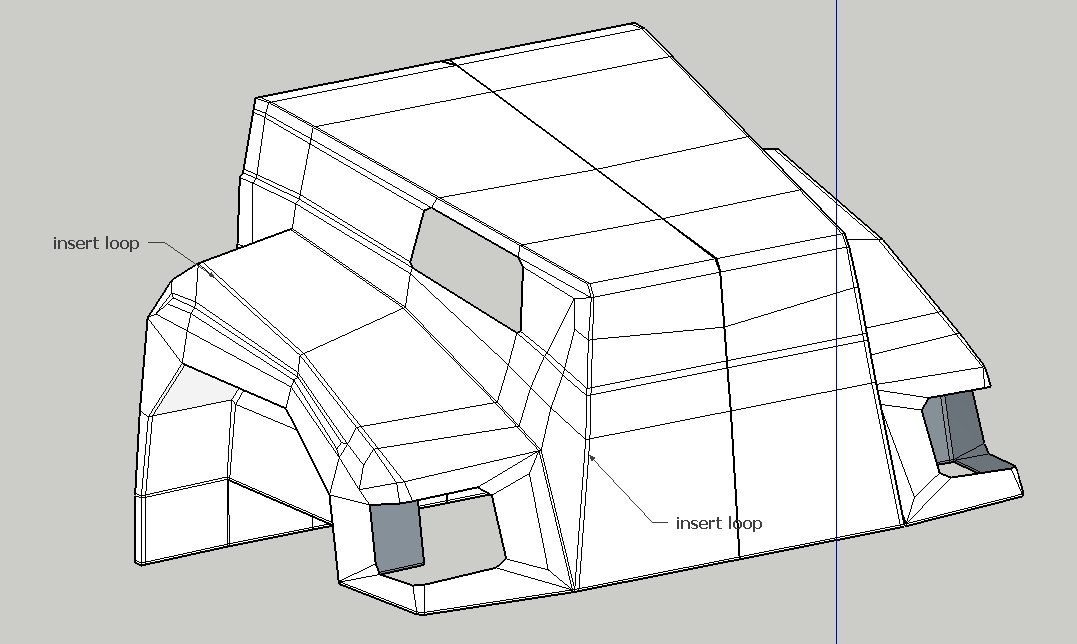
                                any chance "loop cut and slide" is possible? There's add loop in Quadface Tools, but specifying where within the quad the loop goes would be HUGE! Anyhow, just dreaming πŸ˜„

                                http://charlottesvillearchitecturalrendering.com/

                                1 Reply Last reply
                                Reply Quote 0
                                • thomthomT
                                  thomthom
                                  last edited by

                                  @andybot said:

                                  any chance "loop cut and slide" is possible? There's add loop in Quadface Tools, but specifying where within the quad the loop goes would be HUGE! Anyhow, just dreaming πŸ˜„

                                  Can you elaborate more? "slide"?
                                  You mean like a insert loop by offset from reference edge?

                                  Thomas Thomassen β€” SketchUp Monkey & Coding addict
                                  List of my plugins and link to the CookieWare fund

                                  1 Reply Last reply
                                  Reply Quote 0
                                  • andybotA
                                    andybot
                                    last edited by

                                    @thomthom said:

                                    @andybot said:

                                    any chance "loop cut and slide" is possible? There's add loop in Quadface Tools, but specifying where within the quad the loop goes would be HUGE! Anyhow, just dreaming πŸ˜„

                                    Can you elaborate more? "slide"?
                                    You mean like a insert loop by offset from reference edge?

                                    It's a Blender command. It allows you to place a loop by percentage distance between adjacent loops. Offset by distance from edge would be nice too πŸ˜„

                                    http://charlottesvillearchitecturalrendering.com/

                                    1 Reply Last reply
                                    Reply Quote 0
                                    • J
                                      jaceguay
                                      last edited by

                                      @andybot said:

                                      @thomthom said:

                                      @andybot said:

                                      any chance "loop cut and slide" is possible? There's add loop in Quadface Tools, but specifying where within the quad the loop goes would be HUGE! Anyhow, just dreaming πŸ˜„

                                      Can you elaborate more? "slide"?
                                      You mean like a insert loop by offset from reference edge?

                                      It's a Blender command. It allows you to place a loop by percentage distance between adjacent loops. Offset by distance from edge would be nice too πŸ˜„

                                      Yes, it would be very usefull.
                                      loop.jpg


                                      loop2.jpg

                                      1 Reply Last reply
                                      Reply Quote 0
                                      • StinkieS
                                        Stinkie
                                        last edited by

                                        Oh, wow!

                                        1 Reply Last reply
                                        Reply Quote 0
                                        • C
                                          cuttingedge
                                          last edited by

                                          πŸ˜„ the hope for a cleaner model in SU acceptable to the high standard cg world.

                                          1 Reply Last reply
                                          Reply Quote 0
                                          • panixiaP
                                            panixia
                                            last edited by

                                            @andybot said:

                                            @thomthom said:

                                            @andybot said:

                                            any chance "loop cut and slide" is possible? There's add loop in Quadface Tools, but specifying where within the quad the loop goes would be HUGE! Anyhow, just dreaming πŸ˜„

                                            Can you elaborate more? "slide"?
                                            You mean like a insert loop by offset from reference edge?

                                            It's a Blender command. It allows you to place a loop by percentage distance between adjacent loops. Offset by distance from edge would be nice too πŸ˜„

                                            the workaround i use in order to mimic this is to select the ring then use "connect edge" with 2 segments and the proper pinch, then "remove" the unwanted loop


                                            1 Reply Last reply
                                            Reply Quote 0

                                            Hello! It looks like you're interested in this conversation, but you don't have an account yet.

                                            Getting fed up of having to scroll through the same posts each visit? When you register for an account, you'll always come back to exactly where you were before, and choose to be notified of new replies (either via email, or push notification). You'll also be able to save bookmarks and upvote posts to show your appreciation to other community members.

                                            With your input, this post could be even better πŸ’—

                                            Register Login
                                            • 1
                                            • 2
                                            • 3
                                            • 4
                                            • 1 / 4
                                            • First post
                                              Last post
                                            Buy SketchPlus
                                            Buy SUbD
                                            Buy WrapR
                                            Buy eBook
                                            Buy Modelur
                                            Buy Vertex Tools
                                            Buy SketchCuisine
                                            Buy FormFonts

                                            Advertisement