sketchucation logo sketchucation
    • 登入
    Oops, your profile's looking a bit empty! To help us tailor your experience, please fill in key details like your SketchUp version, skill level, operating system, and more. Update and save your info on your profile page today!
    🔌 Smart Spline | Fluid way to handle splines for furniture design and complex structures. Download

    [Plugin] FloorGenerator ( Updated 6-Apr-2017)

    已排程 已置頂 已鎖定 已移動 Plugins
    331 貼文 109 Posters 368.9k 瀏覽 109 Watching
    正在載入更多貼文
    • 從舊到新
    • 從新到舊
    • 最多點贊
    回覆
    • 在新貼文中回覆
    登入後回覆
    此主題已被刪除。只有擁有主題管理權限的使用者可以查看。
    • l_breaultL 離線
      l_breault
      最後由 編輯

      Thank you very much! I can't wait to give this a go!

      Thanks,
      Leo Breault
      http://www.breaultdesignstudio.com

      1 條回覆 最後回覆 回覆 引用 0
      • sdmitchS 離線
        sdmitch
        最後由 編輯

        @rviz said:

        Sdmitch, first off thank you for helpful tool!
        Could you please polish the following things (though it was puplished as floorgenerator):
        Yes, I probably should have called it Pattern Generator instead.

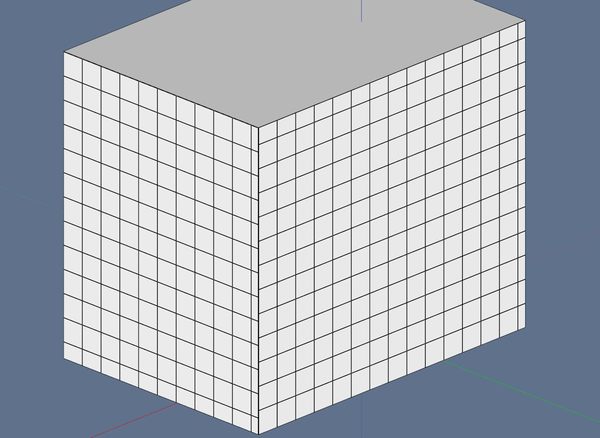
        1. inconsistent grid origin\rotation (tried on simple cube, see pic.1)
          By design, the plugin aligns the pattern length with the longest edge of the face picked. In this case, I would undo and redo the face with 90 rotation selected.

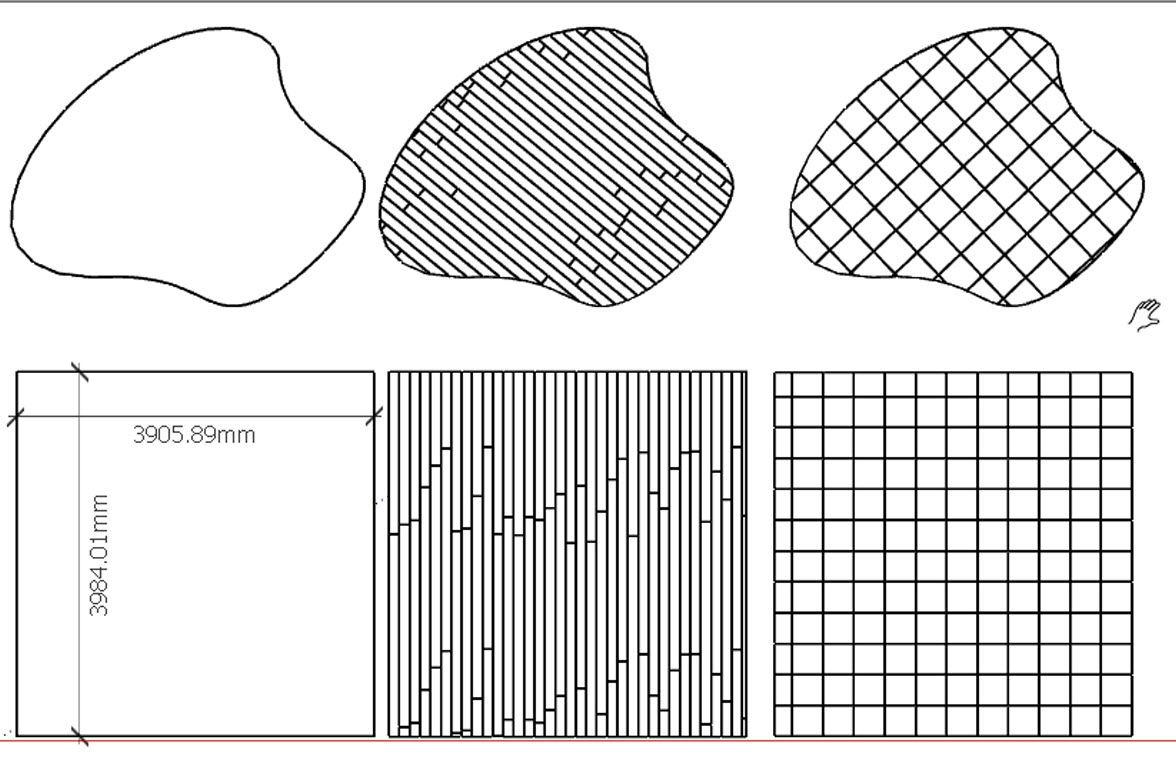
        2. additional option 'respect user's pattern- one tile per face, consistent gaps (pic.2).
          ?????????

        3. 'don't penetrate corners' option(very important for metal panel siding\glazing)
          I guess, to implement p.1 and 2, the tool would have to work with multiple faces.
          This is a pattern generator not a groove cutter.

        4. respect adjacent faces!
          Nothing this plugin does should ever effect an adjacent face.

        5. pick up file's units (I'm on cm, for instance)?
          It does determine the units used but switches to inches or millimeters while executing then returns model to original units when exiting.

        6. presets saving?
          All the values for each option are saved in the registry and retrieved when needed.

        Thank you once again.

        Nothing is worthless, it can always be used as a bad example.

        http://sdmitch.blogspot.com/

        1 條回覆 最後回覆 回覆 引用 0
        • JQLJ 離線
          JQL
          最後由 編輯

          I'm thrilled that finally this is available in Sketchup!

          Unfortunatelly, it isn't available in the download link any more...

          Updating?

          EDIT: Yes... Updating! Can't wait to try it out!

          www.casca.pt
          Visit us on facebook!

          1 條回覆 最後回覆 回覆 引用 0
          • rvizR 離線
            rviz
            最後由 編輯

            @sdmitch said:

            @rviz said:

            Sdmitch, first off thank you for helpful tool!
            Could you please polish the following things (though it was puplished as floorgenerator):
            Yes, I probably should have called it Pattern Generator instead.

            🙂 I meant it's not only 'floor' but rather general building finishes modeller.
            So it could be tweaked (or 'polished') for wider use.

            1. inconsistent grid origin\rotation (tried on simple cube, see pic.1)
              By design, the plugin aligns the pattern length with the longest edge of the face picked. In this case, I would undo and redo the face with 90 rotation selected.

            I see. But may for vertical\ surfaces the horizontal direction set the lenth?

            1. additional option 'respect user's pattern- one tile per face, consistent gaps (pic.2).
              ?????????

            simply every single preselected polygon will turn into the single tile piece (multiple selection would be crucial in this case). see pic.2 in my previous reply.

            1. 'don't penetrate corners' option(very important for metal panel siding\glazing)
              I guess, to implement p.1 and 2, the tool would have to work with multiple faces.
              This is a pattern generator not a groove cutter.

            I'd call it building finishes modeler. So in addition to bricks, tiles and parquet
            It'd be sweet to get metal panels which have special treatment at the corners. Please
            see:

            http://materialsandsources.com/wp-content/uploads/2010/01/residence-dri-design-1.jpg

            http://pfisterroofing.com/wp-content/uploads/2013/04/aluminum-wall-panel-composite-systems.jpg

            BTW have you ever thought about 'groove cutter'? It's really missing

            Many thanks for attention

            1 條回覆 最後回覆 回覆 引用 0
            • U 離線
              unearthed
              最後由 編輯

              Thanks sdmitch, another great tool, will speed up my decks and patios no end

              Growplan - People ∩ Plants ∩ Place

              windows 7 64b, 4GB RAM, SU 8.0.16846
              Gimp, QGIS, Vectorworks 12, Bricscad 11

              1 條回覆 最後回覆 回覆 引用 0
              • B 離線
                Ben Ritter
                最後由 編輯

                SDMitch, thank you for your generosity and talent.

                1 條回覆 最後回覆 回覆 引用 0
                • B 離線
                  Ben Ritter
                  最後由 編輯

                  @pixero said:

                  I've said it before, but thanks you! 😍

                  I think you forgot to say that if you place a folder called BTW_Textures in your plugin folder and choose use Apply material: Rand_Tex it will use all textures in that folder. Here are a few tests I've made:

                  [attachment=3:1u96rdu7]<!-- ia3 -->Bricks01.jpg<!-- ia3 -->[/attachment:1u96rdu7]
                  Can you spot the tiling? No, because there is none. This is with 10 small seamless brick textures used.

                  [attachment=2:1u96rdu7]<!-- ia2 -->floor03.jpg<!-- ia2 -->[/attachment:1u96rdu7]
                  This is just one single seamless texture used.

                  [attachment=0:1u96rdu7]<!-- ia0 -->tiles01.jpg<!-- ia0 -->[/attachment:1u96rdu7]
                  This is also just one texture used.

                  Pixero, thank you very much.

                  1 條回覆 最後回覆 回覆 引用 0
                  • sdmitchS 離線
                    sdmitch
                    最後由 編輯

                    A new update. Added two new patterns.

                    Nothing is worthless, it can always be used as a bad example.

                    http://sdmitch.blogspot.com/

                    1 條回覆 最後回覆 回覆 引用 0
                    • OxerO 離線
                      Oxer
                      最後由 編輯

                      Thanks you very much for this useful plugin!! 👍
                      It works perfectly on Mac & SU2014. One question, the Row2Row Offset for Brick is 0.5 by default when you use mm units, I changed to 50 in line 69 of the rb file.

                      @defaults=["Corner","0","Current","Yes","Yes","50","No","No","0","No","No","30","150","50","12","6","3"] if @@opt=="Brick"

                      @pixero said:

                      I think you forgot to say that if you place a folder called BTW_Textures in your plugin folder and choose use Apply material: Rand_Tex it will use all textures in that folder.

                      Thanks Pixero for the info and Textures 👍

                      Another question, what units uses the Texture Size, mm, inches or pixels?

                      "The result is the end what is important is the process" by Oxer
                      http://www.oxervision.blogspot.com/

                      1 條回覆 最後回覆 回覆 引用 0
                      • sdmitchS 離線
                        sdmitch
                        最後由 編輯

                        @oxer said:

                        Thanks you very much for this useful plugin!! 👍
                        It works perfectly on Mac & SU2014. One question, the Row2Row Offset for Brick is 0.5 by default when you use mm units, I changed to 50 in line 69 of the rb file.

                        @defaults=["Corner","0","Current","Yes","Yes","50","No","No","0","No","No","30","150","50","12","6","3"] if @@opt=="Brick"

                        Thanks for pointing that out. Originally I was using a fraction(0.5) instead of a %. Once it is corrected from within the plugin and Update is clicked, that should take care of it.

                        @pixero said:

                        I think you forgot to say that if you place a folder called BTW_Textures in your plugin folder and choose use Apply material: Rand_Tex it will use all textures in that folder.

                        Thanks Pixero for the info and Textures 👍

                        Another question, what units uses the Texture Size, mm, inches or pixels?

                        What ever units you are using in the model, either mm or inches. The API says inches but mm seemed to work for me.

                        Nothing is worthless, it can always be used as a bad example.

                        http://sdmitch.blogspot.com/

                        1 條回覆 最後回覆 回覆 引用 0
                        • OxerO 離線
                          Oxer
                          最後由 編輯

                          I use metric units in my models for that, I suppose the Texture Size it will expressed in mm, is it so?
                          The Options Window is a bit little on Mac, I changed the window hight to 530 so I can see all options.

                          @@dlg=UI::WebDialog.new("FloorGenerator", false,"BTW",300,530,10,10,true)

                          "The result is the end what is important is the process" by Oxer
                          http://www.oxervision.blogspot.com/

                          1 條回覆 最後回覆 回覆 引用 0
                          • OxerO 離線
                            Oxer
                            最後由 編輯

                            I have created a icon for the plugin.

                            Floor Generator Icon

                            Icons FloorGenerator

                            "The result is the end what is important is the process" by Oxer
                            http://www.oxervision.blogspot.com/

                            1 條回覆 最後回覆 回覆 引用 0
                            • KrisidiousK 離線
                              Krisidious
                              最後由 編輯

                              Can we get something like this as a pattern?

                              Can you show us some patterns to build for you? let us help.


                              3D_Hatching_LedgeStone.skp

                              By: Kristoff Rand
                              Home DesignerUnique House Plans

                              1 條回覆 最後回覆 回覆 引用 0
                              • sdmitchS 離線
                                sdmitch
                                最後由 編輯

                                @krisidious said:

                                Can we get something like this as a pattern?

                                Can you show us some patterns to build for you? let us help.

                                That pattern is just a bit to random I think. the closest I could get is a random length, width and thickness using the wood pattern


                                3D_Hatching_LedgeStone.skp

                                Nothing is worthless, it can always be used as a bad example.

                                http://sdmitch.blogspot.com/

                                1 條回覆 最後回覆 回覆 引用 0
                                • pbacotP 離線
                                  pbacot
                                  最後由 編輯

                                  Still after the holy grail, ay Kris? lol. I am trying to figure out how to do a stone wall surface (with SU hole punch components for windows etc.) and make some sort of detail at the corners that suggests the stone profile...

                                  That's not bad sdmitch Should keep looking at it!

                                  MacOSX MojaveSketchUp Pro v19 Twilight v2 Thea v3 PowerCADD

                                  1 條回覆 最後回覆 回覆 引用 0
                                  • KrisidiousK 離線
                                    Krisidious
                                    最後由 編輯

                                    @pbacot said:

                                    Still after the holy grail, ay Kris? lol. I am trying to figure out how to do a stone wall surface (with SU hole punch components for windows etc.) and make some sort of detail at the corners that suggests the stone profile...

                                    That's not bad sdmitch Should keep looking at it!

                                    lmao... And I will have it.

                                    By: Kristoff Rand
                                    Home DesignerUnique House Plans

                                    1 條回覆 最後回覆 回覆 引用 0
                                    • KrisidiousK 離線
                                      Krisidious
                                      最後由 編輯

                                      That looks pretty dame good sdmitch... if I had used a better tiling texture it would look better.

                                      By: Kristoff Rand
                                      Home DesignerUnique House Plans

                                      1 條回覆 最後回覆 回覆 引用 0
                                      • rvizR 離線
                                        rviz
                                        最後由 編輯

                                        @unknownuser said:

                                        1. inconsistent grid origin\rotation (tried on simple cube, see pic.1)
                                          By design, the plugin aligns the pattern length with the longest edge of the face picked. In this case, I would undo and redo the face with 90 rotation selected.

                                        After 90 rotating the tool takes origins randomly: sometimes it's the upper corner, sometimes the lower one.

                                        But the most important: is there place for code optimization? It takes approx 5 min to put 2k tiles (to do it manually would take may be 0.5 min 😕 ).


                                        sdf.JPG

                                        1 條回覆 最後回覆 回覆 引用 0
                                        • sdmitchS 離線
                                          sdmitch
                                          最後由 編輯

                                          As with any plugin, if you can do it faster manually, then don't use the plugin.

                                          If you are using Corner origin, the corner closest to the point on the face that you pick will be used.

                                          Nothing is worthless, it can always be used as a bad example.

                                          http://sdmitch.blogspot.com/

                                          1 條回覆 最後回覆 回覆 引用 0
                                          • zieiosZ 離線
                                            zieios
                                            最後由 編輯

                                            f2.jpg
                                            Thanks
                                            love it.... 👍

                                            1 條回覆 最後回覆 回覆 引用 0
                                            • 1
                                            • 2
                                            • 3
                                            • 4
                                            • 5
                                            • 16
                                            • 17
                                            • 2 / 17
                                            • 第一個貼文
                                              最後的貼文
                                            Buy SketchPlus
                                            Buy SUbD
                                            Buy WrapR
                                            Buy eBook
                                            Buy Modelur
                                            Buy Vertex Tools
                                            Buy SketchCuisine
                                            Buy FormFonts

                                            Advertisement