[Plugin] Shortcutter Beta
-
It's not that simple on a mac...
@unknownuser said:
There are three different caches involved in WebKit on Mac OS X.
A) The resource cache in the NSURL networking layer, which caches both in memory and on disk.
B) The resource cache inside WebCore, which caches in memory.
C) The page cache in WebCore, a higher level cache which only affects "go back" and "go forward" commands.they aren't the easiest to erase...
besides you already havePragma; no-cache Cache-Control; no-cachewhich are the two sure-fire ways of not cacheing...
On the surface it looks like Sketchup may have broken get_shortcuts, which I'm assuming is being used for the harvest...
john -
TIG Tested it with MAC and it worked for him. My suspition - and that's why I asked for a re-load - is that we have again some problem with the asynchronous nature of MAC running javascript. Of course I'm not sure in it as I have no chance to test it on MAC but we have run into this async/sync problem several times with the SketchUcation tools during the dev.
Anyhow thank you for testing/noticing/explaining. Let's wait for TIG if he has any idea,
-
Until TIG arrives. If you have the time and you wish to....
I've made a debug version of the javascript. So if you edit the 41st line of the.../SketchUcation/SCF-myShortcuts.rbfile and change the filename in the URL fromshortcutter.htmltoshortcutter1.htmland after SU reload you run it, you'll get a popup what will show what is returned by the ruby side to the js.It would be useful to see a screenshot of that popup.
-
list is quicker than screenshot...
A	selectArcTool;
B	selectPaintTool;
C	selectCircleTool;
D	selectDimensionTool;
E	selectEraseTool;
F	selectExtrudeTool;
G	makeComponent;
H	viewShowHidden;
K	/Plugins/Keyboard Shortcuts
L	selectLineTool;
M	selectMoveTool;
O	selectOffsetTool;
P	selectPushPullTool;
Q	selectRotateTool;
R	selectRectangleTool;
S	selectScaleTool;
Space	selectSelectionTool;
T	selectMeasureTool;
U	editUnlockSelected;
V	toggleHideRestOfModel;
W	/Plugins/Weld
Z	selectZoomTool;
⇧A	/File/Export/Animation...
⇧E	/File/Export/2D Graphic...
⇧P	viewParallelProjection;
⇧R	/Draw/Rotated Rectangle
⇧S	/File/Export/Section Slice...
⇧T	togglePageTabsDsiplay;
⇧V	pasteInPlace;
⇧Z	viewZoomExtents;
⌃S	saveCopy;
⌃⌥⇧T	viewTop;
⌥B	orderFrontColorPanel;
⌥M	/Plugins/Mirror Selection
⌥T	doThreeDText;
so it is seeing them...
-
@driven said:
so it is seeing them...
Thank you. So now we know that the .js side receives the shortcuts. Now we have to find out why it doesn't poulate the .html with them. I made shortcutter2.html what - after the initial popup - will pop up an alert for each individual shortcut with the HTML insert for that. If you could send the content of the first two or three of those popups that would help. (You need to click OK one by one on them to get the next)
-
I think it might be the tabs
javascript isn't seeing '\t' for the split, it's a ' ' that's being sent
-
@driven said:
I think it might be the tabs
javascript isn't seeing '\t' for the split, it's a ' ' that's being sent
Well. IMO it is seeing the TAB as in the popup they are separated by a TAB.
BUT! And I think we got the problem here. Your MAC SU is not sending the corresponding menu with the shortcuts. And that information used to place the data into the appropriate section of the webdialog. My PC popup looks like:
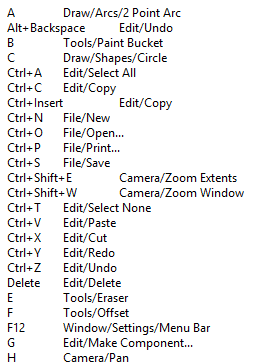
As you see every action begins with the menu name. Tomorrow or Monday I'll find out something how to handle this situation. Probably we have to give up the display by menu items layout in these cases.Thank you very much for your help.
EDIT: Now I see the information is there but just in an other format. Will do version 0.2.0 on Monday to handle this.
-
ok
couple of observationsA selectArcTool;is actually a
Sketchup.send_actionkey...so on mac it's short cutting all of the ones that end in [ : ], and not supplying the path type structure for those...
your name in the file [and the file itself] have Central European( Windows latin 2) text encoding which don't work with
force-encoding('UFT-8')as you may expect, I think you would needforce-encoding( [Central European( Windows latin 2] ).encode('UFT-8'), replacing [""] with the correct encoding constant, it's much simpler to encode the files correctly from the start and avoid any need to 'force' it. it may be part of the issue...john
-
Thank you John. We'll make the suggested corrections in v0.2.0. (On Monday)
-
I hadn't tested it on MAC - just PCs...
Of course the encoding should be UTF-8

I suspect that the Gábor v Gabor should not cause an issue as it's behind a # so is never read ?
BUT the file is ANSI encoded incorrectly - a sure thing to break Ruby2 - but it does not !
Somewhere it's encoding changed - the version I sent Gábor via Skype was encoded correctly, subsequent editing by him seems to have changed its encoding for the worseBUT now I have a very strange issue with my MAC.

In v2013 and v2014 in the Ruby Console:Sketchup.get_shortcutsreturns[]!Even though there are many shortcuts listed in the menus and Shortcuts.plist ?
So then the listing in the dialog is unpopulated as the list is
""!I can't see why SketchUp has stopped making these lists
-
I have now found that on MAC using a shortcut somehow wakes up the plist and then
Sketchup.get_shortcutsreturns the array as expected.
BUT it still fails to populate the shortcutter dialog.
I suspect that the MAC string that is passed to the JS side contains characters that break it - perhaps we need to encode it Ruby side then decode it JS side ?
It contains special-characters for Option, Cmd etc - while on PC they would be Alt, Ctrl etc...
I recast a UTF8-without-BOM encoded version of the .rb so it outputs what it's sending to the JS...On MAC with SketchUp just opened [v2014].
Sketchup.get_shortcutsreturns[]
When the the shortcutter runs it sends""to the JS.
Which is rubbish !
BUT when I use just one shortcut !
It works thereafter...
Now:
Sketchup.get_shortcuts
returns:
["A\tselectArcTool:", "B\tselectPaintTool:", "C\tselectCircleTool:", "E\tselectEraseTool:", "F\tselectOffsetTool:", "G\tmakeComponent:", "H\tselectDollyTool:", "K\ttoggleDisplayBackEdges:", "L\tselectLineTool:", "M\tselectMoveTool:", "O\tselectOrbitTool:", "P\tselectPushPullTool:", "Q\tselectRotateTool:", "R\tselectRectangleTool:", "S\tselectScaleTool:", "Space\tselectSelectionTool:", "T\tselectMeasureTool:", "Z\tselectZoomTool:", "|\tviewPerspective:", "⇧Z\tviewZoomExtents:", "⌥S\t/Plugins/SketchUcation/My Shortcuts..."]
and when the the shortcutter runs the passed string is:
"A\tselectArcTool:\\nB\tselectPaintTool:\\nC\tselectCircleTool:\\nE\tselectEraseTool:\\nF\tselectOffsetTool:\\nG\tmakeComponent:\\nH\tselectDollyTool:\\nK\ttoggleDisplayBackEdges:\\nL\tselectLineTool:\\nM\tselectMoveTool:\\nO\tselectOrbitTool:\\nP\tselectPushPullTool:\\nQ\tselectRotateTool:\\nR\tselectRectangleTool:\\nS\tselectScaleTool:\\nSpace\tselectSelectionTool:\\nT\tselectMeasureTool:\\nZ\tselectZoomTool:\\n|\tviewPerspective:\\n⇧Z\tviewZoomExtents:\\n⌥S\t/Plugins/SketchUcation/My Shortcuts..."
BUT it still does NOT populate the dialog - so something is breaking the JS execute_script side...
I suspect these special MAC symbols -
FWIW, this is what I get on my Mac after clearing the Safari caches. I do have shortcuts established.
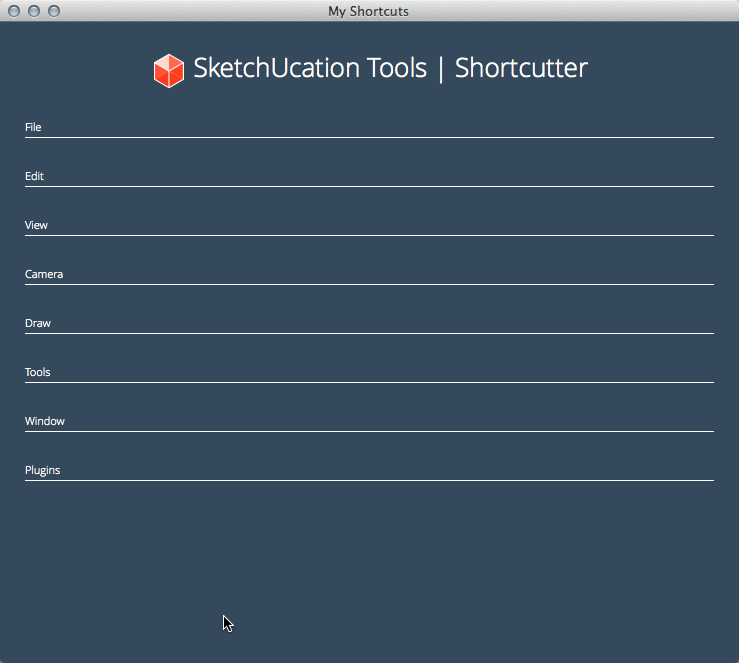
-
Yep, in MAC is it's foobar...
I suspect it's the special-characters that MACs use for the modifier keys...
Those will break the server's JS...
Gábor and I need to look at it tomorrow... -
I did try
myscuts = (Sketchup.get_shortcuts.to_s.gsub(/⌃/,'Ctrl').gsub(/⌥/,'Alt').gsub(/⇧/,'Shift').split(',').sort.join("\\n"))which almost works on the ruby side if I encode the page UTF-8,
"AltT\tdoThreeDText;"\n "B\tselectPaintTool;"\n "C\tselectCircleTool;"\n "CtrlAltShiftT\tviewTop;"\n["Space\tselectSelectionTool;"the last entry for Space is screwed up, and then I get a load error on the html...
-
Yes, the script must be encoded as UTF-8-without-BOM to be fully compatible with all versions of SketchUp - I was surprised it hadn't broken v2.14 Ruby2...
Try this
myscuts = Sketchup.get_shortcuts.sort.join("\\n").gsub(/#{'⌃'}/, 'Ctrl').gsub(/#{'⌥'}/, 'Alt').gsub(/#{'⇧'}/, 'Shift')Should perhaps work for MACs ?
It is something like I am going to test with Gábor tomorrow...BUT... do you have any idea why on my MAC
Sketchup.get_shortcutsreturns[]- so thatmyscuts == ""- unless I have used one shortcut before that, then it works ? -
The main problem is that in case of Mac we do not have the menu name at the beginning of each action, so the Javascript and maybe also the HTML has to be prepared first to handle this situation. The javascript populates the paragraphs based on the menuname what is missing in case of MAC. More tomorrow.
-
@tig said:
BUT... do you have any idea why on my MAC
Sketchup.get_shortcutsreturns[]- so thatmyscuts == ""- unless I have used one shortcut before that, then it works ?on my mac it works from the off...
...and, I do have a 'hunch',
I may depend on some of your startup 'Preferences'...
I think SU is using these
send_actionsinternally for those as well and 'that' triggers the plist read...try enabling 'Auto activate paint tool' and see if they appear...
I can't get it to revert to 'not' showing...
-
@gábor said:
The main problem is that in case of Mac we do not have the menu name at the beginning of each action, so the Javascript and maybe also the HTML has to be prepared first to handle this situation. The javascript populates the paragraphs based on the menuname what is missing in case of MAC. More tomorrow.
We'll Skype on Monday morning [UK time] -
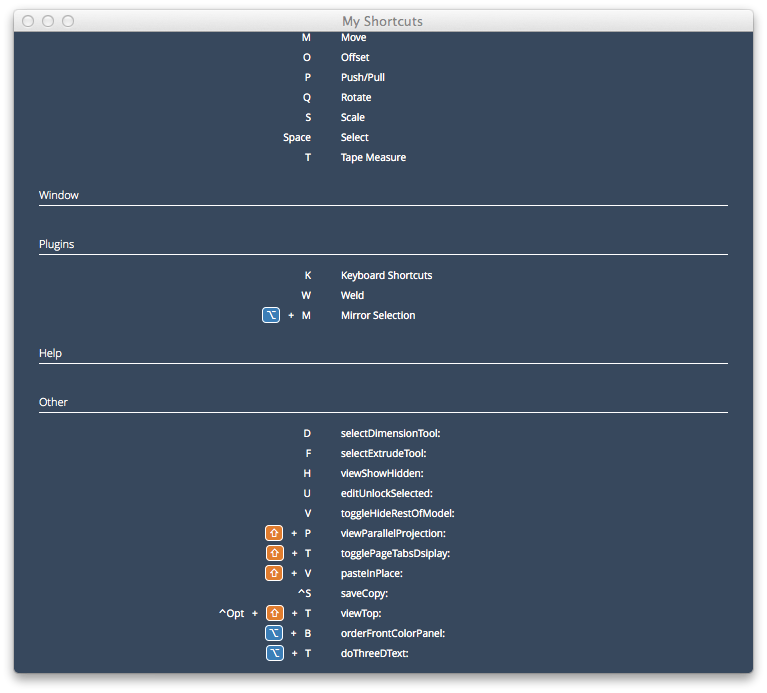
Version 0.2.0 is out now in the pluginstore. It addresses the MAC issue. MAC users, please test.
-
getting there...




Advertisement