sketchucation logo sketchucation
    • 登入
    Oops, your profile's looking a bit empty! To help us tailor your experience, please fill in key details like your SketchUp version, skill level, operating system, and more. Update and save your info on your profile page today!
    🔌 Smart Spline | Fluid way to handle splines for furniture design and complex structures. Download

    Slope analysis of 2d Autocad contour drawing

    已排程 已置頂 已鎖定 已移動 SketchUp Discussions
    sketchup
    23 貼文 7 Posters 4.5k 瀏覽 7 Watching
    正在載入更多貼文
    • 從舊到新
    • 從新到舊
    • 最多點贊
    回覆
    • 在新貼文中回覆
    登入後回覆
    此主題已被刪除。只有擁有主題管理權限的使用者可以查看。
    • john2J 離線
      john2
      最後由 編輯

      Hello everyone

      I have an autocad file of site plan having contours. It is all in 2D form. A flat drawing with all the contours and labelled with their levels.

      I want to do a slope analysis

      like

      Shade areas with slope of
      5-10%
      10-15%
      15-20%
      above 20%

      How can I do it?

      I will have to make a model of that drawing in sketchup with sandbox and then do something. ?

      Can anyone give a full workaround of how to deal with such things?

      Thanks

      Sketchup Make 2017 (64-bit), Vray 4.0 , Windows 10 – 64 bit, corei7-8750H, 16GB RAM, Nvidia GeForce GTX 1050Ti 4GB

      1 條回覆 最後回覆 回覆 引用 0
      • KrisidiousK 離線
        Krisidious
        最後由 編輯

        This will get you halfway there... http://sketchucation.com/forums/viewtopic.php?f=323%26amp;t=52039

        Then someone else will tell you about the color height map... i can't remember what the name of it is.

        By: Kristoff Rand
        Home DesignerUnique House Plans

        1 條回覆 最後回覆 回覆 引用 0
        • JQLJ 離線
          JQL
          最後由 編輯

          There's a color by slope plugin somewhere in here

          www.casca.pt
          Visit us on facebook!

          1 條回覆 最後回覆 回覆 引用 0
          • KrisidiousK 離線
            Krisidious
            最後由 編輯

            I know... and I can't find it for the life of me.

            By: Kristoff Rand
            Home DesignerUnique House Plans

            1 條回覆 最後回覆 回覆 引用 0
            • jeff hammondJ 離線
              jeff hammond
              最後由 編輯

              %(#FF0000)[__c
              ___o
              ____l
              _____o
              ______r]
              _______by slope is a plugin by chris fullmer:

              http://sketchucation.com/forums/viewtopic.php?t=20635

              (it's available via the trimble extension warehouse)


              ..or maybe try this one by sdmitch:

              http://sketchucation.com/forums/viewtopic.php?t=39735

              .

              dotdotdot

              1 條回覆 最後回覆 回覆 引用 0
              • KrisidiousK 離線
                Krisidious
                最後由 編輯

                AHHHH Thanks Jeff.

                By: Kristoff Rand
                Home DesignerUnique House Plans

                1 條回覆 最後回覆 回覆 引用 0
                • john2J 離線
                  john2
                  最後由 編輯

                  Thank you everyone for replying. I'll download these plugins for sure. 😄 These plugins are for the situation wherein the terrain model has already been made. As i have mentioned before, my drawing is flat 2d drawing. So if i import that in sketchup, it comes in x-y plane only. There is no z axis location of object in that drawing (all z axis position is 0). So is there a quick way to make the model of that drawing or will I have to place one by one each polyline to the desired level?

                  Sketchup Make 2017 (64-bit), Vray 4.0 , Windows 10 – 64 bit, corei7-8750H, 16GB RAM, Nvidia GeForce GTX 1050Ti 4GB

                  1 條回覆 最後回覆 回覆 引用 0
                  • KrisidiousK 離線
                    Krisidious
                    最後由 編輯

                    No, use that toposhaper I linked... That will build your topo.

                    By: Kristoff Rand
                    Home DesignerUnique House Plans

                    1 條回覆 最後回覆 回覆 引用 0
                    • jeff hammondJ 離線
                      jeff hammond
                      最後由 編輯

                      @john2 said:

                      So is there a quick way to make the model of that drawing or will I have to place one by one each polyline to the desired level?

                      watch the video 'altitude editor' in the first post of the TopoShaper thread that Kris linked to..

                      you do have to set the lines to height- it's just that there are some easier ways to do it with toposhaper besides selecting each one then move it vertically then select the next and so_on_and_so_forth

                      dotdotdot

                      1 條回覆 最後回覆 回覆 引用 0
                      • john2J 離線
                        john2
                        最後由 編輯

                        I have made my terrain but couldn't do my thing

                        I want slope analysis like this 0-5% ------ very light brown

                        5-10% -----little dark brown

                        10-15% ---more dark brown

                        and so on till 25% and above ----- darkest brown

                        Chris fullmer plugin does this by itself not lettingme put values.

                        Sketchup Make 2017 (64-bit), Vray 4.0 , Windows 10 – 64 bit, corei7-8750H, 16GB RAM, Nvidia GeForce GTX 1050Ti 4GB

                        1 條回覆 最後回覆 回覆 引用 0
                        • KrisidiousK 離線
                          Krisidious
                          最後由 編輯

                          Perhaps you could use Photoshop or Gimp to replace colors?

                          Oh wait. It's not letting you dictate certain slopes. just it's own determination huh? I think this is going to be something that doesn't exist.

                          By: Kristoff Rand
                          Home DesignerUnique House Plans

                          1 條回覆 最後回覆 回覆 引用 0
                          • KrisidiousK 離線
                            Krisidious
                            最後由 編輯

                            You can make a new post in the Plugins forum here. http://sketchucation.com/forums/viewforum.php?f=323

                            Title it [REQ] Slope Analysis and then describe what you are wanting it to do very specifically. There are many developers and if this interests them they'll make it. Or they might tell you how to make it or how it can be accomplished.

                            By: Kristoff Rand
                            Home DesignerUnique House Plans

                            1 條回覆 最後回覆 回覆 引用 0
                            • jeff hammondJ 離線
                              jeff hammond
                              最後由 編輯

                              if you read through the color by slope thread, you'll see that TIG has written the code to get the desired function.. it hasn't been added to the published version though..

                              i'm going to assume neither chris nor tig are going to combine it or else it would of been done already.. most of the requests in the thread were to have the functionality which tig addressed.

                              basically, someone with some ruby knowledge will have to explain (in simple terms) how to add tig's code to color by slope..

                              (i just tried and failed miserably.. 😆 )

                              dotdotdot

                              1 條回覆 最後回覆 回覆 引用 0
                              • john2J 離線
                                john2
                                最後由 編輯

                                @krisidious said:

                                Perhaps you could use Photoshop or Gimp to replace colors?

                                Oh wait. It's not letting you dictate certain slopes. just it's own determination huh? I think this is going to be something that doesn't exist.

                                Yes, it is determining by itself. Auto mode, i just enter rgb values and it does the thing by itself.

                                Sketchup Make 2017 (64-bit), Vray 4.0 , Windows 10 – 64 bit, corei7-8750H, 16GB RAM, Nvidia GeForce GTX 1050Ti 4GB

                                1 條回覆 最後回覆 回覆 引用 0
                                • TIGT 線上
                                  TIG Moderator
                                  最後由 編輯

                                  I've PM's you an adjusted version of Chris's RB that should do what you want...

                                  TIG

                                  1 條回覆 最後回覆 回覆 引用 0
                                  • KrisidiousK 離線
                                    Krisidious
                                    最後由 編輯

                                    Oh do share Tig...

                                    By: Kristoff Rand
                                    Home DesignerUnique House Plans

                                    1 條回覆 最後回覆 回覆 引用 0
                                    • KrisidiousK 離線
                                      Krisidious
                                      最後由 編輯

                                      Oh it's Chris' plugin adjusted... I understand. 😞

                                      By: Kristoff Rand
                                      Home DesignerUnique House Plans

                                      1 條回覆 最後回覆 回覆 引用 0
                                      • john2J 離線
                                        john2
                                        最後由 編輯

                                        Thanks a lot!

                                        There's one little problem.

                                        I made the terrain using topo plugin of fredo. The faces that i colour using modified plugin are coming in ugly triangular fashion. What can i do to make the colour smoother?
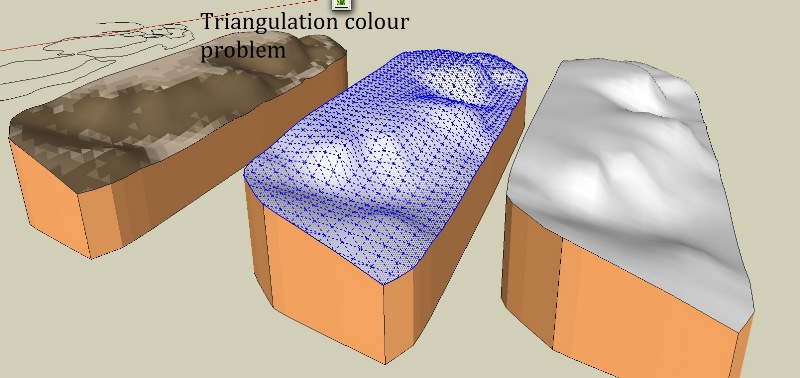

                                        zztg1.jpg

                                        Sketchup Make 2017 (64-bit), Vray 4.0 , Windows 10 – 64 bit, corei7-8750H, 16GB RAM, Nvidia GeForce GTX 1050Ti 4GB

                                        1 條回覆 最後回覆 回覆 引用 0
                                        • TIGT 線上
                                          TIG Moderator
                                          最後由 編輯

                                          You can't. 😕
                                          The facets are individually colored depending on their slope %.
                                          If you make a more subdivided mesh [with finer settings or using say Artisan to post-process it ?] the facets will get smaller... but they'll always be small triangles of a single color, no matter how small they get.
                                          You don't want to go too fine as the extra geometry will slow down SketchUp significantly...

                                          There is way of using a 'projected' graduated textured material initially on a large vertical face to show faces of differing heights smoothly transitioning - from dark to light say - on a terrain mesh.
                                          https://3dwarehouse.sketchup.com/model.html?redirect=1%26amp;mid=77627ea5941ff3d387ecd6083924dba
                                          http://sketchucation.com/forums/viewtopic.php?p=149747#p149747
                                          But if you think about it a little... you can't do the same with 'sloped' facets because those can occur anywhere in 'elevation'...
                                          How could you ever get the right effect between two adjacent slopes which could be at any other slope compared to the first one you considered ? Also every triangle would usually have three neighbors each needing a different transitional graded color/texture and then those in turn etc...

                                          TIG

                                          1 條回覆 最後回覆 回覆 引用 0
                                          • john2J 離線
                                            john2
                                            最後由 編輯

                                            Okay, so what is the most visually cleanest way to do this?
                                            Subdividing with Artisan only or any other free alternative?

                                            And I'd like to thank everyone who guided me to this stage.
                                            I've visited this forum after a really long time and getting a specially customized plugin messages to me, simply blew my mind away.
                                            Thank you TIG sir and everyone

                                            Sketchup Make 2017 (64-bit), Vray 4.0 , Windows 10 – 64 bit, corei7-8750H, 16GB RAM, Nvidia GeForce GTX 1050Ti 4GB

                                            1 條回覆 最後回覆 回覆 引用 0
                                            • 1
                                            • 2
                                            • 1 / 2
                                            • 第一個貼文
                                              最後的貼文
                                            Buy SketchPlus
                                            Buy SUbD
                                            Buy WrapR
                                            Buy eBook
                                            Buy Modelur
                                            Buy Vertex Tools
                                            Buy SketchCuisine
                                            Buy FormFonts

                                            Advertisement



