sketchucation logo sketchucation
    • Anmelden
    Oops, your profile's looking a bit empty! To help us tailor your experience, please fill in key details like your SketchUp version, skill level, operating system, and more. Update and save your info on your profile page today!
    ⚠️ Important | Libfredo 15.6b introduces important bugfixes for Fredo's Extensions Update

    MSPhysics 1.0.3 (16 October 2017)

    Geplant Angeheftet Gesperrt Verschoben Plugins
    926 Beiträge 171 Kommentatoren 918.4k Aufrufe 172 Watching
    Lade mehr Beiträge
    • Älteste zuerst
    • Neuste zuerst
    • Meiste Stimmen
    Antworten
    • In einem neuen Thema antworten
    Anmelden zum Antworten
    Dieses Thema wurde gelöscht. Nur Nutzer mit entsprechenden Rechten können es sehen.
    • robintR Offline
      robint
      zuletzt editiert von

      Hi PP
      changed the angle so its a cannon 0 - 80deg azimuth control
      just gets better 😄


      mortar 5.3.skp

      As one door closes another one slams in your face

      1 Antwort Letzte Antwort Antworten Zitieren 0
      • I Offline
        INVR
        zuletzt editiert von

        I have a little issue where sometimes when I run the sim (simple hinges) it starts scanning and objects seem to disappear. I can control the camera and see them or half of the object. But it gets worse and worst until I have to reset it. Is there any steps I can take to fix this?

        1 Antwort Letzte Antwort Antworten Zitieren 0
        • A Offline
          Anton_S
          zuletzt editiert von

          INVR, camera clipping is very like caused by some objects falling down too far away from camera. To fix this, find the objects that fall down non stop and draw a floor below them or set them to ignore if they are not necessary for the simulation. These objects could be hidden groups or hidden layers. So uif you unhinde everything, and run simulation, you should be able to notice which objects do that.

          1 Antwort Letzte Antwort Antworten Zitieren 0
          • F Offline
            faust07
            zuletzt editiert von

            Testing "export replay to images" in SketchUp 2017.
            The result is incomplete images with always the same empty white parts..
            The same happens when using the following line in a MSPhysics script:

            Sketchup.active_model.active_view.write_image("e;/MSPh_Temp/frame_%06d.png" % frame,1600,900,true,1.0)
            

            How should it be right for SUp 2017?

            1 Antwort Letzte Antwort Antworten Zitieren 0
            • F Offline
              faust07
              zuletzt editiert von

              Hi, Anton. Here I have yet an other question:
              It would be great if, for example, there would be a mode for the servos to hold the joint exactly at the center of rotation and completely prevent the centrifugal forces and the pulling out of the components involved.
              In the enclosed example, I have not found any way to keep the outer sections of the wings exactly at the center of rotation of the servos. There always develops a gap between the parts.
              Have screwed at all settings and nothing was useful.
              It seems to be a kind of inertia of the outer wing segments, which can not be stopped by reducing weight, gravitation, friction, etc.
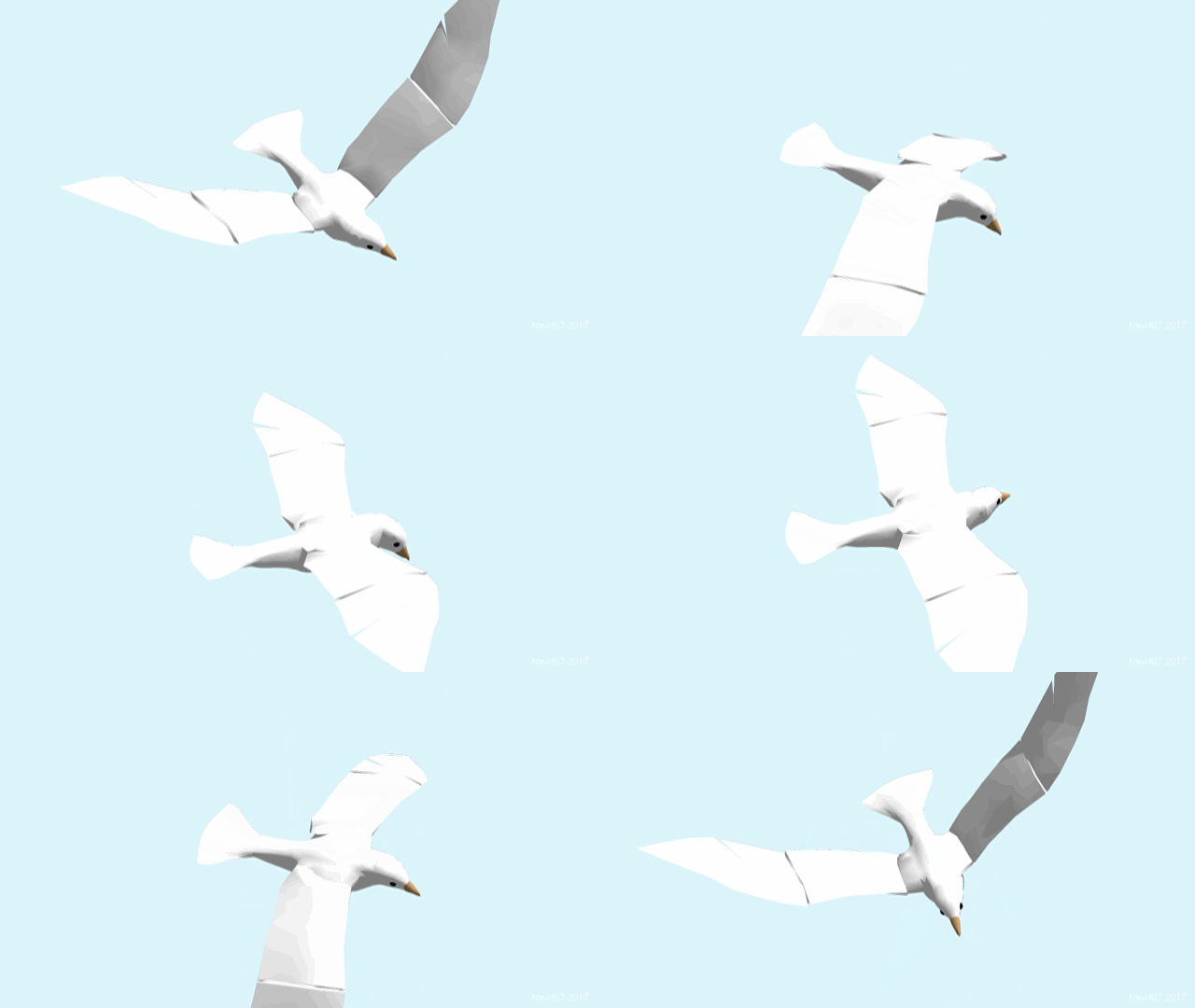
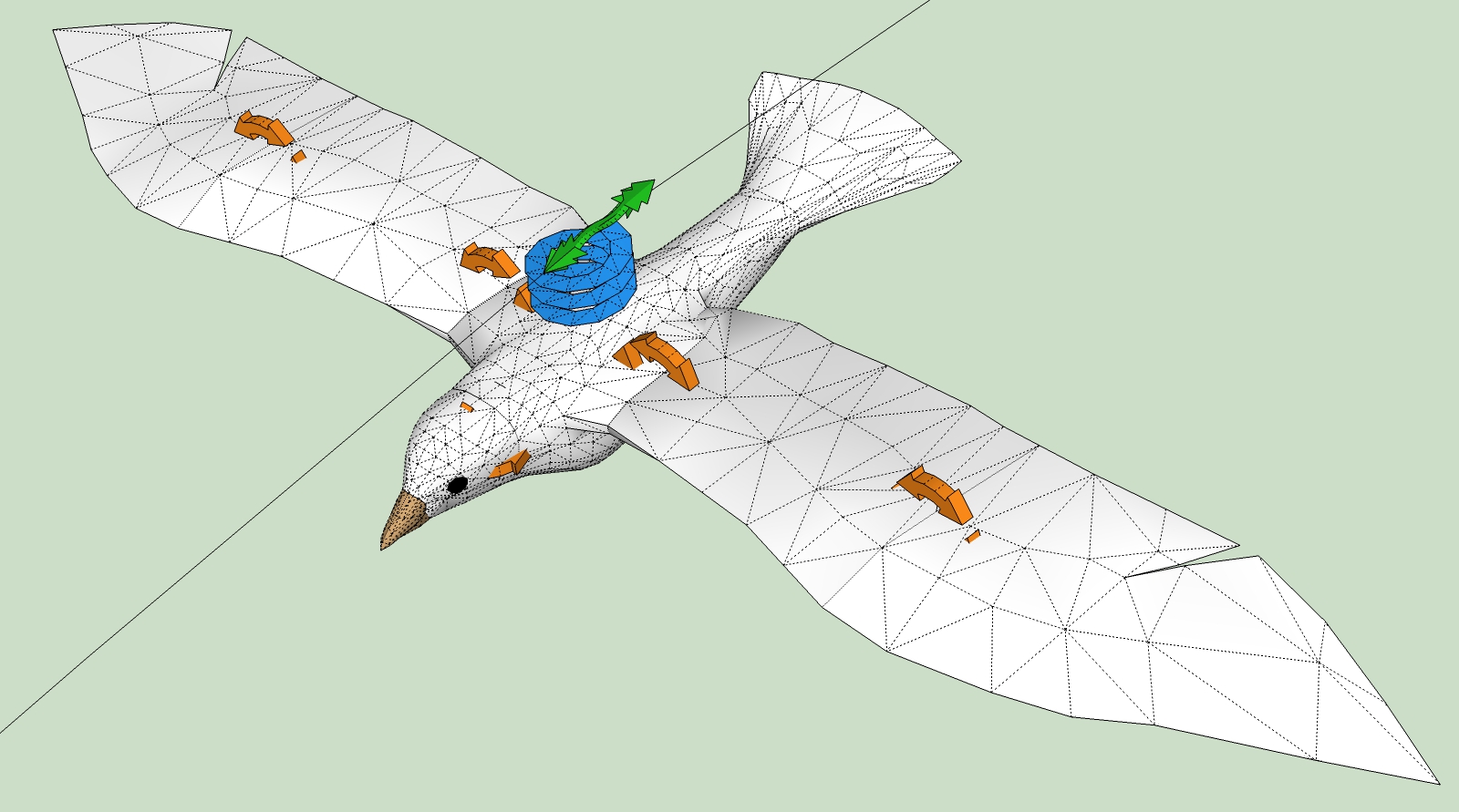
              TestBirdWing0001.gif


              WingTest-SUp-MSP_01.jpg

              1 Antwort Letzte Antwort Antworten Zitieren 0
              • luckyvacL Offline
                luckyvac
                zuletzt editiert von

                Hi Anton, is it possible to control the movement of a servo motor with a function of time. An Excel file ? In the command section can replace the slider by a function of time ( ontick ? ). ... thank you very match.

                1 Antwort Letzte Antwort Antworten Zitieren 0
                • A Offline
                  Anton_S
                  zuletzt editiert von

                  Yes, luckyvac, it is possible to control servo angle through a function of time. There are lots of ways it can be done. One way is to simply write a function into the controller section of the the servo. Say, you want to control the angle of the servo, in degrees, with a function f(t) = t*3 + 150.
                  Converting it to ruby and MSPhysics, the code would like like this: world.time * 3 + 150. If you paste this snippet into the controller section of a servo, it will have the servo angle be the value of this function at simulation time, t.

                  1 Antwort Letzte Antwort Antworten Zitieren 0
                  • luckyvacL Offline
                    luckyvac
                    zuletzt editiert von

                    Hello Anton,

                    Thank you for your reply. I will need more knowledge to carry out my project.

                    I am guitarist and I teach guitar accompanying songs.
                    This project aims to realize a tutorial to learn how to play the accompanying guitar and to show that one can realize accompaniments guitar with 5 or 6 rhythmic figures.

                    http://www.luckyanimationspectacle.com/index.asp?pageid=33

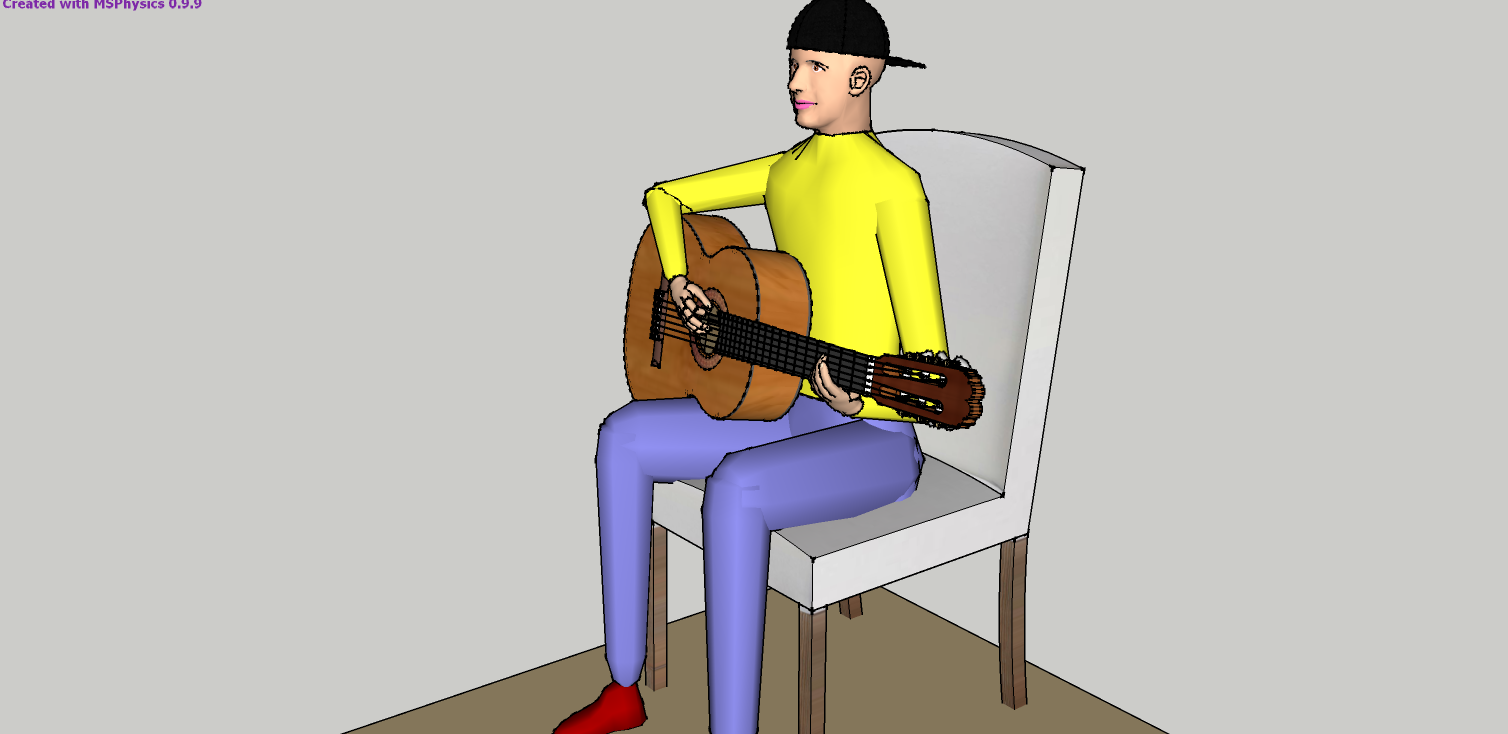
                    I used MSPhysics to simulate the movement of the arm and hand of a guitarist holding a pick.
                      He accompanies guitar with a song following the rhythm 1-2-345et.
                    Fig.01 As an attachment. pierrot robo guitar

                    I used 2 servomotors:

                    • one for the forearm which operates the up and down of the forearm.
                    • a second for the descent of the hand.
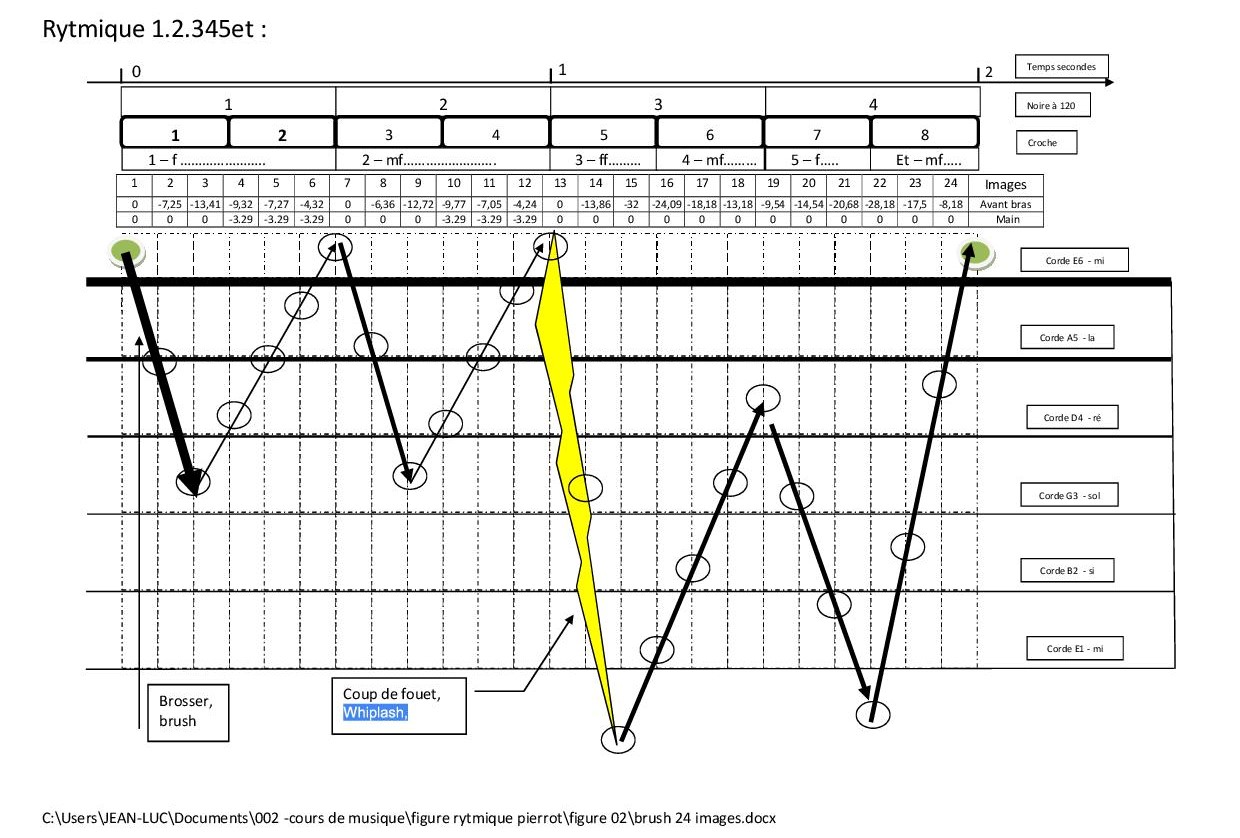
                      I made a stop-motion video by adjusting the two actuators point by point according to the following diagram:
                      Fig.02 As an attachment 1-2-345et

                    I would like to replace the slider by time functions, point by point (FIG. 2) or FFT.

                    The displacement coordinates of the servomotors are shown in the table in figure 02.
                    You will find the simulation with the <FOREARM> (avant bras ) and <HAND> (main ) slider in my drive and an example video. I chose the refrain of Bob Dylan's "blowin in the wind".
                    Here is the link :
                    https://drive.google.com/open?id=0B00m7nJr8D_qTnRXX3AyeWVyZmc
                    The video tutorial shows the synchronized movement with a rhythmic tablature made with Guitar Pro MIDI (*.gpx, *.mid ). There is no human, just my voice 😉.

                    I thank you for your attention and information you can communicate to me to help me realize my project.

                    Best regards

                    jean-luc alias luckyvac... lucky guitaR

                    perrot robo guitar.png


                    figure 2 _  1-2-345et_ 24 images.jpg

                    1 Antwort Letzte Antwort Antworten Zitieren 0
                    • T Offline
                      TheSniper
                      zuletzt editiert von

                      Anton Awesome Plugin Thanks for the hard work!
                      I add And not to complain but hopefully to help.
                      Platform: Sketchup 2017 on Mac 64 bit
                      Known issues: 1 setting dont get saved in multiple areas for instance in the Joint and Piston Settings: Max and Min wont save always defaults back to -393.7007874, as well as the controller line resets back to default values. Controller name wont transfer over either. In the Servo panel: cannot save custom servo names, Plus Servo Max and MIn wont save either. Just some examples. Hope it helps. -S

                      1 Antwort Letzte Antwort Antworten Zitieren 0
                      • S Offline
                        SynSuka3D
                        zuletzt editiert von

                        Hello
                        Problem of direction axes
                        Xbox Controller

                        Joystick 🙂 righty) is X-XAXIS position on right stick.???
                        Joystick 🙂 rightx) is axes button LT.????
                        No axes Y-XAXIS right stick.???

                        please.

                        1 Antwort Letzte Antwort Antworten Zitieren 0
                        • luckyvacL Offline
                          luckyvac
                          zuletzt editiert von

                          Great thanks Anton, I wait peacefully while working on other rhythm guitar. 😄

                          1 Antwort Letzte Antwort Antworten Zitieren 0
                          • luckyvacL Offline
                            luckyvac
                            zuletzt editiert von

                            Hello, I would like to know how to increase the damping of the servo motor. Thank you 😄

                            1 Antwort Letzte Antwort Antworten Zitieren 0
                            • A Offline
                              Anton_S
                              zuletzt editiert von

                              Hi, Luckyvac,

                              Which of the joints are you referring to, a servo or a motor?

                              To increase the damping of a motor joint, simply select the desired motor joint, open MSPhysics UI, and increase the Damp parameter.

                              To increase the damping of a servo joint, that is decrease its angular rate, select the desired servo joint, open MSPhysics UI, and decrease the Angular Rate parameter.

                              Hope this helps,

                              Anton

                              1 Antwort Letzte Antwort Antworten Zitieren 0
                              • A Offline
                                Anton_S
                                zuletzt editiert von

                                @luckyvac My appologies for not responding any sooner. I am a bit busy. In short, it's possible to have the servo angle correspond to the table values at time t. The table with angles and times must be converted to a Ruby Hash and then the rest is easy. I will examine your model in depth soon and we'll see what can be done to get the guitar stringing.


                                @TheSniper Apparently there were a few reports about the dialog options not working properly on Mac OS X and that's not good. I will check it out soon.


                                @SynSuka3D The joystick function accepts four symbols and each of them correspond to an axis on one of the joysticks:
                                joystick(:leftx) returns X position on left stick.
                                joystick(:lefty) returns Y position on left stick.
                                joystick(:rightx) returns X position on right stick.
                                joystick(:righty) returns Y position on right stick.

                                The position ranges from -1.0 to 1.0.

                                Here is the documentation link to the function: http://www.rubydoc.info/github/AntonSynytsia/MSPhysics/MSPhysics/CommonContext#joystick-instance_method

                                I suggest you explore the MSPhysics scripting documentation for specs and other functions that might be useful, such as joybutton(button).

                                1 Antwort Letzte Antwort Antworten Zitieren 0
                                • luckyvacL Offline
                                  luckyvac
                                  zuletzt editiert von

                                  Hi Anton,
                                  Thank you for your advice it works ... but ... I send you the left hand of the guitarist named "Pierrot".
                                  I feel that the system comes into resonance when I connect several servo motors to each other.
                                  What do you think ? How to decrease the resonance ?

                                  Merci 😉

                                  have a nice week end. 👍

                                  Lucky guitaR


                                  main gauche MOV 03.skp

                                  1 Antwort Letzte Antwort Antworten Zitieren 0
                                  • A Offline
                                    Anton_S
                                    zuletzt editiert von

                                    @SynSuka3D Interesting, I will fix this.

                                    1 Antwort Letzte Antwort Antworten Zitieren 0
                                    • S Offline
                                      SynSuka3D
                                      zuletzt editiert von

                                      @anton_s said:

                                      @luckyvac My appologies for not responding any sooner. I am a bit busy. In short, it's possible to have the servo angle correspond to the table values at time t. The table with angles and times must be converted to a Ruby Hash and then the rest is easy. I will examine your model in depth soon and we'll see what can be done to get the guitar stringing.


                                      @TheSniper Apparently there were a few reports about the dialog options not working properly on Mac OS X and that's not good. I will check it out soon.


                                      @SynSuka3D The joystick function accepts four symbols and each of them correspond to an axis on one of the joysticks:
                                      joystick(:leftx) returns X position on left stick.
                                      joystick(:lefty) returns Y position on left stick.
                                      joystick(:rightx) returns X position on right stick.
                                      joystick(:righty) returns Y position on right stick.

                                      The position ranges from -1.0 to 1.0.

                                      Here is the documentation link to the function: http://www.rubydoc.info/github/AntonSynytsia/MSPhysics/MSPhysics/CommonContext#joystick-instance_method

                                      I suggest you explore the MSPhysics scripting documentation for specs and other functions that might be useful, such as joybutton(button).

                                      https://youtu.be/b0YBVqUhMdU xbox controller faill script ?

                                      1 Antwort Letzte Antwort Antworten Zitieren 0
                                      • S Offline
                                        SynSuka3D
                                        zuletzt editiert von

                                        Add joystick(:rightz) and joystick(:leftz) for joy(RT) and joy(LT) please.
                                        for xbox controler.

                                        1 Antwort Letzte Antwort Antworten Zitieren 0
                                        • A Offline
                                          Anton_S
                                          zuletzt editiert von

                                          @synsuka3d said:

                                          Add joystick(:rightz) and joystick(:leftz) for joy(RT) and joy(LT) please.
                                          for xbox controler.

                                          Roger that!

                                          1 Antwort Letzte Antwort Antworten Zitieren 0
                                          • A Offline
                                            Anton_S
                                            zuletzt editiert von

                                            Hi, SynSuka3D,

                                            I fixed it and added rightz/leftx commands.
                                            You can download the WIP version here: https://drive.google.com/open?id=0B3qg8f4WrNdHUmE5OXNiWjQ0Vzg

                                            You can try out the joystick controller test model attached below.

                                            Best regards,
                                            Anton


                                            Joystick.skp

                                            1 Antwort Letzte Antwort Antworten Zitieren 0
                                            • 1
                                            • 2
                                            • 26
                                            • 27
                                            • 28
                                            • 29
                                            • 30
                                            • 46
                                            • 47
                                            • 28 / 47
                                            • Erster Beitrag
                                              Letzter Beitrag
                                            Buy SketchPlus
                                            Buy SUbD
                                            Buy WrapR
                                            Buy eBook
                                            Buy Modelur
                                            Buy Vertex Tools
                                            Buy SketchCuisine
                                            Buy FormFonts

                                            Advertisement