sketchucation logo sketchucation
    • 登入
    Oops, your profile's looking a bit empty! To help us tailor your experience, please fill in key details like your SketchUp version, skill level, operating system, and more. Update and save your info on your profile page today!
    ⚠️ Important | Libfredo 15.6b introduces important bugfixes for Fredo's Extensions Update

    [Plugin] AttributeInspector 1.1.1 – 2014-05-08

    已排程 已置頂 已鎖定 已移動 Plugins
    45 貼文 10 Posters 3.8k 瀏覽 10 Watching
    正在載入更多貼文
    • 從舊到新
    • 從新到舊
    • 最多點贊
    回覆
    • 在新貼文中回覆
    登入後回覆
    此主題已被刪除。只有擁有主題管理權限的使用者可以查看。
    • A 離線
      Aerilius
      最後由 Aerilius 編輯

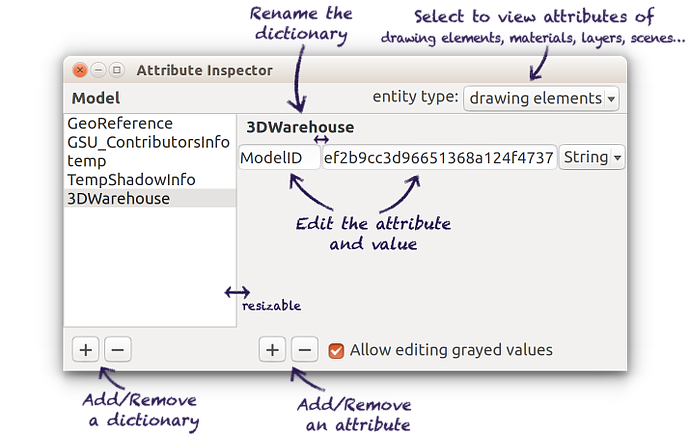
      This is a viewer for entity and model attributes. It keeps the user interface minimal and very efficient: Just like SketchUp's inspector dialogs, it lets you select one or more entities and displays their attributes. By editing the text fields, changes are immediately applied to the entities.
      ae_AttributeInspector_usage_small.png
      http://sketchucation.com/pluginstore?pln=ae_AttributeInspector
      PayPalButton

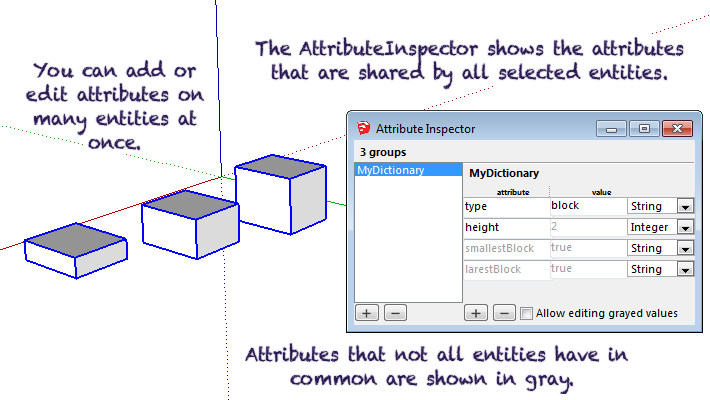
      You can select multiple entities at once and add/edit attributes on all of them. Attributes that are not shared by all selected entities are displayed grayed out. If you edit grayed out values, they will be applied to the whole selection set.
      ae_AttributeInspector_multiple_selection.png

      1 條回覆 最後回覆 回覆 引用 0
      • KrisidiousK 離線
        Krisidious
        最後由 編輯

        2014 only?

        By: Kristoff Rand
        Home DesignerUnique House Plans

        1 條回覆 最後回覆 回覆 引用 0
        • A 離線
          Aerilius
          最後由 編輯

          It was only released in 2014, but I had worked on it around christmas 😄

          I have long been avoiding ruby syntax/methods that were changed in newer Ruby versions. So it works for both Ruby 1.8 nd 2.0, at least from SketchUp 8 to 2014. Did I miss a version setting in the SketchUcation Store?

          1 條回覆 最後回覆 回覆 引用 0
          • jiminy-billy-bobJ 離線
            jiminy-billy-bob
            最後由 編輯

            Nice! 😄
            How about "abstract" entites like materials, layers, scenes, etc?

            25% off Skatter for SketchUcation Premium Members

            1 條回覆 最後回覆 回覆 引用 0
            • A 離線
              Aerilius
              最後由 編輯

              To keep it as simple as possible, I use what ever is selected in the model. Unfortunately SketchUp's selection tool doesn't select materials and layers. I haven't yet decided how to expose other entities in the UI.

              AttributeInspector has an API: You can type in a Ruby Console:
              entity = Sketchup.active_model.materials[0] AE::AttributeInspector.select(entity)
              or
              entities = Sketchup.active_model.layers.to_a AE::AttributeInspector.select(entities)

              1 條回覆 最後回覆 回覆 引用 0
              • KrisidiousK 離線
                Krisidious
                最後由 編輯

                Nope... I didn't go that far to check. Didn't get my hopes up that far or even try to install. Will look at it soon.

                By: Kristoff Rand
                Home DesignerUnique House Plans

                1 條回覆 最後回覆 回覆 引用 0
                • J 離線
                  Jim
                  最後由 編輯

                  Useful plugins, thanks.

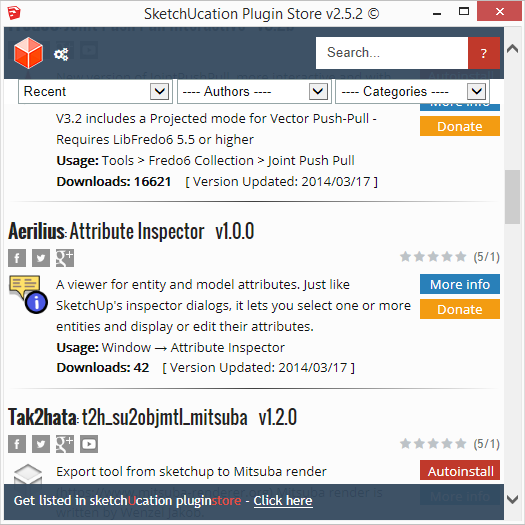
                  The download button does not show in the Plugins Store within SketchUp. When I visit the Store online, I can download it.

                  2014-03-18_040045.png

                  Hi

                  1 條回覆 最後回覆 回覆 引用 0
                  • TIGT 離線
                    TIG Moderator
                    最後由 編輯

                    The special file-format has not been uploaded.
                    I'll make it and add it for you...
                    The latest PluginStore dialog version now in beta-testing will mean that only the RBZ needs uploading, but for now to get it in the dialog you need to make the other kind too...

                    You have also misnamed your first upload [it should not include the version code] so the link is badly named - I'll fix that too...[mod=:33lflicj]Now available via the PluginStore Dialog...
                    .[/mod:33lflicj]

                    TIG

                    1 條回覆 最後回覆 回覆 引用 0
                    • A 離線
                      Aerilius
                      最後由 編輯

                      I updated to 1.0.1, now with more entity types in the UI.

                      You can download the .rbz from a browser. However, the plugins store does not accept anymore rbz.skp (except an admin adds it), so it's probably again out of the Plugins Store dialog..

                      1 條回覆 最後回覆 回覆 引用 0
                      • TIGT 離線
                        TIG Moderator
                        最後由 編輯

                        I'll re-add it for you.
                        If you can add an RBZ you can add the other file type? 😕
                        Are you making it v8 ?
                        You either have to do a save_as v8 after making it in v2013 - and remember to get/use with the alternative tool that's available from the Authors' Guidance page for v2014.
                        When we finally move over to the newer PluginStore version only an RBZ upload will be needed for both Download/AutoInstall...
                        But while there are both versions working for users we need the alternative format....
                        Users will be forced to migrate to the newer version once it goes public after beta-testing is finished...

                        TIG

                        1 條回覆 最後回覆 回覆 引用 0
                        • jiminy-billy-bobJ 離線
                          jiminy-billy-bob
                          最後由 編輯

                          @aerilius said:

                          I updated to 1.0.1, now with more entity types in the UI.

                          Nice! Love it 👍

                          EDIT : Really usefull 😉

                          25% off Skatter for SketchUcation Premium Members

                          1 條回覆 最後回覆 回覆 引用 0
                          • A 離線
                            Anton_S
                            最後由 編輯

                            Useful plugin, AE.
                            The dialog looks professional, as well. 👍

                            Thank you!

                            1 條回覆 最後回覆 回覆 引用 0
                            • jiminy-billy-bobJ 離線
                              jiminy-billy-bob
                              最後由 編輯

                              I'll repeat myself, but this plugin is really great!
                              It's more than usefull for debugging my plugin 😄

                              Thanks again for this!

                              25% off Skatter for SketchUcation Premium Members

                              1 條回覆 最後回覆 回覆 引用 0
                              • inteloideI 離線
                                inteloide
                                最後由 編輯

                                Perfect plugin Aerilius !!!

                                I wanted to write a plugins similar a long time ago, but you do it before and better than me !

                                Thank you soooo much !

                                Inteloide

                                Humanity will do a huge step when the IT professionals will understand that computers are tools...

                                1 條回覆 最後回覆 回覆 引用 0
                                • jiminy-billy-bobJ 離線
                                  jiminy-billy-bob
                                  最後由 編輯

                                  When changing the value of an attribute of a layer, the attribute vanishes. 😕

                                  25% off Skatter for SketchUcation Premium Members

                                  1 條回覆 最後回覆 回覆 引用 0
                                  • A 離線
                                    Aerilius
                                    最後由 編輯

                                    I cannot reproduce this. What steps to reproduce it? What is the dictionary, attribute and value?

                                    1 條回覆 最後回覆 回覆 引用 0
                                    • jiminy-billy-bobJ 離線
                                      jiminy-billy-bob
                                      最後由 編輯

                                      @aerilius said:

                                      I cannot reproduce this.

                                      Suddenly, I can't either! Just as I was about to record it.
                                      Well, if it happens again, I'll get back to you.

                                      25% off Skatter for SketchUcation Premium Members

                                      1 條回覆 最後回覆 回覆 引用 0
                                      • jiminy-billy-bobJ 離線
                                        jiminy-billy-bob
                                        最後由 編輯

                                        I get this in the console whenever I open the dialog in SU2014 (Win7). It works fine, though.
                                        It happens even on brand new files.
                                        I don't have this in SU2013.

                                        AEAttributeInspectorDialog Error for callback 'get_title'; 
                                        undefined method `typename' for #<Sketchup;;Model;0x8a58710>
                                        C;/Users/Marjorie/AppData/Roaming/SketchUp/SketchUp 2014/SketchUp/Plugins/ae_AttributeInspector/AttributeInspector.rb;407;in `get_title'
                                        C;/Users/Marjorie/AppData/Roaming/SketchUp/SketchUp 2014/SketchUp/Plugins/ae_AttributeInspector/AttributeInspector.rb;303;in `block in create_dialog'
                                        C;/Users/Marjorie/AppData/Roaming/SketchUp/SketchUp 2014/SketchUp/Plugins/ae_AttributeInspector/Dialog.rb;199;in `call'
                                        C;/Users/Marjorie/AppData/Roaming/SketchUp/SketchUp 2014/SketchUp/Plugins/ae_AttributeInspector/Dialog.rb;199;in `action_callback_wrapper'
                                        C;/Users/Marjorie/AppData/Roaming/SketchUp/SketchUp 2014/SketchUp/Plugins/ae_AttributeInspector/Dialog.rb;152;in `block in <class;Dialog>'
                                        -e;1;in `call'
                                        

                                        #<Sketchup::Model:0x8a58710> is the active model (in case you're wondering).

                                        25% off Skatter for SketchUcation Premium Members

                                        1 條回覆 最後回覆 回覆 引用 0
                                        • Dan RathbunD 離線
                                          Dan Rathbun
                                          最後由 編輯

                                          Sketchup::Model#typename() is added into the API by "dcutils.rbs"... so turn the DynamicComponents extension back on, and you will no longer have the errors.

                                          I'm not here much anymore.

                                          1 條回覆 最後回覆 回覆 引用 0
                                          • Dan RathbunD 離線
                                            Dan Rathbun
                                            最後由 編輯

                                            Also.. I would like to say that I wrote at least one plugin which I purposely added a AttributeDictionary to a collection object, because I did not want the user messing with it, or having it included in an attribute report.


                                            I'm not here much anymore.

                                            1 條回覆 最後回覆 回覆 引用 0
                                            • 1
                                            • 2
                                            • 3
                                            • 1 / 3
                                            • 第一個貼文
                                              最後的貼文
                                            Buy SketchPlus
                                            Buy SUbD
                                            Buy WrapR
                                            Buy eBook
                                            Buy Modelur
                                            Buy Vertex Tools
                                            Buy SketchCuisine
                                            Buy FormFonts

                                            Advertisement