sketchucation logo sketchucation
    • Login
    Oops, your profile's looking a bit empty! To help us tailor your experience, please fill in key details like your SketchUp version, skill level, operating system, and more. Update and save your info on your profile page today!
    Mac User? | Join the Rayscaper Beta for Mac Learn More

    Multiple Offset?

    Scheduled Pinned Locked Moved Plugins
    23 Posts 7 Posters 2.0k Views 7 Watching
    Loading More Posts
    • Oldest to Newest
    • Newest to Oldest
    • Most Votes
    Reply
    • Reply as topic
    Log in to reply
    This topic has been deleted. Only users with topic management privileges can see it.
    • fredo6F
      fredo6
      last edited by

      Dave,

      You can also use Offset On Surface, which allows to offset close contours not necessary bound to a single face.

      To have several offsets, you can double-click on a generated offset. this will create another one in the same direction and distance

      Fredo

      1 Reply Last reply
      Reply Quote 0
      • Dave RD
        Dave R
        last edited by

        Thank you, Fredo. I'll check it out.

        Etaoin Shrdlu

        %

        (THERE'S NO PLACE LIKE)

        G28 X0.0 Y0.0 Z0.0

        M30

        %

        1 Reply Last reply
        Reply Quote 0
        • Dave RD
          Dave R
          last edited by

          Well, unfortunately, neither one does what I want but thanks. Both require a face or at least a closed loop of edges. I have an open Bezier curve I want to run a multiple offset on.

          Etaoin Shrdlu

          %

          (THERE'S NO PLACE LIKE)

          G28 X0.0 Y0.0 Z0.0

          M30

          %

          1 Reply Last reply
          Reply Quote 0
          • gillesG
            gilles
            last edited by

            A picture, a model of what you want?

            " c'est curieux chez les marins ce besoin de faire des phrases "

            1 Reply Last reply
            Reply Quote 0
            • massimoM
              massimo Moderator
              last edited by

              @dave r said:

              Well, unfortunately, neither one does what I want but thanks. Both require a face or at least a closed loop of edges. I have an open Bezier curve I want to run a multiple offset on.

              Have you already tried with the native offset tool Dave? No surface or closed loop needed. Offset the curve then double click on the new curve and so on.

              1 Reply Last reply
              Reply Quote 0
              • J
                jpalm32
                last edited by

                @dave r said:

                Thank you. It's odd that it doesn't come up when I searched. Especially so since the name is exactly what I was searching for. πŸ˜’

                Search has been letting me down also. With names that should show up.

                1 Reply Last reply
                Reply Quote 0
                • Dave RD
                  Dave R
                  last edited by

                  I just want to make a series of offsets of a curve like this:
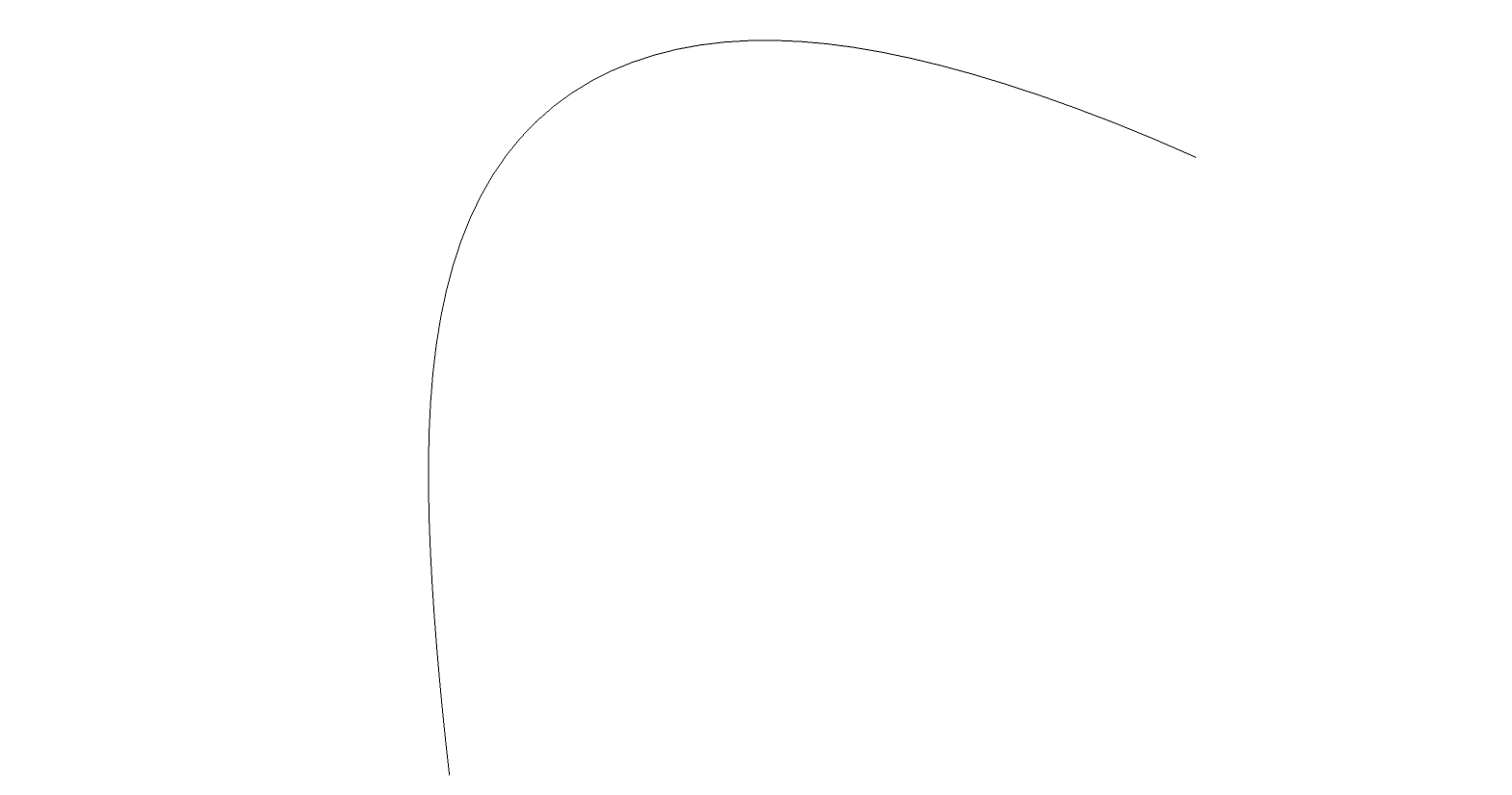
                  Bezier Curve.png

                  And wind up with something like this:

                  Bezier plies.png

                  I know I could use the double click. For the task that made me think of this, I know the overall width and the number of spaces between. I thought it would be nice to be able to make the outermost offset, hit Enter and then type /7, Enter and wind up with all the offsets spaced evenly between. As I said before, it would work like Move/Copy to make arrays.

                  In the case of the model I'm working on at the moment, the offset distance isn't an easy dimension but the overall thickness is.

                  Etaoin Shrdlu

                  %

                  (THERE'S NO PLACE LIKE)

                  G28 X0.0 Y0.0 Z0.0

                  M30

                  %

                  1 Reply Last reply
                  Reply Quote 0
                  • gillesG
                    gilles
                    last edited by

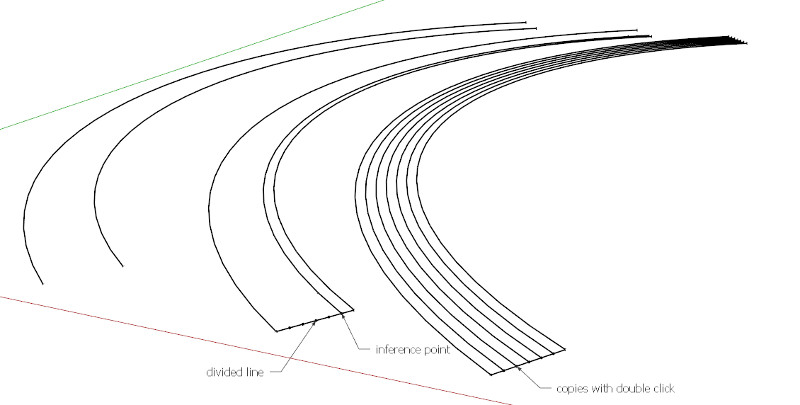
                    You could draw the thickness as a line divide it to have accurate inferences to offset.

                    " c'est curieux chez les marins ce besoin de faire des phrases "

                    1 Reply Last reply
                    Reply Quote 0
                    • cottyC
                      cotty
                      last edited by

                      @gilles said:

                      You could draw the thickness as a line divide it to have accurate inferences to offset.

                      And here's the picture to "your" great idea πŸ˜‰


                      dividedoffset.jpg

                      my SketchUp gallery

                      1 Reply Last reply
                      Reply Quote 0
                      • Dave RD
                        Dave R
                        last edited by

                        Gilles and Cotty, that's what I wound up doing. I just thought it would be nice to have a more direct option. Maybe I'm the only one who would ever use the tool that way.

                        Box, I'll see what I get with that. Thanks.

                        Etaoin Shrdlu

                        %

                        (THERE'S NO PLACE LIKE)

                        G28 X0.0 Y0.0 Z0.0

                        M30

                        %

                        1 Reply Last reply
                        Reply Quote 0
                        • BoxB
                          Box
                          last edited by

                          Offset once and use curviloft for the subdivision.
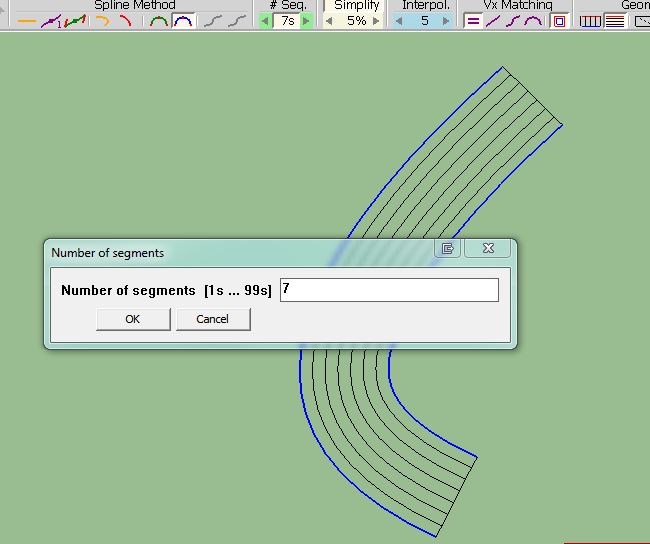

                          CurviOffset.JPG

                          1 Reply Last reply
                          Reply Quote 0
                          • BoxB
                            Box
                            last edited by

                            I fixed a screenr issue I'd been having so made quick vid as a tester.
                            [screenr:1ayanbpo]gWHN[/screenr:1ayanbpo]

                            1 Reply Last reply
                            Reply Quote 0
                            • cottyC
                              cotty
                              last edited by

                              Java issue?

                              my SketchUp gallery

                              1 Reply Last reply
                              Reply Quote 0
                              • BoxB
                                Box
                                last edited by

                                Yep

                                1 Reply Last reply
                                Reply Quote 0
                                • gillesG
                                  gilles
                                  last edited by

                                  Brillant and fast method.

                                  " c'est curieux chez les marins ce besoin de faire des phrases "

                                  1 Reply Last reply
                                  Reply Quote 0
                                  • Dave RD
                                    Dave R
                                    last edited by

                                    Box, thanks for that. Very helpful.

                                    Etaoin Shrdlu

                                    %

                                    (THERE'S NO PLACE LIKE)

                                    G28 X0.0 Y0.0 Z0.0

                                    M30

                                    %

                                    1 Reply Last reply
                                    Reply Quote 0
                                    • cottyC
                                      cotty
                                      last edited by

                                      @box said:

                                      Yep

                                      How did you solve it? I wasn't able...

                                      my SketchUp gallery

                                      1 Reply Last reply
                                      Reply Quote 0
                                      • BoxB
                                        Box
                                        last edited by

                                        It's the upgraded security of the new java version that causes the problem, hopefully screenr will adjust their page to suit in the future. But fixing it is easy, you just need to add screenr to java's security exceptions list. I screenr'd how for you, note I remove the site first so I can type it in and show you the warning message, you shouldn't have it there to remove, just add.
                                        If you don't have the option to add exceptions then you don't have the most recent Java.
                                        If you are feeling young and vigorous and want to live life to the full without restrictions and throw caution to the wind,You can simply adjust the security level slider down to the minimum, that works too.

                                        Oh, this is Win7 other systems may be different but it will be there somewhere.
                                        [screenr:1z0qipxk]upHN[/screenr:1z0qipxk]

                                        1 Reply Last reply
                                        Reply Quote 0
                                        • cottyC
                                          cotty
                                          last edited by

                                          Thank you very much, Box, works great!

                                          my SketchUp gallery

                                          1 Reply Last reply
                                          Reply Quote 0
                                          • BoxB
                                            Box
                                            last edited by

                                            No worries Carsten, but next time it breaks it's your turn to fix it and tell me how.

                                            1 Reply Last reply
                                            Reply Quote 0

                                            Hello! It looks like you're interested in this conversation, but you don't have an account yet.

                                            Getting fed up of having to scroll through the same posts each visit? When you register for an account, you'll always come back to exactly where you were before, and choose to be notified of new replies (either via email, or push notification). You'll also be able to save bookmarks and upvote posts to show your appreciation to other community members.

                                            With your input, this post could be even better πŸ’—

                                            Register Login
                                            • 1
                                            • 2
                                            • 1 / 2
                                            • First post
                                              Last post
                                            Buy SketchPlus
                                            Buy SUbD
                                            Buy WrapR
                                            Buy eBook
                                            Buy Modelur
                                            Buy Vertex Tools
                                            Buy SketchCuisine
                                            Buy FormFonts

                                            Advertisement