sketchucation logo sketchucation
    • 登入
    Oops, your profile's looking a bit empty! To help us tailor your experience, please fill in key details like your SketchUp version, skill level, operating system, and more. Update and save your info on your profile page today!
    🔌 Smart Spline | Fluid way to handle splines for furniture design and complex structures. Download

    [Plugin] SketchUcation Tools 2.6

    已排程 已置頂 已鎖定 已移動 Plugins
    212 貼文 58 Posters 127.0k 瀏覽 58 Watching
    正在載入更多貼文
    • 從舊到新
    • 從新到舊
    • 最多點贊
    回覆
    • 在新貼文中回覆
    登入後回覆
    此主題已被刪除。只有擁有主題管理權限的使用者可以查看。
    • E 離線
      expresso405
      最後由 編輯

      hi all

      I've loaded this and the "box" appears but no content gets shown within the box...
      Any suggestions what I'm doing wrong?
      thanks

      1 條回覆 最後回覆 回覆 引用 0
      • K 離線
        KB
        最後由 編輯

        Hello, I just installed Sketchucation tools Plug In. When I try to have access to the Plug In Manager this windos appears: No Security Permission to Manage ANY Plugins Folder in the $LOAD PATH.
        FULL Read/Write Permissions are needed to Manage Plugins within PLugins Folders...

        As you see I am a novice ....
        Could you give a clue of what to do?

        Thank you

        Katerine

        1 條回覆 最後回覆 回覆 引用 0
        • BoxB 離線
          Box
          最後由 編輯

          With the arrival of SU2014 it would be really handy if the My Downloads section had the auto install button. It would be much easier to scroll through that and add the ones you know you want, rather than find them then go to the main page again to install them.
          I'm probably jumping the gun and you are about to release a new version that lets you synchronize your setup.

          1 條回覆 最後回覆 回覆 引用 0
          • cottyC 離線
            cotty
            最後由 編輯

            @kb said:

            Could you give a clue of what to do?

            You can find a detailed solution here.

            my SketchUp gallery

            1 條回覆 最後回覆 回覆 引用 0
            • K 離線
              KB
              最後由 編輯

              As I see I am not the first one to went trough the game of Security and Permissions.

              Thanks a lot to all of you.

              Katerine

              1 條回覆 最後回覆 回覆 引用 0
              • TIGT 離線
                TIG Moderator
                最後由 編輯

                With v2014 the newly located Plugins folder automatically has FULL permissions so at last this issue should be behind us 😒
                Except the same still potentially applies to the shipped folders for Materials/Components/Styles - although of course you can have extra folders linked to anywhere you choose...

                TIG

                1 條回覆 最後回覆 回覆 引用 0
                • P 離線
                  pomelo3d
                  最後由 編輯

                  Hello. Two suggestions for the next version.
                  It is possible add an option to delete a plugin?
                  It is possible add a link to open the folder where all the plugin?

                  thanks

                  1 條回覆 最後回覆 回覆 引用 0
                  • BoxB 離線
                    Box
                    最後由 編輯

                    @pomelo3d said:

                    It is possible add an option to delete a plugin?

                    The tool has an uninstaller, it's not a toolbar item but you will find it in the Sketchucation plugin submenu.

                    1 條回覆 最後回覆 回覆 引用 0
                    • PixeroP 離線
                      Pixero
                      最後由 編輯

                      A way of not having to click on three confirmation boxes for each installed plugin would be great.

                      1 條回覆 最後回覆 回覆 引用 0
                      • Rich O BrienR 線上
                        Rich O Brien Moderator
                        最後由 編輯

                        What version of the the plugin and SketchUp are u using Jan?

                        Download the free D'oh Book for SketchUp 📖

                        1 條回覆 最後回覆 回覆 引用 0
                        • PixeroP 離線
                          Pixero
                          最後由 編輯

                          v2.5 with SU 8 on Windows 7 at the moment.

                          1 條回覆 最後回覆 回覆 引用 0
                          • Rich O BrienR 線上
                            Rich O Brien Moderator
                            最後由 編輯

                            You should see an improvement on less clicks on more modern versions of SketchUp.

                            It is especially sweet on v2014 because of the plugin folder relocation.

                            If you use Fredo's Additional Folders though you still get prompts. But the default installs are single click conformations.

                            Download the free D'oh Book for SketchUp 📖

                            1 條回覆 最後回覆 回覆 引用 0
                            • TIGT 離線
                              TIG Moderator
                              最後由 編輯

                              In more detail...
                              The number of dialogs/clicks needed is a direct result of the SketchUp version.


                              In v8:

                              If it's the first time you've used the PluginStore's AutoInstall that session...
                              There's a 'click to confirm installation' dialog [SCF initiated but it's built-in to SketchUp], as the destination folder's 'installable'/'writable' properties are checked.
                              Then a 'click to confirm installation' dialog [unavoidable - it's built-into SketchUp].

                              On subsequent usage during that session, there should just be the one 'click to confirm installation' dialog for each AutoInstall [unavoidable - it's built-into SketchUp]
                              ...
                              Final closing SCF dialog to tell you it was successful.
                              This on PC [and probably MAC - but untested...].


                              In v2013:

                              If it's the first time you've used the PluginStore's AutoInstall that session - there's a 'click to confirm installation' dialog [unavoidable - built-into SketchUp].
                              Otherwise, for subsequent installations there is no confirmation dialog [unavoidable - it's built-in to SketchUp].
                              ...
                              Final closing SCF dialog to tell you it was successful.
                              This on MAC/PC.


                              In v2014:

                              There is NO 'click to confirm installation' dialog built-into this SketchUp version.
                              ...
                              Final closing SCF dialog to tell you it was successful.
                              This on MAC/PC.


                              For the 'Update All' option you should get the initial 'confirmation click(s)' [if any] and a 'final closing dialog' for ALL Plugins, not for their individual AutoInstallations.


                              If you have more than one Plugins folder defined in SketchUp's $LOAD_PATH then you WILL also get a dialog asking you to choose the destination folder for the Plugin's AutoInstallation, either before the 'confirmation click(s)' [if any], or simply before the 'final closing dialog' if you have v2014...

                              TIG

                              1 條回覆 最後回覆 回覆 引用 0
                              • T 離線
                                tomot
                                最後由 編輯

                                @tig said:

                                With v2014 the newly located Plugins folder automatically has FULL permissions so at last this issue should be behind us

                                Where do I find out more about the location of the new v2014 plugins folder?
                                It seems to me there were more important items on various SU wish lists, over the years. I don't ever recall seeing move the Plugins folder, on such a list. 😢

                                my plugins
                                tomot

                                1 條回覆 最後回覆 回覆 引用 0
                                • Bob JamesB 離線
                                  Bob James
                                  最後由 編輯

                                  I have SU13 installed.

                                  When I loaded SU14 it put plugins into two places:
                                  C:\Users\jamesb\AppData\Roaming\SketchUp\SketchUp 2014\SketchUp\Plugins
                                  C:\ProgramData\SketchUp\SketchUp 2014\SketchUp\Plugins
                                  I use 'Additional Folders for Plugins'.
                                  D:/Dropbox/Plugins

                                  When I install a new plugin from SketchUcation Plugin Store and direct it to the 'default' directory C:\Users\jamesb\AppData\Roaming\SketchUp\SketchUp 2014\SketchUp\Plugins, I get acknowledging dialog boxes and the plugin is loaded.

                                  When I try to install a new plugin from SketchUcation Plugin Store and direct it to my additional folder D:/Dropbox/Plugins, there are no acknowledging dialogs and the plugin is not loaded.

                                  This happens on my desktop machine here at work, on my laptop and on my machine at home.

                                  I do not have this problem with SU13. I can load plugins using SketchUcation Plugin Store into D:/Dropbox/Plugins
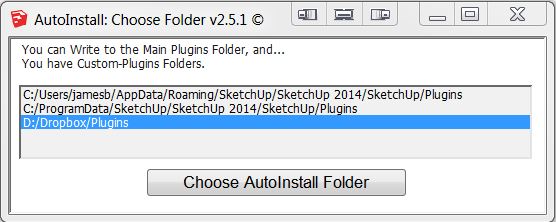
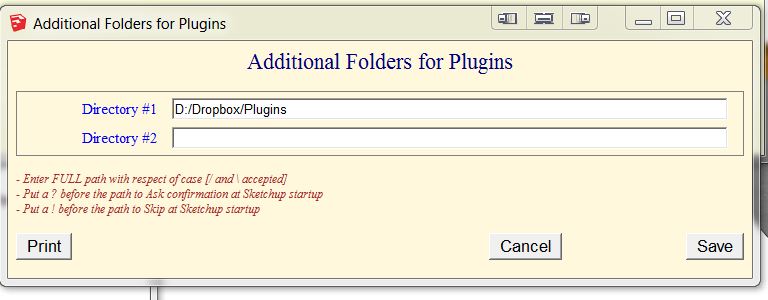
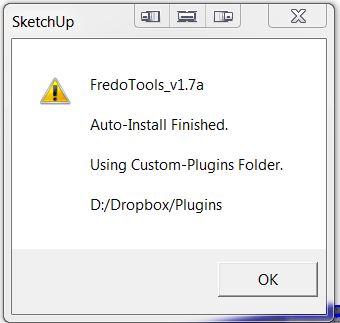
                                  Autoinstall.JPG


                                  Additional Folders.JPG


                                  SU13 Results.JPG

                                  i7-4930K 3.4Ghz, 2x GTX780 6GB, 32GB DDR3-1600 ECC, OCZ Vertex 4 500GB, WD Black 3TB, 32TB NAS, 4x 27" Monitors, SpaceMouse Pro, X-keys XK-60

                                  1 條回覆 最後回覆 回覆 引用 0
                                  • Rich O BrienR 線上
                                    Rich O Brien Moderator
                                    最後由 編輯

                                    Investigating....

                                    I can't reproduce it but it is the second report in 2 days

                                    Download the free D'oh Book for SketchUp 📖

                                    1 條回覆 最後回覆 回覆 引用 0
                                    • TIGT 離線
                                      TIG Moderator
                                      最後由 編輯

                                      Can you repeat it with with the Ruby Console open and see if there are any error messages 😕
                                      This is an odd glitch that we must get to the bottom of... 😒

                                      Is your D:/... folder a 'real folder' or a symbolic link / shortcut ?

                                      There have been some reports of network glitches with v2014 and 😧 is not the same drive as 😄 ?

                                      EDIT:
                                      I just setup J:/Plugins as a custom Plugins-Folder using Fredo's tool in v2014.
                                      I used the PluginStore to install a Plugin.
                                      J:/Plugins was recognized as a possible installation destination and offered in a dialog.
                                      I chose it.
                                      The closing dialog said it installed successfully.
                                      On checking I find that it had installed properly in that folder.

                                      So all seems well. 😄

                                      But suddenly it stops installing - no errors, says it's completed OK but no file !
                                      I find some Plugins install OK and some do not.
                                      IT should only report success if it has worked - which is odd...
                                      I says it has, but nothing is there ...
                                      No Console messages - nothing 😕

                                      I'll do some debugging using the rb versions and report back...

                                      TIG

                                      1 條回覆 最後回覆 回覆 引用 0
                                      • TIGT 離線
                                        TIG Moderator
                                        最後由 編輯

                                        So far I found that when a Plugin fails to extract and get installed into a custom-folder the ZIP that it's using seems to fail to extract properly - it seems to be very slightly corrupted - a manual extract of it is OK, but the WIN automated one is unreliable...
                                        Perhaps the way that v2014's Ruby extracts the ZIP data and recompiles the RBZ is subtly different to the previous version and so occasionally it fails ?

                                        I am investigating...

                                        Because the data transfer relies on a attributes which are packed/unpacked, perhaps their length in the latest version is less tolerant ?

                                        TIG

                                        1 條回覆 最後回覆 回覆 引用 0
                                        • J 離線
                                          Jim
                                          最後由 編輯

                                          In 2014, you could download the .rbz directly saving everyone bandwidth.

                                          Hi

                                          1 條回覆 最後回覆 回覆 引用 0
                                          • Bob JamesB 離線
                                            Bob James
                                            最後由 編輯

                                            @jim said:

                                            In 2014, you could download the .rbz directly saving everyone bandwidth.

                                            But then SketchUp Plugin Store wouldn't recognize it for updating 😞
                                            And, no, D:\Dropbox\Plugins is located on my internal RAID. My 😄 is an SSD.

                                            i7-4930K 3.4Ghz, 2x GTX780 6GB, 32GB DDR3-1600 ECC, OCZ Vertex 4 500GB, WD Black 3TB, 32TB NAS, 4x 27" Monitors, SpaceMouse Pro, X-keys XK-60

                                            1 條回覆 最後回覆 回覆 引用 0
                                            • 1
                                            • 2
                                            • 5
                                            • 6
                                            • 7
                                            • 8
                                            • 9
                                            • 10
                                            • 11
                                            • 7 / 11
                                            • 第一個貼文
                                              最後的貼文
                                            Buy SketchPlus
                                            Buy SUbD
                                            Buy WrapR
                                            Buy eBook
                                            Buy Modelur
                                            Buy Vertex Tools
                                            Buy SketchCuisine
                                            Buy FormFonts

                                            Advertisement





