[Plugin][EVAL] TIG-CutNfill
-
Hello,
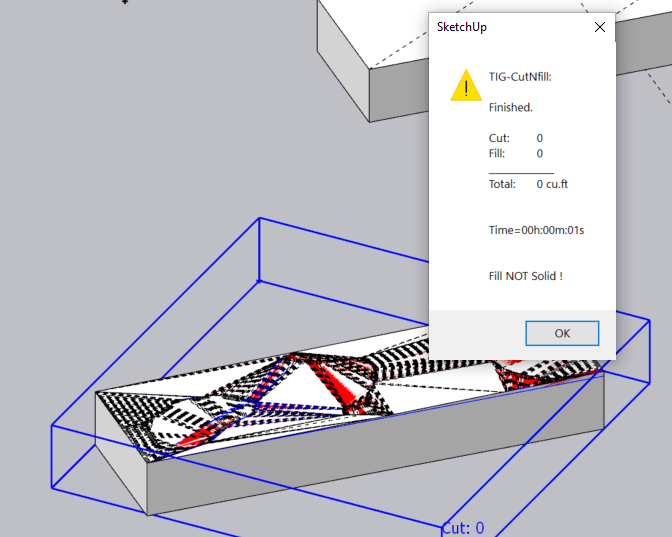
I am trying to work on the cut and fill tool but it shows fill not solid?
All the group are identify solid then.
How to solve this?
-
Hi TIG,
I used the cut and fill tool and also use the solid inspector to make sure it is solid but it still shows fill not solid? How to solve this issue?
-
To do any cut and fill operation - either with this tool or manually using the solid tools - the two solids which are to be used can be contrived in such a manner that when one is subtracted from the other the resultant form fails to be a solid.
To be a solid an object needs to have only faces and edges, and every edge must have exactly two faces - no more no less.
SketchUp has a tolerance of 1/1000" built-in and unchangeable.
If two points are within that tolerance SketchUp assumes they are coincident and merges them.
This can result in the tiny edge that they defined not being made, and as a consequence the related face is not supported either. With that face missing the form is no longer a solid and reports 0 volume.To avoid this I suggest that you make sure that any proposed and existing surfaces are clearly different in their surface's heights/planes, almost coincident point or facets can lead to tiny edges and the related failures to report a volume other than 0.
Another way involves some scaling and editing of the reported forms' text...
This method involves making a group containing the proposed and existing solid forms.
Scale group that up by say 10 [or more - see below] from a diagonal corner.
Edit that group and run CutNfill on its contents.
Because the once tiny edges created might now be big enough to survive the solid-tools operations, a real volume might be made and reported as text [although it'll be reported as 10x10x10 too big!]
Exit the group-edit mode.
Re-scale the containing group down by 1/10 [0.1].
Explode the containing group unless you want to keep it...
It should keep the two solid forms, even though there are now some tiny edges - such tiny edges can exist but can be created !
Now edit the text part and adjust the reported volumes by the appropriate factor of 1/1000 [0.001]
Entity Info might also be used to give these volumes and avoid calculators.
If the 10 scaling up still fails try scaling up the containing group by 100 etc and 1/1000000 [0.000001] for the text reported volumes... etc... -
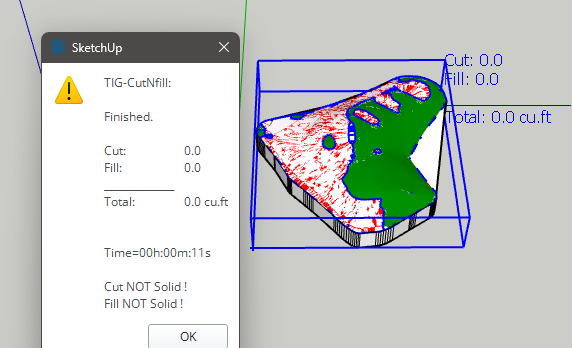
I got the same problem: Cut = 0 Fill = 0 Cut not solid, fill not solid. It generates the cut / fill solids, but states they are not solid and 0 volumes.
Have tried scaling it up 1,000 times but still no joy.
In reality this is not practical as you state below:
"make sure that any proposed and existing surfaces are clearly different in their surface's heights/planes,"Most people need to compare two contour terrain models, you can't change the contours just to make the volume plugin work as the design is set...
So for me I have paid $20 and can't get any useful results from it with using contour created terrain mesh solids
cheers
-
If you try to do this manually using the native solid-tools you will get the same result.
If your surfaces are within 1/1000" vertically then SketchUp assumes they are coincident and so edges/faces get omitted and 'solidity' is lost.
So then no proper volume is formed.
So, by any means available you cannot get a volume by subtraction if the two objects are not reasonably different...
Sorry, but it's a simple SketchUp limitation - and it's not this tool's fault... -
I'm doing everything correct but the plugin fails to calculate the two solid groups.
I've attached the model, if anyone can please help.
-
You have NOT named the two groups as explained in the usage guidance...
You have given the two groups separate Tags, but they are both named 'Group' !I renamed them EXTG and PROP [although the second name is unimportant]
I ran the tool and in 3 seconds here's the result !Cut: 31965.8
Fill: 15770.7
Total: -16195.1 cu.m
Try doing what I just explained and try again...
-
I have been following the guides for the cutNFill instructions on the Sketchup Forum as well as Sketucation. I am facing the same issue as @podanyc (Cut N Fill Plugin - Mesh / Solid Errors & Best Practices)
I tried scaling the group and using the plugin. However I could not achieve the result and it still shows 0.00 cu.ft.I understand that the mesh needs to be simplified.
Hoping you would be able to take a quick look at the file attached and give any guidance on how to avoid these issues.
-
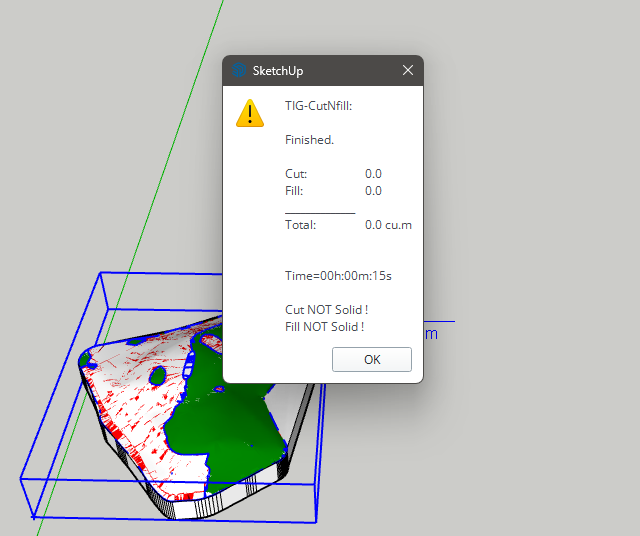
Unfortunately your EXTG and PROP groups are very very complex, and have many faces and edges that are almost coincident.
The native Solids Subtract tool will let you take one from the other, BUT the results are made non-solid, with 0.0 volume.
Because CutNfill relies on these tools, that is why you can't get meaningful results.SketchUp's built-in tolerance is 1/1000" and any edges that would be shorter that that are ignored, as if their end/start points are coincidental, but the tiny gap is not 'healed'. Consequently, any faces relying on such missing tiny edges will fail to form, and the result is a non-solid group with 0.0 volume.
So you need to make your modeling much simpler and ensure that this tiny geometry issue is sidestepped.
In real life cut and fill is not an exact science on site, so any approximation does not need to be perfect. -
May I know why the values are zero?
-
-
Unfortunately your EXTG and PROP groups are very very complex, and have many faces and edges that are almost coincident.
The native Solids Subtract tool will let you take one from the other, BUT the results are made non-solid, with 0.0 volume.
Because CutNfill relies on these tools, that is why you can't get meaningful results.SketchUp's built-in tolerance is 1/1000" and any edges that would be shorter that that are ignored, as if their end/start points are coincidental, but the tiny gap is not 'healed'. Consequently, any faces relying on such missing tiny edges will fail to form, and the result is a non-solid group with 0.0 volume.
So you need to make your modeling much simpler and ensure that this tiny geometry issue is sidestepped.
In real life cut and fill is not an exact science on site, so any approximation does not need to be perfect. -
I've attached the model. Could you please help check whether it can be done?
-
I've looked at it and the differences between the PROP[osed] and EXT[istin]G groups are so tiny in many cases,
that you are unlikely to be able to do a solid/subtraction that results in a solid group afterwards.
So it'll report a 0 volume.
It's a limit of SketchUp - not CutNFill itself.To prove this to yourself try and do a solid > subtraction and see the non solid result ?
It's just like CutNFill's - a woeful non-solid with many missing facets.
Try and making a much more simplified version of the two, with sensible differences -
sites are not worked to mm so don't ruin SketchUp's chances of success with very tiny differences...There are some paid extensions to help with this - e.g. Skimp
Skimp has a 5 day free trial - you will need it to reduce the 2 forms by a significant factor
[e.g. 33% twice], then make the resultant simplified solids [components] back into groups again
and then remake their matching skirts to suit in CutNFill too because the simplification will ruin the existing ones.
After that you might have change of a solid > subtraction result ? -
I used Skimp to simplify and group the components, but when I created the skirts, I noticed they did not match properly. As a result, CutNFill cannot process. Could you suggest the next steps?
-
The EXTG and PROP terrains must have the same overall footprint.
When you have the skirt fitted onto a simplified EXTG group
it should still report as 'solid' in Entity info,
copy that group to one side and edit that copy.
Draw three Guide lines to help locate a new skirt later, on the group's axes.
Delete the top terrain, but keep the vertical skirt and bottom face.Next copy the PROP group to one side and edit the copy.
This time delete the skirt and bottom face, but keep the terrain geometry.
Exit the edit and select the EXTG-copy group and Edit>Cut it to the clipboard.
Reopen the PROP-copy for editing.
Edit>Paste-in-Place.
The EXTG-copy skirt group in now inside the PROP-copy terrain group.
If the skirt-group doesn't line up with the terrain's axes, then Move it into place
using Shift to restrain the movement in the Red/Green axes only.
The guide's intersection should help with this relocation [if needed].
Explode the skirt-group so that the PROP-copy now contains only geometry.
Erase any Guides left behind too.
The PROP-copy should now contain its terrain top and skirt/bottom copied from EXTG.
Exit the edit and check the PROP-copy in Entity Info - chances are it won't be a 'solid'.We now need to make it a solid...
Use Thomthom's SolidInspector2 on the PROP-copy to see where the errors are reported.
They will be highlighted in Red.
Fix the ones that it reports as 'fixable'.If there are other 'non-auto-fixable' errors - e.g. complex holes or inner faces -
then you need to dip in and out of SolidInspector2 and the model itself
[into PROP-copy group > edit] and manually fix these issues in turn.
Use pan/zoom to position yourself over the issues that need fixing...
It's best to have sun/shadows on so you can see holes more easily and the Default-materials showing,
with the back-material being set to a distinctive color - e.g. bright green.These might be 'flaps' or 'shelves' that need deleting, missing faces that need healing by drawing
over edges to force a face to form, or adding diagonal lines to triangulate geometry and force
facets to form [it's best to triangulate resistant faces to infill facets,
even if the larger hole's perimeter appears 'planar'.]
As you do this you might accidentally form internal 'partition' faces and you'll
need to delete those too using a section plane to look inside the form can help in this regard.Remember that a manifold solid can only contain edges and faces.
That is no nested groups or components.
Every edge must support exactly two faces.
That means -
No 'faceless' edges [i.e. stray lines].
No edges with only one face [e.g. flaps, shelves or hole-perimeters].
No edges supporting three or more faces [e.g. two 'boxes' sharing a common edge for 4 faces].
Faces should be consistently oriented 'outwards' with the back-face materials 'inside' the form.Once you have a solid form reported in Entity Info you are good.
Replace PROP with PROP-copy and try CutNFill again on these simplified forms -
the skirts should now match so that hurdle is avoided...

Hello! It looks like you're interested in this conversation, but you don't have an account yet.
Getting fed up of having to scroll through the same posts each visit? When you register for an account, you'll always come back to exactly where you were before, and choose to be notified of new replies (either via email, or push notification). You'll also be able to save bookmarks and upvote posts to show your appreciation to other community members.
With your input, this post could be even better 💗
Register Login


Advertisement